How to install doorbell camera
“`html
In an era where home security is a top priority for many, installing a doorbell camera has become one of the most effective means of safeguarding your property. Whether you’re looking to deter package thieves or simply want to keep an eye on who’s knocking at your door, knowing how to install a doorbell camera can significantly enhance your home’s security. But where do you start? This guide will walk you through everything you need to know.
1. Understanding the Benefits of a Doorbell Camera
Before diving into the installation process, it’s crucial to understand why you might want to install a doorbell camera in the first place. The primary benefit is enhanced security. With real-time alerts and video feeds, you can monitor your front porch from anywhere, giving you peace of mind when you’re away from home.
Additionally, many doorbell cameras come equipped with two-way audio, allowing you to communicate with visitors, delivery personnel, or even potential intruders. This feature can be especially useful if you receive a package while you’re not home; you can instruct the delivery person where to leave your items without being physically present.
Beyond just monitoring, doorbell cameras can play a pivotal role in gathering evidence in case of theft or vandalism. Video footage can be invaluable when dealing with local authorities, potentially helping to identify suspects or recover stolen property.
Moreover, recent studies indicate that homes equipped with security cameras are less likely to be targeted by criminals. A survey conducted by the University of North Carolina found that 60% of convicted burglars stated they would avoid homes that they knew had a security system installed. This highlights the preventive role that doorbell cameras can play in home security.
2. Choosing the Right Doorbell Camera
Not all doorbell cameras are created equal, and choosing the right one is crucial for maximizing your home security. When selecting a camera, consider features like high-definition video quality, night vision, motion detection, and cloud storage options. Brands like Ring, Nest, and Arlo are popular choices that offer a range of features to fit different needs and budgets.
Additionally, check whether the camera is compatible with your existing home systems. Some models integrate seamlessly with smart home ecosystems like Google Home or Amazon Alexa, allowing for easier management through voice commands and mobile apps.
When evaluating different doorbell cameras, look for specific features such as the field of view, which determines how much of your porch and surrounding area the camera can capture. A wider field of view is beneficial for monitoring your entrance thoroughly. You should also consider the camera’s resolution; higher resolution provides clearer images and videos, which is key when identifying visitors.
Another factor to take into account is the subscription plans associated with cloud storage. Some manufacturers charge monthly fees for storing your video footage, so it’s wise to understand the long-term costs involved before making a purchase.
Lastly, read customer reviews to gauge user satisfaction and potential issues. This can provide insights into real-world performance and help you make a more informed decision.
3. Gathering Your Tools and Supplies
Once you’ve chosen your doorbell camera, it’s time to gather the tools and supplies needed for installation. Most installations require basic tools such as a screwdriver, a drill, a level, and possibly a ladder, depending on the height of your doorbell placement.
Make sure to read the installation manual that comes with your device, as some models may require additional tools or accessories. It’s also wise to have a smartphone or tablet handy to download any necessary apps for camera setup and configuration.
In addition to basic tools, consider having a stud finder, especially if you’re drilling into walls. This tool helps you locate the best spots for anchoring your camera securely. Also, having painter’s tape can help mark spots on the wall where you plan to drill, ensuring precise placement.
Don’t forget to have a clean cloth or lens cleaning solution handy for later maintenance to keep your camera clear of dirt and debris that could obstruct the view.
4. Preparing Your Home for Installation
Before installing the doorbell camera, you’ll need to prepare your front door area. Ensure it is clean and free of any obstructions that might interfere with the camera’s view. If you’re replacing an existing doorbell, turn off the power to that unit at the circuit breaker to avoid any electrical mishaps.
If you’re installing a new doorbell camera where none existed before, think about the optimal placement for capturing video footage. Ideally, the camera should be installed at a height of about 4 to 5 feet, providing a clear view of anyone approaching your door. You might also want to consider the angle of the camera; mounting it at a slight downward angle can help capture facial details more effectively. (See: the benefits of doorbell cameras.)
Beyond physical placement, consider the lighting conditions at your front door. If your porch is often dim, ensure your new camera has adequate night vision capabilities. Testing the area during different times of the day can help you determine if additional outdoor lighting is needed.
It’s also a good idea to check local regulations or homeowner association rules regarding video surveillance in your area. Some places may have restrictions on how cameras can be used, so it’s worth being informed.
5. Wiring Your Doorbell Camera
The next step is wiring your doorbell camera, especially if it requires a wired connection. If you’re replacing a traditional doorbell, you may be able to use the existing wiring, but confirm that it meets the voltage requirements of your new device.
If you’re unsure about handling electrical wiring, consider consulting a professional. A safe installation is paramount, and improper wiring can lead to damage or a voided warranty. For wireless models, ensure you have a reliable Wi-Fi connection to facilitate smooth operation.
For wired installations, after confirming voltage requirements, connect the wires from the doorbell to the corresponding terminals on the new camera. Most cameras come with clear instructions, but if you encounter variability, don’t hesitate to refer to online tutorials or forums specific to your camera model.
And remember, safety first! If at any point you feel uncomfortable, it’s best to reach out to a professional electrician to avoid any risks.
6. Mounting the Camera
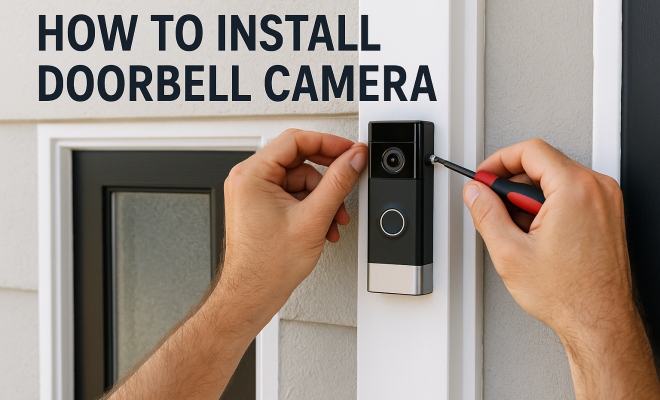
With the wiring complete, it’s time to mount your doorbell camera. Most models come with a mounting bracket that simplifies this process. Use a level to ensure that the camera is aligned correctly before securing it in place.
Be sure to follow the manufacturer’s instructions closely during this step. Some cameras may require you to drill pilot holes, while others might use adhesive mounts. If drilling, be cautious about the material of your door frame to avoid damage.
Additionally, check the manufacturer’s recommendations for angle adjustments. Many models allow for slight adjustments post-installation, providing an opportunity to refine the camera’s focus on the doorway after mounting.
Consider the height of the camera carefully. While 4 to 5 feet is generally recommended, if you live in a neighborhood with high foot traffic or potential theft issues, you might want to place the camera higher, while still ensuring a clear view of visitors.
Don’t forget to double-check that the camera isn’t obstructed by any door decorations or plants, as this could hinder its effectiveness.
7. Connecting to Wi-Fi and Configuring Settings
After mounting the camera, the next step is to connect it to your Wi-Fi network. This usually involves downloading the brand’s designated app on your smartphone. Follow the on-screen instructions to connect the camera to your home’s Wi-Fi, ensuring that your connection is stable.
Once connected, take this opportunity to configure your camera settings, such as motion detection sensitivity, alert preferences, and video storage options. Customizing these settings can significantly enhance your user experience and the overall effectiveness of your security system.
It’s also beneficial to set up activity zones, if your camera supports it. This feature allows you to specify areas where you want to receive alerts, reducing the number of unnecessary notifications from passing cars or pedestrians.
While configuring, consider the notification settings for motion alerts. Some users prefer immediate alerts, while others may want a summary of activity at the end of the day. Tailoring these settings can help you strike a balance between security and the frequency of alerts you receive.
Lastly, ensure that your app is updated regularly for the best performance and security features. Some manufacturers offer additional benefits, like enhanced AI-based alerts, which can help distinguish between people, pets, and other objects.
8. Testing Your Doorbell Camera
Now that your doorbell camera is installed and configured, it’s time to test it. Ring the doorbell or approach the door to see if the camera captures the motion effectively. Check the video quality and audio clarity, ensuring everything works as intended.
Don’t forget to test the features you configured earlier. Make sure alerts are sent to your smartphone, and the two-way audio feature is functioning properly. This testing phase is crucial to ensure that your investment in home security is working correctly.
In addition to functional testing, take some time to review the stored footage. This can help you confirm that the camera is recording properly and that the quality meets your expectations. It’s also a good time to familiarize yourself with how to access and manage your video recordings. (See: safety considerations for home security.)
Try testing the night vision feature as well. Understanding how your camera performs in low-light conditions can help you adjust settings accordingly and ensure you have clear footage at all hours.
9. Maintaining Your Doorbell Camera
After installation, regular maintenance is essential to keep your doorbell camera operating efficiently. Periodically check for software updates through the app, as manufacturers often release updates to improve performance and security features.
Additionally, clean the camera lens to prevent dirt and debris from obstructing the view. If your camera is battery-operated, make sure to check the battery levels regularly. A well-maintained doorbell camera is crucial for optimal security performance.
Another aspect of maintenance involves reviewing your camera’s recording settings and storage periodically. Make sure you’re not running out of storage space, as this can prevent new footage from being saved. If your camera uses cloud storage, check if you need to upgrade your plan to accommodate your needs.
If your doorbell camera is exposed to the elements, consider checking for weather-related wear and tear. This can include ensuring the mounting hardware is secure and inspecting any seals that protect the electronics from moisture.
Finally, consider documenting any maintenance performed. Keeping a log can help you track performance issues and maintenance over time, ensuring your camera remains a reliable part of your home security system.
10. Common Issues and Troubleshooting
Even the best doorbell cameras can encounter issues. Familiarizing yourself with common problems and their solutions can save you time and frustration. One common issue is connectivity problems, often due to Wi-Fi interference.
If your doorbell camera is losing connection, try moving your router closer or using a Wi-Fi extender. This can improve the signal strength and enhance camera performance.
Another common issue is delayed notifications. If notifications are slow or not arriving at all, check the app settings to ensure notifications are enabled. Restarting the camera and your smartphone can also remedy minor glitches.
Sometimes, the video feed may appear choppy or unclear. This can be due to low bandwidth. If you’re running multiple devices on your network, consider limiting the usage during times when you need the camera to function optimally.
If you experience consistent issues, consult the FAQ section of your camera’s manual or the manufacturer’s website for specific troubleshooting steps that may help resolve the problems.
11. Expert Perspectives on Doorbell Cameras
To gain a deeper understanding of the impact of doorbell cameras on home security, we reached out to several security experts. Their insights underscore the significance of integrating technology into home safety. According to security consultant Sarah Johnson, “Doorbell cameras not only give homeowners a sense of security but also act as a deterrent against crime. When potential intruders see a camera, they are often dissuaded from targeting that home.”
Additionally, technology expert Mark Thompson points out, “The evolution of smart home devices means that doorbell cameras can now offer functionalities that traditional security measures cannot. The ability to monitor your home in real time from anywhere in the world is invaluable.” This perspective highlights how doorbell cameras can complement existing security systems, enhancing overall safety.
Experts also emphasize the importance of understanding privacy implications. “It’s essential to know your local laws regarding video surveillance,” says privacy advocate Lisa Grant. “Being transparent about your use of cameras and where they’re pointed can help ensure that you remain compliant while also protecting your property.” This aspect is crucial to consider during installation.
12. Comparing Popular Doorbell Camera Models
When choosing a doorbell camera, understanding the differences between popular models can help inform your decision. Here’s a breakdown of a few top contenders:
Ring Doorbell Camera
Ring cameras are known for their easy installation and user-friendly app. They offer various models, including battery-operated and hardwired options. The Ring Pro provides higher resolution video and advanced features like customizable motion zones. (See: impact of surveillance on crime prevention.)
Nest Hello
Nest Hello stands out with its sleek design and high-definition video quality. It integrates well with Google Home devices, making it ideal for users within that ecosystem. The Nest Aware subscription offers extended video storage and advanced features like facial recognition.
Arlo Video Doorbell
Arlo’s doorbell camera features a unique horizontal field of view, which is great for monitoring more of your porch area. It comes equipped with a built-in siren and enhanced motion detection, adding an extra layer of security.
By comparing features like video quality, storage options, and integration capabilities, you can make an informed choice that best suits your home’s needs.
Additionally, consider factors like battery life, customer service, and warranty options. These can play a significant role in your overall satisfaction with the product.
13. FAQs About Installing Doorbell Cameras
Q: Do I need an existing doorbell to install a doorbell camera?
A: Not necessarily. While many doorbell cameras can replace traditional doorbells and use existing wiring, there are also wireless options available that don’t require a pre-existing doorbell, making them suitable for any home.
Q: Can I install a doorbell camera myself?
A: Yes! Most doorbell cameras are designed for easy installation and come with detailed instructions. However, if you’re uncomfortable with electrical work, it may be worthwhile to hire a professional.
Q: How secure is my video footage?
A: Security varies by manufacturer. Look for cameras that offer end-to-end encryption for video data and use secure cloud services to protect your footage from unauthorized access.
Q: What happens if my Wi-Fi goes down?
A: If your doorbell camera relies on Wi-Fi, it will not function without an internet connection. However, many cameras have local storage options that allow them to record footage until the Wi-Fi is restored.
Q: Are there subscription fees for cloud storage?
A: Many doorbell camera manufacturers offer both free and subscription-based plans for cloud storage. Free plans often come with limitations on video storage duration and features, while subscriptions typically unlock additional capabilities.
Q: What is the average lifespan of a doorbell camera?
A: The lifespan of a doorbell camera can vary between models and usage. Generally, with proper care and maintenance, you can expect a quality doorbell camera to last anywhere from 3 to 7 years, depending on the components and exposure to the elements.
Q: Can I use my doorbell camera to monitor other areas of my property?
A: While doorbell cameras are designed for monitoring your entryway, their wide field-of-view can sometimes capture adjacent areas. However, for comprehensive outdoor security, consider investing in additional cameras positioned around your property.
14. Conclusion
Installing a doorbell camera can enhance your home’s security, providing peace of mind and convenience. By following these steps, you’ll not only install your device correctly but also maximize its potential to protect your home. With the right knowledge and tools, monitoring your property becomes easier and more efficient than ever before. Remember, a little preparation and diligence go a long way in ensuring your doorbell camera serves you well.
“`
Trending Now
Frequently Asked Questions
What are the benefits of installing a doorbell camera?
Installing a doorbell camera enhances home security by providing real-time alerts and video feeds, allowing you to monitor your front porch from anywhere. It also features two-way audio for communication with visitors and can help gather evidence in case of theft or vandalism.
How do I choose the right doorbell camera?
When selecting a doorbell camera, consider factors like video quality, field of view, night vision capability, and two-way audio features. Additionally, check for compatibility with your home’s Wi-Fi and any smart home systems you may have.
Can a doorbell camera help prevent package theft?
Yes, a doorbell camera can deter package theft by allowing you to monitor deliveries in real-time. With two-way audio, you can instruct delivery personnel on where to leave packages, providing added security when you are not home.
Is a doorbell camera worth the investment?
Yes, a doorbell camera is often worth the investment as it enhances security, provides peace of mind, and can potentially lower insurance premiums. Studies show that homes with security cameras are less likely to be targeted by criminals.
How do I install a doorbell camera?
To install a doorbell camera, start by choosing the right model, then follow the manufacturer's instructions for mounting it at the appropriate height. Ensure it connects to your Wi-Fi network and test the video feed and audio features to confirm proper functionality.
What did we miss? Let us know in the comments and join the conversation.