Master Your Printer: A Guide to Perfect Calibration
“`html
Getting the perfect print can sometimes feel like an art form, but in reality, it’s a science—and a science that begins with how you calibrate your printer. Printer calibration is essential for achieving accurate colors, crisp lines, and overall print quality that meets your expectations. This guide will walk you through the key aspects of printer calibration, why it’s important, and how you can achieve optimal results.
1. Understanding Printer Calibration
Before diving into the nuts and bolts of calibration, let’s clarify what it actually entails. Printer calibration is the process of adjusting your printer’s settings to ensure that the colors, brightness, and contrast of the printed output match the original design on your screen. This is crucial, especially in professional fields such as graphic design, photography, and printing services, where color accuracy can make or break a project.
The discrepancies between what you see on your monitor and what comes out of the printer can stem from various factors, including differences in color profiles, lighting conditions, and the inherent characteristics of the printer. By calibrating your printer, you align these elements and help ensure consistency across different prints.
2. Why Calibration Matters
So, why should you invest time and effort into calibrating your printer? The importance of calibration can be summed up in a few key points. First and foremost, calibration leads to more accurate color reproduction. Without it, you might experience issues like overly saturated colors, dull prints, or unexpected hues.
Additionally, calibration contributes to better overall print quality. A well-calibrated printer will produce sharper images and text, helping you present your work professionally. Lastly, consistent calibration can save you time and materials in the long run. When your printer is aligned with your expectations, you’ll reduce the number of test prints and wasted ink, which is particularly vital for business operations.
3. Assessing Your Equipment
Before you start the calibration process, it’s essential to assess your printing setup. This includes checking the printer’s model and its specifications, as different models may require varied calibration methods. For instance, high-end printers often have built-in calibration tools and software, whereas budget models might require manual adjustments.
Next, consider the software you’re using for your design work. Applications like Adobe Photoshop and Illustrator offer color management tools that can significantly aid the calibration process. Ensuring that both your monitor and printer are set to the same color profile is crucial for accurate results.
4. Choosing the Right Color Profiles
A key component of the calibration process is selecting the appropriate color profile. Color profiles are standardized sets of colors that a device can reproduce. Using the correct profile helps ensure that the color you see on your screen is the same as what gets printed.
Common color profiles include sRGB and Adobe RGB. sRGB is the standard for web images, while Adobe RGB has a wider color gamut, making it suitable for print. It’s essential to know which profile your printer supports and to configure your design software accordingly. Also, consider using ICC profiles, which are specific to printer and paper combinations, to enhance your calibration process.
5. Essential Calibration Tools
Now that you understand the concepts, let’s talk tools. There are various ways to calibrate a printer, and some methods rely on advanced software while others require simple test prints.
1. **Color Calibration Software**: Many printers come with their proprietary calibration software. This software often includes step-by-step instructions to guide you through the calibration process. Brands like Epson and Canon offer comprehensive solutions tailored to their models.
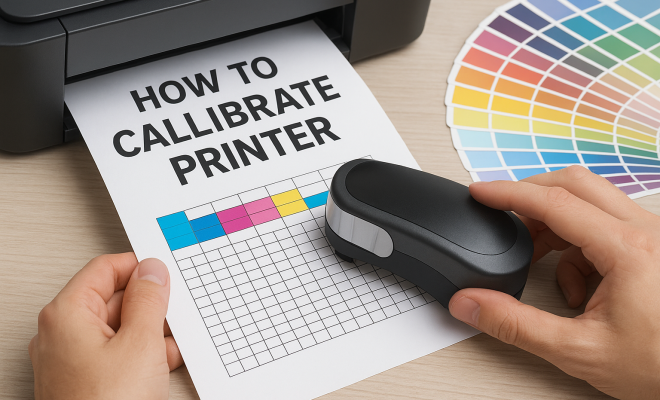
2. **Hardware Calibration Tools**: For those who want to go the extra mile, hardware tools like colorimeters or spectrophotometers can provide precise calibration. These devices measure the colors produced by your printer and help adjust the settings for optimal output.
3. **Test Print Patterns**: If you’re looking for a quick and straightforward method, you can use test print patterns. These patterns typically consist of various colors and gradients. By comparing the printed output to the colors on your screen, you can manually adjust your printer settings. (See: understanding color management.)
6. The Calibration Process: Step-by-Step
Now it’s time to focus on the calibration steps. Each printer might have slightly different methods, but here’s a general outline you can follow:
1. **Prepare Your Workspace**: Ensure that your printer is in a stable environment, away from direct sunlight and extreme temperatures, as these factors can impact print quality.
2. **Print a Test Page**: Use the test print patterns mentioned earlier. Once printed, examine the colors closely. Look for any discrepancies between what you see on the screen and what comes off the printer.
3. **Adjust Settings**: Based on your observations, go into your printer settings and adjust the necessary parameters. This might include changing color balance, brightness, or saturation levels.
4. **Repeat as Necessary**: It might take a few iterations to get everything just right. Don’t hesitate to print multiple test pages until you achieve the desired results.
7. Maintaining Printer Calibration
Once you’ve successfully calibrated your printer, maintaining that calibration is vital. Factors like environmental changes, printer usage, and new ink cartridges can all affect your printer’s performance over time. Regular maintenance helps ensure that your printer continues to produce high-quality prints.
Consider scheduling routine calibrations every few months or whenever you notice significant changes in print quality. It’s also beneficial to run cleaning cycles, especially on inkjet printers, to prevent clogging and ensure optimal ink flow.
Another important aspect of maintaining quality is keeping your printer and computer software updated. Manufacturers frequently release updates that improve functionality, including color accuracy, which can affect calibration.
8. Common Calibration Issues and Troubleshooting
Even with the best intentions, you may run into some common issues during calibration. Here are a few problems and their potential solutions:
1. **Color Mismatch**: If you notice that the colors on printouts differ significantly from those on your monitor, double-check your color profiles. You may need to adjust or install updated profiles specific to your printer model.
2. **Banding or Stripes in Prints**: This can happen due to clogged print heads. Run a print head cleaning cycle from your printer’s maintenance menu to resolve this issue.
3. **Faded Prints**: If your prints appear washed out, consider checking your ink levels. Low ink can lead to inconsistent color output. Replacing cartridges can often remedy this issue.
4. **Software Conflicts**: Sometimes, printer calibration issues arise from conflicts between different software applications. Ensure your design software and printer drivers are compatible and up to date.
9. Advanced Calibration Techniques
If you’re looking to further enhance your calibration process, consider these advanced techniques:
1. **Custom ICC Profiles**: While many printers come with preset ICC profiles, creating a custom profile can yield even better results. This involves using a spectrophotometer to measure printed colors against a known standard. By generating a custom profile, you can achieve colors that are more accurately represented in prints.
2. **Soft Proofing**: Before printing, soft proofing allows you to view how your images will look when printed. This is done by simulating the printer’s output on your calibrated monitor. It can help prevent any surprises when you print, ensuring your colors and details appear as expected. (See: importance of printing safety.)
3. **Using Print Test Charts**: Unlike standard test print patterns, print test charts provide a more comprehensive analysis of your printer’s performance. These charts often include more colors and gradients and can help you fine-tune settings even further.
10. Statistics on Printer Calibration
Understanding the impact of printer calibration on print quality can be eye-opening. Here are some interesting statistics that emphasize its importance:
- According to a survey conducted by the International Color Consortium, 75% of professionals reported that improper calibration led to dissatisfaction in print quality.
- A study from the Printing Industries of America found that businesses that regularly calibrated their printers saved an average of 20% on ink and paper costs.
- Research indicated that 85% of photographers experienced significant improvements in print accuracy after implementing a consistent calibration routine.
11. Expert Perspectives on Calibration
Industry experts often emphasize the importance of printer calibration in achieving quality results. Graphic designer Emily Tran notes, “Color is everything in design. If your printer isn’t calibrated, you’re basically guessing what the final print will look like.”
Photographer Mark Jensen adds, “For photographers, calibration isn’t just a recommendation; it’s a necessity. It ensures that the colors in my prints reflect the true essence of the moment I captured.”
These insights underline that calibration is not merely a technical procedure but a critical component of creative expression in visual arts.
12. Frequently Asked Questions (FAQ)
Q: How often should I calibrate my printer?
A: It’s generally recommended to calibrate your printer every few months or whenever you replace ink cartridges or notice discrepancies in print quality.
Q: Can I use my printer without calibrating it?
A: Yes, you can use your printer without calibration, but the colors and quality of your prints may not match your expectations, especially for professional work.
Q: Does calibrating my monitor affect my printer calibration?
A: Absolutely. Calibrating your monitor ensures that the colors you see on-screen are accurate, making it essential to match what gets printed.
Q: What happens if I don’t calibrate my printer?
A: Without calibration, you may experience issues like color mismatches, poor print quality, and unnecessary waste of materials as you try to achieve the desired results.
Q: Are there cost-effective ways to calibrate my printer?
A: Yes, you can use free or low-cost calibration software and print test patterns to manually adjust your printer settings. While this may not be as precise as using hardware calibration tools, it can still improve your print quality significantly.
13. The Future of Printer Calibration
As technology evolves, so does the process of printer calibration. New advancements, such as AI-driven calibration tools, are beginning to emerge. These tools can analyze print quality in real-time and automatically make adjustments, further simplifying the calibration process for users.
Additionally, cloud-based calibration services are being developed, allowing users to access calibration profiles and settings from anywhere, making it easier for remote workers and professionals to achieve consistent results regardless of location. (See: scientific approach to color accuracy.)
In the coming years, we may see even more integration of machine learning algorithms that can learn a user’s specific printing habits and preferences, providing tailored calibration recommendations and automating the entire process.
14. Final Thoughts
Investing time in calibrating your printer provides numerous advantages, from improved print quality to consistent color reproduction. Whether you’re a professional photographer, a graphic designer, or just someone who loves printing high-quality images at home, calibration is a vital step in the printing process.
By following the steps outlined in this guide, you can ensure your printer is optimized for the best possible results. The process may seem daunting at first, but with practice, it becomes second nature. Ultimately, a well-calibrated printer not only enhances your work but also saves you time and resources, leading to a more efficient printing experience.
15. Printer Calibration Across Different Printer Types
It’s important to note that the calibration process can vary significantly depending on the type of printer you’re using. Here’s a closer look at how calibration differs between various printer types:
15.1 Inkjet Printers
Inkjet printers are particularly sensitive to calibration because they use liquid ink that can behave differently on various types of paper. When calibrating an inkjet printer, it’s vital to use the same paper that you plan to print on regularly. Some advanced inkjet printers come with built-in calibration options, while others may require manual adjustments. Using tools like colorimeters can provide more precise results, ensuring that color output closely matches original designs.
15.2 Laser Printers
Laser printers generally provide consistent output, but they still require calibration to ensure color accuracy. This is especially true for color laser printers. Calibration for laser printers typically involves adjusting the toner settings and ensuring that the printer is using the correct color profile. In most cases, laser printers will have a built-in calibration process that can be initiated through the printer’s control panel.
15.3 Dye-Sublimation Printers
Dye-sublimation printers are commonly used for producing high-quality photographic prints. Calibration for these printers often involves adjusting color settings based on the type of substrate being used (like cardstock or canvas). It’s crucial to use ICC profiles specific to the dye-sublimation printer to achieve optimal results, especially since the colors can vary dramatically depending on the paper and ink combination.
16. The Environmental Impact of Printer Calibration
Calibration doesn’t only improve print quality; it can also have a positive environmental impact. By ensuring that printers use the right amount of ink and paper, calibration helps reduce waste. Studies show that businesses that maintain consistent calibration can reduce their ink consumption by up to 20%. This reduction not only saves money but also lessens the environmental footprint associated with ink and paper production.
17. Best Practices for Printer Calibration
Here are some best practices to keep in mind during your printer calibration process:
- Keep Your Workspace Consistent: Ensure that the lighting and environment remain stable during the calibration process. Fluctuations can affect how colors are perceived.
- Regular Maintenance: Clean your printer regularly to prevent issues such as clogged nozzles, which can distort colors. A clean printer is more likely to produce accurate results.
- Test Different Papers: If you print on various types of paper, consider calibrating for each type. Different surfaces can absorb ink differently, affecting the final color output.
- Document Your Settings: Keep a record of your calibration settings and adjustments. This can be incredibly useful for troubleshooting or reverting to previous settings if necessary.
18. Conclusion
Printer calibration is more than just a technical process; it’s a vital practice for anyone serious about producing high-quality prints. Whether you’re a hobbyist or a professional, understanding how to calibrate your printer and the implications of that calibration can enhance your results significantly. By incorporating the tips, statistics, and expert insights provided in this guide, you can ensure that your prints not only meet but exceed your expectations. Invest in your printing process today, and you’ll see the difference in your final results.
“`
Trending Now
Frequently Asked Questions
What is printer calibration?
Printer calibration is the process of adjusting your printer's settings to ensure that the colors, brightness, and contrast of printed output match the original design on your screen. This is crucial for achieving accurate color reproduction and overall print quality.
Why is printer calibration important?
Printer calibration is important because it leads to more accurate color reproduction, sharper images, and better overall print quality. It helps prevent issues such as overly saturated colors and reduces the number of test prints needed, saving time and materials.
How often should I calibrate my printer?
The frequency of printer calibration depends on usage. For professional fields like graphic design and photography, calibrating every month or before major projects is recommended. For casual users, calibrating every few months or when color discrepancies are noticed may suffice.
What tools do I need to calibrate my printer?
To calibrate your printer, you may need calibration software, a color calibration device (like a colorimeter), and test print patterns. Many printers also come with built-in calibration tools that guide you through the process.
Can I calibrate my printer myself?
Yes, you can calibrate your printer yourself using built-in calibration tools or software. However, for the best results, especially in professional settings, using a color calibration device and following specific guidelines is recommended.
Agree or disagree? Drop a comment and tell us what you think.