How to monitor network traffic
“`html
In today’s digital age, the ability to monitor network traffic has become indispensable for businesses and individuals alike. Whether you’re managing a small home network or overseeing an enterprise-level infrastructure, understanding data flow empowers you to maintain security, optimize performance, and troubleshoot issues effectively. This comprehensive guide will delve into the best practices, tools, and strategies for monitoring network traffic, offering you a robust understanding of how to safeguard and enhance your network.
1. Understanding Network Traffic
Before diving into the methods of monitoring, it’s essential to grasp what network traffic entails. Essentially, network traffic refers to the data that flows over a network at any given time, encapsulating everything from emails to file transfers and streaming services. This flow can be quantified in bits or bytes and is impacted by the number of users, activities being conducted, and the overall bandwidth available.
Network traffic can be categorized into two main types: unicast, where data is sent from one sender to one receiver, and broadcast, where data is sent from one sender to all devices on a network. Comprehending these definitions helps in analyzing traffic patterns and identifying anomalies that might indicate issues like network congestion or security threats.
2. Why Monitoring Network Traffic Matters
Monitoring network traffic serves multiple crucial purposes. First, it enhances security by identifying unauthorized access and potential breaches. For instance, a sudden spike in traffic can signal a Distributed Denial of Service (DDoS) attack. By monitoring traffic in real-time, you can respond rapidly to mitigate such risks.
Moreover, network traffic analysis aids in optimizing performance. By understanding which applications consume the most bandwidth, you can prioritize critical services and allocate resources accordingly. This ensures that vital applications run smoothly, especially during peak usage times. Lastly, it provides valuable insights for planning future network upgrades by identifying trends and usage patterns.
Another significant benefit of monitoring network traffic is compliance. Many industries are subject to regulatory requirements regarding data protection and network security. Monitoring helps maintain compliance with standards like GDPR, HIPAA, or PCI DSS, ensuring that sensitive data is secured and that any breaches can be quickly identified and addressed.
3. Key Tools for Monitoring Network Traffic
To effectively monitor network traffic, you’ll need the right set of tools. Here are some of the most popular options:
- Wireshark: This widely-used network protocol analyzer captures and displays data packets traveling over the network. It’s invaluable for troubleshooting networking issues and analyzing network protocols.
- NetFlow Analyzer: Developed by Cisco, this tool provides real-time traffic analysis and reporting. It allows network administrators to monitor bandwidth usage, identify heavy users, and analyze traffic patterns.
- PRTG Network Monitor: This comprehensive monitoring platform caters to various aspects of network performance, including traffic, bandwidth, and availability. Its sensor-based approach provides detailed insights into network health.
- Ntop: An open-source network traffic probe that shows network usage in a web interface. Ntop provides a graphical representation of traffic flows and helps identify network bottlenecks.
- SolarWinds Network Performance Monitor: A professional-grade tool that offers deep insights into network performance, featuring customizable alerts and dashboards to monitor traffic and network health effectively.
In addition to these tools, there are also specialized solutions for cloud environments, such as AWS CloudWatch and Azure Monitor, which provide tailored monitoring services for cloud infrastructure. These tools allow you to monitor network traffic specifically for cloud-hosted applications and services, ensuring you have visibility across all environments.
4. Setting Up Network Traffic Monitoring
Once you’ve chosen your monitoring tools, the next step is to set them up correctly. Begin by identifying the network segments you want to monitor. This could include local area networks (LANs), wide area networks (WANs), or specific devices within your infrastructure.
Next, configure your chosen tool to capture the relevant traffic. This usually involves setting up packet capturing on your network interfaces and ensuring the tool has the necessary permissions to access traffic data. Make sure to establish a regular monitoring schedule, so you can continually assess network performance and security. (See: Understanding network traffic definitions.)
It’s also vital to ensure that your monitoring setup is scalable. As your network grows, you may need to monitor additional devices or segments. Look for tools that can easily expand to accommodate growth without requiring a complete overhaul of your monitoring strategy.
5. Analyzing Network Traffic Data
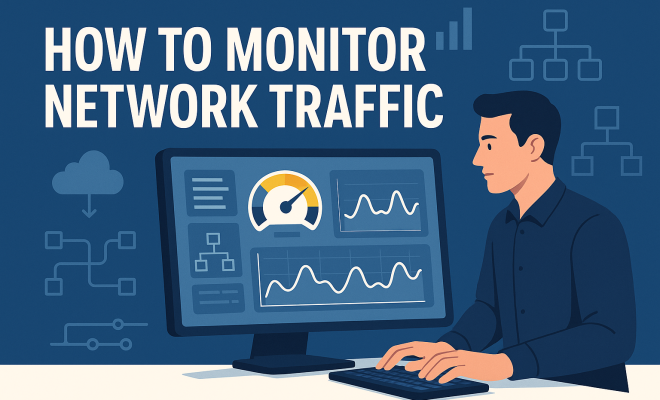
Once you’ve collected traffic data, the focus shifts to analysis. This process involves interpreting the data to identify patterns, anomalies, and potential issues. Start by looking at basic metrics like bandwidth usage, which helps you understand how much data is being transmitted over your network. Follow that with deeper analysis, such as examining protocol usage, identifying top talkers (devices generating the most traffic), and analyzing application performance.
Additionally, create visualizations to make the data more digestible. Graphs and charts can be effective in showcasing trends over time or highlighting unusual spikes in activity. This level of analysis not only informs you about current network conditions but also helps in forecasting future needs.
Consider implementing a baseline of normal network behavior to better detect deviations from typical patterns. For example, if your network usually sees an average of 100 GB of traffic daily, a sudden increase to 300 GB could trigger alerts. Understanding what constitutes “normal” for your network can help you quickly identify and investigate abnormalities.
6. Responding to Network Traffic Insights
Monitoring network traffic isn’t just about gathering data; it’s also about responding effectively to what that data reveals. For example, if you notice that specific applications are consuming excessive bandwidth, you might consider implementing Quality of Service (QoS) policies to prioritize traffic.
In cases where security threats are identified, such as unusual access patterns or unauthorized devices on your network, immediate action is required. This could involve isolating affected systems, conducting further forensic analysis, or even alerting law enforcement if the situation demands it. Establishing a clear incident response plan is crucial for minimizing damage and restoring normal operations swiftly.
It’s essential to conduct regular reviews of your incident response strategy and update it based on new threats and vulnerabilities. As hackers evolve their methods, your defenses must adapt as well. Training your staff on recognizing potential threats can also play a crucial role in your security posture.
7. The Future of Network Traffic Monitoring
As technology evolves, so does the landscape of network traffic monitoring. With the rise of Internet of Things (IoT) devices and remote work, networks are becoming more complex. This complexity necessitates advanced monitoring solutions that can provide comprehensive visibility across diverse environments.
Emerging technologies like artificial intelligence (AI) and machine learning (ML) are set to revolutionize network monitoring. These technologies can analyze traffic patterns in real-time, learning from historical data to predict issues before they occur. Additionally, automated responses to common problems can dramatically reduce downtime and manual intervention.
Moreover, as companies increasingly migrate to cloud solutions, monitoring tools will need to adapt to capture traffic across hybrid environments, providing seamless visibility and control. The future of network traffic monitoring looks promising, with advancements poised to make networks more secure and efficient.
Additionally, the integration of blockchain technology could offer innovative approaches to secure data transmission, enhancing both transparency and security in network traffic management. (See: Importance of monitoring in various fields.)
8. Best Practices for Monitoring Network Traffic
To maximize the effectiveness of your network traffic monitoring, consider implementing these best practices:
- Establish Clear Objectives: Define what you want to achieve with your monitoring efforts, be it improving security, optimizing performance, or ensuring compliance.
- Regularly Update Tools: Keep your monitoring tools up to date to benefit from the latest features and security patches.
- Implement Layered Security: Use multiple security measures to protect your network, such as firewalls, intrusion detection systems, and encryption.
- Conduct Regular Audits: Periodically review your monitoring processes and outcomes to identify areas for improvement.
- Train Your Team: Ensure that your IT staff is trained on how to use monitoring tools effectively and interpret the data they produce.
9. FAQs about Monitoring Network Traffic
What is network traffic monitoring?
Network traffic monitoring involves capturing and analyzing data packets that travel over a network to assess performance, detect security threats, and optimize resource allocation.
Why is it essential to monitor network traffic?
It is essential to monitor network traffic to maintain security, optimize performance, ensure compliance, and identify issues before they escalate into significant problems.
How often should I monitor my network traffic?
The frequency of monitoring depends on your network’s size and complexity. For high-demand environments, real-time monitoring is ideal, while smaller networks may require less frequent checks.
What tools are best for monitoring network traffic?
Popular tools include Wireshark, NetFlow Analyzer, PRTG Network Monitor, Ntop, and SolarWinds Network Performance Monitor. The choice of tool should depend on your specific needs and the scale of your network.
Can I monitor network traffic on a wireless network?
Yes, many network monitoring tools can capture traffic on wireless networks. However, ensure that you have the necessary permissions and that your tools are compatible with wireless protocols.
How do I respond to suspicious network activity?
Upon detecting suspicious activity, you should isolate affected systems, conduct a thorough investigation, and implement an incident response plan to address the issue effectively.
What are some common signs indicating network traffic issues?
Common signs of network traffic issues include slow network performance, frequent disconnections, unexpected increases in bandwidth usage, and unrecognized devices connecting to the network. Regular monitoring can help identify these issues early.
How can I prioritize traffic on my network?
Traffic prioritization can be achieved using Quality of Service (QoS) settings in your router or through specific monitoring software. Establish rules that assign higher priority to critical applications or services, ensuring they receive sufficient bandwidth even during peak times.
Is it legal to monitor my network traffic?
Generally, yes, it is legal for network administrators to monitor traffic on networks they manage. However, it’s essential to comply with local laws and regulations regarding user privacy and data protection. Always notify users if monitoring is in place. (See: Guide on monitoring network traffic.)
What are the challenges in monitoring network traffic?
Some challenges include handling large volumes of data, interpreting complex protocols, ensuring data privacy, and keeping monitoring tools updated with the latest security threats. Effective planning and the right tools can help mitigate these challenges.
In summary, being equipped to monitor network traffic is essential for anyone responsible for managing a network. It empowers you to ensure security, optimize performance, and proactively address issues before they escalate. With the right knowledge and tools at your disposal, you can safeguard your network against threats and ensure smooth operation for all users.
10. Case Studies: Successful Network Traffic Monitoring Implementations
To illustrate the impact of effective network traffic monitoring, here are a couple of case studies showcasing successful implementations:
Case Study 1: A Financial Institution
A medium-sized financial institution faced challenges with network latency and security breaches. After implementing SolarWinds Network Performance Monitor, they were able to visualize their network traffic in real-time. They established a baseline of normal traffic patterns and set alerts for anomalous behavior. When they noticed unusual traffic spikes during non-business hours, they were able to swiftly investigate and mitigate a DDoS attack. The institution reported a 30% improvement in network performance and significantly reduced security incidents.
Case Study 2: An E-commerce Company
An e-commerce company experienced slow loading times and high cart abandonment rates during peak shopping periods. By deploying PRTG Network Monitor, they analyzed traffic patterns and identified that their payment processing service was consuming excessive bandwidth. They implemented QoS settings to prioritize payment processing traffic, resulting in improved transaction speeds and a 20% increase in completed purchases.
11. Emerging Trends in Network Traffic Monitoring
As technology continues to advance, new trends are emerging in the realm of network traffic monitoring that can further enhance security and efficiency:
- Cloud-Native Monitoring: With more businesses migrating to cloud environments, cloud-native monitoring tools are becoming essential. These tools integrate seamlessly with cloud infrastructure and provide insights into traffic patterns specific to cloud services.
- AI-Powered Insights: The application of AI in network monitoring enables predictive analytics, helping organizations anticipate issues before they arise. AI can analyze vast amounts of data much faster than human capabilities, streamlining the monitoring process.
- Integration with Security Solutions: Monitoring tools are increasingly being integrated with security solutions such as Security Information and Event Management (SIEM) systems, enhancing the ability to detect and respond to threats quickly.
- Focus on User Experience: More organizations are recognizing the importance of end-user experience. Monitoring tools are evolving to include user experience metrics, allowing companies to correlate network performance with user satisfaction.
12. Conclusion
Ultimately, effectively monitoring network traffic is a multifaceted endeavor that combines the right tools, strategies, and best practices. By understanding the importance of network traffic, utilizing advanced monitoring technologies, and staying abreast of emerging trends, you can significantly enhance your network’s security and performance. Whether you’re a small business owner or an IT professional in a large organization, implementing a robust network traffic monitoring strategy will be key to navigating the complexities of today’s digital landscape.
“`
Trending Now
Frequently Asked Questions
What is network traffic monitoring?
Network traffic monitoring involves analyzing the data that flows over a network to ensure security, optimize performance, and troubleshoot problems. It helps identify unauthorized access, performance bottlenecks, and potential security threats, allowing for proactive management of network resources.
Why is it important to monitor network traffic?
Monitoring network traffic is crucial for enhancing security, optimizing performance, and troubleshooting issues. It helps detect unauthorized access, identify bandwidth-heavy applications, and respond swiftly to threats like DDoS attacks, ensuring a secure and efficient network environment.
What are the types of network traffic?
Network traffic can be categorized primarily into two types: unicast, where data is sent from one sender to a single receiver, and broadcast, where data is sent from one sender to all devices on a network. Understanding these types aids in analyzing traffic patterns.
How can I monitor network traffic at home?
To monitor network traffic at home, you can use various tools such as Wireshark, PRTG Network Monitor, or built-in router features. These tools allow you to track data flow, identify devices on your network, and analyze bandwidth usage for better performance management.
What tools are best for monitoring network traffic?
Some of the best tools for monitoring network traffic include Wireshark for packet analysis, PRTG Network Monitor for comprehensive monitoring, and SolarWinds for performance management. These tools provide insights into traffic patterns, device performance, and potential security threats.
Agree or disagree? Drop a comment and tell us what you think.