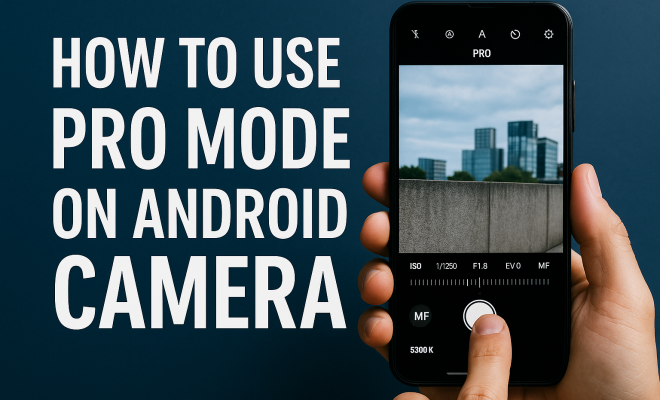
How to use pro mode on Android camera
“`html
As smartphone photography continues to rise in popularity, the capability to take stunning photos directly from your device has never been more accessible. One of the standout features that enhance your photography skills on Android devices is the pro mode Android camera. This advanced feature allows users to take complete control over their camera settings, enabling them to achieve professional-quality images. In this comprehensive guide, we’ll explore how to effectively use the pro mode on your Android camera, covering everything from basic settings to advanced techniques.
1. Understanding Pro Mode
Pro mode, sometimes referred to as manual mode, is a feature found in many modern Android smartphones that gives users granular control over camera settings. Unlike the default auto mode, where the camera makes decisions based on its algorithms, pro mode allows you to manually adjust settings like ISO, shutter speed, white balance, and focus. This flexibility is particularly valuable for photography enthusiasts who want to capture images that reflect their artistic vision.
The origins of pro mode can be traced back to traditional photography, where photographers would use manual settings on their cameras to achieve desired effects. With the advent of smartphones, manufacturers started integrating these capabilities into mobile cameras, making it possible for anyone to experiment and create high-quality images with just a few taps on the screen.
2. Accessing Pro Mode on Your Device
Accessing pro mode can vary slightly depending on the manufacturer of your Android device. Most commonly, you can find it within the camera app, often labeled simply as “Pro” or “Manual.” For instance, on Samsung devices, you can swipe through camera modes until you find Pro mode. Similarly, on Google Pixel phones, it can be accessed through the settings or mode selections. Familiarizing yourself with how to access pro mode on your device will allow you to quickly get started.
To help you get started, here’s a step-by-step guide for locating pro mode on some popular Android devices:
- Samsung: Open the camera app, swipe to the left until you see “Pro” mode.
- Google Pixel: Open the camera app, tap on the three dots in the top right corner, and select “Settings” to find the “Manual” option.
- OnePlus: Open the camera app, tap on “Photo” mode, and switch to “Pro” mode.
Once you have located it, you can begin the exciting journey of photography.
3. Key Settings to Adjust in Pro Mode
Pro mode empowers you with several critical settings that can dramatically influence your photos. Understanding each of these settings is essential for mastering your camera. Here are the primary settings you should familiarize yourself with:
- ISO: This setting controls the sensor’s sensitivity to light. A lower ISO (e.g., 100-200) is ideal for bright conditions, whereas a higher ISO (e.g., 800-1600 or higher) is better for low-light situations. However, increasing the ISO can introduce noise, so it’s a balance that you need to manage.
- Shutter Speed: This determines how long the camera’s shutter remains open to let light in. Faster shutter speeds (e.g., 1/1000 sec) are great for freezing motion, while slower speeds (e.g., 1/30 sec) can create motion blur, adding a sense of dynamism.
- White Balance: This setting adjusts the color temperature of your images. Different lighting conditions (like sunlight, shade, or tungsten light) affect the colors captured by the camera. Adjusting white balance can help eliminate color casts and make your photos more realistic.
- Focus: In pro mode, you can manually control the focus rather than depending on autofocus. This is particularly useful for creative effects, such as achieving a shallow depth of field.
Each of these controls plays a significant role in shaping the final outcome of your image, and experimenting with different settings will help you understand how they work in practice.
4. Lighting Conditions: How to Adapt Your Settings
One of the most critical factors in photography is lighting. Different environments will require you to adjust your settings accordingly. For bright daylight conditions, a low ISO and fast shutter speed will yield the best results, ensuring that your photos are clear and vibrant without overexposure. Conversely, in low-light settings, you’ll want to increase the ISO and potentially slow down the shutter speed to let in more light.
When shooting at dusk or dawn, often referred to as the golden hour, the light is softer and more diffuse. This presents a unique opportunity to capture stunning photos without harsh shadows. During these times, you can experiment with slightly higher ISO settings and adjust your shutter speed to balance the exposure perfectly. Remember, though, to keep an eye on noise levels as you increase the ISO. (See: Understanding the basics of photography.)
5. Composition Basics: Framing Your Shot
While technical settings are crucial, composition is just as important in photography. The way you frame your shot can dramatically alter the impact of your image. Familiarize yourself with the rule of thirds; imagine a grid dividing your frame into nine equal parts. Placing your subject along these lines or at their intersections can create a more balanced and engaging photo.
Additionally, consider leading lines, symmetry, and patterns when composing your shots. These elements guide the viewer’s eye through the image and can add depth. When you’re in pro mode, take the time to adjust your angle and perspective to find the most compelling composition before shooting.
6. Using Manual Focus for Creative Effects
One of the standout features of pro mode Android camera settings is manual focus. This can be particularly useful for achieving artistic effects, such as blurring the background while keeping your subject sharp. To utilize this feature, you can turn the focus ring or slider on your screen to bring your subject into sharp detail while allowing other elements in the scene to fall out of focus.
Manual focus can also be beneficial in low-light situations where autofocus struggles. By switching to manual, you can ensure that your subject remains sharp and clear. Experimenting with focus can produce captivating results, especially in portrait photography where depth of field plays a significant role.
7. Post-Processing for Enhanced Results
After capturing your images with the pro mode Android camera, it’s time to enhance them further with post-processing. Editing apps like Adobe Lightroom, Snapseed, or VSCO offer a range of tools to improve your photos, from adjusting exposure and contrast to cropping and applying filters.
When editing, be careful not to over-process your images. The goal is to enhance the photo while maintaining a natural look. Subtle adjustments often yield the best results, allowing the original shot to shine through while correcting minor issues or enhancing colors.
8. Sharing Your Work: Best Practices
Once you have perfected your shots, the next step is sharing them. Social media platforms like Instagram, Facebook, and Pinterest are excellent for showcasing your photography. However, each platform has specific requirements for image size and quality. Ensure your photos are optimized for online sharing without losing quality.
Consider creating a dedicated photography account or portfolio to present your work professionally. Engage with other photographers by using relevant hashtags, participating in photography challenges, and joining photography groups. This not only exposes your work to a broader audience but also allows for constructive feedback and networking opportunities.
9. Staying Updated: The Future of Mobile Photography
The world of mobile photography is rapidly evolving, with new features and improvements introduced regularly. Keeping up with updates from your smartphone manufacturer can ensure you make the most of your device’s camera capabilities. Features like improved low-light performance, AI enhancements, and additional manual controls are continually being developed.
Joining online photography communities or following renowned photographers on social media can also provide inspiration and insight into emerging trends. As you continue your photography journey, remember that practice is key — the more you experiment with pro mode and refine your skills, the more impressive your photos will become.
The pro mode Android camera represents a significant leap in mobile photography, enabling you to express your creativity fully. With the right settings, an understanding of composition, and a commitment to ongoing learning, you can significantly enhance your photography skills and capture breathtaking images directly from your smartphone.
10. Advanced Techniques for Pro Mode
Once you’re comfortable with the basics of pro mode, it’s time to explore some advanced techniques that can take your photography to the next level. Understanding these techniques will help you harness the full potential of your Android camera, allowing you to capture images that truly stand out. (See: Review of smartphone camera technology.)
10.1 Long Exposure Photography
Long exposure photography is an exciting technique that can create stunning effects, particularly in low-light conditions. By using a slower shutter speed, you can capture motion in a way that creates a sense of fluidity in your images. This is particularly effective for photographing waterfalls, rivers, or light trails from cars. To achieve this, set your shutter speed to a slower setting, keeping an eye on your ISO to prevent excessive noise. Using a tripod is recommended to keep your camera stable throughout the exposure.
10.2 HDR Photography
High Dynamic Range (HDR) photography is another powerful technique to explore in pro mode. This method captures multiple images at different exposure levels and merges them to create a single photo with a broader range of colors and details. When shooting in challenging lighting conditions, such as bright skies and dark shadows, HDR can help balance the exposure, providing richer details in both highlights and shadows. Many Android devices have an HDR mode, but capturing it manually in pro mode can yield even better results.
10.3 Focus Stacking
Focus stacking is a technique used to create images with a greater depth of field than what can be achieved in a single shot. This is particularly useful in macro photography, where you want both the foreground and background to be in sharp focus. To do this, take multiple images at different focus points and use editing software to blend them together. In pro mode, you can control the focus manually to take the necessary shots for this technique.
11. Common Mistakes to Avoid in Pro Mode
While pro mode offers incredible flexibility, it can also lead to some common pitfalls, especially for beginners. Being aware of these mistakes can save you time and help you produce better results.
- Not Paying Attention to Histogram: The histogram is an invaluable tool that shows the distribution of tones in your image. A well-balanced histogram ensures that highlights aren’t blown out and shadows aren’t too dark. Always check the histogram after taking a shot to assess the exposure.
- Overusing High ISO: While increasing the ISO can help in low-light situations, excessive use can lead to noisy images. Try to use the lowest ISO possible while achieving the desired exposure.
- Ignoring the Lighting: Lighting is everything in photography. Always take a moment to observe your surroundings and how light interacts with your subject. Adjust your settings accordingly to make the most of the available light.
12. Frequently Asked Questions (FAQ)
12.1 What is pro mode on an Android camera?
Pro mode is a feature on many Android smartphones that allows users to manually adjust camera settings like ISO, shutter speed, white balance, and focus for greater creative control over their photography.
12.2 How do I access pro mode on my Android phone?
Accessing pro mode varies by device, but it’s typically found in the camera app, often labeled as “Pro” or “Manual.” Check your camera app’s mode selections to find it.
12.3 What settings should I use in low light conditions?
In low-light conditions, increase your ISO to allow more sensitivity to light, and consider using a slower shutter speed to let in more light. Keep an eye on noise levels, as higher ISO can introduce graininess.
12.4 Can I use pro mode for video recording?
Many Android devices with pro mode also allow similar manual controls for video recording. Check your camera settings to see if options for frame rate, bitrate, and focus adjustments are available.
12.5 What are some recommended editing apps for post-processing?
Popular editing apps for post-processing include Adobe Lightroom, Snapseed, VSCO, and PicsArt. These apps offer a range of tools to enhance your photos effectively.
12.6 Is pro mode suitable for beginners?
Absolutely! While pro mode can feel intimidating at first, it’s a great way for beginners to learn about photography. Start with basic adjustments and gradually explore more complex settings as you gain confidence. (See: Research on smartphone photography techniques.)
12.7 How can I practice my skills in pro mode?
Consider dedicating time each week to practice different techniques. You can set specific goals for each session, like mastering manual focus or experimenting with long exposure. Join online photography challenges to motivate you and enhance your skills.
12.8 What equipment do I need for better mobile photography?
While a good smartphone is essential, consider investing in accessories like a tripod for stability, lens attachments for versatility, and external lights for better illumination. These tools can significantly enhance the quality of your shots.
13. Advanced Photography Techniques Using Pro Mode
As you become more proficient with pro mode, you might want to explore advanced techniques that can elevate your photography. Here are some methods that can push your skills even further:
13.1 Night Photography
Night photography can be incredibly rewarding, but it requires a unique approach. When shooting at night, a low ISO combined with a slower shutter speed can help capture the ambient light. Using a tripod is crucial here to avoid camera shake during long exposures. You can also experiment with light trails from vehicles to create dynamic compositions.
13.2 Macro Photography
Macro photography focuses on capturing small subjects up close. Use pro mode to adjust your focus and shutter speed carefully. Consider using a small aperture (high f-stop number) to increase depth of field, which is important for ensuring both your subject and background are in focus. Lighting can be tricky, so make use of natural light or small LED lights to illuminate your subject effectively.
13.3 Portrait Photography
For portraits, the ability to adjust the aperture allows you to create a beautiful bokeh effect, isolating your subject from the background. A wider aperture (lower f-stop number) achieves this while providing a softer background. Experiment with your lighting to enhance your subject’s features, possibly using reflectors to bounce light or create shadows.
14. Conclusion: Unlocking Your Potential
As you explore the pro mode Android camera, remember that practice is essential. The more you experiment with different settings, techniques, and compositions, the more you’ll refine your skills and develop your unique style. Take your time to understand each function and its impact on your images. With dedication and creativity, your smartphone can become a powerful tool for capturing stunning photography that showcases your artistic vision.
“`
Trending Now
Frequently Asked Questions
What is pro mode on an Android camera?
Pro mode, also known as manual mode, is a feature on many Android smartphones that provides users with full control over camera settings. This includes adjustments for ISO, shutter speed, white balance, and focus, allowing for more creative and professional-quality photography.
How do I access pro mode on my Android device?
Accessing pro mode varies by manufacturer, but it is usually found within the camera app labeled as 'Pro' or 'Manual.' For example, on Samsung devices, swipe through camera modes to find Pro mode, while Google Pixel phones may require navigating through settings.
What settings can I adjust in pro mode?
In pro mode, you can manually adjust several key settings including ISO (sensitivity to light), shutter speed (duration the camera's sensor is exposed to light), white balance (color temperature), and focus. This level of control helps achieve desired photographic effects.
Why should I use pro mode for photography?
Using pro mode allows photographers to tailor their camera settings to better match their artistic vision, resulting in higher-quality images. It is especially beneficial for those looking to experiment with different effects and improve their photography skills.
Can all Android phones use pro mode?
Not all Android phones come equipped with pro mode; it is typically found on mid-range to high-end models. Check your device's camera app for the pro or manual mode option to determine if your phone supports this feature.
What did we miss? Let us know in the comments and join the conversation.