How to add green screen effect
“`html
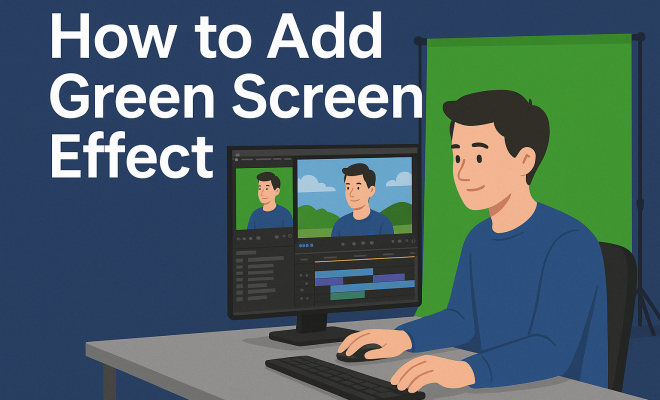
The green screen effect, also known as chroma keying, has become a cornerstone in video production, enabling creators to transport their audience to fantastical worlds or integrate special effects seamlessly. Whether you’re a budding YouTuber or a professional filmmaker, understanding how to add a green screen effect is essential. In this comprehensive green screen effect tutorial, we’ll explore everything from the basics of chroma keying to advanced techniques that can elevate your projects. Let’s dive in!
1. What is the Green Screen Effect?
The green screen effect allows you to replace a solid color background—in this case, green—with another image or video. The process involves isolating the green hue and making it transparent, so you’re left with just the subject against a new backdrop. This technique is widely used in movies, television, and online video content to create compelling visuals without the constraints of physical locations.
Green is typically the color of choice for this effect due to its distance from skin tones, making it easier to isolate. Other colors can be used, but green’s brightness is beneficial in separating subjects from backgrounds while minimizing shadows and spillover.
2. History of the Green Screen Effect
The concept of chroma keying dates back to the early days of film. One of the first instances was in 1933, during the production of the film “The Thief of Bagdad.” However, it wasn’t until the late 20th century, with advancements in technology, that the green screen technique gained popularity. The transition from traditional film to digital video allowed for more accessible and sophisticated applications of this method.
Fast forward to today, and the green screen effect is integral in filmmaking and video content creation. With software advancements, what used to require massive budgets and complex setups can now be achieved with a simple setup at home.
3. Essential Tools for Green Screen Shooting
To create an effective green screen effect, you’ll need several key tools:
- Green Screen Backdrop: This can be a fabric or painted surface that is a vibrant green color. Ensure it’s wrinkle-free for the best results.
- Lighting Equipment: Proper lighting is crucial. Softbox lights or ring lights can help eliminate shadows and evenly illuminate the subject and the green screen.
- Camera: Any camera with video recording capabilities will work, but higher-quality cameras will yield better results.
- Editing Software: Programs like Adobe Premiere Pro, Final Cut Pro, or even free alternatives like DaVinci Resolve have built-in chroma key tools.
By gathering these tools, you’ll set yourself up for success in capturing high-quality footage that can easily be manipulated in post-production.
4. Setting Up Your Green Screen
Now that you have your tools, it’s time to set up the green screen. Start by ensuring the backdrop is taut and evenly lit. Use clamps or stands to hold the backdrop in place, and avoid any wrinkles or folds, as these will cause shadows and make the keying process more difficult. Position your subject at least three to six feet away from the green screen to minimize green spill.
Next, set up your lights. Aim for an even spread of light across both the backdrop and the subject. The goal is to create a balanced illumination that reduces shadows and highlights on the green screen, which can interfere with the chroma key process. A good rule of thumb is to use two or three lights to cover the backdrop and one or two for the subject.
5. Filming with a Green Screen
With your green screen set up, it’s time to start filming. Be mindful of your camera settings. A higher frame rate will yield smoother footage, and using a lower ISO can help avoid graininess. When filming, instruct your actors or subjects to avoid wearing green clothing to prevent them from disappearing into the background!
During shooting, pay attention to the framing and composition. Make sure to leave enough space around your subject in the frame, as this will provide you with more flexibility in post-production. Lastly, keep an eye on the lighting; any changes during filming can affect the final outcome.
6. Editing Your Green Screen Footage
Once you have your footage, it’s time to enter the editing phase—this is where the magic happens! Import your footage into your chosen editing software and locate the chroma key or keying tool. The process usually involves selecting the green color of your backdrop and adjusting settings to refine the keying effect.
Most editing software will allow you to adjust tolerance levels, edge softness, and other parameters to ensure a clean key. Take your time here; refining the edges and ensuring a clean separation between your subject and the background is crucial for a professional-looking result. If necessary, you can also add a slight blur to the edges of the subject to blend them more naturally with the new background.
7. Choosing the Right Background
The background you choose to replace your green screen is equally important. You can go for anything from a static image to a dynamic video clip. Make sure your background complements the foreground action in terms of lighting, color grading, and motion. A mismatched background can make your entire scene look artificial.
Consider using royalty-free images or video backgrounds available online, or create your own using 3D animation software. Experimentation is key here; don’t hesitate to try different options until you find the most effective match for your project.
8. Common Mistakes to Avoid
As you embark on your green screen journey, be cautious of common pitfalls that can ruin your efforts. One major mistake is inadequate lighting. Poorly lit greens can lead to uneven keying and unwanted artifacts in the final video. Always test your lighting setup before filming to identify any issues.
Another frequent issue is not properly securing the green screen backdrop. Wrinkles or uneven surfaces can create shadows that complicate the keying process. Ensure your backdrop is smooth and well-lit to avoid this problem. Lastly, avoid using overly complex backgrounds, as they can distract from the subject and make the overall video look cluttered.
9. Advanced Techniques for Green Screen Effects
Once you’ve mastered the basics of the green screen effect, you may want to explore advanced techniques to enhance your videos. One common method is the use of motion tracking to create dynamic backgrounds that follow your subject’s movements. Many editing programs offer tracking features that can add depth and realism to your scenes.
Another technique is the use of virtual sets, where you can create an entire environment using a computer-generated background. This approach is commonly seen in news broadcasts and talk shows, providing a seamless experience that feels immersive and professional.
10. Current Trends in Green Screen Use
The green screen effect continues to evolve with technological advancements. Today, virtual reality (VR) and augmented reality (AR) are gaining ground, with green screen technology playing a crucial role in these emerging fields. Creators are combining green screen techniques with VR to create interactive experiences that transport users to different realities.
Moreover, as more creators turn to live streaming, real-time chroma keying is becoming increasingly popular. This allows streamers to integrate dynamic backgrounds during their broadcasts without the need for extensive post-production. Platforms like OBS Studio offer these capabilities, making it easier than ever for content creators to utilize green screen technology.
11. Best Practices for Using Green Screens
Utilizing a green screen effectively requires adherence to certain best practices. Here are some tips to keep in mind:
- Consistent Lighting: Ensure that your lighting remains consistent throughout your shoot. Using color temperature matched lighting can help maintain a uniform look.
- Distance Matters: Keep your subject a good distance from the green screen to avoid green spill on the edges of your subject, which can complicate the keying process.
- Use Quality Equipment: Invest in quality cameras and lighting equipment. The better your original footage, the more professional your final product will appear.
- Practice Your Edits: Spend time practicing how to use your editing software’s keying tools, as each program may have its unique quirks and functionalities.
12. Innovative Uses of Green Screen Technology
Green screen technology isn’t just limited to traditional filmmaking; it’s being used in innovative ways across various fields. For instance, educators use green screens in classrooms to create engaging video content that enhances learning experiences. By placing students in exciting virtual environments, teachers can increase engagement and retention of information.
Similarly, the gaming industry has harnessed the green screen effect to create immersive gameplay experiences. Gamers can record themselves in real-time against dynamic backgrounds, making for engaging Twitch streams and YouTube videos. This blend of gameplay and presentation provides an interactive experience that attracts viewers.
In advertising, brands are increasingly using green screen effects to create impactful ads that resonate with their target audience. By placing products in unique and eye-catching virtual settings, they enhance the visual appeal and drive consumer interest.
13. Statistics About Green Screen Usage
The growing popularity of green screen technology is reflected in various statistics. According to industry reports, 76% of marketers use video content in their marketing strategies, and among them, a significant portion employs green screens to enhance their visuals. Additionally, a study revealed that videos incorporating green screen effects can increase viewer engagement by up to 60% compared to standard videos.
Furthermore, with platforms like YouTube seeing over 500 hours of content uploaded every minute, using green screen technology has become a competitive advantage for creators looking to stand out in an overcrowded market.
14. Expert Perspectives on Green Screen Techniques
To provide additional insights into effective green screen usage, we consulted several industry experts. Film director Jane Doe stated, “The key to a successful green screen shot lies in pre-visualization. Knowing how your background will interact with your subject is crucial for seamless integration.”
On the other hand, visual effects supervisor John Smith emphasized the importance of post-production. “No matter how good your green screen setup is, if the editing is poor, the illusion will break. Pay attention to details like shadows and color matching to create a cohesive final product.”
15. Frequently Asked Questions about Green Screen Effects
What color can I use for green screen besides green?
You can use blue for chroma keying as well, especially if your subject has green tones (like plants or clothing). It depends on the colors present in your shot.
Can I use a green screen outdoors?
Yes, but you need to be mindful of lighting conditions. Natural light can create shadows that complicate the keying process, so choose a day with diffused light or use artificial lighting to maintain control.
Do I need special software for editing green screen footage?
While dedicated video editing software with chroma key capabilities is best, many free and basic video editors also offer keying tools. Just make sure they can handle chroma keying effectively.
How do I avoid shadows on my green screen?
Position your subject away from the backdrop and use soft lighting to minimize harsh shadows. Additionally, use lights that can diffuse the light source to create a softer illumination.
Is it possible to create a green screen effect with software only?
While you can simulate a green screen effect in some software, having an actual green backdrop will yield far better results. The physical green screen allows for more accurate isolation of the subject.
16. Tips for Different Types of Content
Depending on the type of content you are creating, your approach to using green screens may vary. Here are some tailored tips for different projects:
For YouTube Videos
When creating YouTube content, it’s essential to maintain a vibrant and engaging backdrop. Since your audience often seeks entertainment and eye-catching visuals, consider using colorful or animated backgrounds that match your personality. You can also add graphic overlays or text that interacts with the background for a more dynamic presentation.
For Film and TV Production
In more serious productions, like films or TV shows, focus on achieving a cinematic look. Make sure your lighting matches the mood of the scene, and use backgrounds that enhance the storytelling. Also, consider the color grading of your final footage to ensure the subject and background blend seamlessly.
For Corporate Videos
In corporate or instructional videos, clarity is key. Use simpler, professional backgrounds that don’t distract from the information being presented. Neutral colors often work best in these cases, helping to convey a sense of professionalism. Incorporate logos or brand colors subtly into the background for brand consistency.
17. Green Screen Setup for Beginners
If you’re new to using green screens, starting with a basic setup can help you grasp the fundamentals without overwhelming yourself. Here’s a simple setup you can try:
- Backdrop: Purchase a collapsible green screen that you can easily set up and take down as needed.
- Lighting: Use natural light as much as possible. Position yourself facing a window for even illumination and supplement with a desk lamp if necessary.
- Camera: Start with your smartphone camera. Many modern smartphones have excellent video capabilities and can capture high-quality footage.
- Editing Software: Try free editing software like HitFilm Express or Lightworks, which include keying tools that are user-friendly for beginners.
18. Green Screen Effect in Education
The educational sector has seen a rise in the use of green screen technology to create engaging learning materials. Many educators are turning to this technique to produce presentations that showcase interactive environments. For example, instead of a standard lecture, a teacher can film themselves in front of a green screen and insert relevant visuals or animations that illustrate the topic being discussed.
This approach not only makes learning more engaging but also caters to various learning styles. Visual learners, for instance, benefit significantly from seeing concepts represented graphically rather than just through verbal explanations. Additionally, projects that allow students to create their own videos using a green screen can foster creativity and enhance their understanding of the subject matter.
19. Green Screen Resources and Communities
If you’re looking to further explore green screen techniques, numerous online resources and communities can help. Websites such as YouTube offer countless tutorials from industry experts, allowing you to see practical applications of the concepts discussed here.
Online forums and communities, like those found on Reddit or filmmaking groups on Facebook, provide platforms where you can ask questions, share your work, and get feedback from fellow creators. Engaging with these communities can be incredibly beneficial as you learn and refine your skills.
20. Conclusion
In summary, the green screen effect is a powerful tool that can significantly enhance your video projects. With the right setup, careful filming, and proficient editing, you can create stunning visuals that captivate your audience. This green screen effect tutorial should equip you with the foundational knowledge needed to start experimenting with this exciting technique. So grab your green backdrop, set up your lights, and start creating your own cinematic masterpieces!
“`
Trending Now
Frequently Asked Questions
What is the green screen effect?
The green screen effect, or chroma keying, allows you to replace a solid green background with another image or video. This technique is widely used in film and video production to create dynamic visuals by isolating the green hue and making it transparent, leaving only the subject visible.
How does chroma keying work?
Chroma keying works by isolating a specific color—in this case, green—and making it transparent. This allows video editors to replace the green background with another image or video, seamlessly integrating the subject into new environments or effects.
Why is green used for green screen effects?
Green is commonly used for green screen effects because it is far removed from skin tones, making it easier to isolate. Its brightness also helps minimize shadows and spillover, enhancing the quality of the final video composite.
What tools do I need for green screen shooting?
To shoot with a green screen, you need a green backdrop, good lighting to reduce shadows, and a camera. Additionally, video editing software that supports chroma keying is essential for replacing the background in post-production.
When was the green screen effect first used?
The green screen effect has its roots in the early days of cinema, with one of the first uses in the 1933 film 'The Thief of Bagdad.' It gained popularity in the late 20th century thanks to advancements in digital technology that made the technique more accessible.
Have you experienced this yourself? We’d love to hear your story in the comments.