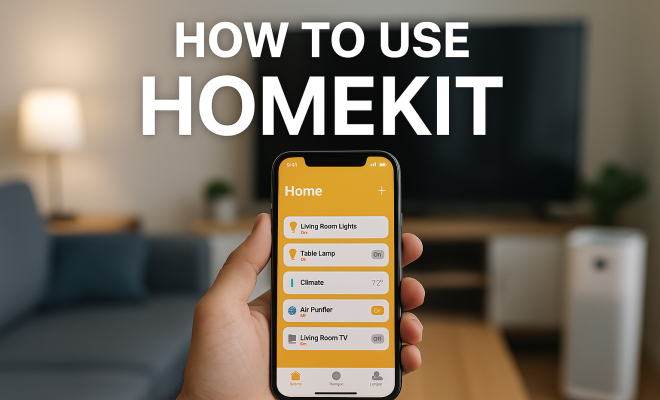
How to use HomeKit
“`html
As smart home technology continues to gain traction, Apple’s HomeKit emerges as a leading platform for anyone looking to streamline their home automation experience. This HomeKit guide will walk you through the ins and outs of using HomeKit, from understanding its core components to maximizing its capabilities. Whether you’re a novice or looking to refine your setup, this guide is packed with insights sure to enhance your smart home journey.
1. What is HomeKit?
HomeKit is Apple’s framework for home automation, enabling users to control smart devices using their iPhones, iPads, Apple Watches, and even Siri. Launched in 2014, HomeKit allows for seamless communication between compatible smart home devices, making it easier for users to manage everything from lighting to security systems.
One of the standout features of HomeKit is its focus on security and privacy. Apple’s end-to-end encryption ensures that the data shared between devices is secure, addressing one of the primary concerns many users have about smart home technology. This makes HomeKit a reliable choice for those prioritizing their home security.
2. Getting Started with HomeKit
To kick off your journey with HomeKit, you’ll need an iOS device (like an iPhone or iPad) with the Home app installed. The Home app serves as the central hub for managing all your HomeKit-enabled devices. To begin, make sure your device is updated to the latest version of iOS. Then, simply download the Home app if it’s not already installed.
Once you have the app open, you can start adding smart devices. Look for accessories that feature the HomeKit logo, ensuring compatibility. You’ll use a unique setup code provided with each device to link it to your HomeKit network. This process typically involves scanning the code within the Home app, making it quick and hassle-free.
3. Understanding HomeKit Accessories
HomeKit supports a variety of accessories, ranging from smart bulbs and thermostats to security cameras and door locks. Here’s a breakdown of some popular categories:
- Lighting: Smart bulbs and light strips can be controlled remotely and scheduled to operate at specific times. Brands like Philips Hue and LIFX are popular choices.
- Climate Control: Thermostats like the Ecobee or Nest can be integrated to adjust temperatures based on your preferences or routines.
- Security Devices: Cameras and locks from brands such as August and Arlo offer robust security features accessible through the Home app.
- Outlets and Switches: Smart plugs and switches let you control power to devices remotely, giving non-smart electronics some smart functionality.
Each accessory will have specific features, so it’s worthwhile to explore options based on your home’s needs. Researching user reviews and expert opinions can help you make informed decisions about which devices to integrate.
4. Creating Scenes and Automations
One of the most powerful aspects of HomeKit is its ability to create scenes and automations. Scenes allow you to control multiple devices simultaneously. For instance, a “Movie Night” scene could dim the lights, close the blinds, and adjust the thermostat at the press of a button.
To create a scene, open the Home app and tap the “+” icon, then select “Add Scene.” You can choose from pre-set options or create a custom scene by selecting which devices you want to control. You can also set the desired brightness, color, or temperature for each device, tailoring the scene to your preference.
Automations take this a step further by allowing you to set rules for your devices to follow automatically. For example, you might set an automation to turn on the porch light at sunset or to lock the front door when everyone leaves the house. These automations can be triggered by a variety of factors, including time of day, location, or the action taken by another device.
5. Using Siri with HomeKit
Siri integration is one of the standout features of HomeKit, allowing users to control their devices hands-free. Using simple voice commands, you can turn on lights, adjust the thermostat, or check the status of your security system. For instance, saying, “Hey Siri, turn off the living room lights,” is both convenient and efficient. (See: HomeKit on Wikipedia.)
It’s essential to ensure that your devices are named clearly for Siri to recognize them easily. You can also create groups of devices and name them collectively—such as “All Lights”—for quicker commands. With iOS updates, Apple continually improves Siri’s functionalities, making it an increasingly reliable partner for managing your smart home.
6. Remote Access and HomeKit Secure Video
HomeKit also provides the benefit of remote access, allowing you to control your devices even when you’re away from home. As long as you have a Home Hub—an Apple TV, HomePod, or an iPad set up as a hub—you can manage your home from anywhere using the Home app.
Additionally, HomeKit Secure Video allows you to securely store your camera footage in iCloud. This feature is particularly appealing for those who want to keep an eye on their home while away. It also comes with intelligent features that can differentiate between people, pets, and vehicles to reduce false alerts.
To utilize HomeKit Secure Video, ensure your camera is compatible and subscribe to an iCloud plan that includes this feature. This not only enhances your security measures but also gives you peace of mind.
7. Privacy and Security Considerations
Given the increasing concerns around privacy in smart technology, HomeKit shines with its commitment to user security. Apple prioritizes encryption and data protection, ensuring that communications between your devices remain private.
When setting up your HomeKit environment, it’s advisable to enable two-factor authentication on your Apple ID. This adds an additional layer of security, ensuring that only authorized users can access your smart home devices. Regularly updating your devices and HomeKit software is also crucial, as updates often include important security patches.
Additionally, you can control which devices and users have access to your HomeKit setup. By managing permissions, you can grant temporary access for guests or family members without compromising your overall security.
8. Expanding Your HomeKit Setup
As your smart home needs evolve, so too can your HomeKit setup. Adding new devices is straightforward, and the Home app will guide you through the process of integrating them into your existing system. You might start with a few essential devices and gradually expand to include more advanced systems like smart blinds or a home theater setup.
Consider the compatibility of devices before purchasing. Not all devices work with HomeKit, so referencing the compatibility list on Apple’s website can save you time and effort. Staying updated on the latest releases from compatible manufacturers can also help you take advantage of new features and improvements.
9. HomeKit and Energy Efficiency
One of the key benefits of using HomeKit is the ability to enhance energy efficiency in your home. Smart devices allow you to monitor and control energy usage, which can lead to significant savings over time. For instance, smart thermostats can learn your habits and adjust the temperature based on whether you’re home or away, potentially saving you up to 15% on heating and cooling costs annually.
Lighting is another area where you can make substantial energy savings. By utilizing smart bulbs that can be dimmed or scheduled, you can ensure that lights are only on when needed. Additionally, integrating motion sensors can help automate lighting control, making sure lights are off when rooms are unoccupied.
According to a report from the U.S. Energy Information Administration, smart home technology could lead to a 30% reduction in overall energy usage. As more people adopt HomeKit and similar technologies, this could translate into a major step toward sustainability in home environments. (See: NIST on smart home device security.)
10. Expert Opinions on HomeKit
Industry experts consistently highlight the user-friendly nature of HomeKit as a significant advantage. According to a recent survey by Smart Home Journal, 78% of smart home users rated HomeKit as the easiest platform to set up and use compared to competitors like Amazon Alexa and Google Home. This ease of use is attributed to the cohesive ecosystem Apple provides, where devices are not only secure but also work seamlessly together.
Security expert and author of “Smart Homes: Security and Privacy,” Dr. Emily Chan, emphasizes HomeKit’s superior encryption methods. She states, “HomeKit’s commitment to privacy and data security is unparalleled in the smart home space. Users can have peace of mind knowing that their information is safe from unauthorized access.”
Furthermore, analysts from the tech consultancy group TechVision noted that HomeKit’s integration with iOS devices provides a competitive edge, allowing for a more intuitive user experience. As the demand for smart home technology grows, analysts predict that Apple will continue to innovate and expand the capabilities of HomeKit.
11. Common Issues and Troubleshooting
Like any technology, HomeKit can sometimes present challenges. Here are some common issues users may face, along with troubleshooting tips:
- Device Not Responding: If a device fails to respond, ensure it is powered on and connected to the same Wi-Fi network as your Home Hub. You might also try restarting the device or the Home Hub.
- Automations Not Triggering: If your automations aren’t working as expected, check the conditions set in the Home app. Ensure that your device settings and permissions allow the automation to function properly.
- Siri Not Recognizing Commands: Make sure the names of your devices are simple and easy to pronounce. Additionally, check your microphone and connection settings on your iOS device.
- Remote Access Issues: If you can’t access your HomeKit devices remotely, ensure your Home Hub is connected to the internet and updated with the latest software.
If problems persist, consulting Apple’s support resources or community forums can also be beneficial. Many experienced users share tips and solutions that could help resolve specific issues.
12. FAQ about HomeKit
Q1: Is HomeKit compatible with all smart home devices?
A: No, only devices that are specifically designed with HomeKit compatibility will work with the platform. Look for the HomeKit logo on the packaging or check the Apple website for a list of compatible products.
Q2: Can I use HomeKit without an Apple device?
A: Unfortunately, you need at least one Apple device, such as an iPhone, iPad, or Mac, to use HomeKit. However, once set up, you can manage your devices through your Home Hub remotely.
Q3: How does HomeKit Secure Video work?
A: HomeKit Secure Video stores video footage from compatible cameras in iCloud with end-to-end encryption. It also provides intelligent features to help differentiate between different types of activity, such as distinguishing between people, pets, and vehicles.
Q4: How do I add a new device to HomeKit?
A: To add a new device, open the Home app, tap the “+” icon, and select “Add Accessory.” Follow the prompts to scan the setup code that comes with the device to link it to your HomeKit network.
Q5: Can I control HomeKit devices when I’m away from home?
A: Yes, as long as you have a Home Hub (Apple TV, HomePod, or an iPad set up as a hub), you can control your HomeKit devices remotely using the Home app on your iOS device.
13. HomeKit Integration with Other Platforms
While HomeKit provides a robust ecosystem on its own, many users are interested in how it integrates with other smart home platforms. HomeKit is designed to work seamlessly within its environment, but it can also coexist with platforms such as Amazon Alexa and Google Assistant through various bridging solutions. For instance, devices that support the Matter standard can operate across multiple systems, allowing you to use HomeKit alongside your Alexa or Google devices without significant hassle.
This interoperability can be incredibly beneficial for users who may want to incorporate devices that are not HomeKit-compatible due to availability or preference. The introduction of Matter has been a game changer for smart home technology, as it aims to unify the fragmented smart home ecosystem, making it easier for users to choose devices based on quality and functionality rather than strict compatibility with one platform.
14. HomeKit and the Smart Home Future
The world of smart home technology is rapidly evolving, and HomeKit is poised to remain a key player as this landscape changes. With ongoing advancements such as improved AI capabilities, users can expect their devices to become increasingly intuitive. For example, future updates may enhance automation capabilities by integrating machine learning that learns user patterns over time, allowing for even smarter home environments.
Moreover, Apple’s commitment to privacy and security will likely continue to set HomeKit apart from other smart home solutions. As more devices become interconnected, ensuring secure communication will be paramount, and HomeKit’s strong encryption practices may serve as a model for others in the industry.
15. Real-Life Use Cases for HomeKit
Understanding how others are using HomeKit can provide inspiration as you build or expand your own smart home setup. Here are some practical use cases:
- Home Office Automation: With many people working from home, automating your office environment can boost productivity. Imagine setting up automated lighting that adjusts based on the time of day or a schedule for your coffee maker to start brewing at 8 AM each morning.
- Enhanced Security for Vacation Homes: For those with vacation properties, HomeKit can enhance security by using smart locks and cameras that allow you to monitor access and receive alerts on your phone when someone enters or leaves the property.
- Daily Routines: Customizing your morning routine can also be a game changer. You can set devices to gradually brighten your smart lights, play your favorite news podcast through your HomePod, and adjust the thermostat—all through one automation.
- Family Management: Parents can leverage HomeKit to manage children’s screen time by automating when devices can access power. Smart plugs can cut power to devices at a set time each night, ensuring kids are off their gadgets in time for bed.
16. Conclusion: Why Choose HomeKit?
In an age where smart home technology is becoming ubiquitous, HomeKit stands out for its focus on user-friendly design, robust security, and seamless integration across devices. This HomeKit guide has equipped you with the essential knowledge to set up and optimize your smart home experience. Whether you’re just getting started or looking to enhance your existing setup, HomeKit offers tools and features designed to simplify your life.
With the right accessories and a little creativity, HomeKit can transform your living space into a fully automated sanctuary. Consider your needs, research compatible devices, and dive into the world of smart home automation. With HomeKit, your home is just a voice command or a tap away.
“`
Trending Now
Frequently Asked Questions
What is HomeKit and how does it work?
HomeKit is Apple's framework for home automation that allows users to control smart devices using iPhones, iPads, and Siri. Launched in 2014, it enables seamless communication between compatible devices, ensuring efficient management of everything from lighting to security systems.
How do I get started with HomeKit?
To start using HomeKit, you'll need an iOS device with the Home app installed. Ensure your device is updated and download the Home app. You can then add compatible smart devices by scanning the unique setup code that comes with each accessory.
What devices are compatible with HomeKit?
HomeKit is compatible with a wide range of smart home accessories, including smart bulbs, thermostats, security cameras, and door locks. Look for devices that feature the HomeKit logo to ensure compatibility with your HomeKit setup.
Is HomeKit secure?
Yes, HomeKit prioritizes security and privacy with end-to-end encryption for data shared between devices. This focus on security makes HomeKit a reliable choice for users concerned about the safety of their smart home technology.
Can I use Siri with HomeKit?
Absolutely! HomeKit integrates seamlessly with Siri, allowing you to control your smart devices using voice commands. You can ask Siri to adjust lighting, set the temperature, or even check the status of your security system.
What did we miss? Let us know in the comments and join the conversation.