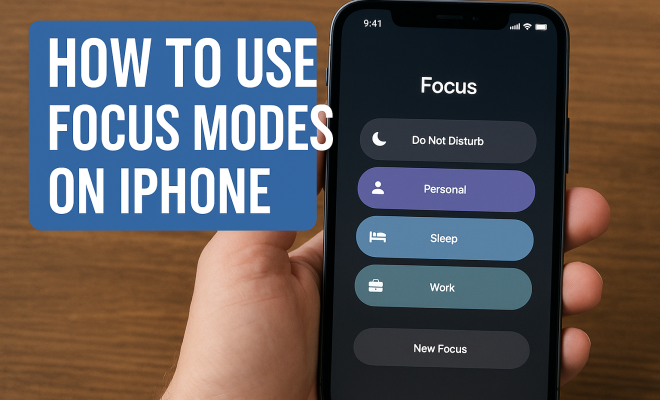
How to use focus modes on iPhone
“`html
The iPhone has transformed the way we communicate, work, and live our daily lives. One of its standout features, especially for those seeking a balanced approach to technology, is the Focus Modes. Introduced with iOS 15, these modes allow users to customize their notifications and app interactions based on their current activities or emotional states, providing a much-needed reprieve from constant digital distractions. In this article, we’ll explore the various iPhone focus modes, delve into their practical applications, and offer tips on how to utilize these modes effectively to enhance your productivity and well-being.
1. Understanding Focus Modes
Focus Modes are more than just a do-not-disturb feature. They allow you to tailor your iPhone experience based on specific contexts such as work, personal time, or sleep. By customizing notifications, you can prioritize what matters most while minimizing interruptions. When a Focus Mode is activated, notifications from certain apps or contacts can be silenced, allowing you to concentrate on the task at hand.
The beauty of these modes is their versatility. Whether you want to focus during work hours, unwind during your downtime, or establish healthy boundaries during your sleep hours, iPhone focus modes are designed to adapt to your lifestyle. They help you regain control over your digital environment, thereby improving your overall quality of life.
2. Setting Up Your First Focus Mode
Starting with Focus Modes is straightforward. To set up your first mode, navigate to the Settings app on your iPhone, then tap on ‘Focus’. Here, you’ll see suggestions for various modes like Work, Personal, or Sleep. Choose one that resonates with your needs. After selecting a mode, you can personalize it by selecting which contacts can reach you during that time. This is where you can decide to allow calls and texts from family, colleagues, or close friends.
In addition to contacts, you can also tailor app notifications. For instance, if you’re in Work mode, you might want to enable notifications from work-related apps like Slack or your email while silencing social media. Remember to customize the home screen as well. You can choose which apps are visible, allowing you to create a distraction-free environment.
3. Leveraging Focus Status
Another powerful aspect of iPhone focus modes is the Focus Status feature. This allows others to see when you’re in a Focus Mode and thus, might not respond immediately. When activated, a message appears to your contacts when they try to reach you, letting them know you’re busy and may not respond right away. You can customize this feature for different modes, ensuring that your colleagues know when you’re in meetings, while your friends understand when you’re winding down for the day.
To enable Focus Status, simply go into a specific Focus Mode in the Settings app and toggle on the ‘Share Focus Status’ option. This transparency can help manage expectations, reducing any frustration when you can’t immediately reply to messages.
4. Creating Custom Focus Modes
While the pre-set Focus Modes are useful, creating your own custom modes can take your productivity to another level. By tapping on the ‘+’ button in the Focus settings, you can design a mode specifically suited to your needs. For instance, you might want to create a ‘Gym’ mode that silences notifications while allowing music apps to play. Here, you can also set a specific schedule for this mode, so it automatically activates when you hit the gym.
These custom modes can encompass various activities outside of work and rest, like studying, tackling hobbies, or even spending quality time with family. The key is to tailor each mode to minimize distractions and maximize engagement with the activity at hand. Think about your daily routine and where interruptions tend to disrupt your flow—this is where custom Focus Modes shine.
5. Integrating Focus Modes with Home Screen Customization
Customizing your home screen in tandem with iPhone focus modes can significantly enhance their effectiveness. Each Focus Mode can have its own unique home screen layout, meaning you can curate which apps and widgets are visible during specific times. For example, in your ‘Work’ mode, you might want to have quick access to productivity apps like Notes, Calendar, and your email, while hiding games and social media. (See: impact of technology on well-being.)
To implement this, go to the Focus settings, select the mode you want to customize, and then tap on ‘Home Screen’. From there, you can either hide app pages or select specific apps to appear. This visual cue reinforces your intention for that mode, helping you stay on track and focused.
6. Utilizing Automation for Focus Modes
Automation is another feature that empowers the use of iPhone focus modes. With automation, you can set your device to automatically switch to a specific Focus Mode based on time, location, or even app usage. For instance, you could configure your ‘Work’ mode to activate from 9 AM to 5 PM on weekdays, or set it to switch on as you arrive at your office.
To set this up, navigate to the specific Focus Mode, tap on ‘Add Schedule or Automation’, and follow the prompts. Think about your typical day: how often do you find yourself distracted during your commute? Automating a ‘Commute’ Focus Mode could help eliminate those distractions and make your travel time more productive or calming.
7. Focus Modes for Better Sleep
One of the most significant benefits of iPhone focus modes is their capacity to improve sleep quality. By setting up a ‘Sleep’ Focus Mode, you can silence notifications and limit screen time, helping your mind unwind before bed. The dawn of technology often leads to insomnia and restless nights, but with the Sleep Focus Mode, you can combat these issues effectively.
In your Sleep Mode, you could set a specific time for this mode to activate each night or even customize it for weekends. Additionally, consider setting a wind-down time that prompts you to engage in relaxing activities—like reading or meditating—before sleep. This holistic approach not only helps you avoid disturbances during the night but also cultivates a healthier nighttime routine.
8. Encouraging a Balanced Digital Life
As we continue to integrate technology into every facet of our lives, the role of iPhone focus modes becomes increasingly crucial in maintaining a balanced digital life. These modes encourage users to consciously disconnect from constant notifications and distractions, promoting mental health and productivity.
It’s essential to regularly evaluate how you’re utilizing your Focus Modes. Check in with yourself: are there new distractions you’ve identified? Perhaps there are new modes you could benefit from as your routine changes. By continuously adapting your Focus Modes, you can maintain a healthy relationship with your device, ensuring it serves you—not the other way around.
9. Common Focus Modes and Their Applications
While custom modes are fantastic, understanding the common pre-set Focus Modes and their typical applications can provide a great starting point for users. Here are a few of the most popular Focus Modes and how people commonly utilize them:
Work Mode
In Work Mode, distractions are minimized to allow you to focus on your tasks. Notifications from non-essential apps are silenced, while you can receive alerts from work-related apps and contacts. This helps in maintaining a professional workflow without interruptions from social media or unrelated notifications.
Personal Mode
Personal Mode is perfect for when you need time to recharge or engage in leisure activities. It allows notifications from family and close friends, ensuring you remain reachable for important matters while blocking out work-related notifications.
Sleep Mode
As mentioned earlier, Sleep Mode is designed to create a peaceful environment for rest. It’s not just about silencing notifications; you can also enable features such as Night Shift, which reduces blue light emitted from the screen to promote better sleep quality. (See: coping with stress and technology.)
Fitness Mode
This is where you can set your iPhone to support your health and fitness goals. Notifications are silenced except for fitness-related apps that might track your workouts or provide music. It’s a great way to keep the focus on your physical health rather than digital distractions.
Driving Mode
Driving Mode is designed to prevent distractions while on the road. It silences notifications and can automatically respond to messages with a customizable message indicating that you’re driving. This feature enhances safety by limiting distractions while you’re behind the wheel.
10. Tips for Maximizing Focus Modes
To really get the most out of your iPhone focus modes, consider these tips:
- Evaluate Your Routine: Take time to assess your daily habits and identify when you need uninterrupted focus. This will help you set up effective Focus Modes.
- Update with Life Changes: As your responsibilities and lifestyle change, revisit your Focus Modes to ensure they still meet your needs.
- Engage Family and Friends: Let your close ones know when you’re using specific Focus Modes so they can respect your time and space.
- Limit Social Media Access: During your focused times, consider removing social media apps temporarily to avoid the temptation of checking notifications.
- Track Your Productivity: Utilize productivity apps to monitor how effective your Focus Modes are. Adjust your settings based on this feedback.
11. FAQs about iPhone Focus Modes
What are the main benefits of using Focus Modes?
The primary benefits include reduced distractions, enhanced productivity, better sleep quality, and a more balanced digital life. By customizing your notifications based on your activities, you gain greater control over your time and focus.
Can multiple Focus Modes be active at the same time?
No, you can only have one Focus Mode active at a time. However, you can create overlapping settings within a custom mode to accommodate various activities.
How do Focus Modes affect incoming calls?
You can customize which contacts can reach you during a Focus Mode. If a contact is not allowed during a Focus Mode, their calls will be silenced; however, they can still leave a voicemail.
Do Focus Modes affect other Apple devices?
If you have multiple Apple devices, such as an iPad or Mac, your Focus Mode settings can synchronize across devices. When you enable a Focus Mode on one device, it applies to all your connected Apple devices.
Can I automate Focus Modes based on location?
Yes, you can set automations based on location. For instance, your ‘Work’ mode can activate automatically when you arrive at the office, making it seamless to shift your focus as needed.
12. The Future of Focus Modes
As technology evolves, the capability and sophistication of iPhone focus modes are likely to expand further. Future updates may introduce more intelligent features, potentially integrating AI to suggest optimal Focus Modes based on your behavior and routines. Imagine a scenario where your iPhone automatically senses your stress levels or fatigue and suggests a focus mode tailored to help you unwind or concentrate. This kind of proactive engagement could revolutionize how we use our devices and manage our time.
Furthermore, collaborations with third-party applications could enhance the functionality of Focus Modes. For instance, fitness apps could integrate deeper with Focus Modes, automatically activating your ‘Gym’ mode while you engage in exercise routines. The possibilities are vast and could lead to a more cohesive relationship between our digital habits and our daily lives.
13. Real-Life Examples of Focus Modes in Action
Understanding how others effectively use iPhone focus modes can inspire you to implement these features in your own life. Here are a few real-life examples of how users are leveraging Focus Modes to enhance their productivity and well-being:
Example 1: The Student’s Study Mode
A college student might create a custom ‘Study’ Focus Mode that activates during exam periods. This mode could silence all notifications from social media and personal messaging apps, allowing only notifications from educational platforms like Google Classroom or study apps like Quizlet. The student could also set this mode to activate during specific hours each day leading up to exams, ensuring they remain dedicated to their studies without interruptions.
Example 2: The Remote Worker
A remote worker might utilize the ‘Work’ Focus Mode to create a clear boundary between work and personal life. This individual can set their Work Mode to silence all notifications from entertainment apps like Netflix and gaming platforms, while allowing notifications from work-related emails and project management tools. This helps them stay focused during working hours and reduces the temptation to engage in leisure activities during work time.
Example 3: The Family Time Advocate
Parents can set up a ‘Family Time’ Focus Mode that activates during dinner or family game night. This mode can block interruptions from work emails or social media, allowing family members to engage fully with each other. They might also configure this mode to allow calls from immediate family members in case of emergencies, ensuring that they stay connected while prioritizing quality time together.
14. Statistics on Digital Distraction and Focus Modes
Understanding the impact of digital distractions can further illustrate the importance of using iPhone focus modes. According to recent studies:
- On average, people check their smartphones **58 times a day**, which can lead to cognitive overload and decreased focus.
- Research indicates that using Focus Modes can lead to an **increase in productivity by up to 50%**, as users can concentrate better without constant distractions.
- **70% of adults** report feeling overwhelmed by constant notifications and messages, highlighting the need for features like Focus Modes that help manage digital noise.
These statistics underscore how implementing Focus Modes can not only enhance individual productivity but also contribute to a more balanced and intentional use of technology.
15. Conclusion
In summary, mastering iPhone focus modes equips you to take control of your digital presence, streamline your tasks, and cultivate a more peaceful environment. Whether you’re striving for productivity during work hours or looking to enhance your personal time, these features can significantly improve your relationship with your technology. By exploring and implementing the strategies discussed in this article, you can tailor your Focus Modes to fit your unique lifestyle and needs, making the iPhone a powerful ally in achieving balance and focus in your life.
“`
Trending Now
Frequently Asked Questions
What are Focus Modes on iPhone?
Focus Modes on iPhone are customizable settings that allow users to tailor notifications and app interactions based on specific activities or emotional states. Introduced with iOS 15, they help minimize distractions and enhance productivity by silencing notifications from certain apps or contacts during designated times.
How do I set up Focus Modes on my iPhone?
To set up Focus Modes on your iPhone, go to the Settings app and tap on 'Focus'. You'll find suggestions for various modes like Work, Personal, or Sleep. Select a mode that suits your needs and personalize it by choosing which contacts and apps can send notifications during that time.
Can I customize notifications in Focus Modes?
Yes, you can customize notifications in Focus Modes. When setting up a mode, you can choose which contacts can reach you and which apps can send notifications, allowing you to prioritize important communications while limiting distractions during specific activities.
What is the purpose of using Focus Modes?
The purpose of using Focus Modes is to help users regain control over their digital environment by minimizing interruptions. These modes allow individuals to concentrate better on tasks by silencing notifications and establishing healthy boundaries for work, personal time, or sleep.
Are Focus Modes the same as Do Not Disturb?
No, Focus Modes are more versatile than Do Not Disturb. While Do Not Disturb silences all notifications, Focus Modes allow for specific customization, enabling users to control which contacts and apps can communicate with them based on their current activities or needs.
What did we miss? Let us know in the comments and join the conversation.