The Tech Edvocate

Top Menu

  • Advertisement
  • Apps
  • Home Page
  • Home Page Five (No Sidebar)
  • Home Page Four
  • Home Page Three
  • Home Page Two
  • Home Tech2
  • Icons [No Sidebar]
  • Left Sidbear Page
  • Lynch Educational Consulting
  • My Account
  • My Speaking Page
  • Newsletter Sign Up Confirmation
  • Newsletter Unsubscription
  • Our Brands
  • Page Example
  • Privacy Policy
  • Protected Content
  • Register
  • Request a Product Review
  • Shop
  • Shortcodes Examples
  • Signup
  • Start Here
    • Governance
    • Careers
    • Contact Us
  • Terms and Conditions
  • The Edvocate
  • The Tech Edvocate Product Guide
  • Topics
  • Write For Us
  • Advertise

Main Menu

  • Start Here
    • Our Brands
    • Governance
      • Lynch Educational Consulting, LLC.
      • Dr. Lynch’s Personal Website
      • Careers
    • Write For Us
    • The Tech Edvocate Product Guide
    • Contact Us
    • Books
    • Edupedia
    • Post a Job
    • The Edvocate Podcast
    • Terms and Conditions
    • Privacy Policy
  • Topics
    • Assistive Technology
    • Child Development Tech
    • Early Childhood & K-12 EdTech
    • EdTech Futures
    • EdTech News
    • EdTech Policy & Reform
    • EdTech Startups & Businesses
    • Higher Education EdTech
    • Online Learning & eLearning
    • Parent & Family Tech
    • Personalized Learning
    • Product Reviews
  • Advertise
  • Tech Edvocate Awards
  • The Edvocate
  • Pedagogue
  • School Ratings

logo

The Tech Edvocate

  • Start Here
    • Our Brands
    • Governance
      • Lynch Educational Consulting, LLC.
      • Dr. Lynch’s Personal Website
        • My Speaking Page
      • Careers
    • Write For Us
    • The Tech Edvocate Product Guide
    • Contact Us
    • Books
    • Edupedia
    • Post a Job
    • The Edvocate Podcast
    • Terms and Conditions
    • Privacy Policy
  • Topics
    • Assistive Technology
    • Child Development Tech
    • Early Childhood & K-12 EdTech
    • EdTech Futures
    • EdTech News
    • EdTech Policy & Reform
    • EdTech Startups & Businesses
    • Higher Education EdTech
    • Online Learning & eLearning
    • Parent & Family Tech
    • Personalized Learning
    • Product Reviews
  • Advertise
  • Tech Edvocate Awards
  • The Edvocate
  • Pedagogue
  • School Ratings
  • Shocking: Your Smart Ring Knows When You’re Having Sex

  • The SwiftRefi Scandal: 7 Astonishing Truths About Their ‘Zero-Fee’ Refinance

  • The AION 2 Scandal: Why This Korean MMO Controversy Is Boiling Over

  • The Bombshell Truth About Gaming’s Legal Reckoning

  • Staggering: AI’s ALS Breakthrough Comes With a $5 Million Price Tag

  • The Astonishing AI Predicting Housing Trends With 98% Accuracy — Regulators Are Freaking Out

  • Your Kids’ Classrooms Are Changing: Here’s What’s Coming by 2026

  • Jaw-Dropping: Millions Face Triple Tax Bills on Forgiven Student Loans

  • Mind-Blowing: Critical Infrastructure Faces Collapse From This Overlooked Threat

  • Unsettling: AI Agents Just Hacked 7 Major Banks — Here’s What It Means For Your Money

Assistive Technology
Home›Assistive Technology›How to Repair a Dead Hard Disk Drive to Recover Data

How to Repair a Dead Hard Disk Drive to Recover Data
By Matthew Lynch
June 14, 2023
0
Spread the love

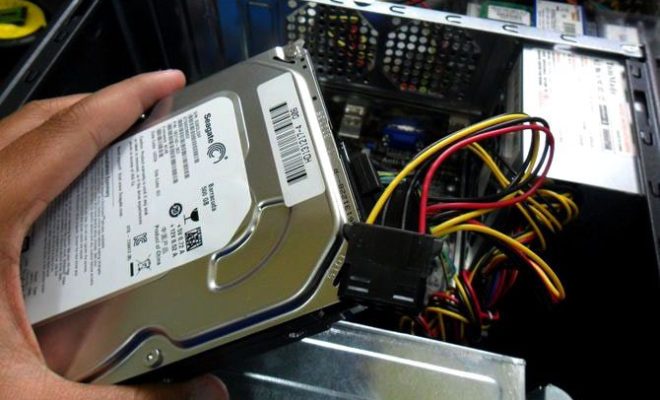
A hard disk drive (HDD) is a vital component of modern computing. It stores all your valuable data, including documents, photos, videos, and more. Unfortunately, HDDs can break down and stop working, leading to loss of important files. When this happens, you need to repair the HDD to recover your data. Here’s how to repair a dead hard disk drive to recover data.

  1. Determine the Cause of the Failure

Before attempting any repairs, you need to determine the cause of the HDD failure. It could be due to physical or logical damage. Physical damage refers to hardware failure, while logical damage refers to software issues. Physical damage can be caused by a drop or other physical impact, while logical damage can result from a virus, corrupted files, etc.

  1. Test the HDD

After determining the cause of the failure, you need to test the HDD to check if it’s still working. You can use a utility like HDDScan, which checks for bad sectors and identifies any potential hardware issues. Additionally, you can check if the HDD is spinning or making any noise when powered on.

  1. Replace the Circuit Board

If the HDD failure is due to a damaged circuit board, you can replace it with a compatible board from the same model or the same family. You need to unscrew the board from the HDD and replace it with the new board. It’s essential to ensure that the board’s firmware is compatible with the HDD’s firmware to avoid any compatibility issues.

  1. Repair the Firmware

If the HDD failure is due to firmware corruption, you can repair the firmware using a firmware repair utility like HDD Regenerator. The utility scans the HDD for bad sectors and attempts to repair them. Additionally, it can refresh the firmware, restoring the HDD to its original state.

  1. Recover the Data

After repairing the HDD, you need to recover the data. You can use a data recovery utility like EaseUS Data Recovery or Recuva to recover the lost data. The software scans the HDD for any recoverable files and displays them for you to choose the ones you want to recover. It’s essential to save the recovered files to a separate drive to avoid any data loss.


Previous Article

What Is DLSS 3? Can You Use ...

Next Article

What Is Crypto Technical Analysis? Technical ...

Matthew Lynch

Related articles More from author

  • Assistive Technology

    How to Change or Reset a Hulu Password

    June 8, 2023
    By Matthew Lynch
  • Assistive Technology

    How to Find Ultra HD and HDR Shows and Movies on Disney+

    June 22, 2023
    By Matthew Lynch
  • Assistive Technology

    How to Connect Bose Headphones to a Mac

    June 6, 2023
    By Matthew Lynch
  • Assistive Technology

    How to Add a New Menu Bar to Google Chrome, Edge, Firefox, and Opera

    June 12, 2023
    By Matthew Lynch
  • Assistive Technology

    How to Set Working Hours in Google Calendar

    June 12, 2023
    By Matthew Lynch
  • Assistive Technology

    How to Fix It When Chromecast Isn’t Working

    June 10, 2023
    By Matthew Lynch

Search

Login & Registration

  • Log in
  • Entries feed
  • Comments feed
  • WordPress.org

Newsletter

Signup for The Tech Edvocate Newsletter and have the latest in EdTech news and opinion delivered to your email address!

About Us

Since technology is not going anywhere and does more good than harm, adapting is the best course of action. That is where The Tech Edvocate comes in. We plan to cover the PreK-12 and Higher Education EdTech sectors and provide our readers with the latest news and opinion on the subject. From time to time, I will invite other voices to weigh in on important issues in EdTech. We hope to provide a well-rounded, multi-faceted look at the past, present, the future of EdTech in the US and internationally.

We started this journey back in June 2016, and we plan to continue it for many more years to come. I hope that you will join us in this discussion of the past, present and future of EdTech and lend your own insight to the issues that are discussed.

Newsletter

Signup for The Tech Edvocate Newsletter and have the latest in EdTech news and opinion delivered to your email address!

Contact Us

The Tech Edvocate
910 Goddin Street
Richmond, VA 23231
(601) 630-5238
[email protected]

Copyright © 2026 Matthew Lynch. All rights reserved.