Master VM Cloning: Your Guide to Duplicating Virtual Machines
“`html
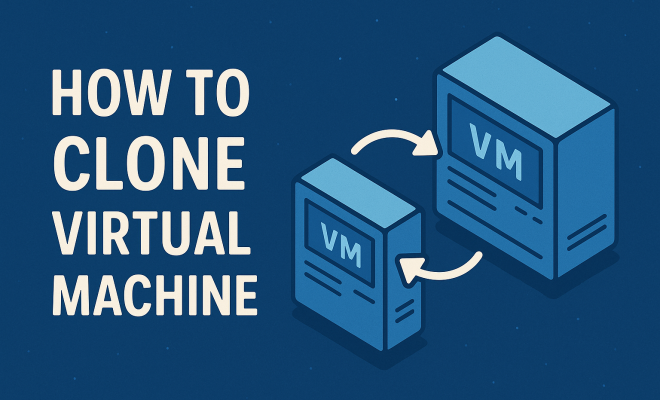
In the world of virtualization, the ability to clone a virtual machine (VM) has become an indispensable tool for IT professionals and developers alike. Cloning allows for rapid deployment of environments, efficient backup solutions, and experimentation without risk. If you’ve ever found yourself needing a duplicate VM for testing or backup purposes, you know how critical this process can be. In this article, we’ll delve into the essentials of cloning virtual machines, covering everything from the basic concepts to practical insights.
1. Understanding Virtual Machines
Before we jump into cloning, it’s important to understand what a virtual machine actually is. A VM simulates a physical computer within a software environment, allowing multiple operating systems to run on a single physical machine. This technology has transformed IT infrastructure, as it helps in optimizing resource usage, facilitating easier backup processes, and testing applications in isolated environments.
A virtual machine comprises virtual hardware—like virtual CPUs, memory, hard disks, and network interfaces—managed by a hypervisor. The hypervisor can be a Type 1 (bare metal) hypervisor like VMware ESXi or a Type 2 (hosted) hypervisor like Oracle VirtualBox. Each VM operates independently, providing a sandbox for applications or services, which is crucial for development, testing, and production scenarios.
2. Why Clone a Virtual Machine?
Cloning a VM offers multiple advantages. For starters, it simplifies the process of creating backups. Instead of manually configuring a new VM, you can quickly create a clone with the same configurations, applications, and data. This is especially useful for disaster recovery scenarios where speed is critical.
Another reason to clone a virtual machine is for testing and development. Developers can create a clone of an existing environment to test new software or settings without affecting the production environment. It also enables multiple developers to work on similar setups, fostering consistency across teams. The ability to revert to a previous VM state is invaluable in situations where updates may cause instability.
3. Types of Cloning
When it comes to cloning VMs, there are generally two types: full clone and linked clone. A full clone is an independent copy of a VM, containing all its virtual disks and settings. This clone functions as a standalone entity, meaning updates to the original VM do not affect it.
On the other hand, a linked clone shares the virtual disks of the original VM, which conserves storage space. However, linked clones are dependent on the parent VM; if the original is deleted or corrupted, the linked clone can suffer. Choosing between these two types depends on your specific needs for isolation, storage management, and performance.
4. Pre-Cloning Considerations
Before you proceed with cloning a virtual machine, certain preparations are necessary. Firstly, assess the VM’s current state to ensure it is operational and free from critical errors. It’s advisable to clean up any unnecessary files and applications, optimizing the VM for cloning.
Next, consider the destination for the clone. Ensure that sufficient storage is available and that the destination environment can support the cloned VM’s specifications. Additionally, make sure to review licensing agreements for software running on the VM, as creating a clone may have implications for compliance.
5. Cloning a Virtual Machine in VMware
One of the most popular platforms for virtualization is VMware. Cloning a VM in VMware is a straightforward process. Start by powering off the VM you wish to clone. Right-click on the VM in the vSphere client, then select Clone. You will be prompted to choose between a full clone or a linked clone. Follow the on-screen instructions to complete the process.
After cloning, you can customize settings like the VM’s name and network configurations. This step is crucial to avoid IP conflicts in your network. Once the clone is created, power it on and verify its functionality before deploying it for use. (See: Understanding virtual machines.)
6. Cloning a Virtual Machine in Microsoft Hyper-V
For those using Microsoft Hyper-V, the process is slightly different but equally effective. To clone a VM in Hyper-V, you typically use the export and import features. Start by right-clicking on the VM and selecting Export. Choose a destination folder and wait for the process to complete.
Next, to create a clone, navigate to the Hyper-V manager and select Import Virtual Machine. Browse to the folder where you exported the VM and follow the prompts to import it as a new VM. It’s essential to adjust the cloned VM’s identifiers and network settings to prevent conflicts.
7. Best Practices for Cloning Virtual Machines
While cloning VMs can be relatively simple, there are best practices that can enhance the process. Always ensure that the VM is powered off before cloning to prevent data corruption. Utilize snapshots if available, as they allow you to revert to the previous state quickly if needed.
Additionally, document the cloning process, especially if you’re managing multiple teams or environments. This documentation helps in maintaining consistency and enhances productivity. Regularly review and clean up old clones that are no longer needed to optimize your storage solutions.
8. Common Pitfalls to Avoid
Even experienced users can encounter issues during the cloning process if they’re not cautious. One common pitfall is neglecting to change the VM’s network settings after cloning, which can lead to conflicts. Always check that each VM has a unique MAC address and IP configuration.
Another mistake is failing to update the cloned VM’s operating system and software. It’s essential to ensure that the latest updates are applied, as clones may carry vulnerabilities from the original system. Always test the cloned VM thoroughly before deploying it for production use.
9. Current Relevance and Future Trends
The relevance of cloning virtual machines has only grown amidst the increase in remote work and cloud computing. Organizations are investing more in virtualization technologies to ensure flexibility and scalability. The ability to clone virtual machines quickly means businesses can adapt to changing workloads and enhance their disaster recovery strategies.
Looking forward, technologies like containerization may influence the traditional VM cloning processes. As more organizations adopt container orchestration platforms, understanding how to clone VMs and containers could become crucial for hybrid cloud strategies. Staying updated on trends will keep your skills relevant in this evolving field.
10. Advanced Cloning Techniques
For those looking to take their cloning skills to the next level, several advanced techniques can streamline the process or enhance functionality. One such technique is using automation scripts, especially in environments with a large number of virtual machines. Tools like PowerShell for Hyper-V and VMware’s PowerCLI allow you to script the cloning process, making it faster and less prone to human error.
Another advanced method is using templates. By creating a VM template, you can standardize configurations across multiple clones. This is particularly beneficial in organizations that require uniformity in deployments. Templates can include pre-installed applications, security configurations, and system updates, saving significant time during the setup of new VMs.
Using cloud features for cloning can also be a game changer. Many cloud providers, like AWS and Azure, offer built-in cloning functionalities that allow you to create copies of instances quickly. This not only saves time but also ensures that cloud-based VMs can scale efficiently with demand.
11. Cost-Benefit Analysis of Cloning VMs
Understanding the financial implications of cloning virtual machines can help organizations make informed decisions. While cloning can be seen as an additional cost due to storage requirements and management, the return on investment (ROI) often surpasses these initial expenses.
For instance, consider the time saved during deployment and backups. When cloning is part of your strategy, the speed at which new environments can be set up may lead to faster project completion and increased productivity across teams. According to a study by VMware, organizations that implement virtualization solutions can see up to a 30% reduction in operational costs, thanks to better resource allocation and management. (See: Guide on virtualization security.)
Moreover, the costs associated with downtime in production environments can be dramatically reduced when rapid cloning can be enacted in disaster recovery scenarios. A robust cloning strategy can be a crucial component in minimizing revenue loss during unexpected outages.
12. Comparing Cloning Tools and Technologies
When it comes to cloning virtual machines, the tools at your disposal can vary significantly by platform. Below is a comparison of some leading virtualization technologies based on ease of cloning, features, and overall efficiency.
- VMware vSphere: Known for its robust cloning capabilities, VMware allows for both full and linked clones with ease. Its integration with vCenter makes it suitable for larger enterprises.
- Microsoft Hyper-V: While slightly less intuitive than VMware, Hyper-V offers solid export/import features. Its integration with Windows Server makes it seamless for organizations already using Microsoft products.
- Oracle VirtualBox: A popular choice for developers, VirtualBox allows for easy cloning but lacks some advanced features found in enterprise-level solutions. It’s great for smaller projects or individual use.
- KVM (Kernel-based Virtual Machine): An open-source option that provides flexibility, KVM supports cloning but requires a bit more technical expertise to manage effectively compared to the other options.
13. FAQ about Cloning Virtual Machines
What is the main difference between a full clone and a linked clone?
A full clone is a complete, independent copy of a virtual machine, while a linked clone is dependent on the original VM, sharing its virtual disks. This means a full clone requires more storage but is self-sufficient, whereas a linked clone is more storage-efficient but can be compromised if the original VM goes missing or becomes corrupted.
Can I clone a running virtual machine?
While it’s technically possible to clone a running VM in some environments, it is highly discouraged as this can lead to data corruption or inconsistencies. It’s always best practice to power off the VM before cloning.
What are the implications of licensing when cloning a VM?
Licensing implications can vary based on your software environment. Some applications may require additional licenses for cloned instances. It’s essential to review the licensing agreements pertinent to the software installed on the VM before cloning.
How do I ensure the cloned VM maintains performance?
To maintain performance in a cloned VM, ensure that it has the appropriate resource allocations (CPU, memory, and storage) as per the workload it is expected to handle. Regularly update the system and optimize settings to avoid any bottlenecks.
Is cloning applicable for all types of virtual machines?
Cloning is generally applicable to most types of virtual machines, regardless of the hypervisor. However, some conditions might affect cloning, such as system configurations or licensing restrictions. Always check the specific requirements of your virtualization platform.
What are the risks associated with cloning virtual machines?
The risks include potential data corruption during the cloning process, configuration conflicts (especially with network settings), and licensing issues for installed software. Proper planning and execution can mitigate these risks effectively.
14. Real-World Use Cases for Cloning Virtual Machines
Cloning virtual machines isn’t just about the theory; it’s about practical applications that solve real-world problems. Here are some examples of how organizations leverage VM cloning:
1. Development and Testing: A software company can clone a VM that contains a specific application version or environment configuration. Developers can then work on new features or bug fixes in the cloned environment without risking the stability of the production system.
2. Disaster Recovery: In a case of server failure, having a cloned VM can mean the difference between quick recovery and prolonged downtime. Businesses often maintain clones in different geographical locations to ensure that if one data center goes down, the other can take over operations seamlessly.
3. Training and Onboarding: Companies can create clones of critical applications or systems for training purposes. New employees can interact with the cloned VM without fear of affecting the live environment, allowing for hands-on learning without the risks involved.
4. Load Testing: When preparing for significant traffic spikes, businesses can clone their web server environments. This way, they can simulate higher loads without impacting their live system, helping them gauge performance and make adjustments ahead of time.
15. Future of Cloning Virtual Machines
As technology continues to evolve, the future of cloning virtual machines is likely to be influenced by advances in cloud computing and virtualization technologies. Here are some trends to keep an eye on:
1. Increased Automation: With the rise of DevOps practices, automation tools for cloning VMs will become more sophisticated. This could allow for seamless integration of cloning into CI/CD pipelines, making deployments faster and more reliable.
2. Cloud-Native Solutions: As more organizations migrate to cloud-native architectures, the demand for cloning capabilities in serverless and containerized environments will grow. Understanding how to adapt traditional VM cloning techniques to these new paradigms will be essential.
3. Enhanced Security Measures: As cloning becomes more prevalent, security concerns will also rise. Future tools will likely integrate advanced security protocols to monitor clones, ensuring they don’t become vulnerabilities in the broader infrastructure.
16. Conclusion
Cloning virtual machines is a powerful technique that enhances the flexibility and efficiency of IT operations. By understanding the various cloning methods, best practices, and advanced techniques, IT professionals can significantly streamline their workflows. As technology evolves, staying informed about new tools and trends will ensure that your cloning strategies remain effective and relevant in an ever-changing landscape.
“`
Trending Now
Frequently Asked Questions
What is a virtual machine?
A virtual machine (VM) is a software simulation of a physical computer that allows multiple operating systems to run on a single physical machine. It consists of virtual hardware like CPUs, memory, and storage, managed by a hypervisor. This technology enhances resource utilization and facilitates isolated environments for testing and development.
Why would you clone a virtual machine?
Cloning a virtual machine simplifies backup creation and speeds up disaster recovery. It allows users to duplicate an existing VM with the same configurations, applications, and data. This is also beneficial for developers who need to test new software in a safe environment without impacting the original system.
How do you clone a virtual machine?
To clone a virtual machine, you typically use the management interface of your hypervisor. This process involves selecting the VM you wish to clone and choosing the clone option, which creates an exact duplicate of the VM with all its settings, applications, and data intact.
What are the benefits of using virtual machines?
Virtual machines offer numerous benefits, including efficient resource utilization, easier backups, and the ability to run multiple operating systems on a single physical machine. They provide isolated environments for testing applications, which is crucial for development and production scenarios.
What is a hypervisor in virtualization?
A hypervisor is software that creates and manages virtual machines. It allows multiple VMs to run on a single physical server by allocating resources such as CPU, memory, and storage. There are two types: Type 1 (bare metal) hypervisors, like VMware ESXi, and Type 2 (hosted) hypervisors, like Oracle VirtualBox.
Agree or disagree? Drop a comment and tell us what you think.