How to extend network with powerline adapter
“`html
In our increasingly digital world, reliable internet access isn’t just a luxury; it’s a necessity. Whether you’re streaming your favorite shows, working from home, or gaming online, a stable connection can make all the difference. For those struggling with dead spots in their homes or offices, a powerline adapter setup can be the game-changer you’re looking for. This article dives deep into how powerline adapters work, their benefits, setup process, and best practices for maximizing performance.
1. Understanding Powerline Adapters: What They Are and How They Work
Powerline adapters utilize your home’s existing electrical wiring to transmit data, effectively turning any power outlet into an internet connection point. Essentially, these devices convert data signals from your router into electrical signals that travel through your home’s wiring. The receiving adapter then converts these signals back into data, allowing devices to connect to the internet.
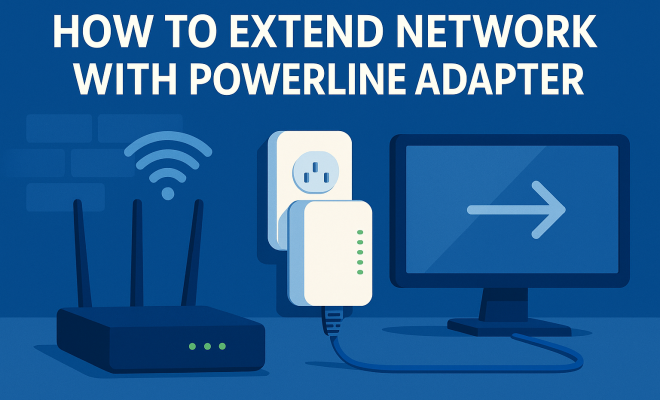
Most powerline adapters consist of two units: one that connects to your router and plugs into an outlet, and another that you place in the area where you need internet access. A simple Ethernet cable connects the second adapter to your device, be it a computer, gaming console, or smart TV. This setup eliminates the need for extensive wiring or additional routers, making it a convenient solution for homes with Wi-Fi dead zones.
2. Advantages of Using Powerline Adapters
Powerline adapters offer numerous advantages that make them a popular choice for extending network coverage. First and foremost, they provide a wired connection that generally offers better stability and speed compared to Wi-Fi. This is particularly advantageous in environments with many walls or interference from other electronic devices.
Another significant benefit is their ease of setup. Unlike traditional networking solutions, which can require complex installation processes, powerline adapters typically involve plugging in two units and connecting them with an Ethernet cable. For most users, this means they can enjoy extended network coverage in minutes without needing advanced technical skills.
Additionally, powerline adapters can be an excellent solution for connecting devices located far from your router, such as gaming consoles in a home theater or desktop computers in a remote office. It’s a practical option that helps users avoid the hassle and expense of running long Ethernet cables through walls or ceilings.
3. Choosing the Right Powerline Adapter: Key Features to Consider
Not all powerline adapters are created equal. When selecting one, it’s essential to consider several factors to ensure optimal performance. Look for adapters with a high data transfer rate—ideally, choose models that support at least 500 Mbps to accommodate multiple devices and high-bandwidth activities like gaming or streaming.
Additionally, consider the number of Ethernet ports available. Some adapters come with multiple ports, allowing you to connect several devices directly. Other features to look out for include integrated Wi-Fi capabilities, which provide wireless connectivity in addition to wired connections, and built-in security features such as encryption to safeguard your network.
It’s also worth noting the compatibility of the adapters with different electrical systems. If you live in an older home, you might want to ensure that the powerline adapters you select can work effectively with potentially outdated wiring.
4. Preparing for Your Powerline Adapter Setup
Before diving into the setup process, it’s crucial to prepare your home environment. Start by identifying the locations where you experience poor connectivity. These spots will help determine where to place your powerline adapters for maximum effectiveness. It’s also essential to ensure that the electrical circuit you’ll be using can handle the adapters without interference from other devices. (See: CDC on electrical wiring safety.)
Next, make sure your routers and adapters are updated and functioning properly. This includes checking for firmware updates and ensuring your router is securely connected to the internet. Taking these steps will help create a smooth setup experience.
5. How to Set Up Your Powerline Adapters: Step-by-Step Guide
Setting up your powerline adapters is a straightforward process that can usually be accomplished in a few simple steps:
- Connect the First Adapter: Plug the first powerline adapter into a wall outlet near your router and connect it to the router using an Ethernet cable.
- Plug in the Second Adapter: Place the second adapter in the location where you want to extend your network and plug it into a wall outlet.
- Pair the Adapters: Most powerline adapters have a pairing button. Press this button on both adapters to establish a secure connection between them.
- Connect Your Device: Use an Ethernet cable to connect your device to the second adapter, or, if your adapter has Wi-Fi capabilities, connect wirelessly.
Once you’ve completed these steps, your powerline adapter setup should be complete, and you should see a significant improvement in your internet connectivity.
6. Troubleshooting Common Issues: Tips to Maintain Your Connection
Even with a well-planned powerline adapter setup, issues can sometimes arise. One common problem is a weak connection, which can be caused by electrical interference from heavy appliances, poor wiring, or using adapters on different circuits. If you experience slow speeds or connection drops, try repositioning the adapters to different outlets.
Another common issue is the pairing process. If the adapters don’t connect, ensure they’re plugged directly into wall outlets and not power strips or surge protectors, which can disrupt the signal. Refer to the manufacturer’s instructions for specific troubleshooting tips, as each model may have unique features or requirements.
It’s also beneficial to regularly check the powerline network for any interference from other devices. Keep an eye on your electrical appliances; if you notice performance drops, it might be worthwhile to unplug or relocate some devices temporarily to see if your connection improves.
7. Maximizing Your Powerline Network Performance
To get the most out of your powerline network, consider a few strategies. First, ensure that both adapters are on the same electrical circuit, as this can improve data transfer speeds. Additionally, keep your adapters away from other electronic devices that might cause interference, such as microwaves and cordless phones.
Regularly check the firmware of your adapters. Manufacturers often release updates that can improve performance and security. Lastly, consider using powerline adapters that support the latest standards, such as HomePlug AV2, which can provide faster speeds and better range.
Another tip is to reduce the number of devices connected to the same circuit to minimize bandwidth sharing. If possible, try to connect high-bandwidth devices, such as gaming consoles or streaming devices, directly to the powerline adapter while keeping other devices on the Wi-Fi network.
8. Comparing Powerline Adapters to Other Networking Solutions
When it comes to extending your network, powerline adapters aren’t the only option. Wi-Fi extenders and mesh network systems are also popular choices. Wi-Fi extenders amplify your existing signal, but they can sometimes lead to reduced speeds due to signal degradation. In contrast, mesh systems use multiple nodes to create a seamless network, offering better coverage but often at a higher price point.
Powerline adapters stand out for their straightforward installation and reliable performance, particularly in homes where Wi-Fi signals struggle to penetrate. For users seeking a balanced combination of cost, simplicity, and effectiveness, powerline adapters are often the ideal solution. (See: New York Times on powerline adapters.)
It’s also worth considering the layout of your home. In homes with multiple floors or thick walls, powerline adapters may be more efficient than a traditional router that struggles to provide coverage through obstacles. Keep in mind, however, that the effectiveness of powerline adapters can vary based on the quality of your home’s electrical wiring.
9. Future of Powerline Technology: What’s Next?
As technology continues to evolve, powerline adapters are also adapting. Future developments may include faster data transfer rates, improved integration with smart home devices, and enhanced security features. For instance, some companies are experimenting with powerline adapters that support higher bandwidths, allowing for even better performance in multi-user environments.
As remote work and digital entertainment continue to grow, the demand for reliable internet solutions will only increase. Powerline technology may become a staple in ensuring that users have consistent access to high-speed connectivity, making it a key player in the future of home networking.
10. Frequently Asked Questions (FAQ)
1. What is the range of a powerline adapter?
The range of a powerline adapter can vary based on the electrical wiring and layout of your home, but most can cover distances of up to 300 meters (approximately 984 feet) within the same electrical circuit. However, performance typically decreases with distance and interference.
2. Can I use powerline adapters with different brands?
Yes, powerline adapters from different brands can generally work together as long as they adhere to the same powerline networking standards, such as HomePlug AV or AV2. However, it’s always best to check the specifications to ensure compatibility.
3. Do powerline adapters work with surge protectors or power strips?
Using powerline adapters with surge protectors or power strips is not recommended, as these can interfere with the signal quality. It’s best to plug the adapters directly into wall outlets for optimal performance.
4. Can powerline adapters be used outdoors?
Most powerline adapters are designed for indoor use only. Outdoor use can expose them to weather conditions that could damage the units. If you need to extend your network outdoors, consider using outdoor-rated networking equipment.
5. How do I know if my powerline adapter is working correctly?
Most powerline adapters have LED indicators that show their connection status. If the lights are green, it typically means they’re working correctly. A red or flashing light may indicate a problem with the connection or signal strength.
6. Can I use powerline adapters for gaming or streaming?
Absolutely! Powerline adapters are an excellent option for gaming and streaming as they provide a stable wired connection, which reduces latency and buffering compared to Wi-Fi. Just ensure that the adapters support the speeds necessary for your gaming or streaming needs.
7. What happens if I change my electrical system?
If you significantly change your electrical system, such as upgrading wiring or changing the layout of circuits, it may affect the performance of your powerline adapters. In such cases, you might need to reposition your adapters or troubleshoot connectivity issues.
8. Are there any security concerns with powerline adapters?
While powerline networking is generally secure, it’s wise to ensure that your adapters are encrypted. Most modern powerline adapters have built-in encryption features to protect data transmission. Always check the security settings during your initial setup.
9. What types of devices can I connect to powerline adapters?
You can connect a wide range of devices to powerline adapters, including computers, gaming consoles, smart TVs, and streaming devices. Any device that has an Ethernet port can benefit from the stable connection provided by powerline adapters.
10. Are powerline adapters suitable for large homes?
Powerline adapters can be suitable for larger homes, but their effectiveness depends on the quality of your electrical wiring and the layout of your circuits. If your home has multiple electrical panels or circuits, you might experience varying performance levels. In such cases, consider using multiple adapters to ensure coverage across the entire house.
11. How do powerline adapters compare to Wi-Fi 6 technology?
Wi-Fi 6 technology offers improved speed, capacity, and coverage compared to previous Wi-Fi standards. However, powerline adapters provide a wired alternative that can be more stable, especially in areas where Wi-Fi signals struggle. If you’re in an environment with thick walls or interference, powerline adapters might outperform Wi-Fi 6 in delivering consistent connections.
12. Can I install more than two powerline adapters in my home?
Yes, you can install multiple powerline adapters in your home. Most systems allow you to connect up to 16 adapters on the same network. This can be particularly beneficial for larger homes where multiple devices require a stable internet connection across various rooms.
In summary, whether you’re looking to eliminate Wi-Fi dead zones or simply want a reliable internet connection for multiple devices, a powerline adapter setup can offer an effective solution. Understanding the benefits, knowing how to set them up, and being aware of best practices will empower you to create a network that meets your needs effectively. With the right approach, you can enjoy seamless internet access throughout your space.
“`
Trending Now
Frequently Asked Questions
How do powerline adapters work?
Powerline adapters use your home's existing electrical wiring to transmit data. They convert data signals from your router into electrical signals that travel through the wiring, and then another adapter converts these signals back into data, allowing devices to connect to the internet.
What are the benefits of using powerline adapters?
Powerline adapters provide a stable wired connection, which is generally faster and more reliable than Wi-Fi. They are easy to set up, requiring only a plug into the outlet and a simple Ethernet connection, making them ideal for eliminating dead zones in homes or offices.
Can powerline adapters improve internet speed?
Yes, powerline adapters can improve internet speed by providing a wired connection that is less prone to interference than Wi-Fi. This is especially beneficial in areas with many walls or electronic devices that may disrupt wireless signals.
Do powerline adapters require special wiring?
No, powerline adapters do not require special wiring. They utilize the existing electrical wiring in your home, making them a convenient solution for extending network coverage without the need for additional cables or routers.
How do you set up a powerline adapter?
Setting up a powerline adapter is simple: plug one adapter into an outlet near your router and connect it with an Ethernet cable, then plug the second adapter into an outlet where you need internet access and connect your device. This straightforward process eliminates complicated installations.
Have you experienced this yourself? We’d love to hear your story in the comments.