The Tech Edvocate

Top Menu

  • Advertisement
  • Apps
  • Home Page
  • Home Page Five (No Sidebar)
  • Home Page Four
  • Home Page Three
  • Home Page Two
  • Home Tech2
  • Icons [No Sidebar]
  • Left Sidbear Page
  • Lynch Educational Consulting
  • My Account
  • My Speaking Page
  • Newsletter Sign Up Confirmation
  • Newsletter Unsubscription
  • Our Brands
  • Page Example
  • Privacy Policy
  • Protected Content
  • Register
  • Request a Product Review
  • Shop
  • Shortcodes Examples
  • Signup
  • Start Here
    • Governance
    • Careers
    • Contact Us
  • Terms and Conditions
  • The Edvocate
  • The Tech Edvocate Product Guide
  • Topics
  • Write For Us
  • Advertise

Main Menu

  • Start Here
    • Our Brands
    • Governance
      • Lynch Educational Consulting, LLC.
      • Dr. Lynch’s Personal Website
      • Careers
    • Write For Us
    • The Tech Edvocate Product Guide
    • Contact Us
    • Books
    • Edupedia
    • Post a Job
    • The Edvocate Podcast
    • Terms and Conditions
    • Privacy Policy
  • Topics
    • Assistive Technology
    • Child Development Tech
    • Early Childhood & K-12 EdTech
    • EdTech Futures
    • EdTech News
    • EdTech Policy & Reform
    • EdTech Startups & Businesses
    • Higher Education EdTech
    • Online Learning & eLearning
    • Parent & Family Tech
    • Personalized Learning
    • Product Reviews
  • Advertise
  • Tech Edvocate Awards
  • The Edvocate
  • Pedagogue
  • School Ratings

logo

The Tech Edvocate

  • Start Here
    • Our Brands
    • Governance
      • Lynch Educational Consulting, LLC.
      • Dr. Lynch’s Personal Website
        • My Speaking Page
      • Careers
    • Write For Us
    • The Tech Edvocate Product Guide
    • Contact Us
    • Books
    • Edupedia
    • Post a Job
    • The Edvocate Podcast
    • Terms and Conditions
    • Privacy Policy
  • Topics
    • Assistive Technology
    • Child Development Tech
    • Early Childhood & K-12 EdTech
    • EdTech Futures
    • EdTech News
    • EdTech Policy & Reform
    • EdTech Startups & Businesses
    • Higher Education EdTech
    • Online Learning & eLearning
    • Parent & Family Tech
    • Personalized Learning
    • Product Reviews
  • Advertise
  • Tech Edvocate Awards
  • The Edvocate
  • Pedagogue
  • School Ratings
  • Viaim Opennote Review: The AI Note-Taker That Disappears Into Your Daily Routine

  • A Visitors Guide to Long Beach (CA), United States

  • A Visitor’s Guide to Fresno (CA), United States

  • A Visitors Guide to New Orleans (LA), United States

  • A Visitors Guide to Sacramento (CA), United States

  • A Visitors Guide to Lyon, France

  • JisuLife Ultra2 Portable Fan: A Powerful Multi-Function Cooling Solution

  • A Visitors Guide to Viña del Mar, Chile

  • A Visitors Guide to Århus, Denmark

  • A Visitors Guide to Bakersfield (CA), United States

Digital & Mobile Technology
Home›Digital & Mobile Technology›What Is Adobe Fresco? A Beginner’s Guide to the Drawing App

What Is Adobe Fresco? A Beginner’s Guide to the Drawing App
By Matthew Lynch
June 10, 2023
0
Spread the love

If you are looking for a creative outlet through drawing, Adobe Fresco may be the drawing app for you. Adobe Fresco is a powerful drawing and painting app that allows users to create on-the-go with their iPad or Windows tablet.

What is Adobe Fresco?

Adobe Fresco is a drawing and painting app that was released in 2019. It is available for iPad and Windows devices and is a part of the Adobe Creative Cloud suite, which also includes Photoshop, Illustrator, and InDesign.

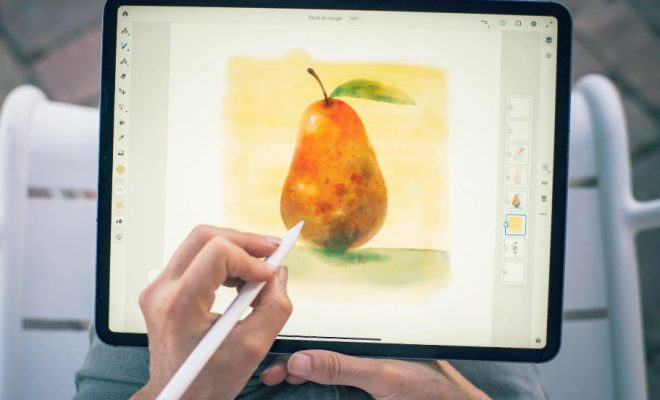
With Adobe Fresco, artists can use realistic brushes and live brushes to create a wide range of styles, from highly realistic to more cartoon-like. Adobe Fresco also offers a variety of tools for creating vector graphics and has the capability to export work as vector files, which is great for digital designers.

One of the unique features of Adobe Fresco is its ability to mimic natural media, like watercolors and oil paints. By using live brushes, artists can create digital paintings that look just like traditional media.

Other features of Adobe Fresco include layers, selection tools, and advanced settings for brush customization. Users can also import photos and use them as reference while drawing.

Getting Started with Adobe Fresco

To get started with Adobe Fresco, users must have a compatible iPad or Windows device. Adobe Fresco is available for download in the App store for the iPad or on the Adobe website for Windows devices.

After downloading the app, users can choose to sign in with an Adobe ID or create a new one. Once logged in, users will be taken to the home screen where they can access their projects, brush library, and tutorials.

Beginners should start by exploring the extensive brush library and experimenting with different brushes and settings. Adobe Fresco offers a wide range of brush options, from sketching pens to watercolor brushes, so take some time to find brushes that work for your style.

As you get more comfortable with Adobe Fresco, try playing around with layers and selection tools to create more complex illustrations. Adobe Fresco also offers a variety of tutorials, which are a great way to learn new techniques and get inspired.

Conclusion

Adobe Fresco is a powerful drawing and painting app that offers a wide range of features for artists and designers. Its ability to mimic traditional media makes it a great tool for digital painters looking to create realistic artwork. With a variety of brush options, layer tools, and tutorials, Adobe Fresco is also great for beginners looking to explore digital art.

Previous Article

The Best Android Browsers With a Built-In ...

Next Article

How to Set Your Location on Google ...

Matthew Lynch

Related articles More from author

  • Digital & Mobile Technology

    Reasons Not to Buy an Apple Watch

    August 5, 2023
    By Matthew Lynch
  • Digital & Mobile Technology

    Is RCN Down… Or Is It Just You?

    August 5, 2023
    By Matthew Lynch
  • Digital & Mobile Technology

    Best Online Stores for Archery Equipment

    June 6, 2023
    By Matthew Lynch
  • Digital & Mobile Technology

    iOS 17 Makes It Easy to Share AirTags. Here’s How

    January 31, 2024
    By Matthew Lynch
  • Digital & Mobile Technology

    Is the My Documents Folder Missing in Windows? Here’s How to Get It Back

    June 22, 2023
    By Matthew Lynch
  • Digital & Mobile Technology

    Unlocked phones vs. locked phones: What’s to know

    April 14, 2023
    By Matthew Lynch

Search

Login & Registration

  • Register
  • Log in
  • Entries feed
  • Comments feed
  • WordPress.org

Newsletter

Signup for The Tech Edvocate Newsletter and have the latest in EdTech news and opinion delivered to your email address!

About Us

Since technology is not going anywhere and does more good than harm, adapting is the best course of action. That is where The Tech Edvocate comes in. We plan to cover the PreK-12 and Higher Education EdTech sectors and provide our readers with the latest news and opinion on the subject. From time to time, I will invite other voices to weigh in on important issues in EdTech. We hope to provide a well-rounded, multi-faceted look at the past, present, the future of EdTech in the US and internationally.

We started this journey back in June 2016, and we plan to continue it for many more years to come. I hope that you will join us in this discussion of the past, present and future of EdTech and lend your own insight to the issues that are discussed.

Newsletter

Signup for The Tech Edvocate Newsletter and have the latest in EdTech news and opinion delivered to your email address!

Contact Us

The Tech Edvocate
910 Goddin Street
Richmond, VA 23231
(601) 630-5238
[email protected]

Copyright © 2025 Matthew Lynch. All rights reserved.