Unlock Your iPhone’s Hidden Power: Measure Anything!
“`html
In an increasingly digital world, the tools at our fingertips can enhance our everyday tasks remarkably. One such tool is your iPhone, which, unbeknownst to many, can act as a powerful measuring device. Whether you need to measure the dimensions of a room, determine the height of a tree, or even calculate the distance from one point to another, your iPhone is equipped with features that make these tasks easier than ever. In this article, we’ll explore how to measure with iPhone in depth, covering essential apps, tips, and techniques.
1. The Measure App: Your Go-To Tool
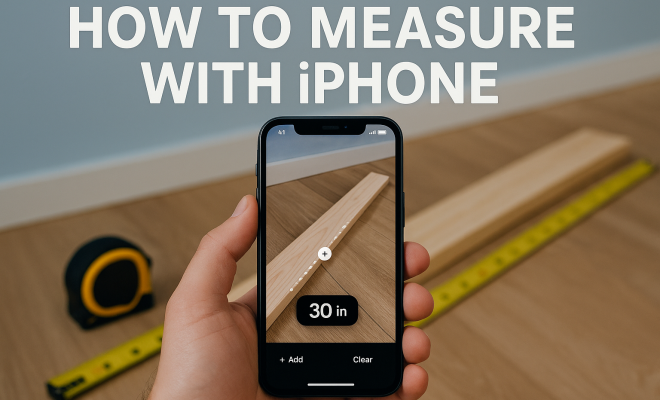
To begin your journey of measuring with iPhone, the built-in Measure app is a fantastic starting point. Launched with iOS 12, this app utilizes augmented reality (AR) technology to provide accurate measurements. It can measure objects and spaces by simply pointing your iPhone’s camera at them.
To use the Measure app, open it and move your iPhone around to let it recognize the surface you’re measuring. Once it detects a flat surface, you can tap the ‘+’ button to start measuring. Move your phone to the other end of the object you want to measure, and tap the ‘+’ button again to get the measurement. It’s that simple! This app can measure lengths, heights, and even detect rectangular shapes automatically, making it versatile for various tasks.
2. Measuring Heights: A Fun Trick
One of the coolest features of the Measure app is its ability to measure height. Need to know how tall that tree in your backyard is? Just follow these steps. First, use the app to measure the height of the object from the base to the top, ensuring you’re standing a few feet away for accuracy. When you tap on the ‘+’ to start, make sure to align the horizontal line with the base of the object and then move to the top for the final measurement.
This feature can come in handy for various scenarios, from DIY projects that require precise measurements to real estate evaluations. By simply pointing your device at the object and following the app’s prompts, you can get accurate height measurements without any bulky equipment.
3. Creating Level Surfaces with the Level Tool
A hidden gem within the Measure app is its level tool, which helps you check if surfaces are even or if pictures and shelves are correctly aligned. This is particularly useful for home improvement projects where precision is critical. To access this tool, open the Measure app and swipe left until you find the ‘Level’ option.
Place your iPhone on the surface you want to check. The app will show a green line when the surface is level, and a red line if it’s not. This function is excellent for hanging frames or ensuring that furniture is stable. It’s a small feature, but one that can save you a lot of headaches down the road!
4. Using ARKit for Detailed Measurements
For developers and tech enthusiasts, Apple’s ARKit allows for even more sophisticated measuring capabilities. ARKit uses advanced computer vision to blend digital objects with the real world, enabling users to create immersive experiences. By integrating ARKit with your own iOS app, you can develop customized measuring tools that cater to specific needs.
Imagine creating an app that can measure intricate structures or perform spatial analysis in real time. This technology is already being used in various industries, such as interior design and architecture, where precision and creativity go hand in hand. If you’re a developer, exploring ARKit could lead you to expand the possibilities of how we measure in daily life.
5. Third-Party Apps: Expanding Your Measuring Toolbox
While the built-in Measure app is fantastic, several third-party applications can enhance your measuring experience. Popular apps like EasyMeasure and MagicPlan offer unique features that may suit your specific needs better. EasyMeasure utilizes the camera and augmented reality to give you distance measurements by simply pointing your device at the object.
On the other hand, MagicPlan allows you to create floor plans by taking pictures of a room. It can calculate the area and even generate 3D models of the space. These apps can be particularly useful for professionals in real estate and interior design, providing a comprehensive toolset for accurate measurements and planning. (See: Understanding augmented reality technology.)
6. Tips for Accurate Measurements
While measuring with iPhone can be straightforward, there are several tips to ensure accuracy. First, make sure you’re in a well-lit space; the Measure app relies on visual cues, and poor lighting can hinder its ability to detect surfaces. Additionally, keep your iPhone steady while measuring; slight movements can lead to discrepancies in the measurements.
Another useful tip is to calibrate your iPhone’s sensors if you notice any inconsistencies. This can be done through the settings menu by resetting location and privacy settings. Regular calibration helps in maintaining the accuracy of the measurements over time.
7. Real-World Applications of Measuring with iPhone
The ability to measure with iPhone has far-reaching implications in various fields. In construction and design, architects and builders can quickly assess spaces and dimensions without needing to carry bulky tools. In the realm of education, teachers can leverage this technology to create interactive lessons in geometry and physics.
Moreover, the use of mobile measurement tools is becoming increasingly popular in e-commerce. Online furniture retailers can allow customers to measure their spaces accurately before making a purchase. This can help reduce the rate of returns and increase customer satisfaction, making it a win-win situation for both businesses and consumers.
8. The Future of Measurement Technology
As technology continues to advance, the features available for measuring with iPhone are expected to evolve further. With the integration of machine learning and AI, we might see apps that can recognize shapes, suggest measurements based on user inputs, or even provide design recommendations in real time. These advancements will not only enhance user experience but could also redefine how we approach measurement tasks.
Moreover, as augmented reality becomes more integrated into our daily lives, the line between physical and digital measurements will blur. We may soon find ourselves using our smartphones to visualize changes in our environments before we make physical alterations, revolutionizing industries from real estate to interior design.
9. Integrating Measuring Tools with Workflow
For professionals, integrating measuring tools into your workflow can streamline processes and increase productivity. For instance, in the construction industry, workers can use the Measure app to quickly gather dimensions at the job site and input them directly into project management software. This reduces the chances of errors that might occur when transferring data manually.
Similarly, architects can utilize ARKit features in their presentations to provide clients with a real-time visual of proposed designs in actual spaces. This interactive element not only enhances client engagement but also aids in making instant adjustments based on client feedback. The ability to make measurements on the fly and visualize them helps in creating a more dynamic working environment.
10. Comparing Measurement Tools: iPhone vs. Traditional Devices
When it comes to measuring, traditional tools like tape measures and laser distance meters have been the norm for a long time. While they provide accurate measurements, they come with certain limitations such as portability, ease of use, and the need for physical interaction. In contrast, measuring with iPhone offers a blend of convenience and advanced technology that traditional tools often lack.
For instance, while tape measures require you to stretch and hold them in place, the Measure app allows you to take measurements from a distance. This can be particularly beneficial in cases where the object is hard to reach or when you’re measuring large spaces. Additionally, the ability to save measurements directly on your device eliminates the need for manual data entry, which can lead to mistakes.
Statistics reveal that many professionals, such as real estate agents and interior designers, prefer using mobile measuring solutions due to their efficiency. A survey conducted by a leading design software company indicated that over 60% of designers reported increased productivity when using AR tools for measurements compared to traditional methods. This shift indicates a growing trend of adopting technology in practical applications.
11. FAQs about Measuring with iPhone
What types of surfaces can the Measure app accurately measure?
The Measure app works best on flat surfaces such as floors, tables, and walls. It may not perform as well on surfaces with complex textures or irregular shapes, so you may need to adjust your approach depending on the context.
Do I need an internet connection to use the Measure app?
No, you do not need an internet connection to use the Measure app. The app uses your iPhone’s built-in sensors and camera, which means you can use it offline. However, for certain features like downloading additional apps or updates, you will require an internet connection. (See: New features of the iPhone Measure app.)
Can I measure objects in low light conditions?
While the Measure app can function in low light, accuracy may be compromised. It’s best to use the app in well-lit conditions to ensure that it can detect surfaces and objects accurately.
How can I improve the accuracy of my measurements?
To improve accuracy, ensure that you are standing a few feet away from the object you’re measuring. Keep your iPhone steady and aligned with the surfaces you are trying to measure. If you notice discrepancies, recalibrating the app through your iPhone settings can help.
Are there any limitations to using the Measure app?
Yes, there are some limitations. While the Measure app is great for everyday use, it may not be suitable for professional-grade measurements that require extreme precision. Additionally, it may struggle with measuring highly reflective surfaces or in environments with complex geometries.
Can I use the Measure app to calculate areas or volumes?
The Measure app doesn’t calculate areas or volumes directly, but you can measure the necessary dimensions and then calculate them manually or use another app designed for those purposes.
12. Enhancing User Experience with Accessibility Features
Apple places a strong emphasis on making its devices accessible to everyone, and the Measure app is no exception. For users with visual impairments, VoiceOver provides auditory feedback, ensuring that they can receive measurements without needing to see the screen. This feature makes it possible for visually impaired users to engage in measuring tasks independently.
In addition to VoiceOver, haptic feedback can alert users when they’ve successfully completed a measurement. This thoughtful integration enhances the app’s usability and makes measuring with iPhone inclusive for all users. The accessibility options available on iPhones resonate well with Apple’s commitment to diversity and inclusion, allowing everyone to take advantage of the powerful measuring tools at their disposal.
13. Exploring Advanced Measuring Techniques
As you become more comfortable with measuring with your iPhone, you can explore advanced techniques that can significantly enhance your measuring skills. One such technique is taking advantage of the grid feature available in some measuring apps. This feature allows you to overlay a grid onto your camera view, making it easier to align measurements accurately.
Additionally, using multiple angles can help verify measurements. For example, measuring an object from different perspectives can confirm accuracy, especially if you’re dealing with irregular shapes or large distances. This practice is often used in professional settings where precision is paramount.
14. Case Studies: Professionals Using the Measure App
To understand the practical applications of measuring with iPhone, let’s look at some case studies of professionals who have integrated the Measure app into their work. Interior designers, for instance, frequently use the Measure app to assess client spaces before making recommendations. By quickly measuring dimensions, they can create mock-ups and visualize how furniture will fit, speeding up the design process and improving client satisfaction.
Real estate agents have also found the app to be beneficial. During property showings, agents can effortlessly measure rooms on-the-fly, providing potential buyers with immediate information about the space. This not only enhances the buying experience but also showcases the agent’s expertise and responsiveness.
15. Challenges and Solutions in Mobile Measuring
While measuring with iPhone offers numerous advantages, there are challenges that users may encounter. One common issue is the accuracy of measurements when used in complex environments, such as crowded rooms or outdoor spaces with various obstacles. To mitigate these issues, consider using the app in open areas where surfaces are clearly defined, and ensure good lighting conditions. (See: Research on mobile measurement applications.)
Another challenge is the app’s reliance on visual indicators. Users may find it difficult to obtain accurate measurements if they’re not familiar with how to properly calibrate the device. Taking time to learn the app’s features and practicing measuring different objects can help users become more proficient.
16. Future Innovations in Measurement Technology
The field of measurement technology is continuously evolving, and we can anticipate exciting innovations on the horizon. Future iterations of the Measure app may incorporate even more advanced features, such as integrating artificial intelligence to provide real-time feedback on measurements or suggesting design solutions based on the measurements taken.
Furthermore, as the capabilities of augmented reality improve, we might see features that allow users to visualize measurements in 3D space, enhancing understanding and usability. Envision being able to walk through a room and get dynamic measurements displayed as you move, making the process more intuitive.
17. FAQs about the Future of Measuring with iPhone
Will the Measure app include more advanced features in future updates?
It’s highly likely! With Apple’s focus on augmented reality and machine learning, we can expect future updates to include more advanced measuring features that enhance usability and accuracy.
Can I expect any industry-specific measuring tools for professionals?
Yes, as the demand for specialized tools increases, we may see the development of industry-specific measuring apps that cater to fields like construction, real estate, and interior design, integrating advanced features tailored to those sectors.
How can I stay updated on new features for the Measure app?
To stay informed, regularly check the App Store for updates. You can also follow Apple’s announcements during events and keynotes, where they often reveal new features and enhancements for their apps.
18. Conclusion: Embracing the Future of Measurement with iPhone
The evolution of measurement technology has brought about significant changes in how we approach everyday tasks. With the ability to measure with iPhone, users not only gain convenience but also a powerful tool that can simplify complex measuring tasks. As we continue to explore and integrate technology into our daily lives, the possibilities for innovative measuring solutions are limitless.
From professionals in various fields to everyday users, the benefits of using an iPhone as a measuring device can be seen across the board. With ongoing advancements in technology, we can expect even more features and capabilities in the future that will revolutionize how we perceive and execute measurements, making it an exciting time to embrace these changes.
“`
Trending Now
Frequently Asked Questions
How do I use the Measure app on my iPhone?
To use the Measure app on your iPhone, open the app and move your device around to recognize the surface. Tap the '+' button to start measuring, move your phone to the other end of the object, and tap the '+' button again to get the measurement. It can measure lengths, heights, and detect rectangular shapes automatically.
Can I measure height with my iPhone?
Yes, you can measure height using the Measure app on your iPhone. Stand a few feet away from the object, tap the '+' button to start, align the horizontal line with the base of the object, and then move to the top for the final measurement. This feature is great for various practical applications.
What features does the iPhone Measure app have?
The iPhone Measure app features augmented reality technology for accurate measurements, including the ability to measure lengths, heights, and automatically detect rectangular shapes. It is user-friendly, allowing you to measure objects and spaces with just a few taps.
Is the Measure app accurate?
The Measure app is generally accurate for everyday measurements, thanks to its utilization of augmented reality. However, for highly precise measurements, it’s recommended to double-check with traditional measuring tools, especially in professional or critical scenarios.
What other measuring apps are available for iPhone?
In addition to the built-in Measure app, there are several other measuring apps available for iPhone, such as EasyMeasure, AR MeasureKit, and Smart Measure. These apps offer various features, including distance measurement, area calculation, and more specialized tools for different measuring needs.
Agree or disagree? Drop a comment and tell us what you think.