
The Tech Edvocate

Top Menu

  • Advertisement
  • Apps
  • Home Page
  • Home Page Five (No Sidebar)
  • Home Page Four
  • Home Page Three
  • Home Page Two
  • Home Tech2
  • Icons [No Sidebar]
  • Left Sidbear Page
  • Lynch Educational Consulting
  • My Account
  • My Speaking Page
  • Newsletter Sign Up Confirmation
  • Newsletter Unsubscription
  • Our Brands
  • Page Example
  • Privacy Policy
  • Protected Content
  • Register
  • Request a Product Review
  • Shop
  • Shortcodes Examples
  • Signup
  • Start Here
    • Governance
    • Careers
    • Contact Us
  • Terms and Conditions
  • The Edvocate
  • The Tech Edvocate Product Guide
  • Topics
  • Write For Us
  • Advertise

Main Menu

  • Start Here
    • Our Brands
    • Governance
      • Lynch Educational Consulting, LLC.
      • Dr. Lynch’s Personal Website
      • Careers
    • Write For Us
    • The Tech Edvocate Product Guide
    • Contact Us
    • Books
    • Edupedia
    • Post a Job
    • The Edvocate Podcast
    • Terms and Conditions
    • Privacy Policy
  • Topics
    • Assistive Technology
    • Child Development Tech
    • Early Childhood & K-12 EdTech
    • EdTech Futures
    • EdTech News
    • EdTech Policy & Reform
    • EdTech Startups & Businesses
    • Higher Education EdTech
    • Online Learning & eLearning
    • Parent & Family Tech
    • Personalized Learning
    • Product Reviews
  • Advertise
  • Tech Edvocate Awards
  • The Edvocate
  • Pedagogue
  • School Ratings

logo

The Tech Edvocate

  • Start Here
    • Our Brands
    • Governance
      • Lynch Educational Consulting, LLC.
      • Dr. Lynch’s Personal Website
        • My Speaking Page
      • Careers
    • Write For Us
    • The Tech Edvocate Product Guide
    • Contact Us
    • Books
    • Edupedia
    • Post a Job
    • The Edvocate Podcast
    • Terms and Conditions
    • Privacy Policy
  • Topics
    • Assistive Technology
    • Child Development Tech
    • Early Childhood & K-12 EdTech
    • EdTech Futures
    • EdTech News
    • EdTech Policy & Reform
    • EdTech Startups & Businesses
    • Higher Education EdTech
    • Online Learning & eLearning
    • Parent & Family Tech
    • Personalized Learning
    • Product Reviews
  • Advertise
  • Tech Edvocate Awards
  • The Edvocate
  • Pedagogue
  • School Ratings
  • The Untapped Goldmine: Why AI Certifications Are Crushing Traditional Degrees in 2026

  • Why Your Degree Might Be Useless: The AI Certifications Quietly Reshaping Data Careers

  • Why Your Degree Might Be Obsolete: The Quiet Rise of AI Certifications

  • This Crucial Shift in Cybersecurity Could Double Your Salary

  • The Quiet Revolution: 7 Online Courses Transforming Cybersecurity With AI

  • The AI Cybersecurity Revolution: Why Your Career Depends on These Skills Now

  • Why Disney’s Controversial Mandate Is Forcing Companies to Rethink HR Tech

  • How to Navigate Disney’s 4-Day In-Office Policy as a Remote Tech Employee

  • Outrageous: Disney’s Remote Work Policy Sparks Termination Threat for Tech Staff

  • The Brutal Truth: AI Skills Will Devour Traditional Tech Roles Sooner Than You Think

Google ClassroomGoogle Classroom Tips
Home›Google Classroom›How Does Google Classroom Improve Teaching and Learning?

How Does Google Classroom Improve Teaching and Learning?

By Matthew Lynch
August 31, 2020
0
Spread the love

Google Classroom is a big time-saver: Since all of the files are located in one place, educators have time to focus on lesson planning, rather than on administrative work. Going paperless makes assessing and grading quick and hassle-free. The added bonus of having a digital grade book saves you from wasting time searching through stacks of paper and eliminates the monotony. Digital grading also helps prevent achy wrists from grading multiple assignments by hand!

Increased levels of educator-learner engagement: AV apps, educational apps, and websites integrated with Google Classroom give the educators more scope to make lessons more interactive and engaging. Educators can create assignments that include an interactive online game, an entertaining YouTube video, or an eye-catching slideshow that is chock full of important information and images.  Google Classroom makes learning fun and catches the attention of today’s technology-driven students. 
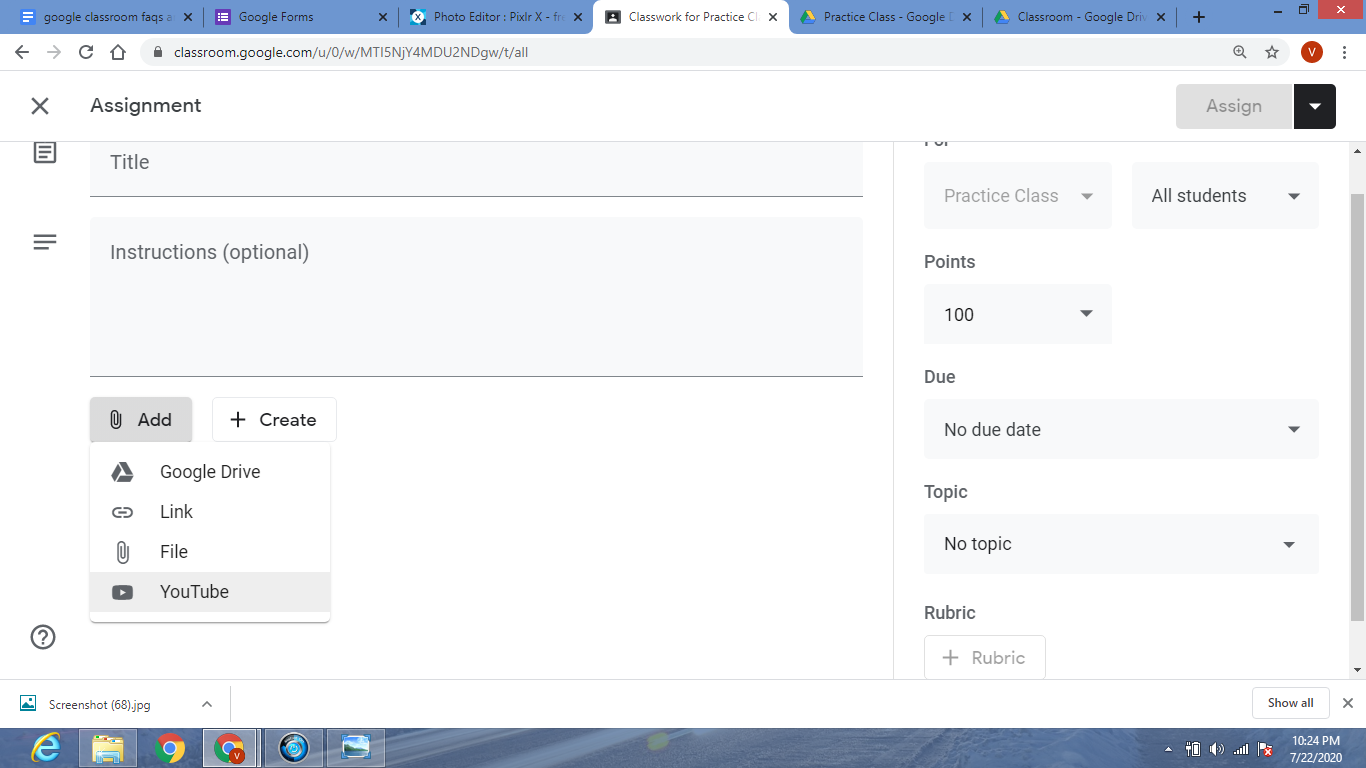
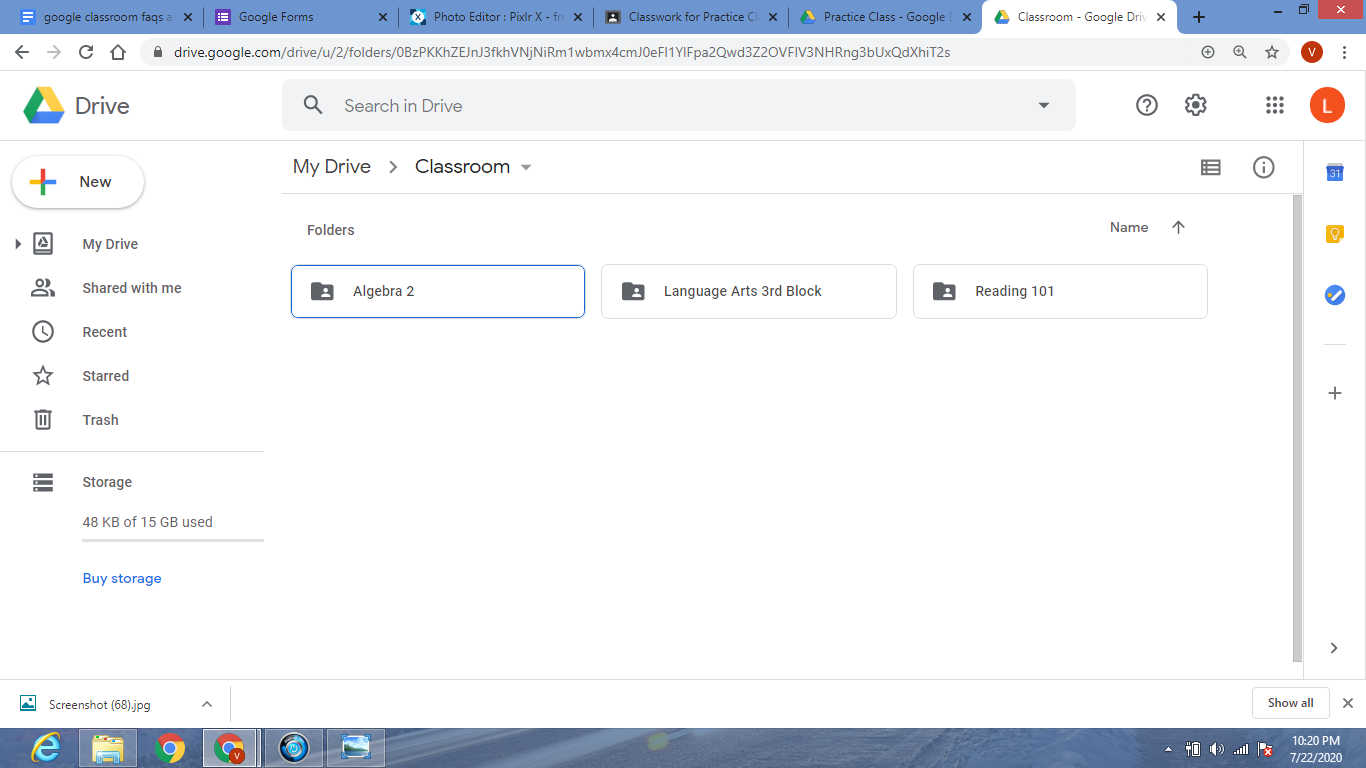
Makes teaching more focused and organized: Educators can view classwork at any time, anywhere. Grade on the go.  A laptop, tablet or phone can give you access to all of your students’ work and grades no matter where you are. Google Classroom also helps you stay organized by providing one spot for assignments, one for grades, and one for announcements. Everything is easy to find, just click on the corresponding tab to find what you’re looking for. It is much easier to locate completed assignments or a particular student’s work because it is all stored on your Classroom Drive folder, just one click away.
Learner-educator communication and collaboration is made easy: Educators can ask questions and make/schedule announcements easily.  Just post your important messages or questions onto the class stream and learners will see it as soon as they log in. Video conferencing apps, such as Google Meet, helps educators, learners, and parents stay in touch from the comfort of their homes or offices. If you are unable to meet face-to-face, video conferencing can save the day with virtual parent conferences, live lessons, or a Q&A session.

Previous Article

What Are the Most Effective Ways to ...

Next Article

6 Apps and Tools That Integrate With ...

Matthew Lynch

Related articles More from author

  • Google Classroom Tips

    Google Classroom Tip #10: Create Authentic Assessments

    November 15, 2018
    By Matthew Lynch
  • Google Classroom Tips

    Google Classroom Tip #18: How to Facilitate Collaboration

    November 19, 2018
    By Matthew Lynch
  • Google ClassroomGoogle Classroom Tips

    How Do I Share Assignments With Multiple Classes in Google Docs?

    September 2, 2020
    By Matthew Lynch
  • Google Classroom Tips

    Google Classroom Tip #46: Create a Student Centered Classroom

    December 16, 2018
    By Matthew Lynch
  • Early Childhood & K-12 EdTechFeaturedFreshGoogle Classroom

    How to Integrate Computational Thinking into Your Classroom

    December 20, 2018
    By Matthew Lynch
  • Google Classroom Tips

    Google Classroom Tip #7: Appointment Book

    November 14, 2018
    By Matthew Lynch

Search

Login & Registration

  • Log in
  • Entries feed
  • Comments feed
  • WordPress.org

Newsletter

Signup for The Tech Edvocate Newsletter and have the latest in EdTech news and opinion delivered to your email address!

About Us

Since technology is not going anywhere and does more good than harm, adapting is the best course of action. That is where The Tech Edvocate comes in. We plan to cover the PreK-12 and Higher Education EdTech sectors and provide our readers with the latest news and opinion on the subject. From time to time, I will invite other voices to weigh in on important issues in EdTech. We hope to provide a well-rounded, multi-faceted look at the past, present, the future of EdTech in the US and internationally.

We started this journey back in June 2016, and we plan to continue it for many more years to come. I hope that you will join us in this discussion of the past, present and future of EdTech and lend your own insight to the issues that are discussed.

Newsletter

Signup for The Tech Edvocate Newsletter and have the latest in EdTech news and opinion delivered to your email address!

Contact Us

The Tech Edvocate
910 Goddin Street
Richmond, VA 23231
(601) 630-5238
[email protected]

Copyright © 2026 Matthew Lynch. All rights reserved.