The Tech Edvocate

Top Menu

  • Advertisement
  • Apps
  • Home Page
  • Home Page Five (No Sidebar)
  • Home Page Four
  • Home Page Three
  • Home Page Two
  • Home Tech2
  • Icons [No Sidebar]
  • Left Sidbear Page
  • Lynch Educational Consulting
  • My Account
  • My Speaking Page
  • Newsletter Sign Up Confirmation
  • Newsletter Unsubscription
  • Our Brands
  • Page Example
  • Privacy Policy
  • Protected Content
  • Register
  • Request a Product Review
  • Shop
  • Shortcodes Examples
  • Signup
  • Start Here
    • Governance
    • Careers
    • Contact Us
  • Terms and Conditions
  • The Edvocate
  • The Tech Edvocate Product Guide
  • Topics
  • Write For Us
  • Advertise

Main Menu

  • Start Here
    • Our Brands
    • Governance
      • Lynch Educational Consulting, LLC.
      • Dr. Lynch’s Personal Website
      • Careers
    • Write For Us
    • The Tech Edvocate Product Guide
    • Contact Us
    • Books
    • Edupedia
    • Post a Job
    • The Edvocate Podcast
    • Terms and Conditions
    • Privacy Policy
  • Topics
    • Assistive Technology
    • Child Development Tech
    • Early Childhood & K-12 EdTech
    • EdTech Futures
    • EdTech News
    • EdTech Policy & Reform
    • EdTech Startups & Businesses
    • Higher Education EdTech
    • Online Learning & eLearning
    • Parent & Family Tech
    • Personalized Learning
    • Product Reviews
  • Advertise
  • Tech Edvocate Awards
  • The Edvocate
  • Pedagogue
  • School Ratings

logo

The Tech Edvocate

  • Start Here
    • Our Brands
    • Governance
      • Lynch Educational Consulting, LLC.
      • Dr. Lynch’s Personal Website
        • My Speaking Page
      • Careers
    • Write For Us
    • The Tech Edvocate Product Guide
    • Contact Us
    • Books
    • Edupedia
    • Post a Job
    • The Edvocate Podcast
    • Terms and Conditions
    • Privacy Policy
  • Topics
    • Assistive Technology
    • Child Development Tech
    • Early Childhood & K-12 EdTech
    • EdTech Futures
    • EdTech News
    • EdTech Policy & Reform
    • EdTech Startups & Businesses
    • Higher Education EdTech
    • Online Learning & eLearning
    • Parent & Family Tech
    • Personalized Learning
    • Product Reviews
  • Advertise
  • Tech Edvocate Awards
  • The Edvocate
  • Pedagogue
  • School Ratings
  • A Visitors Guide to Oklahoma City (OK), United States

  • A Visitor’s Guide to Tucson, Arizona, United States

  • A Visitor’s Guide to Hamilton, Canada

  • Beware of Fiverr: You Might Get Scammed

  • The Future of Artificial Intelligence: Navigating the Next Frontier

  • Best Home Backup Generators for 2026

  • Online Learning Platforms: Transforming Education in the Digital Age

  • Fastest Growing Sectors of the EdTech Market: Exploring Emerging Trends

  • The Best Video Games of All Time

  • What is the Best Gaming Platform on the Market?

Digital & Mobile Technology
Home›Digital & Mobile Technology›Top Ways to Fix DisplayPort Not Working on Windows

Top Ways to Fix DisplayPort Not Working on Windows
By Matthew Lynch
April 13, 2023
0
Spread the love

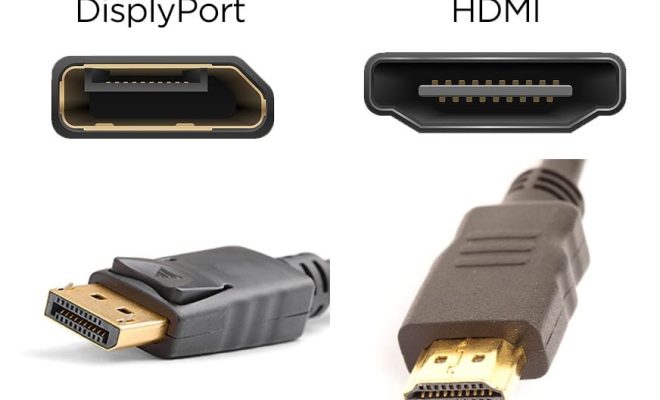
Are you experiencing problems with your DisplayPort connection on your Windows device? In this article, we’ll go over the top ways to fix DisplayPort not working on Windows, so you can get back to enjoying high-quality visuals on your device.

1. Restart your computer

The first and easiest fix you should try is simply restarting your computer. This can often fix any software-related issues with your DisplayPort connection.

2. Check your DisplayPort cable and port

The second step is to check your DisplayPort cable and port. Ensure that your DisplayPort cable is properly connected to your computer and monitor. Make sure it is not loose.

If you are connecting to multiple monitors, verify each DisplayPort interface is properly connected, and that you have selected the proper input.

3. Update your graphics card driver

Another potential problem that can cause DisplayPort not working is outdated drivers. Check if your graphics card driver needs updating. This can be done through Windows Device Manager, by expanding the Display Adapters section of your device manager, right-clicking your graphics card, and selecting “Update Driver Software.”

4. Modify your display settings

If you have connected a new external monitor to your device, you need to configure the extended display settings for both monitors. Ensure that both screens have the same resolution and DPI scaling set. To extend your displays to another screen, press Windows key + P and select “Extend.”

5. Disable “DisplayPort Multi-Stream Transport”

Some users have reported that their DisplayPort connection starts working only after disabling “DisplayPort Multi-Stream Transport.” To do this:

• Right-click on the desktop and select “Display Settings.”

• Scroll down to the bottom, select “Advanced Display Settings,” and click on “Display Adapter Properties.”

• Click on the “Monitor” tab and uncheck the “DisplayPort Multi-Stream Transport” box.

6. Check for hardware issues

Lastly, if none of the above fixes work, it may be a hardware issue. Try connecting a different monitor using the same DisplayPort. If the second monitor works, that means your first monitor or its DisplayPort is faulty.

In conclusion, DisplayPort not working on Windows can be annoying and disruptive. However, these steps can help you identify and fix many of the issues that can cause DisplayPort problems, and get you back to enjoying high-quality visuals on your device.


Previous Article

Top Ways to Fix Wi-Fi Connected But ...

Next Article

Top Ways to Fix iPad Connected to ...

Matthew Lynch

Related articles More from author

  • Digital & Mobile Technology

    How to Send an Email With Any From: Address in Outlook

    July 6, 2023
    By Matthew Lynch
  • Digital & Mobile Technology

    bat: A Modern Alternative to the Classic Linux cat Command

    June 12, 2023
    By Matthew Lynch
  • Digital & Mobile Technology

    WiFi Router Buying Guide: What To Look For

    May 29, 2023
    By Matthew Lynch
  • Digital & Mobile Technology

    Adobe Premiere Pro vs. DaVinci Resolve: Which Is the Ultimate Video Editor?

    June 12, 2023
    By Matthew Lynch
  • Digital & Mobile Technology

    What Is a Preamp and How Does It Work?

    July 15, 2023
    By Matthew Lynch
  • Digital & Mobile Technology

    Chrome’s New Ad Filter: How It Works and How to Enable/Disable It

    April 12, 2023
    By Matthew Lynch

Search

Login & Registration

  • Register
  • Log in
  • Entries feed
  • Comments feed
  • WordPress.org

Newsletter

Signup for The Tech Edvocate Newsletter and have the latest in EdTech news and opinion delivered to your email address!

About Us

Since technology is not going anywhere and does more good than harm, adapting is the best course of action. That is where The Tech Edvocate comes in. We plan to cover the PreK-12 and Higher Education EdTech sectors and provide our readers with the latest news and opinion on the subject. From time to time, I will invite other voices to weigh in on important issues in EdTech. We hope to provide a well-rounded, multi-faceted look at the past, present, the future of EdTech in the US and internationally.

We started this journey back in June 2016, and we plan to continue it for many more years to come. I hope that you will join us in this discussion of the past, present and future of EdTech and lend your own insight to the issues that are discussed.

Newsletter

Signup for The Tech Edvocate Newsletter and have the latest in EdTech news and opinion delivered to your email address!

Contact Us

The Tech Edvocate
910 Goddin Street
Richmond, VA 23231
(601) 630-5238
[email protected]

Copyright © 2025 Matthew Lynch. All rights reserved.