The Tech Edvocate

Top Menu

  • Advertisement
  • Apps
  • Home Page
  • Home Page Five (No Sidebar)
  • Home Page Four
  • Home Page Three
  • Home Page Two
  • Home Tech2
  • Icons [No Sidebar]
  • Left Sidbear Page
  • Lynch Educational Consulting
  • My Account
  • My Speaking Page
  • Newsletter Sign Up Confirmation
  • Newsletter Unsubscription
  • Our Brands
  • Page Example
  • Privacy Policy
  • Protected Content
  • Register
  • Request a Product Review
  • Shop
  • Shortcodes Examples
  • Signup
  • Start Here
    • Governance
    • Careers
    • Contact Us
  • Terms and Conditions
  • The Edvocate
  • The Tech Edvocate Product Guide
  • Topics
  • Write For Us
  • Advertise

Main Menu

  • Start Here
    • Our Brands
    • Governance
      • Lynch Educational Consulting, LLC.
      • Dr. Lynch’s Personal Website
      • Careers
    • Write For Us
    • The Tech Edvocate Product Guide
    • Contact Us
    • Books
    • Edupedia
    • Post a Job
    • The Edvocate Podcast
    • Terms and Conditions
    • Privacy Policy
  • Topics
    • Assistive Technology
    • Child Development Tech
    • Early Childhood & K-12 EdTech
    • EdTech Futures
    • EdTech News
    • EdTech Policy & Reform
    • EdTech Startups & Businesses
    • Higher Education EdTech
    • Online Learning & eLearning
    • Parent & Family Tech
    • Personalized Learning
    • Product Reviews
  • Advertise
  • Tech Edvocate Awards
  • The Edvocate
  • Pedagogue
  • School Ratings

logo

The Tech Edvocate

  • Start Here
    • Our Brands
    • Governance
      • Lynch Educational Consulting, LLC.
      • Dr. Lynch’s Personal Website
        • My Speaking Page
      • Careers
    • Write For Us
    • The Tech Edvocate Product Guide
    • Contact Us
    • Books
    • Edupedia
    • Post a Job
    • The Edvocate Podcast
    • Terms and Conditions
    • Privacy Policy
  • Topics
    • Assistive Technology
    • Child Development Tech
    • Early Childhood & K-12 EdTech
    • EdTech Futures
    • EdTech News
    • EdTech Policy & Reform
    • EdTech Startups & Businesses
    • Higher Education EdTech
    • Online Learning & eLearning
    • Parent & Family Tech
    • Personalized Learning
    • Product Reviews
  • Advertise
  • Tech Edvocate Awards
  • The Edvocate
  • Pedagogue
  • School Ratings
  • 7 Game-Changing Finelo Alternatives Quietly Reshaping How You Learn Money

  • Why Finelo’s Approach to Gen Z Financial Literacy Is Completely Changing the Game

  • Why You’re Losing Money: The Surprising Truth About Financial Literacy Education in America

  • Why Millions Are Finally Using AI to Master High-Demand Skills

  • 7 Cybersecurity Bootcamps That Will Catapult Your Career in 2024

  • The Silent Revolution: 10 Workplace Learning Trends Quietly Reshaping Your Career

  • The Silent Crisis: Why Cybersecurity Pros Are Burning Out — And 10 Courses That Can Help

  • 8 Vital Strategies to Combat Cybersecurity Burnout Before It’s Too Late

  • The Silent Crisis Killing Cybersecurity Jobs: Why Half of Pros Are Burning Out

  • The Gold Rush: Why AI Governance Careers Will Eclipse Traditional Compliance

Digital & Mobile Technology
Home›Digital & Mobile Technology›Post-It to Your Screen: Sticky Note Apps for Windows

Post-It to Your Screen: Sticky Note Apps for Windows
By Matthew Lynch
June 22, 2023
0
Spread the love

Post-It notes have been a popular tool for organization and reminders for decades. However, in the digital age, sticking paper notes all around the desk is no longer practical. Enter sticky note apps for Windows – a convenient, electronic solution to cluttered desks and disorganized thoughts.

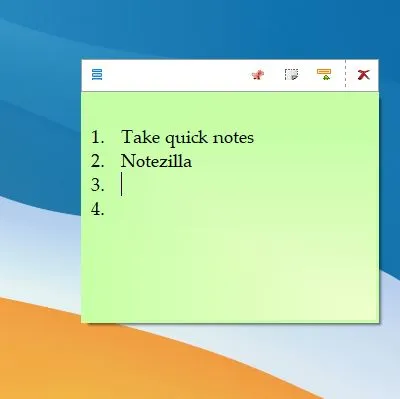
There are a plethora of sticky note apps available to download for free on Windows operating systems. Some popular apps include Microsoft Sticky Notes, Stickies, and Notezilla. These apps share some similar features but also differ in capabilities, customization, and accessibility.

Microsoft Sticky Notes is an option specifically designed for Windows 10 users. It is integrated with the Microsoft ecosystem and can be accessed via mobile devices and the web. The app is easy to use and offers basic features such as note-taking, color customization, and pinning notes to the desktop. It also offers the ability to search for notes and sync across devices if logged in with a Microsoft account. However, some users may find the lack of advanced customization and formatting options limiting.

Stickies, on the other hand, offers more customization options and features. Users can manipulate the text style, font, color, and even add images to their notes. It also offers tagging capabilities and alarms for reminders or deadlines. The app has been around for over 20 years and has a dedicated community of users continually upgrading and improving the app.

Notezilla is another sticky note app with advanced features, including encryption for sensitive information, syncing across devices, and hierarchical folders for organizational purposes. The app also offers integration with Gmail and Outlook, making it a useful tool for work purposes.

Sticky note apps are beneficial for both personal and professional use. They allow for quick and easy note-taking, reminders, and organization. They can also be used collaboratively in group settings or in conjunction with project management tools.

Previous Article

Best Sites to Find Daily Deals and ...

Next Article

100% Disk Usage in Windows 10? Tips ...

Matthew Lynch

Related articles More from author

  • Digital & Mobile Technology

    How to Change Windows Update Settings

    June 10, 2023
    By Matthew Lynch
  • Best of the Best ListsDigital & Mobile Technology

    Best Online Photography Classes

    June 8, 2023
    By Matthew Lynch
  • Digital & Mobile Technology

    Top 3 Ways to Reduce Video Size on iPhone

    April 2, 2023
    By Matthew Lynch
  • Digital & Mobile Technology

    Best Shared Calendar Apps of 2023

    June 1, 2023
    By Matthew Lynch
  • Digital & Mobile Technology

    What is Number Lock (Num Lock)?

    May 25, 2023
    By Matthew Lynch
  • Digital & Mobile Technology

    What is a Data Server (DS)?

    April 17, 2023
    By Matthew Lynch

Search

Login & Registration

  • Log in
  • Entries feed
  • Comments feed
  • WordPress.org

Newsletter

Signup for The Tech Edvocate Newsletter and have the latest in EdTech news and opinion delivered to your email address!

About Us

Since technology is not going anywhere and does more good than harm, adapting is the best course of action. That is where The Tech Edvocate comes in. We plan to cover the PreK-12 and Higher Education EdTech sectors and provide our readers with the latest news and opinion on the subject. From time to time, I will invite other voices to weigh in on important issues in EdTech. We hope to provide a well-rounded, multi-faceted look at the past, present, the future of EdTech in the US and internationally.

We started this journey back in June 2016, and we plan to continue it for many more years to come. I hope that you will join us in this discussion of the past, present and future of EdTech and lend your own insight to the issues that are discussed.

Newsletter

Signup for The Tech Edvocate Newsletter and have the latest in EdTech news and opinion delivered to your email address!

Contact Us

The Tech Edvocate
910 Goddin Street
Richmond, VA 23231
(601) 630-5238
[email protected]

Copyright © 2026 Matthew Lynch. All rights reserved.