The Tech Edvocate

Top Menu

  • Advertisement
  • Apps
  • Home Page
  • Home Page Five (No Sidebar)
  • Home Page Four
  • Home Page Three
  • Home Page Two
  • Home Tech2
  • Icons [No Sidebar]
  • Left Sidbear Page
  • Lynch Educational Consulting
  • My Account
  • My Speaking Page
  • Newsletter Sign Up Confirmation
  • Newsletter Unsubscription
  • Our Brands
  • Page Example
  • Privacy Policy
  • Protected Content
  • Register
  • Request a Product Review
  • Shop
  • Shortcodes Examples
  • Signup
  • Start Here
    • Governance
    • Careers
    • Contact Us
  • Terms and Conditions
  • The Edvocate
  • The Tech Edvocate Product Guide
  • Topics
  • Write For Us
  • Advertise

Main Menu

  • Start Here
    • Our Brands
    • Governance
      • Lynch Educational Consulting, LLC.
      • Dr. Lynch’s Personal Website
      • Careers
    • Write For Us
    • The Tech Edvocate Product Guide
    • Contact Us
    • Books
    • Edupedia
    • Post a Job
    • The Edvocate Podcast
    • Terms and Conditions
    • Privacy Policy
  • Topics
    • Assistive Technology
    • Child Development Tech
    • Early Childhood & K-12 EdTech
    • EdTech Futures
    • EdTech News
    • EdTech Policy & Reform
    • EdTech Startups & Businesses
    • Higher Education EdTech
    • Online Learning & eLearning
    • Parent & Family Tech
    • Personalized Learning
    • Product Reviews
  • Advertise
  • Tech Edvocate Awards
  • The Edvocate
  • Pedagogue
  • School Ratings

logo

The Tech Edvocate

  • Start Here
    • Our Brands
    • Governance
      • Lynch Educational Consulting, LLC.
      • Dr. Lynch’s Personal Website
        • My Speaking Page
      • Careers
    • Write For Us
    • The Tech Edvocate Product Guide
    • Contact Us
    • Books
    • Edupedia
    • Post a Job
    • The Edvocate Podcast
    • Terms and Conditions
    • Privacy Policy
  • Topics
    • Assistive Technology
    • Child Development Tech
    • Early Childhood & K-12 EdTech
    • EdTech Futures
    • EdTech News
    • EdTech Policy & Reform
    • EdTech Startups & Businesses
    • Higher Education EdTech
    • Online Learning & eLearning
    • Parent & Family Tech
    • Personalized Learning
    • Product Reviews
  • Advertise
  • Tech Edvocate Awards
  • The Edvocate
  • Pedagogue
  • School Ratings
  • Viaim Opennote Review: The AI Note-Taker That Disappears Into Your Daily Routine

  • A Visitors Guide to Long Beach (CA), United States

  • A Visitor’s Guide to Fresno (CA), United States

  • A Visitors Guide to New Orleans (LA), United States

  • A Visitors Guide to Sacramento (CA), United States

  • A Visitors Guide to Lyon, France

  • JisuLife Ultra2 Portable Fan: A Powerful Multi-Function Cooling Solution

  • A Visitors Guide to Viña del Mar, Chile

  • A Visitors Guide to Århus, Denmark

  • A Visitors Guide to Bakersfield (CA), United States

Digital & Mobile Technology
Home›Digital & Mobile Technology›What is Number Lock (Num Lock)?

What is Number Lock (Num Lock)?
By Matthew Lynch
May 25, 2023
0
Spread the love

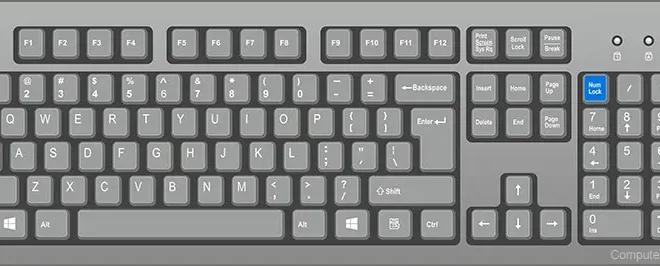
Number Lock, also known as Num Lock, is an essential key that can be found on almost all computer keyboards. It is typically positioned either next to or above the numeric keypad, which is located on the right-hand side of most standard keyboard layouts.

When the Num Lock key is activated, the numeric keypad on the right-hand side of the keyboard becomes active and can be used to input numerical data into the computer. The key is essentially a toggle switch that enables or disables the numeric keypad on the keyboard.

When Num Lock is disabled, the numeric keypad works as additional arrow keys, allowing users to navigate through documents or web pages more easily. However, when Num Lock is enabled, the numeric keypad works as a numeric keypad and can be used to input numbers and perform calculations.

Most modern keyboards have a small LED light that indicates whether Num Lock is on or off. When the light is illuminated, it indicates that Num Lock is enabled, whilst when the light is turned off, it indicates that Num Lock is disabled. Users can easily turn the key on or off at any time by pressing the Num Lock button on the keyboard.

There are several situations where Num Lock can be useful. For instance, when users need to input a large amount of numerical data, such as when working with spreadsheets or databases, activating Num Lock can save time and improve efficiency. Additionally, Num Lock can be helpful when playing video games that require the use of the numeric keypad, such as flight simulators or racing games.

In summary, Num Lock is a crucial key that can be found on almost all computer keyboards. It serves as a toggle switch that enables or disables the numeric keypad on the keyboard, allowing users to input numerical data into the computer more efficiently. Understanding how to use Num Lock can make computing tasks easier and improve productivity.


Previous Article

What is NIST (National Institute of Standards ...

Next Article

What is Object-Relational Database Management System (ORDBMS)?

Matthew Lynch

Related articles More from author

  • Digital & Mobile Technology

    What is a Digital Optical Connection?

    June 6, 2023
    By Matthew Lynch
  • Digital & Mobile Technology

    Belarc Advisor v12 Review

    June 10, 2023
    By Matthew Lynch
  • Digital & Mobile Technology

    Where to Learn Piano Online

    June 8, 2023
    By Matthew Lynch
  • Digital & Mobile Technology

    How to Connect Steam Deck to a PC

    June 23, 2023
    By Matthew Lynch
  • Digital & Mobile Technology

    Ways to Remove Yahoo’s Search Engine From Chrome

    June 8, 2023
    By Matthew Lynch
  • Digital & Mobile Technology

    What Is an 8K Camera?

    June 23, 2023
    By Matthew Lynch

Search

Login & Registration

  • Register
  • Log in
  • Entries feed
  • Comments feed
  • WordPress.org

Newsletter

Signup for The Tech Edvocate Newsletter and have the latest in EdTech news and opinion delivered to your email address!

About Us

Since technology is not going anywhere and does more good than harm, adapting is the best course of action. That is where The Tech Edvocate comes in. We plan to cover the PreK-12 and Higher Education EdTech sectors and provide our readers with the latest news and opinion on the subject. From time to time, I will invite other voices to weigh in on important issues in EdTech. We hope to provide a well-rounded, multi-faceted look at the past, present, the future of EdTech in the US and internationally.

We started this journey back in June 2016, and we plan to continue it for many more years to come. I hope that you will join us in this discussion of the past, present and future of EdTech and lend your own insight to the issues that are discussed.

Newsletter

Signup for The Tech Edvocate Newsletter and have the latest in EdTech news and opinion delivered to your email address!

Contact Us

The Tech Edvocate
910 Goddin Street
Richmond, VA 23231
(601) 630-5238
[email protected]

Copyright © 2025 Matthew Lynch. All rights reserved.