The Tech Edvocate

Top Menu

  • Advertisement
  • Apps
  • Home Page
  • Home Page Five (No Sidebar)
  • Home Page Four
  • Home Page Three
  • Home Page Two
  • Home Tech2
  • Icons [No Sidebar]
  • Left Sidbear Page
  • Lynch Educational Consulting
  • My Account
  • My Speaking Page
  • Newsletter Sign Up Confirmation
  • Newsletter Unsubscription
  • Our Brands
  • Page Example
  • Privacy Policy
  • Protected Content
  • Register
  • Request a Product Review
  • Shop
  • Shortcodes Examples
  • Signup
  • Start Here
    • Governance
    • Careers
    • Contact Us
  • Terms and Conditions
  • The Edvocate
  • The Tech Edvocate Product Guide
  • Topics
  • Write For Us
  • Advertise

Main Menu

  • Start Here
    • Our Brands
    • Governance
      • Lynch Educational Consulting, LLC.
      • Dr. Lynch’s Personal Website
      • Careers
    • Write For Us
    • The Tech Edvocate Product Guide
    • Contact Us
    • Books
    • Edupedia
    • Post a Job
    • The Edvocate Podcast
    • Terms and Conditions
    • Privacy Policy
  • Topics
    • Assistive Technology
    • Child Development Tech
    • Early Childhood & K-12 EdTech
    • EdTech Futures
    • EdTech News
    • EdTech Policy & Reform
    • EdTech Startups & Businesses
    • Higher Education EdTech
    • Online Learning & eLearning
    • Parent & Family Tech
    • Personalized Learning
    • Product Reviews
  • Advertise
  • Tech Edvocate Awards
  • The Edvocate
  • Pedagogue
  • School Ratings

logo

The Tech Edvocate

  • Start Here
    • Our Brands
    • Governance
      • Lynch Educational Consulting, LLC.
      • Dr. Lynch’s Personal Website
        • My Speaking Page
      • Careers
    • Write For Us
    • The Tech Edvocate Product Guide
    • Contact Us
    • Books
    • Edupedia
    • Post a Job
    • The Edvocate Podcast
    • Terms and Conditions
    • Privacy Policy
  • Topics
    • Assistive Technology
    • Child Development Tech
    • Early Childhood & K-12 EdTech
    • EdTech Futures
    • EdTech News
    • EdTech Policy & Reform
    • EdTech Startups & Businesses
    • Higher Education EdTech
    • Online Learning & eLearning
    • Parent & Family Tech
    • Personalized Learning
    • Product Reviews
  • Advertise
  • Tech Edvocate Awards
  • The Edvocate
  • Pedagogue
  • School Ratings
  • The Zhipu ZCode Data Scandal: How Your Code Vanished and What Happens Next

  • Dramatic: Your Smart Glasses Are Recording You — And Everyone Around You

  • This Startup Just Raised $6.8M to Fix Your Broken Job Hunt — Here’s How

  • Oracle’s Billion-Dollar AI Bet Hits a Wall: What This Means for Leaner Startups

  • Outrageous: Vietnam PUBG Boycott Explodes — How It Threatens Krafton’s Empire

  • This PS5 Game Just Proved Everyone Wrong About Live Service Dominance

  • Aurora High School Police Cameras: Why This Expansion Has Civil Rights Groups Fuming

  • The Brutal Truth About AI and Reading: Why Top Students Are Avoiding It

  • Billion-Dollar Verdict: What This Facebook Privacy Lawsuit Means For YOU

  • Millions of VW Owners Face Sudden Steering Loss — The Critical Details You Need Now

Digital & Mobile Technology
Home›Digital & Mobile Technology›How to Stream Hulu in 4K

How to Stream Hulu in 4K

By Matthew Lynch
July 28, 2023
0
Spread the love

Streaming Hulu in 4K can be a great way to enhance your overall viewing experience. With 4K resolution, you can enjoy sharper details, richer colors, and smoother video playback. However, to stream Hulu in 4K, you need to have a compatible device and a fast internet connection. In this article, we will walk you through the step-by-step process of how to stream Hulu in 4K.

1. Check the device compatibility:

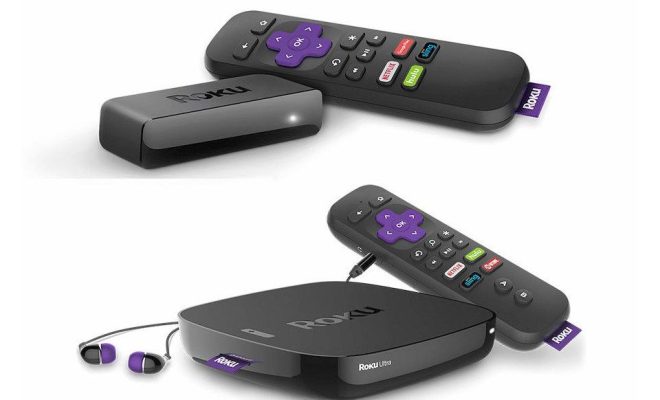
Not all devices support streaming Hulu in 4K. Currently, Hulu only supports 4K streaming on select devices, such as Roku Premiere, Roku Streaming Stick+, Amazon Fire TV Stick 4K, Apple TV 4K, Chromecast Ultra, LG OLED TVs, and Samsung 4K TVs. Therefore, before you start streaming Hulu in 4K, make sure that your device is compatible with 4K streaming.

2. Check the internet speed:

Streaming in 4K requires high internet speed. Hulu recommends that you have at least 16 Mbps internet speed to stream in 4K. Check your internet speed to ensure that you have a sufficient connection. You can use an online speed test tool such as speedtest.net to check your internet speed.

3. Subscribe to Hulu with 4K:

Streaming Hulu in 4K requires you to have a premium subscription. Make sure that you are subscribed to Hulu with the Live TV package. If not, upgrade your subscription to Hulu with Live TV in order to gain access to 4K streaming.

4. Adjust the 4K Streaming Settings:

Once you have ensured the compatibility of your device, checked your internet speed, upgraded your subscription to Hulu with Live TV, you can start streaming in 4K. Navigate to the Hulu app on your 4K-enabled device and log in to your account. Access Settings and scroll down to Video Quality. Make sure that you select “Best Available” to enable streaming in 4K.

5. Test the 4K Streaming Quality:

Once you have selected “Best Available” in Hulu settings, you can start watching your favorite shows or movies in 4K. To ensure that you are streaming in 4K, you can check the streaming quality by selecting the Info button on the player controls. If the video quality is displaying as 2160p, then congratulations! You are now streaming Hulu in 4K.

In conclusion, streaming Hulu in 4K can help you get the most out of your streaming experience. Make sure that your device is compatible, you have a fast internet connection, and you have the right subscription package. Adjust your settings to optimize the video quality, and test the streaming quality to ensure that you are streaming in 4K. Once the above steps are in place, you are ready to enjoy the fantastic world of 4K streaming through Hulu.

Previous Article

How to Post a 3D Photo on ...

Next Article

How to Encrypt Your Mac

Matthew Lynch

Related articles More from author

  • Digital & Mobile Technology

    What Is a Media Streamer?

    July 24, 2023
    By Matthew Lynch
  • Digital & Mobile Technology

    What is a Network Server?

    April 18, 2023
    By Matthew Lynch
  • Digital & Mobile Technology

    How to Fix It When Your Xbox Series X or S Mic Isn’t Working

    June 4, 2023
    By Matthew Lynch
  • Digital & Mobile Technology

    How to Watch YouTube on Nintendo Switch

    June 26, 2023
    By Matthew Lynch
  • Digital & Mobile Technology

    Starter Tips for Managing Your Photos Library on Mac

    June 22, 2023
    By Matthew Lynch
  • Digital & Mobile Technology

    What Is the Difference Between a Port and a Socket?

    August 1, 2023
    By Matthew Lynch

Search

Login & Registration

  • Log in
  • Entries feed
  • Comments feed
  • WordPress.org

Newsletter

Signup for The Tech Edvocate Newsletter and have the latest in EdTech news and opinion delivered to your email address!

About Us

Since technology is not going anywhere and does more good than harm, adapting is the best course of action. That is where The Tech Edvocate comes in. We plan to cover the PreK-12 and Higher Education EdTech sectors and provide our readers with the latest news and opinion on the subject. From time to time, I will invite other voices to weigh in on important issues in EdTech. We hope to provide a well-rounded, multi-faceted look at the past, present, the future of EdTech in the US and internationally.

We started this journey back in June 2016, and we plan to continue it for many more years to come. I hope that you will join us in this discussion of the past, present and future of EdTech and lend your own insight to the issues that are discussed.

Newsletter

Signup for The Tech Edvocate Newsletter and have the latest in EdTech news and opinion delivered to your email address!

Contact Us

The Tech Edvocate
910 Goddin Street
Richmond, VA 23231
(601) 630-5238
[email protected]

Copyright © 2026 Matthew Lynch. All rights reserved.