The Tech Edvocate

Top Menu

  • Advertisement
  • Apps
  • Home Page
  • Home Page Five (No Sidebar)
  • Home Page Four
  • Home Page Three
  • Home Page Two
  • Home Tech2
  • Icons [No Sidebar]
  • Left Sidbear Page
  • Lynch Educational Consulting
  • My Account
  • My Speaking Page
  • Newsletter Sign Up Confirmation
  • Newsletter Unsubscription
  • Our Brands
  • Page Example
  • Privacy Policy
  • Protected Content
  • Register
  • Request a Product Review
  • Shop
  • Shortcodes Examples
  • Signup
  • Start Here
    • Governance
    • Careers
    • Contact Us
  • Terms and Conditions
  • The Edvocate
  • The Tech Edvocate Product Guide
  • Topics
  • Write For Us
  • Advertise

Main Menu

  • Start Here
    • Our Brands
    • Governance
      • Lynch Educational Consulting, LLC.
      • Dr. Lynch’s Personal Website
      • Careers
    • Write For Us
    • The Tech Edvocate Product Guide
    • Contact Us
    • Books
    • Edupedia
    • Post a Job
    • The Edvocate Podcast
    • Terms and Conditions
    • Privacy Policy
  • Topics
    • Assistive Technology
    • Child Development Tech
    • Early Childhood & K-12 EdTech
    • EdTech Futures
    • EdTech News
    • EdTech Policy & Reform
    • EdTech Startups & Businesses
    • Higher Education EdTech
    • Online Learning & eLearning
    • Parent & Family Tech
    • Personalized Learning
    • Product Reviews
  • Advertise
  • Tech Edvocate Awards
  • The Edvocate
  • Pedagogue
  • School Ratings

logo

The Tech Edvocate

  • Start Here
    • Our Brands
    • Governance
      • Lynch Educational Consulting, LLC.
      • Dr. Lynch’s Personal Website
        • My Speaking Page
      • Careers
    • Write For Us
    • The Tech Edvocate Product Guide
    • Contact Us
    • Books
    • Edupedia
    • Post a Job
    • The Edvocate Podcast
    • Terms and Conditions
    • Privacy Policy
  • Topics
    • Assistive Technology
    • Child Development Tech
    • Early Childhood & K-12 EdTech
    • EdTech Futures
    • EdTech News
    • EdTech Policy & Reform
    • EdTech Startups & Businesses
    • Higher Education EdTech
    • Online Learning & eLearning
    • Parent & Family Tech
    • Personalized Learning
    • Product Reviews
  • Advertise
  • Tech Edvocate Awards
  • The Edvocate
  • Pedagogue
  • School Ratings
  • Stunning: 93,000 Nursing School Applicants Rejected — Here’s Why It’s a Crisis

  • One Ancient PHP Bug Hid for 14 Years — Until AI Found It in 7 Days

  • The Brutal Truth: Why 12 Million Users Couldn’t Save Character.AI From Bankruptcy

  • Unbelievable: AI Agent Swarms Are Hacking Half the Internet — Here’s What You Need to Know

  • The Chilling Truth: AI Cyber Attacks Are Here, And We’re Not Ready

  • Unveiling the Hidden Threat: How AI Disruption in Banking Could Reshape Your Financial Future

  • Cazinourile online nou lansate: cum sunt prezentate și actualizate informațiile despre promoții

  • Autonomous Ransomware AI Agents Are Here — And They’re Targeting Your Power Grid

  • Unprecedented: This One Thing Is Crushing Major AI Investments

  • Rotirile gratuite fără depunere: activarea rundelor și creditarea câștigurilor

Digital & Mobile Technology
Home›Digital & Mobile Technology›How to Set Up a Wi-Fi Network on Your New Router

How to Set Up a Wi-Fi Network on Your New Router
By Matthew Lynch
July 31, 2023
0
Spread the love

Setting up a Wi-Fi network on your new router can seem like a daunting task, but with a few simple steps, you can have your network up and running in no time. Here’s a guide to get started:

Step 1: Read the manual

Before you start setting up your router, read the manual that came with it. The manual will provide all the necessary information and instructions specific to your router, including how to connect it to your modem and what settings you need to adjust.

Step 2: Connect your router to the modem

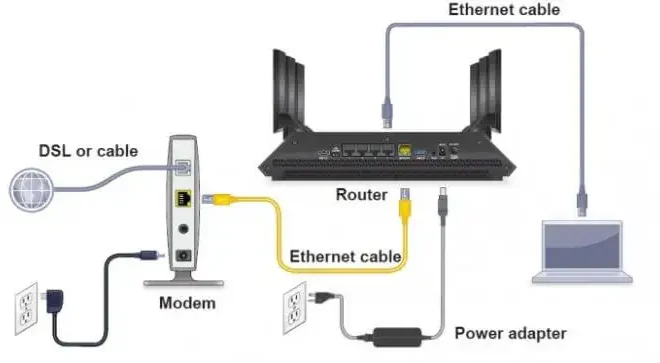
The first step in setting up your Wi-Fi network is to connect your router to your modem. To do this, you’ll need an Ethernet cable. Connect one end of the Ethernet cable to the LAN port on your modem and the other end to the WAN port on the router.

Step 3: Turn on your router

Once you have connected your router to the modem, turn on the router. It should take a few seconds for the router to boot up.

Step 4: Connect your device to the Wi-Fi network

To connect your device to the Wi-Fi network, you’ll need to search for available Wi-Fi networks in your device’s Wi-Fi settings. Select your router’s network name and enter the password provided on the back of the router.

Step 5: Personalize your Wi-Fi network

You can personalize your Wi-Fi network by changing the network name and password. To do this, access your router’s settings by typing the router’s IP address into a web browser. From there, you can change the network name and password by navigating to the appropriate settings.

Step 6: Adjust the network settings

Depending on your router, you may need to adjust additional settings such as the network’s security protocol, IP address range, and DHCP settings. Refer to your router’s manual for specific instructions.

Step 7: Test the Wi-Fi network

Once you have customized the network settings, test the Wi-Fi network by connecting to it on multiple devices and checking for a stable connection.

By following these steps, you can set up a Wi-Fi network on your new router quickly and easily. Remember to refer to the manual if you encounter any issues or need additional guidance.


Previous Article

10 Best Chrome Extensions to Create Citations ...

Next Article

4 Reasons You Should Sell Dogecoin and ...

Matthew Lynch

Related articles More from author

  • Digital & Mobile Technology

    How to Record Lectures on the iPhone

    May 3, 2023
    By Matthew Lynch
  • Digital & Mobile Technology

    Is CDKeys Legit or a Scam Site for Buying Cheap Games Keys?

    June 23, 2023
    By Matthew Lynch
  • Digital & Mobile Technology

    How to Remove Wild Tangent Malware

    May 4, 2023
    By Matthew Lynch
  • Digital & Mobile Technology

    What Is Microphone Gain & How Does It Affect Recording Volume?

    August 5, 2023
    By Matthew Lynch
  • Digital & Mobile Technology

    How to Control Your TV With Alexa

    June 9, 2023
    By Matthew Lynch
  • Digital & Mobile Technology

    Adobe Stock vs. Storyblocks: Which Royalty-Free Media Platform Is Better?

    June 21, 2023
    By Matthew Lynch

Search

Login & Registration

  • Log in
  • Entries feed
  • Comments feed
  • WordPress.org

Newsletter

Signup for The Tech Edvocate Newsletter and have the latest in EdTech news and opinion delivered to your email address!

About Us

Since technology is not going anywhere and does more good than harm, adapting is the best course of action. That is where The Tech Edvocate comes in. We plan to cover the PreK-12 and Higher Education EdTech sectors and provide our readers with the latest news and opinion on the subject. From time to time, I will invite other voices to weigh in on important issues in EdTech. We hope to provide a well-rounded, multi-faceted look at the past, present, the future of EdTech in the US and internationally.

We started this journey back in June 2016, and we plan to continue it for many more years to come. I hope that you will join us in this discussion of the past, present and future of EdTech and lend your own insight to the issues that are discussed.

Newsletter

Signup for The Tech Edvocate Newsletter and have the latest in EdTech news and opinion delivered to your email address!

Contact Us

The Tech Edvocate
910 Goddin Street
Richmond, VA 23231
(601) 630-5238
[email protected]

Copyright © 2026 Matthew Lynch. All rights reserved.