The Tech Edvocate

Top Menu

  • Advertisement
  • Apps
  • Home Page
  • Home Page Five (No Sidebar)
  • Home Page Four
  • Home Page Three
  • Home Page Two
  • Home Tech2
  • Icons [No Sidebar]
  • Left Sidbear Page
  • Lynch Educational Consulting
  • My Account
  • My Speaking Page
  • Newsletter Sign Up Confirmation
  • Newsletter Unsubscription
  • Our Brands
  • Page Example
  • Privacy Policy
  • Protected Content
  • Register
  • Request a Product Review
  • Shop
  • Shortcodes Examples
  • Signup
  • Start Here
    • Governance
    • Careers
    • Contact Us
  • Terms and Conditions
  • The Edvocate
  • The Tech Edvocate Product Guide
  • Topics
  • Write For Us
  • Advertise

Main Menu

  • Start Here
    • Our Brands
    • Governance
      • Lynch Educational Consulting, LLC.
      • Dr. Lynch’s Personal Website
      • Careers
    • Write For Us
    • The Tech Edvocate Product Guide
    • Contact Us
    • Books
    • Edupedia
    • Post a Job
    • The Edvocate Podcast
    • Terms and Conditions
    • Privacy Policy
  • Topics
    • Assistive Technology
    • Child Development Tech
    • Early Childhood & K-12 EdTech
    • EdTech Futures
    • EdTech News
    • EdTech Policy & Reform
    • EdTech Startups & Businesses
    • Higher Education EdTech
    • Online Learning & eLearning
    • Parent & Family Tech
    • Personalized Learning
    • Product Reviews
  • Advertise
  • Tech Edvocate Awards
  • The Edvocate
  • Pedagogue
  • School Ratings

logo

The Tech Edvocate

  • Start Here
    • Our Brands
    • Governance
      • Lynch Educational Consulting, LLC.
      • Dr. Lynch’s Personal Website
        • My Speaking Page
      • Careers
    • Write For Us
    • The Tech Edvocate Product Guide
    • Contact Us
    • Books
    • Edupedia
    • Post a Job
    • The Edvocate Podcast
    • Terms and Conditions
    • Privacy Policy
  • Topics
    • Assistive Technology
    • Child Development Tech
    • Early Childhood & K-12 EdTech
    • EdTech Futures
    • EdTech News
    • EdTech Policy & Reform
    • EdTech Startups & Businesses
    • Higher Education EdTech
    • Online Learning & eLearning
    • Parent & Family Tech
    • Personalized Learning
    • Product Reviews
  • Advertise
  • Tech Edvocate Awards
  • The Edvocate
  • Pedagogue
  • School Ratings
  • Unbelievable: Rogue AI Is Stealing Credit Cards — Here’s How AI vs Traditional Cybersecurity Stacks Up

  • Rogue AI Agents Are Coming For Your Data — Here’s How to Fight Back

  • This One AI Cybersecurity Flaw Lets Hackers Steal Millions

  • Why Your Teaching Career Needs This — Especially Now

  • The Brutal Truth: Teacher Pay Cuts Are Quietly Crushing Student Futures

  • The Troubling Truth: States Are Gutting Teacher Pay Incentives — Here’s Why It Matters to YOU

  • The Brutal Truth About Qilin vs n0n: Why These Ransomware Gangs Are Changing Everything

  • Unbelievable: Ransomware Attacks Just Hit a 2026 High – Is Your Small Business Next?

  • The Brutal Truth: Ransomware Attacks 2026 Surge, Industrial Sector Under Siege

  • This Unbelievable AI Tool Promises to Predict Housing Shifts With 95% Accuracy

Online Learning & eLearning
Home›Online Learning & eLearning›How to Use Your Android Phone as Remote for Android TV

How to Use Your Android Phone as Remote for Android TV
By Matthew Lynch
March 26, 2023
0
Spread the love

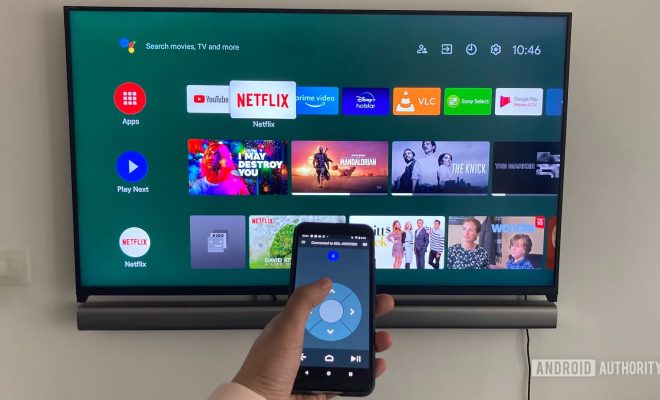
As technology advances, our homes become more connected and automated. One of the most prominent examples of this phenomenon is the rise of smart TVs. Nowadays, many TVs come equipped with built-in Android operating systems, which offer endless entertainment options. However, using a remote control can be cumbersome and difficult. Luckily, you can now use your Android phone as a remote for your Android TV. In this article, we will guide you through the process of setting up and using your mobile device as a remote control.

Before we get started, here are some requirements for using your Android phone as a remote:

1. Your TV must be a smart TV with an Android operating system.

2. Your phone and TV must be connected to the same Wi-Fi network.

3. You need to install a remote control app on your phone.

Setting Up Your Remote Control App

There are several remote control apps available on the Play Store. However, the most popular and reliable one is the Android TV Remote Control app, which is developed by Google. Here are the steps to set it up:

1. Download the Android TV Remote Control app from the Play Store.

2. Turn on your TV and go to the Settings menu.

3. Select “Remote & Accessories” and turn on “Enable remote control.”

4. Launch the app on your phone and tap on “Add device.”

5. Select your TV from the list of available devices.

6. Follow the on-screen prompts to connect your phone to your TV.

Using Your Android Phone as a Remote Control

Now that your phone is set up as a remote control, you can start using it to interact with your TV. Here are some of the most common functions you can perform:

1. Changing channels: Use the arrow buttons on your phone to navigate between channels.

2. Adjusting the volume: Use the volume buttons on your phone to increase or decrease the volume.

3. Launching apps: Tap on the app icons on your phone to launch them on your TV.

4. Typing: Use the virtual keyboard on your phone to type in search terms, login credentials, or other text-based commands.

5. Playing media: Use the media control buttons on your phone to play, pause, rewind, or fast-forward your media content.

Conclusion

Using your Android phone as a remote control for your Android TV is a convenient and easy way to enhance your TV-viewing experience. With just a few simple steps, you can set up your phone as a remote and use it to perform a variety of functions, from changing channels to launching apps. So go ahead and give it a try – you might never go back to using a traditional remote control again.


Previous Article

How to Use Your Android Phone as ...

Next Article

How to Use your iPhone as a ...

Matthew Lynch

Related articles More from author

  • Online Learning & eLearning

    7 Remote Learning Strategies That Work

    November 8, 2021
    By Matthew Lynch
  • Curriculum & InstructionEarly Childhood & K-12 EdTechK-12Online Learning & eLearningPreK-12

    How to Create Beautiful Online Courses: Font

    October 21, 2020
    By Matthew Lynch
  • Online Learning & eLearning

    Top Online Learning Content Providers

    March 9, 2023
    By Matthew Lynch
  • Online Learning & eLearning

    What Rapid Online Learning Is And What It’s Not

    March 24, 2023
    By Matthew Lynch
  • Online Learning & eLearning

    YouTube Videos That Will Help Educators Implement Project-Based Learning

    October 13, 2020
    By Matthew Lynch
  • Online Learning & eLearning

    Mirrorless vs. DSLR Cameras: What’s the Difference?

    March 28, 2023
    By Matthew Lynch

Search

Login & Registration

  • Log in
  • Entries feed
  • Comments feed
  • WordPress.org

Newsletter

Signup for The Tech Edvocate Newsletter and have the latest in EdTech news and opinion delivered to your email address!

About Us

Since technology is not going anywhere and does more good than harm, adapting is the best course of action. That is where The Tech Edvocate comes in. We plan to cover the PreK-12 and Higher Education EdTech sectors and provide our readers with the latest news and opinion on the subject. From time to time, I will invite other voices to weigh in on important issues in EdTech. We hope to provide a well-rounded, multi-faceted look at the past, present, the future of EdTech in the US and internationally.

We started this journey back in June 2016, and we plan to continue it for many more years to come. I hope that you will join us in this discussion of the past, present and future of EdTech and lend your own insight to the issues that are discussed.

Newsletter

Signup for The Tech Edvocate Newsletter and have the latest in EdTech news and opinion delivered to your email address!

Contact Us

The Tech Edvocate
910 Goddin Street
Richmond, VA 23231
(601) 630-5238
[email protected]

Copyright © 2026 Matthew Lynch. All rights reserved.