Master TikTok Filters: Enhance Your Videos & Go Viral!
“`html
In the world of social media, TikTok filters have become a vital tool for users looking to enhance their videos and express their creativity. These filters not only improve the visual appeal of content but can also make it more engaging and fun to watch. With millions of creators on the platform, understanding how to effectively use TikTok filters can give you an edge in standing out from the crowd. This article explores the ins and outs of TikTok filters, offering key insights, practical tips, and relevant examples to guide you on your journey to becoming a TikTok star.
1. What Are TikTok Filters?
TikTok filters are digital overlays or enhancements applied to videos that modify their appearance or mood. These filters can alter colors, add visual effects, change backgrounds, and even transform facial features. They are designed to help creators add a personal touch to their content, making videos more appealing and engaging for viewers.
The platform offers a wide range of filters, from simple color adjustments to intricate augmented reality (AR) effects. TikTok continuously updates its library, introducing new and trendy filters in response to user demands and seasonal themes. Understanding the variety of filters available is the first step towards leveraging them effectively in your videos.
2. How to Access TikTok Filters
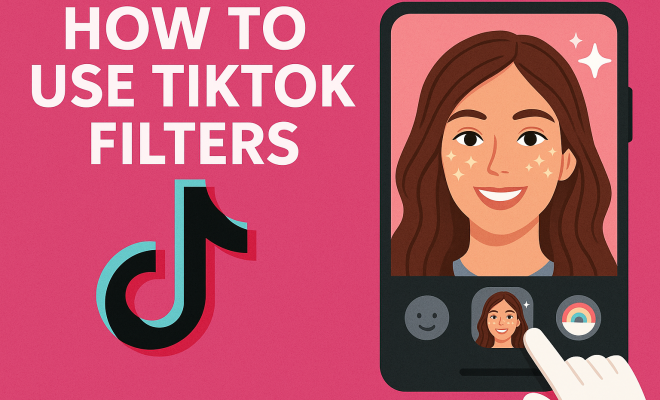
Accessing TikTok filters is straightforward. When you open the TikTok app, tap on the ‘+’ icon at the bottom of the screen to create a new video. Once in the camera interface, you’ll see a variety of options on the right side of the screen. Tap on the Effects button, which resembles a smiley face, to browse the available filters.
Filters are categorized into different sections, including:
- Trending: Popular filters that are currently in vogue.
- Cameras: Filters that offer different camera perspectives.
- Beauty: Filters that enhance facial features and skin.
- Special Effects: Unique AR filters that interact with your movements.
Scroll through these categories to find a filter that resonates with your video’s theme. Once selected, you can preview the filter by holding down the record button to see how it looks in action.
3. Utilizing Effects vs. Filters
It’s essential to understand the distinction between TikTok filters and effects. While filters modify the overall appearance of your video, effects often add interactive elements or animations directly to the scene. For example, a filter might change the color grading of a video, while an effect could add a dancing character or a visual explosion.
Using these tools in tandem can elevate your videos further. Think of filters as the base layer that sets the mood, and effects as the exciting additions that grab viewers’ attention. Experimenting with both can help you discover unique combinations that reflect your style, so don’t hesitate to play around!
4. The Importance of Trends in TikTok Filters
Trends play a crucial role in the TikTok ecosystem, influencing the popularity of certain filters and effects. Participating in trending challenges often requires specific filters, which can draw more viewers to your content. Staying updated on current trends can significantly enhance your visibility on the platform.
For instance, during seasonal events like Halloween or Christmas, TikTok releases themed filters that allow users to create festive content. These trends not only promote creativity but also foster community engagement, as viewers actively seek out and share content that resonates with the current vibe of the platform.
To keep up with trends, follow popular TikTok creators, browse the ‘Discover’ page frequently, and engage with content that catches your eye. This way, you won’t miss out on the latest TikTok filters that could potentially boost your content’s reach.
5. Creating Your Own TikTok Filters
For those looking to take their creativity a step further, TikTok allows users to create their own filters using the TikTok Effect House. This tool provides the resources needed to design custom filters and effects tailored to your unique style. It’s a fantastic way to express your creativity and set your content apart from the rest. (See: BBC article on TikTok trends.)
The process involves a few steps: you’ll need to download the Effect House application, familiarize yourself with its interface, and follow tutorials that guide you through creating your filter. You can incorporate animations, 3D objects, and even interactive elements, allowing for a truly personalized experience. Once your filter is published, it can be used by anyone on TikTok, giving you a chance to go viral if it catches on!
6. Best Practices for Using TikTok Filters
While TikTok filters can significantly enhance your videos, there are some best practices to keep in mind to ensure your content remains engaging and high-quality. Here are a few tips:
- Choose Wisely: Select filters that complement your video’s theme, rather than distract from it. A mismatched filter can make your content feel disjointed.
- Don’t Overdo It: Using too many filters or effects can overwhelm viewers. Stick to one or two focal points to maintain clarity.
- Test Your Filters: Before posting, always preview your video with the selected filters. Ensure they enhance your visuals and do not distort your message.
- Keep Your Audience in Mind: Consider your target audience when using filters. Certain filters resonate more with specific demographics.
These best practices can help you create polished, visually appealing content that resonates with your audience and keeps them coming back for more.
7. Analyzing the Impact of TikTok Filters on Engagement
Research shows that videos utilizing TikTok filters tend to have higher engagement rates compared to those without. A well-chosen filter can enhance the emotional response of viewers, making them more likely to like, share, and comment on your content.
For example, studies indicate that videos featuring vibrant colors or whimsical effects can draw more eyeballs due to their eye-catching nature. Creators who consistently use trending filters often see a rise in followers, as users are drawn to visually stimulating content. This shows that TikTok filters aren’t just a fun addition; they’re a strategic tool for building an audience.
Furthermore, engaging with your audience through these filters fosters community engagement. Encouraging viewers to use your favorite filter in their videos can create a collaborative atmosphere, enhancing your reach and influence on the platform.
8. The Future of TikTok Filters
As the technology behind social media continues to evolve, so too do TikTok filters. The platform is increasingly integrating advanced features, including AI and machine learning, to create more personalized and immersive experiences for users. This could mean even more powerful filters that adapt based on user behavior or preferences.
Additionally, collaborations with major brands and influencers are likely to result in exclusive filter releases that drive user engagement. These partnerships can introduce unique themes and styles, keeping the content fresh and exciting for users.
Ultimately, understanding the trajectory of TikTok filters can better prepare creators for the future. By staying abreast of these advancements, you’ll be better equipped to leverage new tools and techniques, ensuring your content remains relevant in an ever-changing social media landscape.
9. How TikTok Filters Foster Creativity
TikTok filters aren’t just tools for enhancing videos; they’re also significant catalysts for creativity. By allowing creators to experiment with different visual styles, filters can inspire content in entirely new directions. Many users find that a filter can spark an idea for a theme, story, or even a character, leading to innovative content that stands out.
For instance, the popular “Dancing in the Rain” filter encourages users to create videos that incorporate playful elements like umbrellas and rain effects, inspiring humorous or artistic storytelling. Creators can think outside the box and blend various filters to craft a unique visual narrative, enhancing engagement and encouraging viewers to share their own interpretations of the trend.
10. Statistics on TikTok Filter Usage
Understanding TikTok filter usage can provide deeper insights into the platform’s dynamics. A recent survey indicated that over 80% of TikTok users have used a filter in their videos, showcasing their prevalence. Additionally, videos with filters received, on average, 30% more likes and shares compared to those without filters.
Another interesting statistic is that filters categorized under “Beauty” are among the most frequently used, particularly by younger demographics. About 60% of creators aged 16 to 24 reported using beauty filters to enhance their appearance before posting. This demonstrates the psychological impact filters have, as they can affect not just visual appeal but also self-confidence. (See: New York Times on TikTok filters.)
11. FAQs About TikTok Filters
What are the most popular TikTok filters right now?
Some of the most popular TikTok filters often change with trends, but currently, filters like “Vintage,” “Beauty Mode,” and seasonal filters like “Spooky” for Halloween are highly favored. You can check the “Trending” section in the Effects menu to find what’s currently hot.
Can I use TikTok filters on existing videos?
Unfortunately, TikTok filters can only be applied during the filming process. If you want to edit an existing video, you’ll need to re-upload it using the filters you desire from the recording interface.
Are TikTok filters free to use?
Yes, all TikTok filters are free to use. TikTok regularly updates its library, adding new filters and effects without any cost to users.
Can I share my custom TikTok filter with others?
Absolutely! Once you create and publish your custom filter using the TikTok Effect House, it can be used by anyone on the platform. This can greatly increase your visibility if it becomes popular.
How do TikTok filters affect video quality?
Generally, TikTok filters are designed to enhance video quality rather than diminish it. However, using overly complex filters on low-resolution videos can sometimes result in a less clear visual presentation. Always test your video with the filter before posting to ensure the quality remains high.
What should I do if a filter doesn’t work?
If a TikTok filter isn’t working, try closing and reopening the app, checking for updates, or reinstalling TikTok. Sometimes filters may temporarily be unavailable due to server issues or updates.
12. Comparisons with Other Social Media Platforms
When comparing TikTok filters to those on platforms like Instagram and Snapchat, you’ll notice both similarities and differences. Instagram offers a wide range of filters and effects primarily focused on enhancing photos, while Snapchat pioneered the AR filter concept with face lenses that are highly interactive.
TikTok, on the other hand, combines both video and filter functionalities in a way that encourages storytelling and creativity. Users often create short clips that weave narratives while utilizing filters as storytelling tools. This unique approach cultivates a dynamic environment where creativity can flourish, setting TikTok apart.
Additionally, TikTok filters tend to be more trend-oriented, often changing in response to viral challenges or popular themes, whereas Instagram filters remain relatively constant. This aspect can make TikTok an exciting platform for creators who thrive on innovation and staying ahead of the curve.
13. How to Choose the Right Filter for Your Content
Choosing the right TikTok filter can make a significant difference in how your video is received. Here are some strategies to help you select filters that enhance your content:
- Align with Your Theme: Consider the mood and message of your video. For instance, if you’re creating a fun and upbeat clip, opt for bright and colorful filters. Conversely, darker or muted filters might suit a more serious or reflective theme.
- Consider Your Audience: Different demographics respond to various aesthetics. Conduct surveys or check analytics to see what resonates with your viewers. If your audience is predominantly younger, they might prefer more playful and experimental filters.
- Stay Informed About Trends: Filters come and go in popularity. Using a trending filter can help you ride the wave of current interests and increase your views. Follow popular TikTok creators and keep an eye on the ‘Discover’ page to stay up-to-date.
- A/B Test Filters: If you’re uncertain which filter to use, try creating two versions of your video with different filters and see which one performs better. TikTok’s analytics will help you track engagement and preferences.
14. Innovative Uses of TikTok Filters
Beyond their basic functionality, TikTok filters can facilitate innovative storytelling and artistic expression. For example, some creators use filters to create short films, using transitions and overlays to develop a plot. Others incorporate filters that change in time with the music, enhancing the rhythm and flow of their videos. (See: Research on social media effects.)
There’s also a growing trend where creators blend different filters to create unique visual effects. This mixing can lead to entirely new aesthetics, making content instantly recognizable. Some filters allow for personalization, where creators can adjust settings like brightness or color intensity, adding a layer of customization that makes each video unique.
For educational content, filters can serve as visual aids, helping to illustrate complex concepts more clearly. For instance, science educators might use filters that overlay images of molecules or phenomena on their videos, making learning interactive and engaging.
15. Community and Collaboration: The Role of Filters
Filters can also foster community and collaboration among TikTok users. Many challenges explicitly require the use of certain filters, creating a shared experience among creators and viewers. This not only builds a sense of community but also encourages users to engage with each other’s content.
Users frequently remix each other’s videos, using the same filters to create variations on popular themes. This collaborative spirit is a hallmark of TikTok, and filters play a pivotal role in facilitating these interactions. By participating in filter-based challenges, you can connect with a broader audience and potentially gain followers who share similar interests.
16. The Influence of TikTok Filters on Branding
Brands are increasingly recognizing the importance of TikTok filters in their marketing strategies. Sponsored filters can promote products in a fun and engaging way, allowing users to interact with a brand on a more personal level. For example, some brands have launched campaigns where users can use specific filters to show off their products, driving user-generated content that feels authentic.
Moreover, influencer partnerships often focus on filters that align with both the creator’s aesthetic and the brand’s identity. This synergy can amplify brand messages and create genuine connections with target audiences. It’s a win-win, as influencers get engaging content to share, and brands get exposure through creative and relatable videos.
17. Final Thoughts on TikTok Filters
TikTok filters are more than just tools for visual enhancement; they are an integral part of the creative process and can significantly impact engagement and reach. As a creator, understanding how to leverage these filters to tell a story, engage an audience, and drive trends is crucial for success on the platform. By staying informed about current trends, experimenting with different filters, and considering your audience, you can create vibrant content that resonates and stands out.
The future of TikTok filters looks bright, with ongoing innovations and opportunities for creativity on the horizon. As you navigate the world of TikTok, remember to embrace the power of filters as a way to express yourself and connect with others.
“`
Trending Now
Frequently Asked Questions
What are TikTok filters?
TikTok filters are digital enhancements applied to videos that modify their appearance or mood. They can alter colors, add visual effects, change backgrounds, and even transform facial features, making videos more appealing and engaging for viewers.
How do you access filters on TikTok?
To access TikTok filters, open the app and tap the '+' icon to create a new video. In the camera interface, tap the 'Effects' button (smiley face) on the right side to browse through various filter categories.
What types of filters are available on TikTok?
TikTok offers a variety of filters, including trending filters, camera perspective filters, beauty filters that enhance facial features, and special effects filters that utilize augmented reality (AR) for unique visual effects.
How can TikTok filters enhance my videos?
TikTok filters enhance videos by improving visual appeal and adding creative elements. They help creators express their personality and make content more engaging, which can increase viewer retention and interaction.
Are TikTok filters updated regularly?
Yes, TikTok regularly updates its filter library, introducing new and trendy filters based on user demand and seasonal themes, ensuring that creators have fresh options to enhance their videos.
What did we miss? Let us know in the comments and join the conversation.