Master Ableton Live: Your Guide to Music Production & Performance
“`html
1. What is Ableton Live?
Ableton Live is a digital audio workstation (DAW) that revolutionizes the way music is created, produced, and performed. Launched in 2001 by Ableton AG, it has quickly become a staple in both studio setups and live performance environments. Unlike traditional DAWs that are often linear in nature, Ableton Live features a unique session view that allows users to trigger clips and loops in real-time. This flexibility makes it particularly popular among DJs and electronic music producers.
Initially designed for live performances, Ableton Live has grown into a comprehensive tool for all aspects of music production. Whether you’re creating intricate arrangements, manipulating audio samples, or collaborating with other musicians, this software can cater to your needs. The intuitive interface and powerful features offer a blend that appeals to both beginners and seasoned professionals alike.
2. Setting Up Your Ableton Live Environment
Getting started with Ableton Live requires a few initial steps. First, you’ll need to download and install the software, which is available for both Windows and macOS. Once installed, familiarize yourself with the interface, which consists of two main views: the Session View and the Arrangement View. Session View is ideal for improvisation and live performances, while Arrangement View is better for detailed editing and track arrangement.
Additionally, ensure your audio preferences are set correctly. Go to the Preferences menu and configure your audio input and output settings to match your audio interface. This step is crucial to ensure that you have low latency and high-quality audio output. Once you’re set up, take the time to explore the built-in tutorials available within the software. They provide a hands-on introduction to various features and functionalities.
3. Understanding the Interface
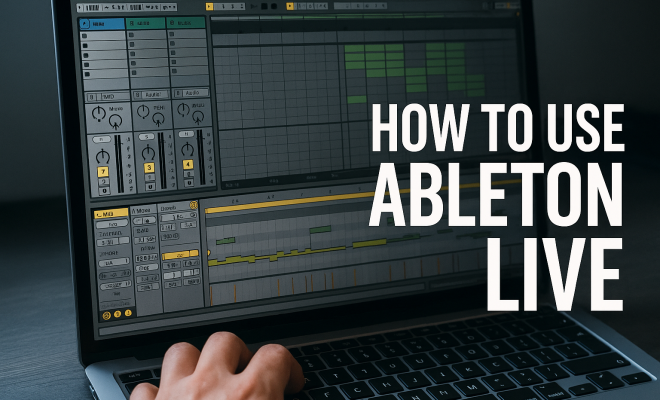
The interface of Ableton Live is designed for ease of use, but it can be overwhelming at first. The main components include the top bar, the browser, the session view, and the arrangement view. The top bar provides essential controls such as transport buttons for play, stop, and record. The browser on the left side gives you access to your sounds, instruments, and samples.
In Session View, you’ll see a grid where you can place clips, which are your musical elements. Each column represents a track, while each row corresponds to a scene. This helps you manage multiple clips effectively. In contrast, the Arrangement View allows for a more traditional linear arrangement of your music, making it easier to edit sections and add effects. Understanding how to navigate between these views is crucial for maximizing your workflow.
4. Creating Your First Project
To kick off your journey with an Ableton Live tutorial, create your first project. Start by selecting a new set from the File menu. In Session View, drag and drop audio clips or MIDI loops from the browser into the grid. You can also create your own MIDI clips by double-clicking on a blank slot. This brings up the MIDI Note Editor, where you can input notes and adjust parameters like velocity and length.
Once your clips are in place, familiarize yourself with the clip launch settings. You can set each clip to play in a loop, launch with specific quantization, or even adjust its tempo. Experimenting with these settings gives you a better understanding of how clips interact in real time, allowing for dynamic and spontaneous performances.
5. Utilizing Audio and MIDI Effects
Ableton Live offers an extensive range of built-in audio and MIDI effects that can enhance your productions. Audio effects such as reverb, delay, and EQ can be easily dragged onto individual audio tracks or the master track for a global effect. Adjust the parameters to shape your sound. For instance, using reverb can add depth to a vocal track, while delay can create interesting rhythmic patterns.
MIDI effects, on the other hand, manipulate MIDI data before it triggers a virtual instrument. You can use devices like the Arpeggiator or Chord effect to generate complex patterns and harmonies effortlessly. The combination of audio and MIDI effects is one of the reasons why Ableton Live remains a favorite among electronic music producers, as it allows for intricate sound design.
6. Max for Live: Expanding Your Possibilities
One of the standout features of Ableton Live is integration with Max for Live, a platform that allows users to create their own devices and effects. If you’re looking to customize your music production experience, Max for Live opens up endless possibilities. You can create unique instruments, audio effects, or even MIDI devices tailored to your specific needs. (See: Ableton Live on Wikipedia.)
Max for Live also provides access to a vast library of user-created devices. These range from innovative synths to unusual audio effects that can drastically alter your sound. Exploring the Max for Live community can provide inspiration and enhance your projects with tools you never knew you needed. It truly expands what you can achieve within Ableton Live.
7. Best Practices for Live Performances
Using Ableton Live for live performances can be incredibly rewarding, but it requires thorough preparation. One of the best practices is organizing your session efficiently. Create a template that includes your most-used tracks and effects, which can save you valuable time during performances.
Additionally, practice your set thoroughly. Familiarize yourself with your clips and how they transition from one to another. You can set up warping and cue points to ensure seamless transitions between tracks. The beauty of using Ableton Live is that you can improvise and adapt in real-time, but only if you know your material well. The more comfortable you are with the software, the more creative you can be during your performance.
8. Collaborating with Others in Ableton Live
Collaboration is an integral part of music production, and Ableton Live makes it easier to work with others. You can share your projects with other users, and the built-in chat and comment feature allows for real-time feedback. Cloud storage solutions also enable seamless collaboration, especially when working with remote musicians.
Apps like Splice allow you to share your Ableton Live projects and collaborate on them with others. This not only encourages creativity but also helps you learn from the diverse approaches of your collaborators. Embracing collaboration can help you discover new techniques and ideas that can elevate your productions.
9. Resources and Community Support
As you embark on your Ableton Live journey, don’t underestimate the value of community support and resources. Online forums, YouTube channels, and dedicated communities like the Ableton forum provide a wealth of information. Whether you’re looking for tips, tutorials, or troubleshooting advice, these platforms can be incredibly helpful.
Investing time in these resources can enhance your learning experience. Many established producers offer free Ableton Live tutorials that cover everything from basics to advanced techniques. By actively participating in these communities, you can gain insights that will not only improve your skills but also keep you updated on the latest trends and techniques in music production.
10. Exploring Ableton Live’s Unique Features
Ableton Live is packed with unique features that set it apart from other DAWs. One such feature is its extensive warping capabilities, which allow you to manipulate audio clips in real time. This means you can easily sync samples to your project’s tempo, making it ideal for remixing or incorporating audio from various sources. For example, if you have a vocal sample that was recorded at a different tempo, you can warp it to match your project seamlessly.
Another great feature is the Drum Rack. This tool enables you to create custom drum kits by layering samples, and it’s particularly useful for electronic music production. You can trigger samples via MIDI, and each pad can be customized with effects and parameters tailored to your needs. This level of customization is what keeps many producers coming back to Ableton Live.
11. Advanced Techniques for Sound Design
Diving deeper into sound design within Ableton Live reveals a plethora of techniques that can elevate your music production. One popular method is using the Operator instrument, a versatile FM synthesizer that can create anything from soft pads to aggressive bass sounds. Understanding FM synthesis opens new doors for sound design, allowing you to produce unique timbres that stand out in your tracks.
Additionally, utilizing layering techniques can significantly enhance your sound. By layering multiple synths or samples, you can create a richer soundscape. For instance, layering a warm pad with a bright lead synth can result in a full, dynamic sound that captures listeners’ attention. Experimenting with different combinations and effects can lead to discovering your signature sound.
12. Statistics and Trends in Music Production
The music production landscape has changed dramatically over the past two decades, and understanding these trends is crucial for modern producers. Recent statistics show that electronic music accounts for a significant percentage of music streams globally. In fact, a report from the International Federation of the Phonographic Industry (IFPI) noted that electronic music is one of the fastest-growing genres in the streaming era. This uptick means there’s a higher demand for producers skilled in DAW like Ableton Live.
Furthermore, a survey conducted by Sound on Sound revealed that around 40% of music producers use Ableton Live as their primary DAW. This statistic underscores the platform’s popularity among both professionals and amateurs alike. With a growing community and an ever-evolving set of features, Ableton Live continues to be at the forefront of music production technology. (See: New York Times article on Ableton Live.)
13. Frequently Asked Questions about Ableton Live
Q: Is Ableton Live suitable for beginners?
A: Absolutely! While it offers advanced features for seasoned professionals, its intuitive design makes it great for beginners. The built-in tutorials and extensive online resources provide a solid foundation for new users.
Q: What are the system requirements for Ableton Live?
A: Ableton Live requires a computer running Windows 10 or later, or macOS 10.13 or later. A minimum of 8 GB of RAM is recommended, along with a multi-core CPU. You’ll also need at least 3 GB of free disk space for the installation.
Q: Can I use third-party VST plugins with Ableton Live?
A: Yes! Ableton Live supports both VST2 and VST3 plugins, allowing you to expand your sound palette significantly by utilizing third-party instruments and effects.
Q: How can I learn more about advanced techniques in Ableton Live?
A: There are countless resources available, including online courses, YouTube channels, and forums. Websites like Skillshare and Coursera offer structured courses, while platforms like YouTube have countless free tutorials covering advanced techniques.
Q: Is it possible to collaborate on projects using Ableton Live?
A: Yes, collaboration in Ableton Live is easy. You can share projects via cloud services or use collaborative platforms like Splice, which help sync project files and allow multiple users to work seamlessly together.
Q: Can I use Ableton Live for genres outside of electronic music?
A: Definitely! While Ableton Live is popular in electronic music, its features are versatile enough to accommodate a wide range of genres, including rock, pop, hip-hop, and classical music production.
Q: What is the difference between Ableton Live Lite and the full version?
A: Ableton Live Lite is a limited edition of the software, typically bundled with hardware products. It has fewer features, tracks, and effects compared to the full version, which offers extensive capabilities for professional music production.
14. Exploring Ableton Live’s Instruments
Ableton Live comes equipped with a variety of virtual instruments that cater to many genres. Instruments like Analog, Operator, and Sampler provide users with options for sound creation that are both diverse and powerful. For example, Analog is perfect for those looking to create warm, lush analog synth sounds reminiscent of classic synthesizers. On the other hand, Operator is a flexible FM synthesizer that can produce an array of sounds from throbbing basses to bell-like tones.
In addition to these, Drum Racks allow for fast and creative drum programming. You can layer samples, apply effects, and even use MIDI to trigger sounds in an inspiring way. With over 300 presets available, users can jump right in to find sounds that resonate with their musical vision without needing to start from scratch.
15. Tips for Effective MIDI Editing
MIDI editing is where many producers spend a significant amount of time, and getting comfortable with these tools is essential for creating polished tracks. Ableton Live offers a range of options for editing MIDI notes, including the ability to quantize, transpose, and adjust velocities. To effectively edit MIDI, start by selecting your MIDI clip, then you can easily adjust note lengths, add or remove notes, and fine-tune velocities, giving each note its own unique character.
Using the piano roll view allows for precise editing too. You can visualize the notes and their timing, which makes it easier to align your music with the rhythm of the track. For added efficiency, employing shortcuts can significantly speed up your workflow; for example, using Command + D (Mac) or Control + D (Windows) allows you to duplicate selected notes quickly.
16. Sampling Techniques in Ableton Live
Sampling is a fundamental aspect of music production, and Ableton Live provides powerful tools for working with samples. From one-shot samples to loops, the Simpler and Sampler instruments give you full control over how samples are manipulated. You can slice samples into manageable sections and rearrange them, allowing for creative freedom in your arrangements. This technique is especially useful in genres like hip-hop and electronic music, where sampling is prevalent.
Additionally, you can apply effects and modulation to samples, further enhancing their uniqueness. For instance, using warping features, you can stretch or compress your samples to fit the tempo of your project. With the right techniques, you can create entirely new sounds from existing audio clips, which is a hallmark of innovative music production. (See: Ableton Live in scientific literature.)
17. Integrating Ableton Live with Hardware
Many producers prefer using hardware alongside Ableton Live to enhance their workflow and sound design capabilities. Whether it’s connecting MIDI controllers, synthesizers, or drum machines, Ableton Live supports a range of hardware integration options. Controllers like the Ableton Push provide hands-on control over your session with pads and knobs designed specifically for Live.
Integrating hardware instruments can also breathe life into your projects. For instance, connecting an analog synth can add unique textures that are difficult to replicate with software alone. By using MIDI, you can play these instruments directly from Ableton, capturing the essence of live performance while taking advantage of Live’s powerful recording and editing capabilities.
18. Case Study: Famous Producers Using Ableton Live
Ableton Live is not just for amateurs; many famous producers and artists rely on it for their creative process. For example, artists like Deadmau5, Skrillex, and Daft Punk have incorporated Ableton Live into their workflows to create some of the most iconic tracks in modern music. By examining their methods, you can gain valuable insights into how to use the software effectively.
Deadmau5 is known for his intricate sound design and live performances. His use of Ableton Live’s Session View allows him to improvise during shows, creating a unique experience each time. Similarly, Skrillex utilizes the software for its flexibility in crafting bass-heavy electronic music, showcasing how different artists can use the same tools to achieve distinct sounds.
19. Future Trends in Music Production with Ableton Live
As technology continues to evolve, so does the landscape of music production. One emerging trend is the integration of artificial intelligence (AI) into music creation processes. Ableton Live is positioned to adapt to these changes, potentially incorporating smart features that assist in composition, arrangement, and sound design. As AI tools become more prevalent, producers can expect to see features that analyze music and offer suggestions to enhance creative processes.
Moreover, the rise of virtual reality (VR) in live performances signals another exciting avenue for Ableton Live users. Imagine performing in a fully immersive environment where visuals and sounds are synchronized perfectly. This blend of technology and creativity will allow artists to push the boundaries of what’s possible in music production and performance.
20. Final Thoughts on Your Ableton Live Journey
Your journey with Ableton Live is just beginning. With its rich features and community support, you have everything you need to explore your creativity and produce music that resonates with your audience. Whether you’re a hobbyist or aspiring professional, the skills you develop using this powerful DAW will serve you well in your musical endeavors.
Remember to take advantage of the many resources available, engage with the community, and experiment with different techniques. As you continue to learn and grow, you’ll discover your unique voice as a producer, and who knows—your tracks might just be the next big thing in music!
“`
Trending Now
Frequently Asked Questions
What is Ableton Live used for?
Ableton Live is a digital audio workstation (DAW) designed for music creation, production, and live performance. It allows users to trigger clips and loops in real-time, making it particularly popular among DJs and electronic music producers.
How do I set up Ableton Live for the first time?
To set up Ableton Live, download and install the software on your computer. Familiarize yourself with the interface, focusing on the Session and Arrangement Views, and configure your audio preferences for optimal performance.
What are the main features of Ableton Live?
Ableton Live features a unique session view for real-time clip triggering, an arrangement view for detailed editing, and powerful audio manipulation tools. It also includes built-in tutorials to help users explore its functionalities.
Is Ableton Live good for beginners?
Yes, Ableton Live is suitable for beginners due to its intuitive interface and comprehensive tutorials. It provides a blend of powerful features that can cater to both novice and experienced music producers.
Can I use Ableton Live for live performances?
Absolutely! Ableton Live was initially designed for live performances, allowing musicians to improvise and trigger clips in real-time, making it a preferred choice for many live electronic music acts.
Have you experienced this yourself? We’d love to hear your story in the comments.