How to unblur photos with Remini
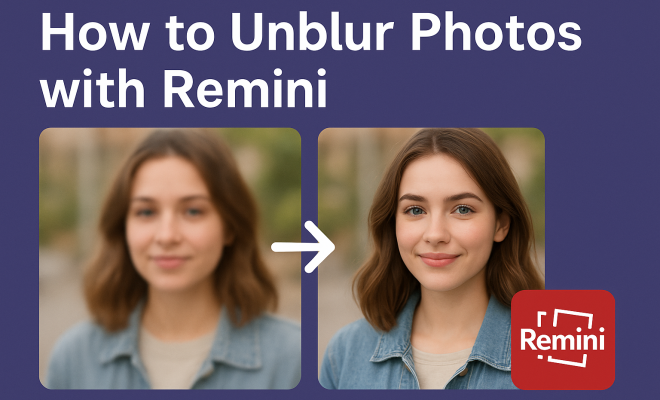
Remember that perfect shot ruined by a shaky hand or a subject that just wouldn’t hold still? Or perhaps you’ve stumbled upon an old, pixelated gem from your family’s archives, wishing you could bring it back to life with modern clarity. For years, the dream of truly restoring blurry or low-resolution images felt like science fiction, a task reserved for highly skilled digital artists with expensive software. But what if I told you that a powerful AI tool is making this not just possible, but incredibly easy for anyone with a smartphone? You can now genuinely unblur photos with Remini, transforming frustratingly fuzzy images into sharp, shareable memories.
Remini isn’t just another photo editor; it’s a dedicated AI enhancer that leverages sophisticated machine learning algorithms to intelligently reconstruct details. Instead of simply sharpening an image (which often just makes it look grainier), Remini actually ‘guesses’ what the missing information should look like, effectively filling in the blanks. This capability has made it a go-to for everyone from amateur photographers to professionals looking to salvage seemingly lost images. Let’s dive into how this remarkable app works and why it’s become such a phenomenon in the world of digital photo restoration.
1. Understanding the Magic Behind Remini’s AI: More Than Just a Filter
Before we get into the nitty-gritty of how to unblur photos with Remini, it’s crucial to understand what makes this app so different from traditional photo editing tools. Most photo editors offer a ‘sharpen’ slider, which essentially increases the contrast along edges. While this can sometimes make an image appear crisper, it often highlights noise and can make low-resolution photos look even worse, like a bad photocopy of a bad photocopy. Remini, however, operates on an entirely different principle.
At its core, Remini uses deep learning models, specifically trained on vast datasets of high-quality images. When you feed it a blurry or low-resolution photo, its AI doesn’t just apply a global effect. Instead, it analyzes the image pixel by pixel, identifying patterns and structures. Based on its training, it then generates new pixels to fill in the missing details, effectively ‘de-blurring’ and ‘upscaling’ the image simultaneously. Think of it like a digital artist meticulously repainting the missing sections of a canvas, but at an incredibly accelerated, algorithmic pace. This isn’t just a simple filter; it’s a complex, generative process that reconstructs visual information.
2. Getting Started: Downloading and Initial Setup
Ready to give it a try? The first step to unblur photos with Remini is, predictably, to download the app. Remini is available on both the Apple App Store for iOS devices and the Google Play Store for Android. Simply search for ‘Remini’ and look for the icon – it’s typically a stylized ‘R’ or a camera lens. The app is free to download and offers a limited number of free enhancements daily, which is a great way to test its capabilities before committing to a subscription.
Once downloaded, you’ll need to open the app and go through a quick setup process. This usually involves agreeing to terms of service and potentially creating an account or logging in with an existing social media account (like Google or Facebook). While you can often use the app as a guest for a few free enhancements, creating an account ensures your progress and settings are saved. Pay attention to any prompts asking about notifications or access to your photo library; you’ll definitely want to grant access to your photos for the app to function correctly.
3. The Core Process: How to Unblur Photos with Remini in a Few Taps
Now for the main event: actually unblurring your photos. The process is remarkably straightforward, designed for ease of use even for those who aren’t tech-savvy. Here’s a step-by-step guide to unblur photos with Remini effectively:
- Open Remini and Select ‘Enhance’ or ‘Photo Enhance’: Once you’re in the app, you’ll typically see a prominent button, often labeled ‘Enhance’ or ‘Photo Enhance’. Tap this to begin.
- Choose Your Blurry Photo: The app will then prompt you to select an image from your device’s photo gallery. Navigate to the blurry photo you wish to fix and tap on it.
- Confirm and Process: After selecting the photo, you might get a preview or a confirmation screen. Tap ‘Enhance’ or ‘Process’ to let Remini do its work.
- Wait for the Magic: This is where the AI takes over. Depending on your internet connection and the complexity of the image, this can take anywhere from a few seconds to a minute. You’ll usually see a progress bar or a loading animation.
- Review and Save: Once processed, Remini will present you with a side-by-side comparison, often with a slider. Drag the slider across the image to see the dramatic ‘before’ and ‘after’ difference. You’ll be able to clearly discern how much sharper and clearer your photo has become. If you’re happy with the result, tap the download or save icon (usually a down-arrow) to save the enhanced version to your gallery.
It’s genuinely that simple. The app’s interface is intuitive, ensuring that even first-time users can navigate it without a hitch. The immediate visual feedback from the slider comparison is often the most impressive part, clearly showcasing the AI’s capabilities.
4. Beyond Basic Enhancement: Exploring Remini’s Other Features
While the primary draw is its ability to unblur photos with Remini’s core ‘Enhance’ feature, the app has evolved to offer several other valuable tools, all powered by its impressive AI. These features can further refine your images and address different types of photo imperfections: (See: Understanding image processing techniques.)
- Video Enhance: One of Remini’s standout features is its ability to enhance video footage. Just like with photos, you can upload a blurry or low-resolution video clip, and the AI will work to improve its clarity and detail. This is particularly useful for old home videos or footage captured in less-than-ideal conditions.
- Colorize: Have an old black and white photo that you wish was in color? Remini’s colorize feature uses AI to intelligently add realistic colors to monochrome images. While not always perfect, it often produces surprisingly natural-looking results, breathing new life into historical photographs.
- Scratch Repair: Old printed photos often suffer from scratches, dust, and tears. Remini offers a dedicated tool to detect and attempt to remove these imperfections, further restoring the integrity of aged images.
- Portrait Enhancement: This feature is specifically optimized for photos containing faces. It focuses on sharpening facial features, improving skin texture, and often making eyes pop, resulting in more flattering portraits.
These additional tools demonstrate Remini’s versatility, moving beyond simple de-blurring to comprehensive photo and video restoration. It’s clear the developers are continuously pushing the boundaries of what AI can achieve in visual media. There’s a fuller look at ai breakthrough in machine learning.
5. The Free vs. Paid Experience: What You Need to Know
Like many powerful apps, Remini operates on a freemium model. You can download and use it for free, but there are limitations that often encourage users to subscribe. Understanding these differences is key to managing your expectations and deciding if a subscription is right for you when you want to unblur photos with Remini frequently.
The free version typically provides a limited number of ‘enhancements’ per day. This might be 3-5 images, for example. You’ll also encounter advertisements before and after processing each image, which can be a bit disruptive. The processing speed might also be slightly slower for free users. For someone who only needs to enhance an occasional photo, this free tier is perfectly adequate and offers a fantastic taste of the AI’s power. However, if you find yourself hitting the daily limit regularly, or if the ads become too much, a subscription is likely in your future. The paid ‘Pro’ version removes ads, offers unlimited enhancements, and often provides faster processing times. Some premium features might also be exclusive to subscribers. Given the significant impact Remini can have on your photos, many users find the subscription fee a worthwhile investment.
6. Tips for Achieving the Best Results with Remini
While Remini is incredibly powerful, even AI has its limits. To get the absolute best results when you unblur photos with Remini, consider these practical tips:
- Start with the Best Possible Input: Remini is a restorer, not a miracle worker. While it can dramatically improve blurry photos, it can’t invent details that were never there. A photo that is completely out of focus or extremely pixelated will yield less impressive results than one with a slight blur or lower resolution. The better the original image, even if flawed, the better the AI can work its magic.
- Focus on Faces and Clear Subjects: Remini’s AI is exceptionally good at reconstructing human faces. If your blurry photo contains people, especially portraits, you’ll often see the most dramatic improvements. For landscapes or highly complex scenes with no clear focal point, the results might be less striking, though still improved.
- Use One Enhancement at a Time: Resist the urge to run a photo through the ‘Enhance’ feature multiple times. While sometimes a second pass can marginally improve things, often it can introduce artifacts or an unnatural, ‘plastic’ look. Process once, review, and if you’re not satisfied, consider if the original image was simply too far gone.
- Good Lighting Helps: Even if blurry, a photo taken in good lighting conditions provides the AI with more visual information to work with. Dark, noisy photos are inherently harder to reconstruct.
- Experiment with Other Features: Don’t just stick to ‘Enhance’. If your photo is also scratched or needs color, try those specific tools after the initial enhancement to see if they further refine the image.
By keeping these points in mind, you’ll maximize the potential of Remini’s AI and consistently achieve impressive transformations.
7. Limitations and What to Expect
While Remini is an incredible tool, it’s important to approach it with realistic expectations. It’s powerful, but it’s not perfect, and understanding its limitations will prevent disappointment:
- Not a Panacea for All Blurs: Extremely severe motion blur, where subjects are mere streaks, or photos that are completely out of focus with no discernible edges, will likely not be fully recovered. The AI needs some underlying structure to intelligently reconstruct.
- The ‘AI Look’: Sometimes, especially with very challenging images, the AI can introduce a slightly artificial or ‘smoothed-out’ look, particularly on skin textures or complex patterns. While usually an improvement over the blur, it might not always look perfectly natural or identical to a high-resolution native photograph. This ‘AI look’ is a trade-off for clarity.
- Background Detail: Remini often prioritizes faces and foreground subjects. While it enhances the entire image, background elements might not receive the same level of detail restoration as the main subjects.
- Privacy Concerns (General AI App Consideration): When using any AI photo enhancement app, it’s wise to be mindful of your privacy. While reputable apps like Remini have privacy policies in place, you are uploading your personal images to their servers for processing. Always review the app’s privacy policy, especially if you’re concerned about sensitive photos.
Despite these minor caveats, the sheer capability of Remini to unblur photos with Remini’s core technology, often turning unusable images into cherished memories, far outweighs its limitations for the vast majority of users.
8. Remini’s Impact on Digital Photography and Archiving
The rise of tools like Remini represents a significant shift in how we interact with our digital photo archives. Previously, a blurry or low-resolution photo was often deemed unsalvageable, relegated to a forgotten corner of a hard drive. Now, with a few taps, those ‘lost’ images can be resurrected. This has profound implications.
For individuals, it means preserving family history. Old photos from flip phones, grainy scans of printed pictures, or even early digital camera shots that now look dated can be brought up to modern standards. Think about the joy of seeing a clear image of a grandparent from decades ago, or finally getting a sharp view of a beloved pet from a poorly taken snapshot. For professionals, particularly in fields like journalism, real estate, or e-commerce, it offers a quick solution to enhance less-than-perfect source images, saving time and resources that would otherwise be spent on reshoots or extensive manual editing. It democratizes powerful photo restoration, making it accessible to anyone with a smartphone, not just those with professional software and skills. (See: Research on AI in image restoration.)
9. The Future of AI Photo Enhancement
What Remini has achieved with its ability to unblur photos is just the beginning. The field of generative AI and image processing is advancing at an astonishing pace. We can anticipate even more sophisticated algorithms that can: handle extreme blur more effectively, produce even more natural-looking results, offer greater control over specific areas of an image, and perhaps even predict missing elements with higher accuracy.
Imagine AI that can not only sharpen a face but also subtly adjust lighting or expressions to improve a portrait, all while maintaining authenticity. We might see integrations directly into camera apps, allowing real-time enhancement as photos are taken, or even AI that can reconstruct 3D information from 2D images. As these technologies mature, the line between a ‘bad’ photo and a ‘good’ one will continue to blur, making professional-quality results achievable for everyone. Remini is a powerful testament to how AI is already changing our relationship with visual media, and it’s exciting to ponder what comes next.
10. A Look at the Technology Under the Hood: Generative Adversarial Networks (GANs)
To truly appreciate how Remini can unblur photos, it helps to peek behind the curtain at the core technology driving it: Generative Adversarial Networks (GANs). This isn’t just a fancy name; it’s a revolutionary approach in AI.
Imagine two AI components, a “generator” and a “discriminator,” locked in a continuous game of cat and mouse. The generator’s job is to create new images – in Remini’s case, to create a sharp, detailed version from a blurry input. The discriminator’s role is to act as a critic, trying to determine if an image is a real, high-quality photograph or a fake one created by the generator.
Here’s how it plays out: The generator takes your blurry photo and tries to create a sharper version. The discriminator then looks at both the generator’s output and a vast collection of real, sharp photos. It tells the generator, “Nope, that still looks fake,” or “Getting closer!” Based on this feedback, the generator continuously refines its process, learning to produce more realistic and detailed images. This adversarial training continues over millions of images until the generator becomes incredibly adept at producing outputs that are almost indistinguishable from real, sharp photos to the discriminator (and to our human eyes). This continuous feedback loop is what allows Remini to effectively “hallucinate” or reconstruct missing details with such impressive accuracy, far beyond what traditional sharpening filters could ever achieve. It’s truly a testament to the power of competitive learning in AI.
11. Comparisons with Other AI Photo Enhancers
While Remini has certainly carved out a significant niche, it’s not the only player in the AI photo enhancement game. Several other apps and software leverage similar AI principles to improve images. How does Remini stack up?
- VanceAI/Upscale.media: These tools often focus heavily on upscaling resolution and can do a decent job with general image enhancement. They’re good for making small images larger without pixelation. Remini often excels more specifically at de-blurring faces and adding fine details that go beyond simple upscaling.
- Topaz Labs Gigapixel AI/DeNoise AI: These are professional desktop-grade tools that offer incredible control and often superior results for extreme cases. They come with a higher price tag and a steeper learning curve, targeting photographers and graphic designers. Remini, in contrast, prioritizes ease of use and mobile accessibility, making it the champion for on-the-go fixes.
- Fotor/PicsArt (AI features): Many general-purpose photo editing apps have started integrating basic AI enhancement features. While they can offer some improvements, they typically don’t match Remini’s dedicated focus and advanced algorithms for deep restoration, especially when you need to unblur photos effectively.
Essentially, Remini strikes a fantastic balance between powerful AI capabilities and user-friendliness on a mobile platform. For quick, impressive results on a smartphone, especially for faces and general blurring, it remains a top contender. For professional-grade work on a desktop, specialized software might offer more granular control, but for the average user, Remini’s convenience and effectiveness are hard to beat.
Frequently Asked Questions About Remini
Q1: Is Remini truly free to use?
A: Yes, Remini offers a free tier. You can download the app and typically get a few free enhancements per day. However, this free version includes ads and has limitations. For unlimited enhancements, faster processing, and an ad-free experience, you’ll need to subscribe to the paid ‘Pro’ version. (See: Impact of technology on health and well-being.)
Q2: Can Remini fix all types of blurry photos?
A: Remini is incredibly powerful, but it’s not a magic wand. It works best on photos with slight to moderate blur, low resolution, or minor pixelation, especially those containing faces. Extremely severe motion blur (where subjects are just streaks) or photos completely devoid of detail may not be fully recoverable. The better the initial input, the better the output.
Q3: Does Remini store my photos?
A: When you upload a photo to Remini for processing, it is sent to their servers. Remini’s privacy policy states how they handle your data, typically for processing and improving their AI models. It’s always a good idea to review the privacy policy of any app you use, especially if you’re concerned about sensitive images. Most reputable apps delete processed images from their servers after a short period.
Q4: Can I use Remini offline?
A: No, Remini requires an active internet connection to function. The AI processing happens on Remini’s powerful cloud servers, not locally on your device. This allows the app to be relatively small on your phone while still delivering complex enhancements.
Q5: Is it safe to unblur photos with Remini?
A: As with any app, ‘safety’ involves a few factors. From a technical standpoint, the app is generally stable and secure. As for your data, Remini has a privacy policy outlining its data handling practices. It’s always recommended to only upload photos you’re comfortable sharing with a third-party service, even if only temporarily.
Q6: Why do my enhanced photos sometimes look “plastic” or artificial?
A: This “AI look” can happen, especially with highly challenging or very low-quality original images. When the AI has to reconstruct a lot of missing detail, it sometimes smooths out textures or creates details that, while sharper, don’t perfectly mimic natural photographic grain or skin imperfections. It’s a trade-off for achieving clarity from a heavily compromised image.
Ultimately, Remini has proven itself to be an indispensable tool for anyone looking to rescue their blurry or low-resolution photographs. It’s a prime example of how artificial intelligence can solve real-world problems in an accessible and user-friendly way. So go ahead, dig out those old, fuzzy pictures you thought were beyond hope – you might be astonished at what Remini can do.
Trending Now
Frequently Asked Questions
How does Remini unblur photos?
Remini uses advanced AI technology and deep learning models to reconstruct details in blurry images. Unlike traditional editors that simply sharpen edges, Remini intelligently fills in missing information, transforming low-resolution photos into clearer, more detailed images.
Is Remini effective for old photos?
Yes, Remini is particularly effective for restoring old or pixelated photos. Its AI algorithms can enhance details and clarity, making it a popular choice for those looking to revive family archives or vintage images.
Do I need to be a professional to use Remini?
No, Remini is designed for users of all skill levels. Its user-friendly interface allows anyone with a smartphone to easily unblur and enhance their photos, making it accessible for both amateurs and professionals.
What makes Remini different from other photo editors?
Unlike traditional photo editors that rely on sharpening tools, Remini uses sophisticated machine learning algorithms to analyze and reconstruct images. This results in more natural-looking enhancements without the graininess often associated with basic sharpening techniques.
Can Remini be used on any type of image?
Remini can be used on various types of images, including blurry photos, low-resolution images, and even scanned old pictures. Its AI technology is versatile and works well across different image qualities, making it a valuable tool for a wide range of photo restoration needs.
What did we miss? Let us know in the comments and join the conversation.