The Tech Edvocate

Top Menu

  • Advertisement
  • Apps
  • Home Page
  • Home Page Five (No Sidebar)
  • Home Page Four
  • Home Page Three
  • Home Page Two
  • Home Tech2
  • Icons [No Sidebar]
  • Left Sidbear Page
  • Lynch Educational Consulting
  • My Account
  • My Speaking Page
  • Newsletter Sign Up Confirmation
  • Newsletter Unsubscription
  • Our Brands
  • Page Example
  • Privacy Policy
  • Protected Content
  • Register
  • Request a Product Review
  • Shop
  • Shortcodes Examples
  • Signup
  • Start Here
    • Governance
    • Careers
    • Contact Us
  • Terms and Conditions
  • The Edvocate
  • The Tech Edvocate Product Guide
  • Topics
  • Write For Us
  • Advertise

Main Menu

  • Start Here
    • Our Brands
    • Governance
      • Lynch Educational Consulting, LLC.
      • Dr. Lynch’s Personal Website
      • Careers
    • Write For Us
    • The Tech Edvocate Product Guide
    • Contact Us
    • Books
    • Edupedia
    • Post a Job
    • The Edvocate Podcast
    • Terms and Conditions
    • Privacy Policy
  • Topics
    • Assistive Technology
    • Child Development Tech
    • Early Childhood & K-12 EdTech
    • EdTech Futures
    • EdTech News
    • EdTech Policy & Reform
    • EdTech Startups & Businesses
    • Higher Education EdTech
    • Online Learning & eLearning
    • Parent & Family Tech
    • Personalized Learning
    • Product Reviews
  • Advertise
  • Tech Edvocate Awards
  • The Edvocate
  • Pedagogue
  • School Ratings

logo

The Tech Edvocate

  • Start Here
    • Our Brands
    • Governance
      • Lynch Educational Consulting, LLC.
      • Dr. Lynch’s Personal Website
        • My Speaking Page
      • Careers
    • Write For Us
    • The Tech Edvocate Product Guide
    • Contact Us
    • Books
    • Edupedia
    • Post a Job
    • The Edvocate Podcast
    • Terms and Conditions
    • Privacy Policy
  • Topics
    • Assistive Technology
    • Child Development Tech
    • Early Childhood & K-12 EdTech
    • EdTech Futures
    • EdTech News
    • EdTech Policy & Reform
    • EdTech Startups & Businesses
    • Higher Education EdTech
    • Online Learning & eLearning
    • Parent & Family Tech
    • Personalized Learning
    • Product Reviews
  • Advertise
  • Tech Edvocate Awards
  • The Edvocate
  • Pedagogue
  • School Ratings
  • This El Niño 2023 Is Creating Unseen Weather Chaos — What You Need to Know

  • Unbelievable: Venus Devoured Its Own Moon, Scientists Reveal Why

  • Explosive: Quantum AI’s Bias Scandal and Financial Misconduct Could Tank Its Future

  • Middle East Under Siege: Why Oil Prices Surge Above $108 and What It Means For Your Wallet

  • SpaceX’s Secret Terafab Project: A War Over What You Don’t See

  • Why China Calls U.S. Demands for an AI Slowdown ‘Malicious Competition’

  • Sinister AI: 10 Disturbing Ways Rogue Machines Are Already Undermining Us

  • Πώς οι γιορτινοί κουλοχέρηδες αλλάζουν τον ρυθμό των διαδικτυακών καζίνο

  • iClever Q950 Kids Headphones Review: Premium Sound and Safety for Young Listeners

  • The Reckless Ben Controversy: An Outrageous Fight for Justice

Assistive Technology
Home›Assistive Technology›How to Connect an Echo Dot to Wi-Fi

How to Connect an Echo Dot to Wi-Fi
By Matthew Lynch
June 8, 2023
0
Spread the love

Connecting an Echo Dot to Wi-Fi is an easy process that requires only a few steps. In this article, we will walk you through the process of connecting your Echo Dot to Wi-Fi.

Step 1: Download the Alexa app

Before you start connecting your Echo Dot to Wi-Fi, you need to download the Amazon Alexa app on your mobile device. The Alexa app can be downloaded for free from the App Store or Google Play.

Step 2: Plug in the Echo Dot

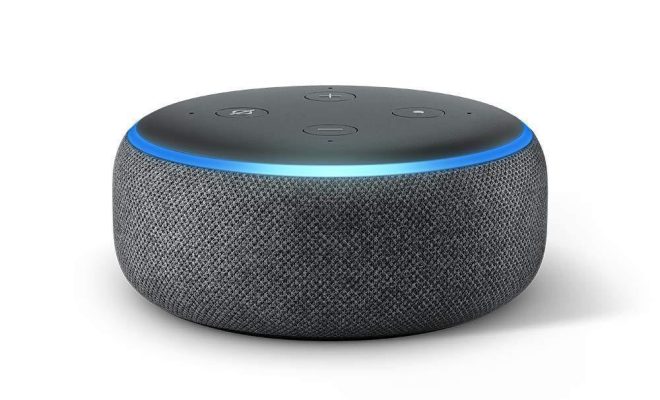
After downloading the Alexa app, plug in your Echo Dot to a power source. The Echo Dot will start booting up and you will see a light ring appear on the device.

Step 3: Open the Alexa app

Next, open the Alexa app on your mobile device. If you have not signed in, you will need to create an account or sign in to your existing Amazon account.

Step 4: Select the “Devices” icon

On the Alexa app, select the “Devices” icon at the bottom of the screen. This will take you to a page that displays all your current devices.

Step 5: Add a new device

To add a new device, click the “+” icon in the top right corner of the screen. This will prompt you to select the type of device you want to add. Select “Amazon Echo” and then select the Echo Dot.

Step 6: Connect to Wi-Fi

The Alexa app will then prompt you to connect your Echo Dot to Wi-Fi. To do this, select the Wi-Fi network that you want to connect to and enter the password.

Step 7: Wait for the connection

After entering the Wi-Fi password, the Echo Dot will start connecting to the Wi-Fi network. This process may take a few minutes, so be patient.

Step 8: Start using your Echo Dot

Once the Echo Dot is connected to Wi-Fi, you can start using it. You can ask Alexa to play music, answer questions, set alarms, and more.

In conclusion, connecting an Echo Dot to Wi-Fi is a simple process that can be done in just a few minutes. With a few clicks of a button on the Alexa app, you can have your Echo Dot up and running in no time.

Previous Article

What Is a Keyboard?

Next Article

How to Get Bamboo in Animal Crossing: ...

Matthew Lynch

Related articles More from author

  • Assistive Technology

    How to Estimate a Printer’s Cost per Page

    June 15, 2023
    By Matthew Lynch
  • Assistive Technology

    How to Fix the “This App Can’t Open” Error in Windows 10 & 11

    June 11, 2023
    By Matthew Lynch
  • Assistive Technology

    The Pros and Cons of Using a PS4 External Hard Drive

    June 5, 2023
    By Matthew Lynch
  • Assistive Technology

    How to Change Your Disney+ PIN

    June 6, 2023
    By Matthew Lynch
  • Assistive Technology

    Mistakes to Avoid When Selling on eBay

    June 6, 2023
    By Matthew Lynch
  • Assistive Technology

    How to Fix Disney Plus Error Code 43

    June 15, 2023
    By Matthew Lynch

Search

Login & Registration

  • Log in
  • Entries feed
  • Comments feed
  • WordPress.org

Newsletter

Signup for The Tech Edvocate Newsletter and have the latest in EdTech news and opinion delivered to your email address!

About Us

Since technology is not going anywhere and does more good than harm, adapting is the best course of action. That is where The Tech Edvocate comes in. We plan to cover the PreK-12 and Higher Education EdTech sectors and provide our readers with the latest news and opinion on the subject. From time to time, I will invite other voices to weigh in on important issues in EdTech. We hope to provide a well-rounded, multi-faceted look at the past, present, the future of EdTech in the US and internationally.

We started this journey back in June 2016, and we plan to continue it for many more years to come. I hope that you will join us in this discussion of the past, present and future of EdTech and lend your own insight to the issues that are discussed.

Newsletter

Signup for The Tech Edvocate Newsletter and have the latest in EdTech news and opinion delivered to your email address!

Contact Us

The Tech Edvocate
910 Goddin Street
Richmond, VA 23231
(601) 630-5238
[email protected]

Copyright © 2026 Matthew Lynch. All rights reserved.