Restore Print Quality: How to Clean Printer Heads Effectively
“`html
Printer heads are essential components in inkjet printers, responsible for delivering ink onto the paper. Over time, these heads can become clogged with dried ink, dust, and other debris, leading to poor print quality and frustrating printing experiences. If you’ve ever encountered streaks on your documents or missing colors, you know the importance of knowing how to clean printer heads. In this article, we’ll explore the best methods, tips, and tricks for effectively cleaning printer heads, ensuring you get the most out of your printing equipment.
1. Understanding Why Printer Heads Need Cleaning
Before diving into the cleaning process, it’s crucial to understand why printer heads can become clogged. Inkjet printers use tiny nozzles — often smaller than a human hair — to spray ink onto paper. If the printer is left unused for extended periods, the ink can dry up and create blockages. Additionally, dust and other contaminants can settle on the heads, further impairing performance. Knowing this can help you take proactive steps to maintain your printer.
Regular cleaning not only improves print quality but can also extend the lifespan of your printer. By keeping the printer heads clean, you reduce the chances of having to replace them frequently, which can be a costly endeavor. Understanding these factors will encourage you to incorporate cleaning into your regular printer maintenance routine.
2. Recognizing the Signs of Clogged Printer Heads
Identifying clogged printer heads early can save you a lot of time and frustration. Some common symptoms include:
- Streaks or lines: If your printouts are displaying streaks or missing sections, this is a clear sign that the printer heads may be clogged.
- Poor color quality: When colors appear faded or inaccurate, it may indicate that the nozzles responsible for those colors are blocked.
- No ink on paper: In extreme cases, you might find that no ink is being deposited on the paper at all, which is a definitive indicator that the heads require cleaning.
Being aware of these signs can prompt you to take action before the problem worsens. Regular maintenance checks can help you maintain optimal print quality.
3. Gathering Necessary Materials
Before you begin the cleaning process, gather the necessary materials to ensure a smooth and effective operation. Here’s what you’ll need:
- Lint-free cloths: These prevent scratching and ensure that no fibers are left behind on the printer heads.
- Distilled water: Tap water can contain minerals that may damage your printer, so distilled water is the safest option.
- Isopropyl alcohol: This can help dissolve dried ink and is effective in cleaning sticky residues.
- Paper towels: Useful for drying surfaces after cleaning.
- Printer manual: Always a good idea to reference your specific printer model for manufacturer-recommended cleaning methods.
Having the right tools will make the process much more efficient and minimize the risk of damage to your printer.
4. Using Printer Software for Cleaning
Most modern printers come equipped with software that includes built-in cleaning functions. Despite being a basic step, many users overlook this feature. Accessing your printer’s settings through your computer can provide options such as a clean printer heads function, which can automatically attempt to clear blockages.
To use this feature, navigate to your printer settings on your computer, look for maintenance or service options, and follow the prompts. While this method may not completely eliminate stubborn clogs, it’s an excellent first line of defense and can be performed quickly.
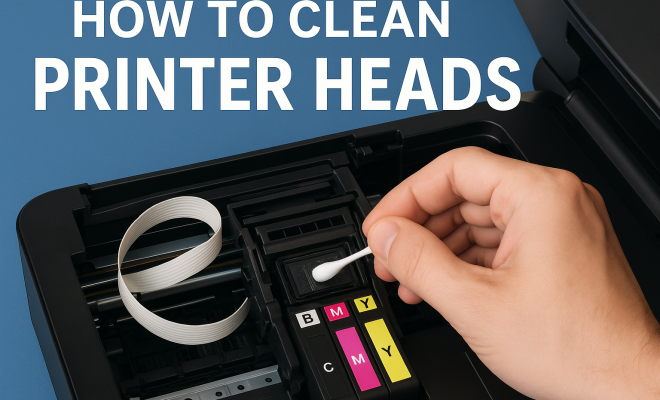
5. Manual Cleaning Process
If the software cleaning doesn’t yield results, manual cleaning is the next step. Here’s how to do it: (See: Understanding inkjet printer technology.)
- Turn off the printer and unplug it for safety.
- Remove the ink cartridges carefully to avoid ink spills.
- Locate the print head — this is often accessible in the same area where the cartridges are installed.
- Dampen a lint-free cloth with distilled water or isopropyl alcohol, and gently wipe the print head. Avoid excessive pressure to prevent damage.
- Allow the print head to dry completely before reassembling the printer.
- Reinstall the ink cartridges and run a test print.
Manual cleaning can be meticulous, but it often proves to be highly effective in clearing stubborn clogs and restoring print quality.
6. Cleaning with a Printhead Cleaning Kit
If manual cleaning feels daunting or doesn’t seem effective, consider investing in a printhead cleaning kit. These kits often contain specialized solutions designed to dissolve dried ink and come with tools to help you apply them effectively. Here’s how to use them:
- Follow the instructions provided with the kit carefully.
- Apply the cleaning solution to the print head, using the provided tools.
- Allow it to sit for the recommended time, usually around 10-15 minutes.
- Wipe away excess solution and let the print head dry before reassembling.
Using a cleaning kit can be beneficial if you frequently experience clogs or if your printer hasn’t been maintained for a long time.
7. Preventative Maintenance Tips
Once you’ve cleaned your printer heads, you’ll want to ensure they stay clean. Here are some preventative measures:
- Print regularly: Regular use of your printer helps prevent ink from drying in the nozzles.
- Use high-quality ink: Cheaper inks can have a higher likelihood of clogging and may produce more residues.
- Keep the printer covered: Dust can settle on the printer and the heads, so keeping it covered when not in use is a good practice.
- Run test prints: Periodically printing a test page can help you catch clogs before they become severe.
These simple practices can greatly enhance the reliability of your printer and reduce the amount of time spent on cleaning.
8. When to Seek Professional Help
If you’ve tried all the cleaning methods and your printer heads still aren’t functioning properly, it may be time to seek professional help. There could be underlying issues that require specialized tools and expertise. Signs that you should consult a professional include:
- Persistent clogs: If you can’t get the heads unclogged no matter what you try, it’s best to let a technician look at it.
- Mechanical problems: If the printer is making unusual noises or showing error messages, this could indicate mechanical failure.
- Frequent ink wastage: If you’re constantly replacing cartridges without much use, there might be a leak or other issue.
Consulting a professional can ensure your printer is repaired correctly and can help avoid further damage.
9. Long-Term Effects of Ignoring Clogged Printer Heads
Ignoring clogged printer heads can have significant long-term consequences. In addition to experiencing poor print quality, prolonged neglect can lead to permanent damage to the print head itself. Over time, the ink can build up and dry, creating a hardened layer that’s much harder to remove. This can lead to the need for costly repairs or even complete replacement of the printer.
Additionally, clogs can lead to increased ink consumption. When the printer attempts to push ink through blocked nozzles, it may use more ink in the process, leading to wastage and increased costs. This is particularly problematic for businesses that rely on printing for their operations.
In some cases, continuous use of a printer with clogged heads can even affect the overall performance of the printer. Users may notice that their printers run hotter, make unusual sounds, or display error messages. All of these are signs that the printer is under stress, which can significantly shorten its lifespan.
10. Expert Perspectives on Printer Maintenance
Industry experts emphasize the importance of regular maintenance for ensuring optimal printer performance. According to a survey by the Imaging Supplies Coalition, up to 30% of printer issues can be directly attributed to poor maintenance habits. Experts recommend incorporating a scheduled maintenance routine into your printing habits. Setting reminders to conduct checks and cleanings can prevent unexpected failures and extend the lifespan of your equipment.
Additionally, many professionals suggest using high-quality printer cartridges and inks. In a study conducted by a leading printer manufacturer, it was found that using compatible or generic inks increased the likelihood of clogs compared to using original equipment manufacturer (OEM) inks. The quality of the ink can play a significant role in how well the printer functions over time. (See: Importance of cleaning equipment.)
Moreover, experts recommend familiarizing yourself with your printer’s specific model. Different brands and models may have unique cleaning protocols or maintenance requirements. Always consult the user manual or reach out to the manufacturer for tailored advice.
11. Common Misconceptions About Printer Cleaning
There are several misconceptions surrounding printer maintenance, particularly regarding cleaning printer heads. One common myth is that you need to clean the printer heads every time you replace the ink cartridges. While it’s good practice to check for clogs during this process, frequent cleaning can lead to unnecessary ink wastage and may not be required if print quality is satisfactory.
Another misconception is that using household products, such as vinegar or soap, will effectively clean printer heads. While these substances may seem like viable options, they can actually cause more harm than good. Many household cleaners can leave residues that exacerbate clogging issues, or even damage sensitive printer components.
Lastly, some users believe that once their printer heads are clogged beyond a certain point, they are irreparably damaged. While severe clogs can be difficult to clear, many users have successfully restored functionality through diligent cleaning and maintenance practices.
12. FAQ
Q1: How often should I clean my printer heads?
A: Generally, it’s advisable to clean your printer heads every few months, but this can vary based on usage. If you print frequently, more regular cleaning may be necessary. Conversely, if you seldom use your printer, cleaning it before significant printing sessions can help.
Q2: Can I use tap water to clean printer heads?
A: It’s not recommended. Tap water can contain minerals and contaminants that may further clog the printer heads. Always use distilled water for cleaning.
Q3: What should I do if my printer doesn’t have a cleaning function?
A: If your printer lacks a cleaning function, you can still clean the printer heads manually as described in the previous sections. Regular manual checks and cleaning can help maintain print quality.
Q4: How can I tell if my printer heads are beyond repair?
A: If multiple cleaning attempts have failed, and you continue to experience poor print quality or error messages, it might be time to seek professional help. A technician can assess whether the heads can be repaired or if replacement is necessary.
Q5: Is it safe to clean printer heads with a cloth?
A: Yes, provided the cloth is lint-free and dampened with an appropriate cleaning solution like distilled water or isopropyl alcohol. Avoid using abrasive materials that could scratch sensitive components.
13. Advanced Techniques for Cleaning Printer Heads
If you find that routine cleaning methods aren’t effective, you might want to explore advanced techniques that can provide deeper cleaning. Here are a couple of methods that can be particularly useful: (See: Tips for cleaning your printer.)
Ultrasonic Cleaning
Ultrasonic cleaning has become popular in various industries, including printing. This technique uses high-frequency sound waves to create microscopic bubbles in a cleaning solution, which implode and create high-pressure cleaning action. For printer heads, this method can effectively remove stubborn clogs without damaging sensitive components. You can find ultrasonic cleaners specifically designed for this purpose, and while they represent a higher initial investment, they can save you money on repairs in the long run.
Vacuum Cleaning
When dealing with severe clogs, a vacuum cleaner can sometimes be used creatively to draw out dried ink and debris. This method involves placing the vacuum hose near the print head while the printer runs a cleaning cycle. The suction can help dislodge blockages and pull them away from the nozzles. However, this method should be used cautiously to avoid causing any damage to the printer components.
14. Environmental Impact of Printer Maintenance
As technology continues to evolve, so do environmentally friendly practices surrounding printer maintenance. Using eco-friendly cleaning solutions can minimize your ecological footprint. Many companies now offer biodegradable cleaning kits, which can efficiently clean printer heads without contributing harmful chemicals to the environment.
Additionally, consider the ink you use. Many brands are beginning to produce inks that are made from sustainable resources or have reduced harmful chemicals. These inks can not only prevent clogs but also ensure that your printing practices are more environmentally responsible.
15. Future Trends in Printer Technology
The world of printing technology is constantly evolving, and future innovations may change how we approach maintenance. For instance, some manufacturers are developing self-cleaning printer heads that use built-in mechanisms to prevent clogs before they occur. This could significantly reduce the need for manual cleaning and help maintain optimal performance without user intervention.
Another exciting trend is the integration of smart technology in printers. With IoT (Internet of Things) capabilities, printers could automatically notify users when cleaning is needed or even initiate a cleaning cycle based on usage patterns. Such advancements could streamline the maintenance process and enhance the overall user experience.
16. Conclusion
Maintaining clean printer heads is essential for optimal print quality and the longevity of your printer. By recognizing the signs of clogs, utilizing both software and manual cleaning methods, and implementing preventative measures, you can ensure that your printer consistently produces sharp, vibrant prints. Remember, a little maintenance goes a long way in keeping your printer functioning efficiently. With the right tools, techniques, and knowledge of advanced methods, you can maximize your printer’s performance and avoid unnecessary costs. Embracing new technology and eco-friendly practices will not only benefit your printing needs but also contribute to a more sustainable future.
“`
Trending Now
Frequently Asked Questions
How do I know if my printer heads are clogged?
You can recognize clogged printer heads by checking for common symptoms such as streaks or lines on printouts, poor color quality, or even no ink being deposited on the paper. If you notice any of these issues, it’s likely time to clean your printer heads.
What causes printer heads to become clogged?
Printer heads often become clogged due to dried ink, dust, and contaminants that accumulate over time, especially if the printer is left unused for extended periods. Regular maintenance can help prevent these blockages and improve print quality.
How often should I clean my printer heads?
It’s recommended to clean your printer heads regularly, especially if you notice print quality issues. If you use your printer frequently, cleaning every few months is advisable, while infrequent users should clean them before long periods of inactivity.
What are the best methods for cleaning printer heads?
The best methods for cleaning printer heads include using the printer's built-in cleaning function, manually cleaning with a lint-free cloth and distilled water, or using a specialized cleaning solution. Always consult your printer's manual for specific instructions.
Can clogged printer heads be repaired?
In many cases, clogged printer heads can be cleaned rather than replaced. However, if the blockage is severe or if the heads are damaged, you may need to replace them. Regular cleaning can help extend their lifespan and prevent serious clogs.
Agree or disagree? Drop a comment and tell us what you think.