The Tech Edvocate

Top Menu

  • Advertisement
  • Apps
  • Home Page
  • Home Page Five (No Sidebar)
  • Home Page Four
  • Home Page Three
  • Home Page Two
  • Home Tech2
  • Icons [No Sidebar]
  • Left Sidbear Page
  • Lynch Educational Consulting
  • My Account
  • My Speaking Page
  • Newsletter Sign Up Confirmation
  • Newsletter Unsubscription
  • Our Brands
  • Page Example
  • Privacy Policy
  • Protected Content
  • Register
  • Request a Product Review
  • Shop
  • Shortcodes Examples
  • Signup
  • Start Here
    • Governance
    • Careers
    • Contact Us
  • Terms and Conditions
  • The Edvocate
  • The Tech Edvocate Product Guide
  • Topics
  • Write For Us
  • Advertise

Main Menu

  • Start Here
    • Our Brands
    • Governance
      • Lynch Educational Consulting, LLC.
      • Dr. Lynch’s Personal Website
      • Careers
    • Write For Us
    • The Tech Edvocate Product Guide
    • Contact Us
    • Books
    • Edupedia
    • Post a Job
    • The Edvocate Podcast
    • Terms and Conditions
    • Privacy Policy
  • Topics
    • Assistive Technology
    • Child Development Tech
    • Early Childhood & K-12 EdTech
    • EdTech Futures
    • EdTech News
    • EdTech Policy & Reform
    • EdTech Startups & Businesses
    • Higher Education EdTech
    • Online Learning & eLearning
    • Parent & Family Tech
    • Personalized Learning
    • Product Reviews
  • Advertise
  • Tech Edvocate Awards
  • The Edvocate
  • Pedagogue
  • School Ratings

logo

The Tech Edvocate

  • Start Here
    • Our Brands
    • Governance
      • Lynch Educational Consulting, LLC.
      • Dr. Lynch’s Personal Website
        • My Speaking Page
      • Careers
    • Write For Us
    • The Tech Edvocate Product Guide
    • Contact Us
    • Books
    • Edupedia
    • Post a Job
    • The Edvocate Podcast
    • Terms and Conditions
    • Privacy Policy
  • Topics
    • Assistive Technology
    • Child Development Tech
    • Early Childhood & K-12 EdTech
    • EdTech Futures
    • EdTech News
    • EdTech Policy & Reform
    • EdTech Startups & Businesses
    • Higher Education EdTech
    • Online Learning & eLearning
    • Parent & Family Tech
    • Personalized Learning
    • Product Reviews
  • Advertise
  • Tech Edvocate Awards
  • The Edvocate
  • Pedagogue
  • School Ratings
  • A Visitors Guide to Long Beach (CA), United States

  • A Visitor’s Guide to Fresno (CA), United States

  • A Visitors Guide to New Orleans (LA), United States

  • A Visitors Guide to Sacramento (CA), United States

  • A Visitors Guide to Lyon, France

  • JisuLife Ultra2 Portable Fan: A Powerful Multi-Function Cooling Solution

  • A Visitors Guide to Viña del Mar, Chile

  • A Visitors Guide to Århus, Denmark

  • A Visitors Guide to Bakersfield (CA), United States

  • A Visitors Guide to Aurora (CO), United States

Digital & Mobile Technology
Home›Digital & Mobile Technology›A Complete Guide to Your iPhone’s Health App and How to Use It

A Complete Guide to Your iPhone’s Health App and How to Use It
By Matthew Lynch
June 15, 2023
0
Spread the love

Your iPhone is not just a device for making calls, sending messages or browsing the web, it’s also a tool for monitoring and tracking your health and wellness goals. The Health app, introduced in iOS 8, is a robust and comprehensive platform for tracking your physical and mental well-being. In this guide, we’ll explore the various features of the Health app and how to use it to stay on top of your health goals.

Getting started with the Health app

Before you start using the various features of the Health app, you need to set it up first. To do this, open the app and you’ll be prompted to enter your age, gender, height, and weight. You can also set up emergency contacts and medical ID information. Once you’ve entered this information, you’re ready to start tracking your health goals.

Tracking your activity and workouts

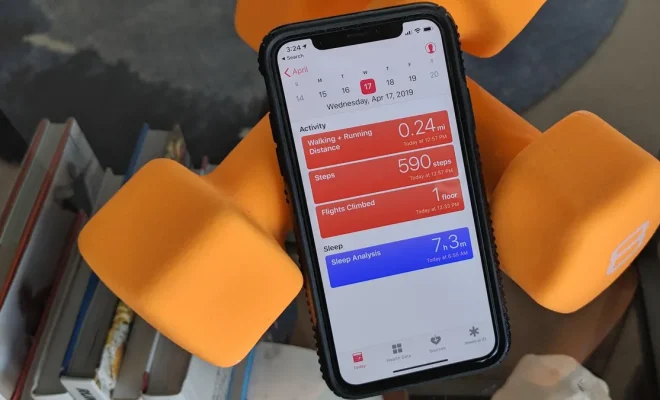
One of the core features of the Health app is activity tracking. You can use the app to track your steps, distance walked or run, and flights of stairs climbed. You can also track your workouts using the app’s Workout section, which includes options for different activities, like running, cycling, and swimming.

The Health app also supports third-party apps that work with Apple’s HealthKit technology, which adds even more workout data to your dashboard. Some popular apps that integrate with HealthKit include Strava, MyFitnessPal, and Nike+ Run Club.

Monitoring your sleep

Sleep is an essential part of your overall health and wellness, so it’s important to track it using the Health app. The app can track your sleep duration and provide an analysis of the quality of your sleep. To enable sleep tracking, make sure that you wear your device to bed and have the “Sleep Analysis” feature turned on in the app.

Tracking your nutrition

Tracking your food intake is a crucial part of maintaining a healthy lifestyle. With the Health app, you can track your daily calorie intake, as well as your macronutrient profile (proteins, fats, and carbohydrates). To add your daily food intake, head to the Food section in the app and select “Add Data.”

Monitoring your heart health

The Health app also includes a section for tracking your heart health. You can monitor your heart rate, heart rate variability, and blood pressure using third-party devices that work with HealthKit. To add these metrics to the Health app, select “Add Data” in the Heart section.

Tracking your reproductive health

The Health app also includes a section for tracking your reproductive health, which can be useful for women who want to monitor their menstrual cycles or track their fertility. You can add information about your cycle length, menstrual flow, and basal body temperature to the app’s “Reproductive Health” section.

Overall, the Health app is a fantastic tool for monitoring and tracking your health and wellness goals. With its comprehensive features, you can stay on top of all aspects of your physical and mental health. Try using the Health app on your iPhone today and start tracking your progress towards a healthier you.


Previous Article

How to Use and Customize the Share ...

Next Article

How to Change the Scrolling Direction in ...

Matthew Lynch

Related articles More from author

  • Digital & Mobile Technology

    How to Cancel Your Amazon Kindle Unlimited Subscription

    May 20, 2023
    By Matthew Lynch
  • Digital & Mobile Technology

    Free Internet TV Channels You Can Watch Online

    August 5, 2023
    By Matthew Lynch
  • Digital & Mobile Technology

    How to Customize Gmail Notifications for Android

    May 27, 2023
    By Matthew Lynch
  • Digital & Mobile Technology

    Best Sites to Send Free Text Messages to Cell Phones (SMS)

    August 5, 2023
    By Matthew Lynch
  • Digital & Mobile Technology

    The 8 Best Gmail Alternatives of 2023

    June 3, 2023
    By Matthew Lynch
  • Digital & Mobile Technology

    How to Enable Cookies on an iPad

    June 1, 2023
    By Matthew Lynch

Search

Login & Registration

  • Register
  • Log in
  • Entries feed
  • Comments feed
  • WordPress.org

Newsletter

Signup for The Tech Edvocate Newsletter and have the latest in EdTech news and opinion delivered to your email address!

About Us

Since technology is not going anywhere and does more good than harm, adapting is the best course of action. That is where The Tech Edvocate comes in. We plan to cover the PreK-12 and Higher Education EdTech sectors and provide our readers with the latest news and opinion on the subject. From time to time, I will invite other voices to weigh in on important issues in EdTech. We hope to provide a well-rounded, multi-faceted look at the past, present, the future of EdTech in the US and internationally.

We started this journey back in June 2016, and we plan to continue it for many more years to come. I hope that you will join us in this discussion of the past, present and future of EdTech and lend your own insight to the issues that are discussed.

Newsletter

Signup for The Tech Edvocate Newsletter and have the latest in EdTech news and opinion delivered to your email address!

Contact Us

The Tech Edvocate
910 Goddin Street
Richmond, VA 23231
(601) 630-5238
[email protected]

Copyright © 2025 Matthew Lynch. All rights reserved.