The Tech Edvocate

Top Menu

  • Advertisement
  • Apps
  • Home Page
  • Home Page Five (No Sidebar)
  • Home Page Four
  • Home Page Three
  • Home Page Two
  • Home Tech2
  • Icons [No Sidebar]
  • Left Sidbear Page
  • Lynch Educational Consulting
  • My Account
  • My Speaking Page
  • Newsletter Sign Up Confirmation
  • Newsletter Unsubscription
  • Our Brands
  • Page Example
  • Privacy Policy
  • Protected Content
  • Register
  • Request a Product Review
  • Shop
  • Shortcodes Examples
  • Signup
  • Start Here
    • Governance
    • Careers
    • Contact Us
  • Terms and Conditions
  • The Edvocate
  • The Tech Edvocate Product Guide
  • Topics
  • Write For Us
  • Advertise

Main Menu

  • Start Here
    • Our Brands
    • Governance
      • Lynch Educational Consulting, LLC.
      • Dr. Lynch’s Personal Website
      • Careers
    • Write For Us
    • The Tech Edvocate Product Guide
    • Contact Us
    • Books
    • Edupedia
    • Post a Job
    • The Edvocate Podcast
    • Terms and Conditions
    • Privacy Policy
  • Topics
    • Assistive Technology
    • Child Development Tech
    • Early Childhood & K-12 EdTech
    • EdTech Futures
    • EdTech News
    • EdTech Policy & Reform
    • EdTech Startups & Businesses
    • Higher Education EdTech
    • Online Learning & eLearning
    • Parent & Family Tech
    • Personalized Learning
    • Product Reviews
  • Advertise
  • Tech Edvocate Awards
  • The Edvocate
  • Pedagogue
  • School Ratings

logo

The Tech Edvocate

  • Start Here
    • Our Brands
    • Governance
      • Lynch Educational Consulting, LLC.
      • Dr. Lynch’s Personal Website
        • My Speaking Page
      • Careers
    • Write For Us
    • The Tech Edvocate Product Guide
    • Contact Us
    • Books
    • Edupedia
    • Post a Job
    • The Edvocate Podcast
    • Terms and Conditions
    • Privacy Policy
  • Topics
    • Assistive Technology
    • Child Development Tech
    • Early Childhood & K-12 EdTech
    • EdTech Futures
    • EdTech News
    • EdTech Policy & Reform
    • EdTech Startups & Businesses
    • Higher Education EdTech
    • Online Learning & eLearning
    • Parent & Family Tech
    • Personalized Learning
    • Product Reviews
  • Advertise
  • Tech Edvocate Awards
  • The Edvocate
  • Pedagogue
  • School Ratings
  • The AI Job Apocalypse: Are Companies Hiding The Real Reason For Mass Layoffs?

  • One Crucial Factor Could Decimate Your US Auto Insurance Rates in 2026

  • Unbelievable: Meta Hit With $25 Billion Fine — Is Your Health Data Next?

  • 10 Crucial AI Literacy Courses Every Parent Needs Now

  • The Unseen Force Quietly Reshaping Rural Life: 7 Satellite Internet Providers Battling for Supremacy

  • Best Buy’s Gamers Hub: The Unbelievable Truth About Its “Rewards” And Discounts

  • 8 Crucial Reasons Why MAI-DxO Just Obliterated Doctors in a Head-to-Head Diagnosis Battle

  • The Brutal Truth About Student Loan Refinancing for New Grads in 2024

  • The Brutal Truth: AI Just Blew Up PHP Security – Here’s How to Survive ‘Black October’

  • Sodium-ion storage maker Peak Energy raises $108 million in GM-led round – PV Magazine

Early Childhood & K-12 EdTechGoogle ClassroomHigher EducationHigher Education EdTech
Home›Early Childhood & K-12 EdTech›How to Use Google Classroom to Train Your Employees

How to Use Google Classroom to Train Your Employees
By Matthew Lynch
September 5, 2018
0
Spread the love

Professional development and job-related training can be a source of despair for many people. But what if employers could break that mold by making training fun, interactive, and memorable? Google Classroom brings that possibility to life. Using the many resources Classroom has to offer can expand employee knowledge and offer numerous opportunities for growth. With a few simple steps, employers can set up a Google Classroom worth their employees’ time.

Set Up a Classroom & Invite Students

Before training can begin, a Google Classroom must be set up for employees. Remember to give the classroom an appropriate, specific title which correlates with your needs. Separate classrooms may be set up for different topics; however, the most efficient method is to set up one classroom which separates topics into learning modules. Don’t forget to invite employees to become students in the class or share the classroom join code.

Create a Training Module

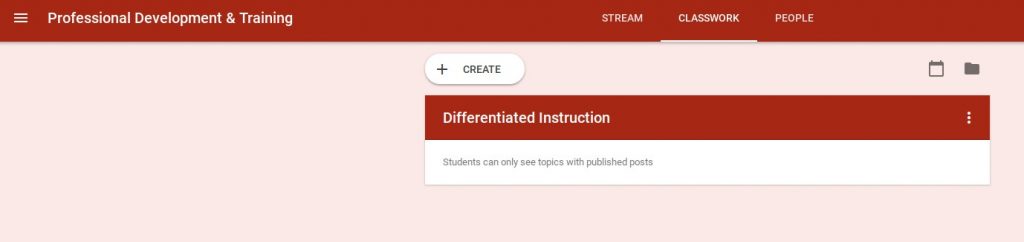
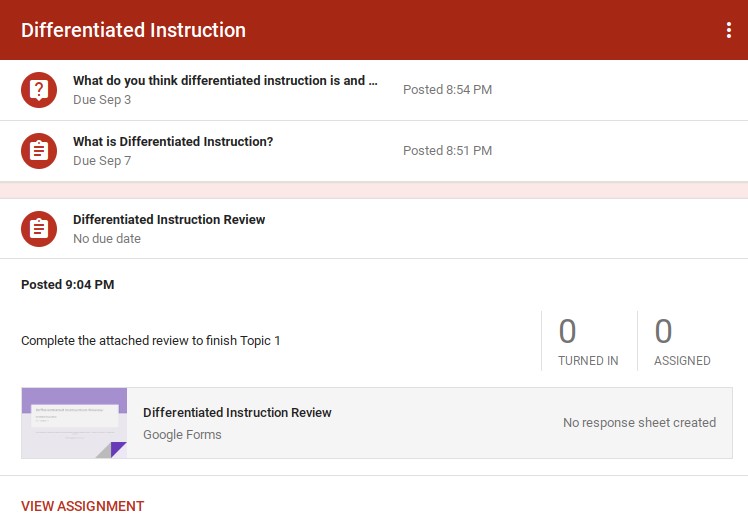
The most important aspect of using Classroom as a professional development tool is organization. Setting up the Classroom with training topics (also referred to as modules) can save employers time and keep employees engaged. Once the basic setup of the classroom is complete, it’s time to create training modules. On the Classwork tab, click the plus sign to create a new topic and name it according to the content of the training. For example, the classroom below is titled Professional Development & Training with a training topic of “Differentiated Instruction” which will serve as the first module.
Add Content to Your Module

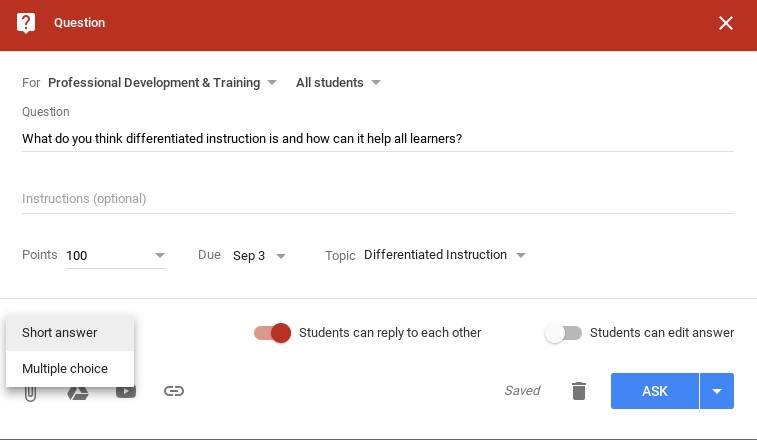
There are several options for adding content to a module in Classroom. Adding assignments or questions is an easy task, but creating engaging content is where Classroom has an advantage. Adding a question is a quick way to get employees engaged in a professional dialogue.
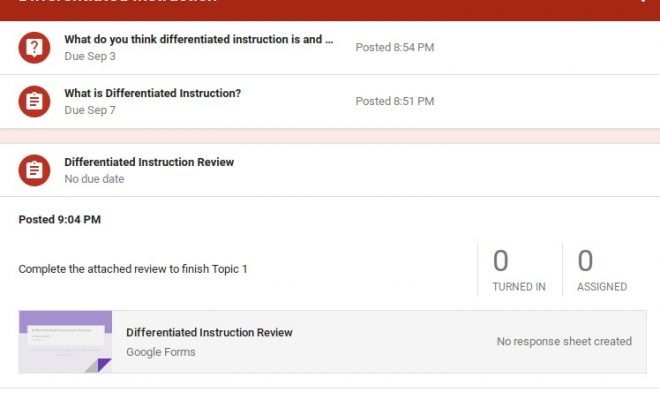
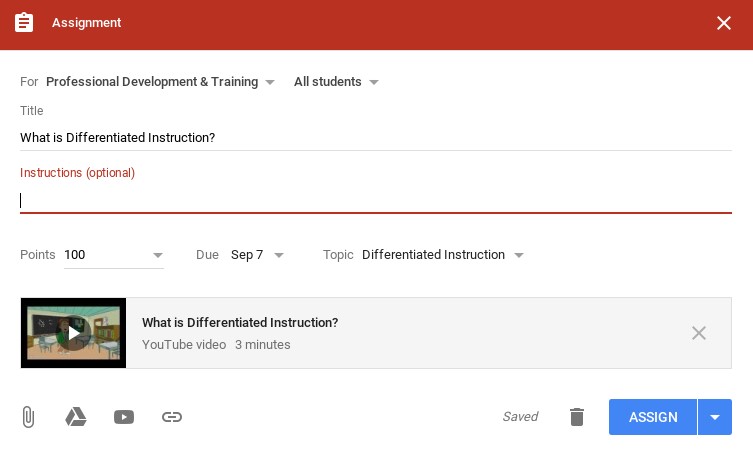
When adding an assignment, users have the option to add files and other content from Google Drive such as Slides or Forms. YouTube videos or links can also be added to assignments. This provides opportunities to create content which connects to different learning styles and prevents employees from having to pile into a room for “sit and get” professional development sessions. Setting a timeline for completion allows learners the flexibility to engage in activities at their own pace on their own time.
Evaluate Learning

Evaluating learning is an important component of professional development. Classroom provides multiple tools to make evaluations a breeze for employers. When creating a question, there is an option to make the question open-ended for user responses or to make it multiple choice. In addition, users can upload a Google Form for a more detailed assessment of learning. This is also an efficient method of gathering feedback about the training itself and whether the employer needs to make changes or adjustments to the module.
Follow Up

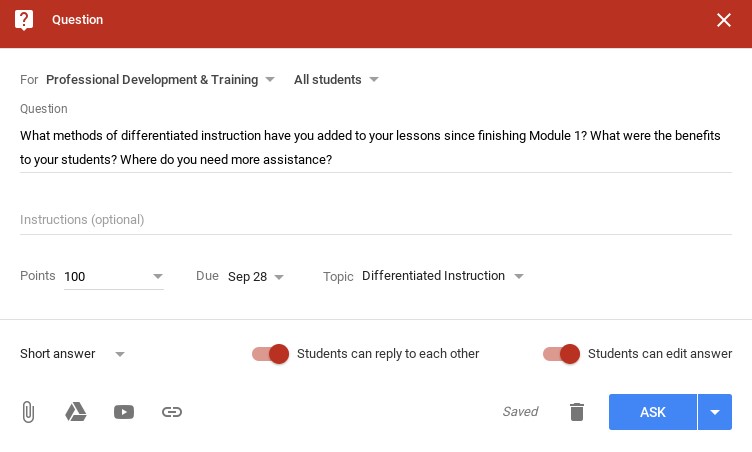
Follow up is one of the most important components of professional development. Creating a follow up discussion allows employees to provide feedback on implementation of content learned. It also provides a forum for discussing areas where assistance is needed and allows peers to provide guidance to one another.
 

Previous Article

10 Benefits of Google Classroom Integration

Next Article

Teacher Time Savers for Google Classroom

Matthew Lynch

Related articles More from author

  • Early Childhood & K-12 EdTechGoogle Classroom

    Is Google Classroom Too Good to Be True? A Definitive Answer

    April 23, 2018
    By Matthew Lynch
  • Early ChildhoodEarly Childhood & K-12 EdTech

    Parents express concerns as more toddlers switch on tablet computers

    May 18, 2017
    By Matthew Lynch
  • Early Childhood & K-12 EdTechEducation LeadershipTeachers

    Back On Track with Credit Recovery

    March 25, 2020
    By Matthew Lynch
  • Early Childhood & K-12 EdTechEducational Leadership

    The Future of Teacher Professional Development

    March 24, 2020
    By Matthew Lynch
  • Best of the Best ListsEarly Childhood & K-12 EdTechHigher Education EdTech

    29 of the Best Flipped Classroom Apps for Elementary School Teachers

    February 5, 2018
    By Matthew Lynch
  • Higher Education EdTech

    Micro-Scholarships a New Funding Source for College

    October 30, 2016
    By Matthew Lynch

Search

Login & Registration

  • Log in
  • Entries feed
  • Comments feed
  • WordPress.org

Newsletter

Signup for The Tech Edvocate Newsletter and have the latest in EdTech news and opinion delivered to your email address!

About Us

Since technology is not going anywhere and does more good than harm, adapting is the best course of action. That is where The Tech Edvocate comes in. We plan to cover the PreK-12 and Higher Education EdTech sectors and provide our readers with the latest news and opinion on the subject. From time to time, I will invite other voices to weigh in on important issues in EdTech. We hope to provide a well-rounded, multi-faceted look at the past, present, the future of EdTech in the US and internationally.

We started this journey back in June 2016, and we plan to continue it for many more years to come. I hope that you will join us in this discussion of the past, present and future of EdTech and lend your own insight to the issues that are discussed.

Newsletter

Signup for The Tech Edvocate Newsletter and have the latest in EdTech news and opinion delivered to your email address!

Contact Us

The Tech Edvocate
910 Goddin Street
Richmond, VA 23231
(601) 630-5238
[email protected]

Copyright © 2026 Matthew Lynch. All rights reserved.