The Tech Edvocate

Top Menu

  • Advertisement
  • Apps
  • Home Page
  • Home Page Five (No Sidebar)
  • Home Page Four
  • Home Page Three
  • Home Page Two
  • Home Tech2
  • Icons [No Sidebar]
  • Left Sidbear Page
  • Lynch Educational Consulting
  • My Account
  • My Speaking Page
  • Newsletter Sign Up Confirmation
  • Newsletter Unsubscription
  • Our Brands
  • Page Example
  • Privacy Policy
  • Protected Content
  • Register
  • Request a Product Review
  • Shop
  • Shortcodes Examples
  • Signup
  • Start Here
    • Governance
    • Careers
    • Contact Us
  • Terms and Conditions
  • The Edvocate
  • The Tech Edvocate Product Guide
  • Topics
  • Write For Us
  • Advertise

Main Menu

  • Start Here
    • Our Brands
    • Governance
      • Lynch Educational Consulting, LLC.
      • Dr. Lynch’s Personal Website
      • Careers
    • Write For Us
    • The Tech Edvocate Product Guide
    • Contact Us
    • Books
    • Edupedia
    • Post a Job
    • The Edvocate Podcast
    • Terms and Conditions
    • Privacy Policy
  • Topics
    • Assistive Technology
    • Child Development Tech
    • Early Childhood & K-12 EdTech
    • EdTech Futures
    • EdTech News
    • EdTech Policy & Reform
    • EdTech Startups & Businesses
    • Higher Education EdTech
    • Online Learning & eLearning
    • Parent & Family Tech
    • Personalized Learning
    • Product Reviews
  • Advertise
  • Tech Edvocate Awards
  • The Edvocate
  • Pedagogue
  • School Ratings

logo

The Tech Edvocate

  • Start Here
    • Our Brands
    • Governance
      • Lynch Educational Consulting, LLC.
      • Dr. Lynch’s Personal Website
        • My Speaking Page
      • Careers
    • Write For Us
    • The Tech Edvocate Product Guide
    • Contact Us
    • Books
    • Edupedia
    • Post a Job
    • The Edvocate Podcast
    • Terms and Conditions
    • Privacy Policy
  • Topics
    • Assistive Technology
    • Child Development Tech
    • Early Childhood & K-12 EdTech
    • EdTech Futures
    • EdTech News
    • EdTech Policy & Reform
    • EdTech Startups & Businesses
    • Higher Education EdTech
    • Online Learning & eLearning
    • Parent & Family Tech
    • Personalized Learning
    • Product Reviews
  • Advertise
  • Tech Edvocate Awards
  • The Edvocate
  • Pedagogue
  • School Ratings
  • Can Clio accept client payments

  • How to dispatch jobs in FieldAware

  • Can ServiceTitan do call booking

  • How to onboard construction workers BambooHR

  • Is FieldAware worth it for contractors

  • How many users in Jobber

  • Can JobNimbus track leads

  • How to create estimates in Housecall Pro

  • How many users in mHelpDesk

  • How to track certifications in BambooHR construction

Early Childhood & K-12 EdTechGoogle ClassroomHigher EducationHigher Education EdTech
Home›Early Childhood & K-12 EdTech›Teacher Time Savers for Google Classroom

Teacher Time Savers for Google Classroom
By Matthew Lynch
September 5, 2018
0
Spread the love

One of the many perks of Google Classroom is the time it saves teachers. Here are just a few of the ways Classroom can help make a class more productive without adding additional time constraints for educators.

Formative Assessments

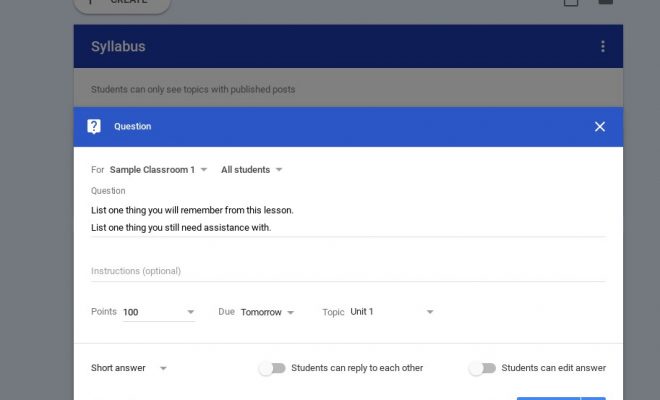
With Google Classroom, formative assessment has never been easier. Teachers can create a Google Form to utilize as a quiz which is automatically graded and saved to Classroom. Results can be exported to Sheets for teachers to gather data about the lesson. This feature can be accessed while viewing an assignment.
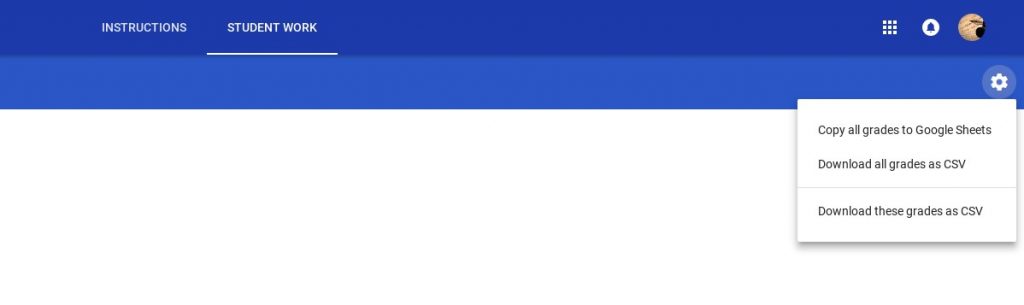
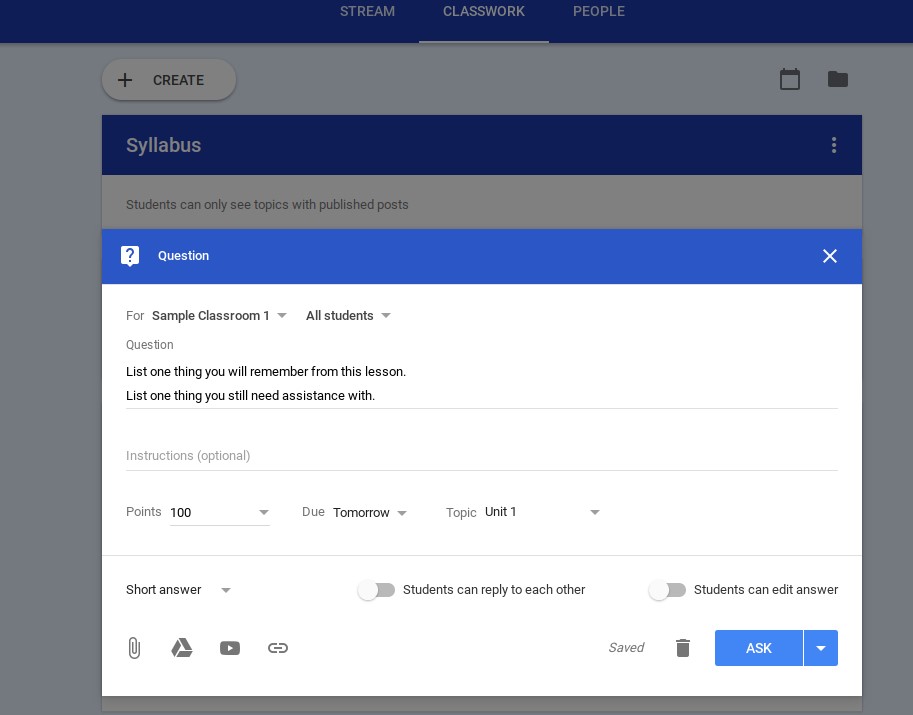
The question feature provides an additional way to create a quick exit ticket or thought-provoking question for students.
Differentiate Instruction

Differentiated instruction is easy with Classroom. One of the newest features allows teachers to assign work to individual students or groups of students based on need. When creating a new assignment, simply choose the check box next to the student(s) who should receive the assignment. Repeat the process as needed.

Translate for ELL Students

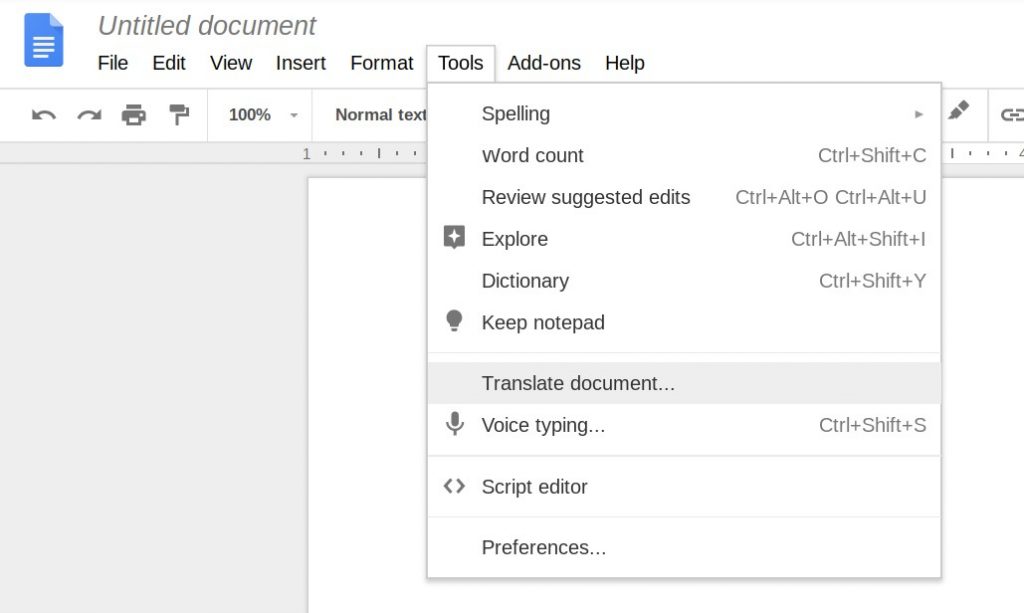
English Language Learners will have an easier time keeping up with the class with the Google Translate extension for Classroom. There is also a Translate feature embedded in Google Docs under Tools. These additional options can also help teachers communicate with ELL students and their parents despite language barriers.

Google Translate Extension Used in Google Docs
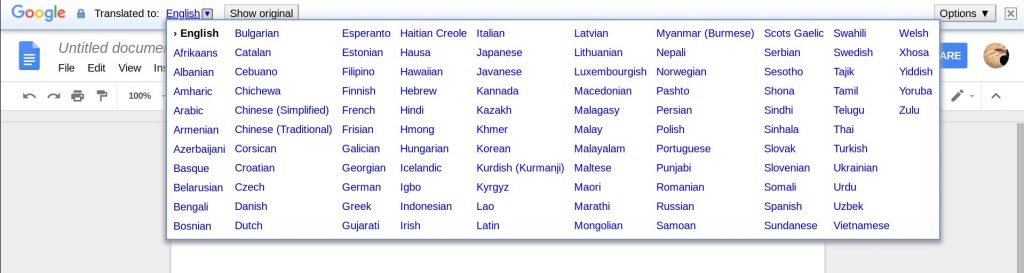
 

Built-in Translate Feature in Google Docs
 

Google Drive Search

Classroom files are saved in a “Classroom” folder in Google Drive. Files are sorted by Classroom name, assignment, and student name. Finding these files in Drive is already an easy task; however, the Drive search bar creates a quicker way to find student assignments. Simply type in a student’s name or the title of the assignment, and all results from Classroom files will appear in the search results.

Share to Classroom Extension

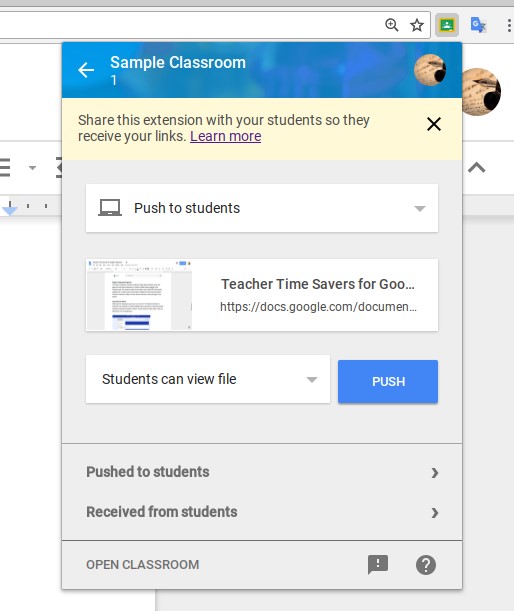
The Share to Classroom extension created by Google allows teachers to push web pages and web-based assignments to students instantly without switching to the Classroom app. This prevents students from having to waste time typing in long URLs. In order to use the push feature, students must also have the Share to Classroom extension. Students can use the extension to push web pages to the teacher as well.
 

Copy Posts for Reuse

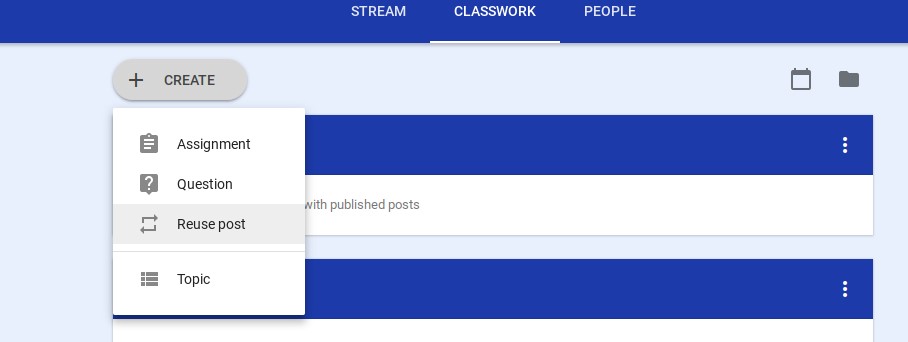
Why waste time retyping the same post over and over? The Reuse Post feature of Classroom is an easy way to create an editable copy of past posts or posts from another Classroom owned by the teacher. Teachers can also choose to make copies of files and attachments from the original post.
Resources in One Place

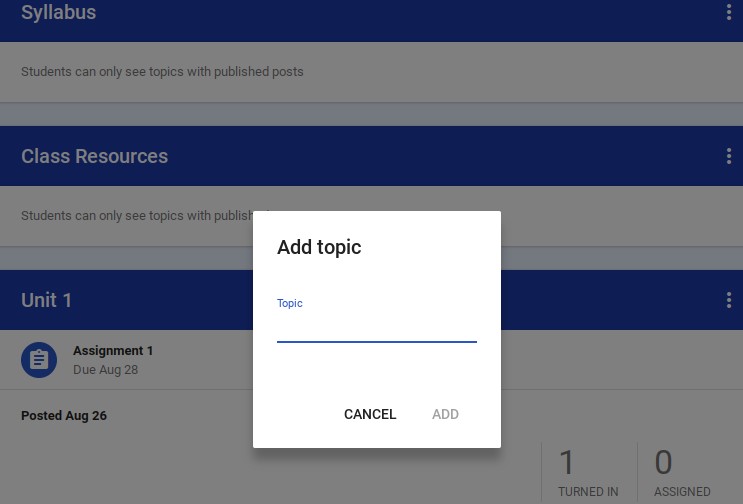
From the Classwork tab, teachers can create a module which is reserved for posting all class resources. This keeps important documents such as the teacher’s syllabus, reading lists, and other important class resources in one place.
 

Immediate Feedback

When grading student work, teachers can use the new grading tool which makes switching between grades, comments, and submitted assignments quick and easy. From the grading interface, teachers can also leave feedback and save frequently used comments for future use.

Apps for Google Classroom

There are a vast number of apps available for download; however, not all of them work with Google Classroom. The Google for Education Classroom Partners page lists a few of these apps, and Googling #withClassroom will produce search results for hundreds of apps and other ideas for Classroom.




Previous Article

How to Use Google Classroom to Train ...

Next Article

6 Ways to Integrate Media Literacy in ...

Matthew Lynch

Related articles More from author

  • Higher Education

    Working on a College Group Project: Everything You Need to Know

    October 10, 2022
    By Matthew Lynch
  • Early Childhood & K-12 EdTech

    8 Essential Digital Literacy Skills That Students Need

    August 6, 2017
    By Matthew Lynch
  • Higher Education

    The Best Colleges and Universities in North America

    June 11, 2023
    By Matthew Lynch
  • Early Childhood & K-12 EdTech

    Social Media and the Student/Teacher Relationship: The Pros and Cons of Establishing Connections with a Grade School Student

    December 17, 2016
    By Matthew Lynch
  • Early Childhood & K-12 EdTech

    Deep Learning in a Digital World of Possibilities

    August 15, 2018
    By Matthew Lynch
  • Early Childhood & K-12 EdTech

    5 Must-Have Google Docs Add-Ons for Teachers

    April 12, 2018
    By Matthew Lynch

Search

Login & Registration

  • Log in
  • Entries feed
  • Comments feed
  • WordPress.org

Newsletter

Signup for The Tech Edvocate Newsletter and have the latest in EdTech news and opinion delivered to your email address!

About Us

Since technology is not going anywhere and does more good than harm, adapting is the best course of action. That is where The Tech Edvocate comes in. We plan to cover the PreK-12 and Higher Education EdTech sectors and provide our readers with the latest news and opinion on the subject. From time to time, I will invite other voices to weigh in on important issues in EdTech. We hope to provide a well-rounded, multi-faceted look at the past, present, the future of EdTech in the US and internationally.

We started this journey back in June 2016, and we plan to continue it for many more years to come. I hope that you will join us in this discussion of the past, present and future of EdTech and lend your own insight to the issues that are discussed.

Newsletter

Signup for The Tech Edvocate Newsletter and have the latest in EdTech news and opinion delivered to your email address!

Contact Us

The Tech Edvocate
910 Goddin Street
Richmond, VA 23231
(601) 630-5238
[email protected]

Copyright © 2026 Matthew Lynch. All rights reserved.