The Tech Edvocate

Top Menu

  • Advertisement
  • Apps
  • Home Page
  • Home Page Five (No Sidebar)
  • Home Page Four
  • Home Page Three
  • Home Page Two
  • Home Tech2
  • Icons [No Sidebar]
  • Left Sidbear Page
  • Lynch Educational Consulting
  • My Account
  • My Speaking Page
  • Newsletter Sign Up Confirmation
  • Newsletter Unsubscription
  • Our Brands
  • Page Example
  • Privacy Policy
  • Protected Content
  • Register
  • Request a Product Review
  • Shop
  • Shortcodes Examples
  • Signup
  • Start Here
    • Governance
    • Careers
    • Contact Us
  • Terms and Conditions
  • The Edvocate
  • The Tech Edvocate Product Guide
  • Topics
  • Write For Us
  • Advertise

Main Menu

  • Start Here
    • Our Brands
    • Governance
      • Lynch Educational Consulting, LLC.
      • Dr. Lynch’s Personal Website
      • Careers
    • Write For Us
    • The Tech Edvocate Product Guide
    • Contact Us
    • Books
    • Edupedia
    • Post a Job
    • The Edvocate Podcast
    • Terms and Conditions
    • Privacy Policy
  • Topics
    • Assistive Technology
    • Child Development Tech
    • Early Childhood & K-12 EdTech
    • EdTech Futures
    • EdTech News
    • EdTech Policy & Reform
    • EdTech Startups & Businesses
    • Higher Education EdTech
    • Online Learning & eLearning
    • Parent & Family Tech
    • Personalized Learning
    • Product Reviews
  • Advertise
  • Tech Edvocate Awards
  • The Edvocate
  • Pedagogue
  • School Ratings

logo

The Tech Edvocate

  • Start Here
    • Our Brands
    • Governance
      • Lynch Educational Consulting, LLC.
      • Dr. Lynch’s Personal Website
        • My Speaking Page
      • Careers
    • Write For Us
    • The Tech Edvocate Product Guide
    • Contact Us
    • Books
    • Edupedia
    • Post a Job
    • The Edvocate Podcast
    • Terms and Conditions
    • Privacy Policy
  • Topics
    • Assistive Technology
    • Child Development Tech
    • Early Childhood & K-12 EdTech
    • EdTech Futures
    • EdTech News
    • EdTech Policy & Reform
    • EdTech Startups & Businesses
    • Higher Education EdTech
    • Online Learning & eLearning
    • Parent & Family Tech
    • Personalized Learning
    • Product Reviews
  • Advertise
  • Tech Edvocate Awards
  • The Edvocate
  • Pedagogue
  • School Ratings
  • A Visitor’s Guide to Fresno (CA), United States

  • A Visitors Guide to New Orleans (LA), United States

  • A Visitors Guide to Sacramento (CA), United States

  • A Visitors Guide to Lyon, France

  • JisuLife Ultra2 Portable Fan: A Powerful Multi-Function Cooling Solution

  • A Visitors Guide to Viña del Mar, Chile

  • A Visitors Guide to Århus, Denmark

  • A Visitors Guide to Bakersfield (CA), United States

  • A Visitors Guide to Aurora (CO), United States

  • A Visitor’s Guide to Toledo (OH), United States

Digital & Mobile Technology
Home›Digital & Mobile Technology›What to Do When Your iPhone Says ‘No SIM’

What to Do When Your iPhone Says ‘No SIM’
By Matthew Lynch
May 31, 2023
0
Spread the love

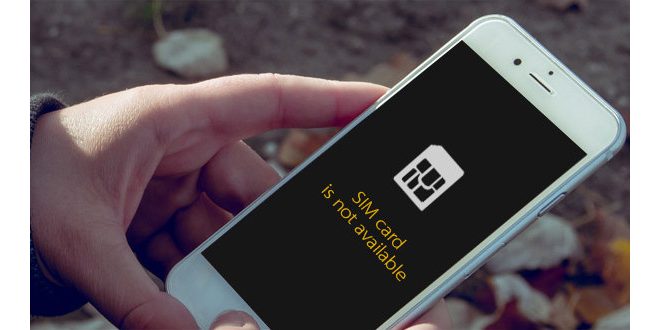
If your iPhone says ‘No SIM’, it can be a frustrating experience. You’re unable to make calls, send texts, or access your data plan. However, there are several things you can try to resolve the issue.

Before we start, it’s worth noting that if you recently replaced your SIM card, it may take up to 24 hours for your iPhone to recognize the new card. So, if you just replaced your SIM, wait a day or so before attempting any of the following troubleshooting steps.

1. Check if your SIM card is properly inserted

It may sound obvious, but sometimes we forget just how important it is to properly insert our SIM cards. So, before anything else, check to make sure your SIM card is properly inserted. Unfold a paper clip, insert it into the small hole on the side of your iPhone, and push. The tray should pop out – ensure the SIM card is in there properly.

2. Clean your SIM card and SIM card tray

Dirt and grime can build up on your SIM card and SIM card tray over time, leading to connectivity issues. Take a dry cloth and gently clean both the SIM card and the tray. Once both are clean, reinsert the SIM card and see if it works.

3. Restart your iPhone

This is the go-to solution for any tech-related issue. Try restarting your iPhone and see if the ‘No SIM’ message goes away. Sometimes, this simple step can resolve the issue.

4. Update your iPhone

If your iPhone’s operating system isn’t up to date, it can cause issues. Check if there are any updates available for your iPhone and install them. Many software updates contain fixes for known issues, so this may resolve the ‘No SIM’ issue.

5. Reset your network settings

If your iPhone still says ‘No SIM’ after trying the above steps, try resetting your network settings. Go to Settings > General > Reset > Reset Network Settings. This will reset all your network settings, including your Wi-Fi passwords, but it may resolve the SIM issue.

6. Visit an Apple Store or carrier

If none of the above steps resolve the issue, it’s time to get professional help. Visit an Apple Store or your carrier’s store, explain the issue, and see if they can assist you. There may be an issue with the hardware or the SIM card itself, and they’ll be able to give you further advice.

Final Thoughts

A ‘No SIM’ message can be frustrating, but it’s not the end of the world. Try the above troubleshooting tips, and hopefully, your SIM card will be recognized once again. If all else fails, seek professional help – there’s always a solution.

Previous Article

How to Use the Clipboard on Android ...

Next Article

Proper Formatting of Song Titles in Written ...

Matthew Lynch

Related articles More from author

  • Digital & Mobile Technology

    Google Pixel 7 & 7 Pro: News, Price, Release Date, Specs & More

    May 31, 2023
    By Matthew Lynch
  • Digital & Mobile Technology

    How to Fix the DistributedCOM Error 10016 in Windows 10

    June 22, 2023
    By Matthew Lynch
  • Digital & Mobile Technology

    Understanding T-Mobile’s Domestic Wireless Roaming Policy

    June 12, 2023
    By Matthew Lynch
  • Digital & Mobile Technology

    The Best Smart Devices Compatible With SmartThings

    August 1, 2023
    By Matthew Lynch
  • Digital & Mobile Technology

    What is wearable technology?

    May 14, 2023
    By Matthew Lynch
  • Digital & Mobile Technology

    How to Create DEB Packages for Debian/Ubuntu

    June 21, 2023
    By Matthew Lynch

Search

Login & Registration

  • Register
  • Log in
  • Entries feed
  • Comments feed
  • WordPress.org

Newsletter

Signup for The Tech Edvocate Newsletter and have the latest in EdTech news and opinion delivered to your email address!

About Us

Since technology is not going anywhere and does more good than harm, adapting is the best course of action. That is where The Tech Edvocate comes in. We plan to cover the PreK-12 and Higher Education EdTech sectors and provide our readers with the latest news and opinion on the subject. From time to time, I will invite other voices to weigh in on important issues in EdTech. We hope to provide a well-rounded, multi-faceted look at the past, present, the future of EdTech in the US and internationally.

We started this journey back in June 2016, and we plan to continue it for many more years to come. I hope that you will join us in this discussion of the past, present and future of EdTech and lend your own insight to the issues that are discussed.

Newsletter

Signup for The Tech Edvocate Newsletter and have the latest in EdTech news and opinion delivered to your email address!

Contact Us

The Tech Edvocate
910 Goddin Street
Richmond, VA 23231
(601) 630-5238
[email protected]

Copyright © 2025 Matthew Lynch. All rights reserved.