The Tech Edvocate

Top Menu

  • Advertisement
  • Apps
  • Home Page
  • Home Page Five (No Sidebar)
  • Home Page Four
  • Home Page Three
  • Home Page Two
  • Home Tech2
  • Icons [No Sidebar]
  • Left Sidbear Page
  • Lynch Educational Consulting
  • My Account
  • My Speaking Page
  • Newsletter Sign Up Confirmation
  • Newsletter Unsubscription
  • Our Brands
  • Page Example
  • Privacy Policy
  • Protected Content
  • Register
  • Request a Product Review
  • Shop
  • Shortcodes Examples
  • Signup
  • Start Here
    • Governance
    • Careers
    • Contact Us
  • Terms and Conditions
  • The Edvocate
  • The Tech Edvocate Product Guide
  • Topics
  • Write For Us
  • Advertise

Main Menu

  • Start Here
    • Our Brands
    • Governance
      • Lynch Educational Consulting, LLC.
      • Dr. Lynch’s Personal Website
      • Careers
    • Write For Us
    • The Tech Edvocate Product Guide
    • Contact Us
    • Books
    • Edupedia
    • Post a Job
    • The Edvocate Podcast
    • Terms and Conditions
    • Privacy Policy
  • Topics
    • Assistive Technology
    • Child Development Tech
    • Early Childhood & K-12 EdTech
    • EdTech Futures
    • EdTech News
    • EdTech Policy & Reform
    • EdTech Startups & Businesses
    • Higher Education EdTech
    • Online Learning & eLearning
    • Parent & Family Tech
    • Personalized Learning
    • Product Reviews
  • Advertise
  • Tech Edvocate Awards
  • The Edvocate
  • Pedagogue
  • School Ratings

logo

The Tech Edvocate

  • Start Here
    • Our Brands
    • Governance
      • Lynch Educational Consulting, LLC.
      • Dr. Lynch’s Personal Website
        • My Speaking Page
      • Careers
    • Write For Us
    • The Tech Edvocate Product Guide
    • Contact Us
    • Books
    • Edupedia
    • Post a Job
    • The Edvocate Podcast
    • Terms and Conditions
    • Privacy Policy
  • Topics
    • Assistive Technology
    • Child Development Tech
    • Early Childhood & K-12 EdTech
    • EdTech Futures
    • EdTech News
    • EdTech Policy & Reform
    • EdTech Startups & Businesses
    • Higher Education EdTech
    • Online Learning & eLearning
    • Parent & Family Tech
    • Personalized Learning
    • Product Reviews
  • Advertise
  • Tech Edvocate Awards
  • The Edvocate
  • Pedagogue
  • School Ratings
  • The Billion-Dollar Space Gold Rush: Why Asteroid Mining Laws Are a Mess

  • This Company’s Asteroid Mining Plan Could Spark a Trillion-Dollar Space Gold Rush

  • Cosmic Colonialism or Shared Prosperity? The Asteroid Mining 2026 Race Ignites a Legal Firestorm

  • Baffling California Ban: 8 Alternatives to Social Casinos You Need to Know

  • California’s Disturbing New Law: How AB 831 Just Gutted Your Social Casino Fun

  • California’s Shocking Casino Ban: Everything You Need to Know Before 2026

  • The GTA 6 Map Leak: 7 Wild Confessions About Vice City’s TRUE Size

  • Stunning: How This GTA 5 Mod Unlocks Vice City’s Future Today

  • Devastating: New GTA 6 Leak Exposes Scrapped DLC and Early Vice City Map

  • Typhoon Threat: Your Gaming Event Survival Guide — Don’t Get Caught Off Guard!

Digital & Mobile Technology
Home›Digital & Mobile Technology›What is VRAM, How to Check it, and Can You Increase It?

What is VRAM, How to Check it, and Can You Increase It?
By Matthew Lynch
May 14, 2023
0
Spread the love

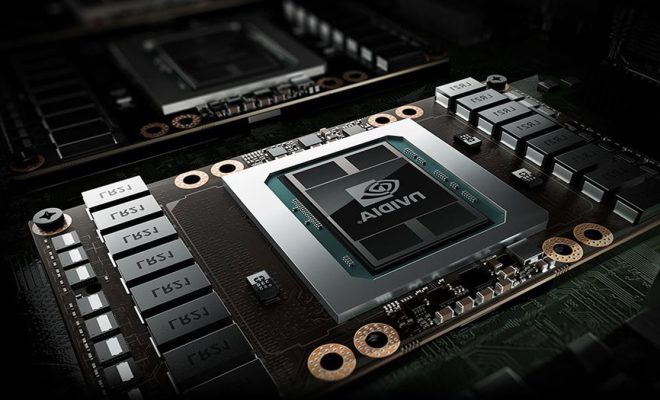
When it comes to improving your computer’s performance, understanding VRAM is a vital component. VRAM, which stands for Video Random Access Memory, is a core element in any GPU or graphics card. It holds a significant impact on the graphics performance of the system, especially when running video games or making videos. This article will discuss VRAM, how to check it, and if it can be increased.

VRAM, in simple terms, is a dedicated form of RAM used by GPUs to store graphical information for image display. It stores and manages the data created by the CPU in real-time, the images that the graphic card displays on your desktop, and the videos and games you play. The more VRAM your graphics card has, the more data it can store, and the faster it can access real-time data, and hence, will be perfect for running high-end games and software.

To check the amount of VRAM on your computer, there are several methods. The first one is to look at the specifications of the graphics card. You can find the details by checking the manual, box, or manufacturer’s website. The second method is to use the device manager of your Windows computer. Go to the start menu and search for “Device Manager.” Look for the “Display Adapters” option and click on it. Right-click on your graphics card and select “Properties.” A window will pop up with details about the graphics card, including its VRAM capacity.

Now, the question arises, can you increase the VRAM on your computer? In most cases, the VRAM on your graphics card cannot be upgraded. It is mainly because it is integrated into the design and architecture of the GPU chip itself. It’s a dedicated piece of hardware that cannot be added externally, like RAM or storage on your computer’s motherboard. Thus, if you want to upgrade your VRAM, you have to purchase a new graphics card that has a higher capacity. However, some graphics cards, such as AMD Radeon and Nvidia, have software utilities that can help manage the VRAM allocation. These tools allow you to control how much of the graphics card memory is assigned to different applications.


Previous Article

What is VPN Client Software?

Next Article

What is VRM and How it Affects ...

Matthew Lynch

Related articles More from author

  • Digital & Mobile Technology

    How to Recover Deleted Facebook Messages

    August 3, 2023
    By Matthew Lynch
  • Digital & Mobile TechnologyDigital Literacy

    Teaching Students How to Manage Digital Distractions

    September 24, 2020
    By Matthew Lynch
  • Digital & Mobile Technology

    What Is UTC, and How Is It Used?

    August 3, 2023
    By Matthew Lynch
  • Digital & Mobile Technology

    How to Make a Voronoi Pattern with a 3D Printer

    July 14, 2023
    By Matthew Lynch
  • Digital & Mobile Technology

    What is a Wireless Monitor?

    March 19, 2023
    By Matthew Lynch
  • Digital & Mobile Technology

    What Is Tinder and How Does It Work?

    June 23, 2023
    By Matthew Lynch

Search

Login & Registration

  • Log in
  • Entries feed
  • Comments feed
  • WordPress.org

Newsletter

Signup for The Tech Edvocate Newsletter and have the latest in EdTech news and opinion delivered to your email address!

About Us

Since technology is not going anywhere and does more good than harm, adapting is the best course of action. That is where The Tech Edvocate comes in. We plan to cover the PreK-12 and Higher Education EdTech sectors and provide our readers with the latest news and opinion on the subject. From time to time, I will invite other voices to weigh in on important issues in EdTech. We hope to provide a well-rounded, multi-faceted look at the past, present, the future of EdTech in the US and internationally.

We started this journey back in June 2016, and we plan to continue it for many more years to come. I hope that you will join us in this discussion of the past, present and future of EdTech and lend your own insight to the issues that are discussed.

Newsletter

Signup for The Tech Edvocate Newsletter and have the latest in EdTech news and opinion delivered to your email address!

Contact Us

The Tech Edvocate
910 Goddin Street
Richmond, VA 23231
(601) 630-5238
[email protected]

Copyright © 2026 Matthew Lynch. All rights reserved.