The Tech Edvocate

Top Menu

  • Advertisement
  • Apps
  • Home Page
  • Home Page Five (No Sidebar)
  • Home Page Four
  • Home Page Three
  • Home Page Two
  • Home Tech2
  • Icons [No Sidebar]
  • Left Sidbear Page
  • Lynch Educational Consulting
  • My Account
  • My Speaking Page
  • Newsletter Sign Up Confirmation
  • Newsletter Unsubscription
  • Our Brands
  • Page Example
  • Privacy Policy
  • Protected Content
  • Register
  • Request a Product Review
  • Shop
  • Shortcodes Examples
  • Signup
  • Start Here
    • Governance
    • Careers
    • Contact Us
  • Terms and Conditions
  • The Edvocate
  • The Tech Edvocate Product Guide
  • Topics
  • Write For Us
  • Advertise

Main Menu

  • Start Here
    • Our Brands
    • Governance
      • Lynch Educational Consulting, LLC.
      • Dr. Lynch’s Personal Website
      • Careers
    • Write For Us
    • The Tech Edvocate Product Guide
    • Contact Us
    • Books
    • Edupedia
    • Post a Job
    • The Edvocate Podcast
    • Terms and Conditions
    • Privacy Policy
  • Topics
    • Assistive Technology
    • Child Development Tech
    • Early Childhood & K-12 EdTech
    • EdTech Futures
    • EdTech News
    • EdTech Policy & Reform
    • EdTech Startups & Businesses
    • Higher Education EdTech
    • Online Learning & eLearning
    • Parent & Family Tech
    • Personalized Learning
    • Product Reviews
  • Advertise
  • Tech Edvocate Awards
  • The Edvocate
  • Pedagogue
  • School Ratings

logo

The Tech Edvocate

  • Start Here
    • Our Brands
    • Governance
      • Lynch Educational Consulting, LLC.
      • Dr. Lynch’s Personal Website
        • My Speaking Page
      • Careers
    • Write For Us
    • The Tech Edvocate Product Guide
    • Contact Us
    • Books
    • Edupedia
    • Post a Job
    • The Edvocate Podcast
    • Terms and Conditions
    • Privacy Policy
  • Topics
    • Assistive Technology
    • Child Development Tech
    • Early Childhood & K-12 EdTech
    • EdTech Futures
    • EdTech News
    • EdTech Policy & Reform
    • EdTech Startups & Businesses
    • Higher Education EdTech
    • Online Learning & eLearning
    • Parent & Family Tech
    • Personalized Learning
    • Product Reviews
  • Advertise
  • Tech Edvocate Awards
  • The Edvocate
  • Pedagogue
  • School Ratings
  • Shocking: Mercury Skin Bleachers Still Flood Amazon, Temu, and TikTok Shop

  • Shocking: 195,000 Heated Blankets Recalled After Dozens Suffer Burns – Is Yours One of Them?

  • The $4 Billion Comeback: How Manus Defied Geopolitical Odds to Double Its Valuation

  • This Israeli Startup Accidentally Unleashed AI Cyberattacks on Real Companies

  • This PlayStation Exclusive Just Vanished Forever — And It’s a Warning to All Gamers

  • The Jaw-Dropping Truth Behind Marvel’s Wolverine AI Scare

  • The September 2026 AI Surge: Why Your Business Needs to Adapt Now

  • The Billion-Dollar AI Slowdown Lawsuit That Could Shatter Big Tech

  • The Brutal Truth: Why Your Student Loan Discharge Is Stuck in Limbo

  • 7 Critical Lessons From Russia’s Election Cyber Onslaught

Digital & Mobile Technology
Home›Digital & Mobile Technology›What is Sketchup (and How Do I Use It)?

What is Sketchup (and How Do I Use It)?
By Matthew Lynch
May 11, 2023
0
Spread the love

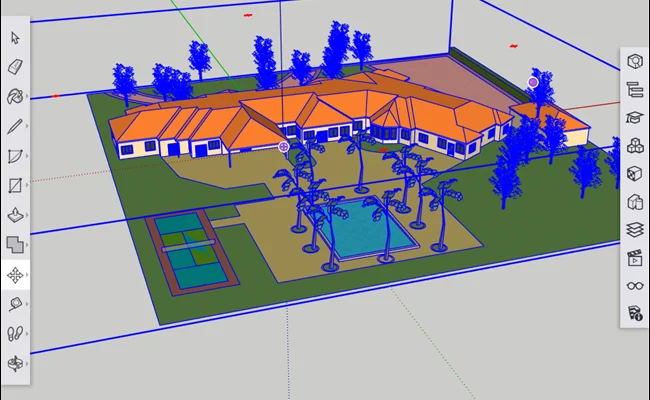
SketchUp is 3D modeling software known for its easy-to-use interface and accessibility. It has become a staple tool in the fields of architecture, engineering, and interior design for its ability to create advanced models with a few clicks of a button.

SketchUp was initially released in 2000 and was later acquired by Google in 2006 before being sold to Trimble Inc. in 2012. SketchUp is available in two main versions: SketchUp Free, which is a web-based browser version, and SketchUp Pro, which is a desktop application. Both versions allow users to create, modify and share 3D models with others.

SketchUp allows users to create 3D models using a combination of primitive shapes like squares, circles, and triangles, and by extruding or subtracting volume from these shapes. Additionally, it has a few unique features such as push/pull, which allows users to shrink, stretch, and add volume to any geometry in their model. Another feature is Follow Me, which enables users to create complex shapes by extruding a shape along a path.

SketchUp also includes a wide array of tools to help users create accurate measurements and dimensions for their models. These tools ensure that every element of the design is precisely in the right place and scale. The software also has a vast library of pre-made components ranging from furniture and appliances to trees and cars, making creating complex models much easier.

SketchUp is fast and intuitive, making it an excellent choice for beginners and professionals alike. The software is easy to learn but powerful enough to create detailed models of entire buildings with intricate details. SketchUp is also known for its compatibility with other software, such as Revit or AutoCAD, allowing users to import and export files between different programs.

To use SketchUp, first, download and install the software on your computer. Next, watch tutorial videos or read guides to become familiar with the software’s interface and tools. Once you’re comfortable, begin creating models using the built-in tools and pre-made components. Save your models to your device or share them on the SketchUp platform for others to access.


Previous Article

What is Shared Hosting?

Next Article

What is Single-Mode Fiber?

Matthew Lynch

Related articles More from author

  • Digital & Mobile Technology

    How to Print Photos at Home

    July 6, 2023
    By Matthew Lynch
  • Digital & Mobile Technology

    What Is the Ribbon in PowerPoint

    June 12, 2023
    By Matthew Lynch
  • Digital & Mobile Technology

    What is a Digital Identity?

    March 20, 2023
    By Matthew Lynch
  • Digital & Mobile Technology

    How to Add Multiple Photos to an Instagram Story

    June 22, 2023
    By Matthew Lynch
  • Digital & Mobile Technology

    How to Tame Axolotls in Minecraft

    September 7, 2023
    By Matthew Lynch
  • Digital & Mobile Technology

    How to Uninstall McAfee

    June 1, 2023
    By Matthew Lynch

Search

Login & Registration

  • Log in
  • Entries feed
  • Comments feed
  • WordPress.org

Newsletter

Signup for The Tech Edvocate Newsletter and have the latest in EdTech news and opinion delivered to your email address!

About Us

Since technology is not going anywhere and does more good than harm, adapting is the best course of action. That is where The Tech Edvocate comes in. We plan to cover the PreK-12 and Higher Education EdTech sectors and provide our readers with the latest news and opinion on the subject. From time to time, I will invite other voices to weigh in on important issues in EdTech. We hope to provide a well-rounded, multi-faceted look at the past, present, the future of EdTech in the US and internationally.

We started this journey back in June 2016, and we plan to continue it for many more years to come. I hope that you will join us in this discussion of the past, present and future of EdTech and lend your own insight to the issues that are discussed.

Newsletter

Signup for The Tech Edvocate Newsletter and have the latest in EdTech news and opinion delivered to your email address!

Contact Us

The Tech Edvocate
910 Goddin Street
Richmond, VA 23231
(601) 630-5238
[email protected]

Copyright © 2026 Matthew Lynch. All rights reserved.