The Tech Edvocate

Top Menu

  • Advertisement
  • Apps
  • Home Page
  • Home Page Five (No Sidebar)
  • Home Page Four
  • Home Page Three
  • Home Page Two
  • Home Tech2
  • Icons [No Sidebar]
  • Left Sidbear Page
  • Lynch Educational Consulting
  • My Account
  • My Speaking Page
  • Newsletter Sign Up Confirmation
  • Newsletter Unsubscription
  • Our Brands
  • Page Example
  • Privacy Policy
  • Protected Content
  • Register
  • Request a Product Review
  • Shop
  • Shortcodes Examples
  • Signup
  • Start Here
    • Governance
    • Careers
    • Contact Us
  • Terms and Conditions
  • The Edvocate
  • The Tech Edvocate Product Guide
  • Topics
  • Write For Us
  • Advertise

Main Menu

  • Start Here
    • Our Brands
    • Governance
      • Lynch Educational Consulting, LLC.
      • Dr. Lynch’s Personal Website
      • Careers
    • Write For Us
    • The Tech Edvocate Product Guide
    • Contact Us
    • Books
    • Edupedia
    • Post a Job
    • The Edvocate Podcast
    • Terms and Conditions
    • Privacy Policy
  • Topics
    • Assistive Technology
    • Child Development Tech
    • Early Childhood & K-12 EdTech
    • EdTech Futures
    • EdTech News
    • EdTech Policy & Reform
    • EdTech Startups & Businesses
    • Higher Education EdTech
    • Online Learning & eLearning
    • Parent & Family Tech
    • Personalized Learning
    • Product Reviews
  • Advertise
  • Tech Edvocate Awards
  • The Edvocate
  • Pedagogue
  • School Ratings

logo

The Tech Edvocate

  • Start Here
    • Our Brands
    • Governance
      • Lynch Educational Consulting, LLC.
      • Dr. Lynch’s Personal Website
        • My Speaking Page
      • Careers
    • Write For Us
    • The Tech Edvocate Product Guide
    • Contact Us
    • Books
    • Edupedia
    • Post a Job
    • The Edvocate Podcast
    • Terms and Conditions
    • Privacy Policy
  • Topics
    • Assistive Technology
    • Child Development Tech
    • Early Childhood & K-12 EdTech
    • EdTech Futures
    • EdTech News
    • EdTech Policy & Reform
    • EdTech Startups & Businesses
    • Higher Education EdTech
    • Online Learning & eLearning
    • Parent & Family Tech
    • Personalized Learning
    • Product Reviews
  • Advertise
  • Tech Edvocate Awards
  • The Edvocate
  • Pedagogue
  • School Ratings
  • A Visitors Guide to Long Beach (CA), United States

  • A Visitor’s Guide to Fresno (CA), United States

  • A Visitors Guide to New Orleans (LA), United States

  • A Visitors Guide to Sacramento (CA), United States

  • A Visitors Guide to Lyon, France

  • JisuLife Ultra2 Portable Fan: A Powerful Multi-Function Cooling Solution

  • A Visitors Guide to Viña del Mar, Chile

  • A Visitors Guide to Århus, Denmark

  • A Visitors Guide to Bakersfield (CA), United States

  • A Visitors Guide to Aurora (CO), United States

Digital & Mobile Technology
Home›Digital & Mobile Technology›What Can You Do With Samsung’s Bixby Vision?

What Can You Do With Samsung’s Bixby Vision?
By Matthew Lynch
June 21, 2023
0
Spread the love

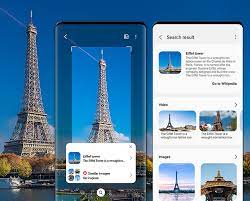
Samsung’s Bixby Vision is a powerful tool that can be used to augment your smartphone experience. This unique feature is designed to capture an image and provide you with information that is relevant to it. With Bixby Vision, you can scan, search, and explore what you see in front of you, and discover more about the world around you. Here are some of the ways you can use Samsung’s Bixby Vision.

1. Shopping

One of the most popular uses of Bixby Vision is shopping. With this feature, you can scan a product, and Bixby Vision will provide you with information on where to buy it, the price, and reviews. You can even purchase the product directly from your phone, without having to leave the app.

2. Translation

Bixby Vision also supports translation, making it easier to communicate with people who speak a different language. All you need to do is point your camera at the text, and Bixby Vision will translate it for you.

3. Text Recognition

Need to copy and paste some text from an image? Bixby Vision will extract the text from an image and allows you to copy it with just a few taps.

4. Food Recognition

Foodies rejoice! Bixby Vision supports food recognition, which is essentially image recognition for food. If you’re unsure about a dish, take a picture of it, and Bixby Vision will recognize it for you and provide you with information on the ingredients and calories.

5. QR Code Scanning

QR codes are becoming ever more prevalent in our daily lives, and Bixby Vision can help you scan them. Just point your camera at the QR Code, and Bixby Vision will automatically scan it and provide you with information.

6. Landscape Identification

Hiking enthusiasts can use Bixby Vision to identify the landscape and the flora and fauna around them. Just point your camera at the landscape, and Bixby Vision will provide you with information about the flora and fauna in the area.

In conclusion, Samsung’s Bixby Vision is a powerful tool that can be used for a wide range of purposes. With features like shopping, translation, text recognition, food recognition, QR code scanning, and landscape identification, you can use your smartphone to explore the world around you in new and exciting ways. Bixby Vision is an excellent example of how technology can augment our lives and enhance our experiences.


Previous Article

Why Apple Abandoned Its Plan to Scan ...

Next Article

Unable to Scan the QR Code on ...

Matthew Lynch

Related articles More from author

  • Digital & Mobile Technology

    How to Transfer Data to a New iPhone or iPad

    May 29, 2023
    By Matthew Lynch
  • Digital & Mobile Technology

    How To Find Your Twitch Stream Key

    July 6, 2023
    By Matthew Lynch
  • Digital & Mobile Technology

    9 Fun DIY Projects to Get Your Feet Wet in Robotics

    June 6, 2023
    By Matthew Lynch
  • Digital & Mobile Technology

    Miles Morales: The Man, The Spider (-man), The Game

    June 3, 2023
    By Matthew Lynch
  • Digital & Mobile Technology

    How to Transfer Photos From iPhone to iPhone

    June 4, 2023
    By Matthew Lynch
  • Digital & Mobile Technology

    How to Reset Your Microsoft Account Password

    July 6, 2023
    By Matthew Lynch

Search

Login & Registration

  • Register
  • Log in
  • Entries feed
  • Comments feed
  • WordPress.org

Newsletter

Signup for The Tech Edvocate Newsletter and have the latest in EdTech news and opinion delivered to your email address!

About Us

Since technology is not going anywhere and does more good than harm, adapting is the best course of action. That is where The Tech Edvocate comes in. We plan to cover the PreK-12 and Higher Education EdTech sectors and provide our readers with the latest news and opinion on the subject. From time to time, I will invite other voices to weigh in on important issues in EdTech. We hope to provide a well-rounded, multi-faceted look at the past, present, the future of EdTech in the US and internationally.

We started this journey back in June 2016, and we plan to continue it for many more years to come. I hope that you will join us in this discussion of the past, present and future of EdTech and lend your own insight to the issues that are discussed.

Newsletter

Signup for The Tech Edvocate Newsletter and have the latest in EdTech news and opinion delivered to your email address!

Contact Us

The Tech Edvocate
910 Goddin Street
Richmond, VA 23231
(601) 630-5238
[email protected]

Copyright © 2025 Matthew Lynch. All rights reserved.