The Tech Edvocate

Top Menu

  • Advertisement
  • Apps
  • Home Page
  • Home Page Five (No Sidebar)
  • Home Page Four
  • Home Page Three
  • Home Page Two
  • Home Tech2
  • Icons [No Sidebar]
  • Left Sidbear Page
  • Lynch Educational Consulting
  • My Account
  • My Speaking Page
  • Newsletter Sign Up Confirmation
  • Newsletter Unsubscription
  • Our Brands
  • Page Example
  • Privacy Policy
  • Protected Content
  • Register
  • Request a Product Review
  • Shop
  • Shortcodes Examples
  • Signup
  • Start Here
    • Governance
    • Careers
    • Contact Us
  • Terms and Conditions
  • The Edvocate
  • The Tech Edvocate Product Guide
  • Topics
  • Write For Us
  • Advertise

Main Menu

  • Start Here
    • Our Brands
    • Governance
      • Lynch Educational Consulting, LLC.
      • Dr. Lynch’s Personal Website
      • Careers
    • Write For Us
    • The Tech Edvocate Product Guide
    • Contact Us
    • Books
    • Edupedia
    • Post a Job
    • The Edvocate Podcast
    • Terms and Conditions
    • Privacy Policy
  • Topics
    • Assistive Technology
    • Child Development Tech
    • Early Childhood & K-12 EdTech
    • EdTech Futures
    • EdTech News
    • EdTech Policy & Reform
    • EdTech Startups & Businesses
    • Higher Education EdTech
    • Online Learning & eLearning
    • Parent & Family Tech
    • Personalized Learning
    • Product Reviews
  • Advertise
  • Tech Edvocate Awards
  • The Edvocate
  • Pedagogue
  • School Ratings

logo

The Tech Edvocate

  • Start Here
    • Our Brands
    • Governance
      • Lynch Educational Consulting, LLC.
      • Dr. Lynch’s Personal Website
        • My Speaking Page
      • Careers
    • Write For Us
    • The Tech Edvocate Product Guide
    • Contact Us
    • Books
    • Edupedia
    • Post a Job
    • The Edvocate Podcast
    • Terms and Conditions
    • Privacy Policy
  • Topics
    • Assistive Technology
    • Child Development Tech
    • Early Childhood & K-12 EdTech
    • EdTech Futures
    • EdTech News
    • EdTech Policy & Reform
    • EdTech Startups & Businesses
    • Higher Education EdTech
    • Online Learning & eLearning
    • Parent & Family Tech
    • Personalized Learning
    • Product Reviews
  • Advertise
  • Tech Edvocate Awards
  • The Edvocate
  • Pedagogue
  • School Ratings
  • The Shocking Truth: ESG Training Programs Are Quietly Reshaping Your Career Path

  • Why Millions of People Are Switching to These Green Energy Certifications Right Now

  • The green skills gap in 2026: How to address this growing problem

  • The Shocking Truth: Your Degree Won’t Land You the Best IT Jobs in 2026

  • The Brutal Truth About Degrees: Why Micro-Credentials Are Quietly Dominating Careers by 2026

  • Why 96% of Employers Now Prefer Skills Over Degrees: The Micro-Credential Revolution

  • This Crucial Mistake With AI Is Stunting Student Minds: Here’s How to Fix It

  • The AI ‘Cognitive Surrender’ Crisis: 7 Tools Every Educator Needs NOW

  • This Crucial Mistake Is Quietly Killing Students’ Brains, Says MIT

  • The Sneaky Truth About RTO: How to Negotiate Flexible Work Without Losing Your Job

Digital & Mobile Technology
Home›Digital & Mobile Technology›How to Use Widgetsmith to Make Widgets on an iPhone or iPad

How to Use Widgetsmith to Make Widgets on an iPhone or iPad
By Matthew Lynch
June 22, 2023
0
Spread the love

Widgetsmith is a popular app that can be used to create and customize widgets on iPhones or iPads. Widgets are small, interactive boxes that display useful information or quick actions on your device’s home screen. With Widgetsmith, you can create personalized widgets that include the information you need most, such as weather updates, calendar appointments, or health data. In this article, we’ll explain how to use Widgetsmith to make widgets on your iPhone or iPad.

Step 1: Download Widgetsmith from the App Store

The first step to using Widgetsmith is to download the app from the App Store. Widgetsmith is available for free, but some of its features require a premium subscription. Once you’ve downloaded and installed the app on your device, open it to start creating your first widget.

Step 2: Choose a Widget Size

After you open Widgetsmith, you’ll see a list of available widgets to choose from. You can choose from small, medium, or large widgets, depending on how much information you want to display. Small widgets are the size of one app icon, medium widgets take up four app icons, and large widgets take up eight app icons. Choose the size that fits your needs best.

Step 3: Customize Your Widget

Once you’ve chosen your widget size, you’ll be taken to a screen where you can customize your widget. You can select the type of data you want to display, such as the current time, date, weather forecast, or battery life. You can also select fonts, colors, and icon styles to match your personal taste.
Widgetsmith also allows you to add custom images or choose from its library of stock photos to use as backgrounds for your widgets. If you have a premium subscription, you can even select dynamic backgrounds that change throughout the day.

Step 4: Add Your Widget to the Home Screen

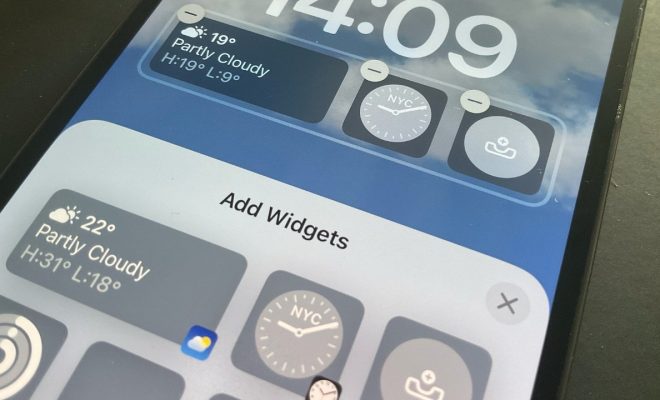
After you’ve customized your widget, tap the “Save” button to add it to your list of available widgets. You can then go to your device’s home screen and press and hold an empty space until the apps start to jiggle. In the upper left corner, you’ll see a “+” icon. Tap that icon to open the list of available widgets.
Find the Widgetsmith widget you just created and tap on it to add it to your home screen. You can then move the widget around and resize it to your liking.

Step 5: Check Your Widget and Make Changes if Necessary

Once you’ve added your widget to the home screen, it’s a good idea to check that it’s displaying the information you want correctly. If you’re not satisfied with your widget, you can tap and hold it on the home screen and select “Edit Widget” to make changes. You can then save your changes and the widget will automatically update on the home screen.


Previous Article

What Time Does BeReal Go Off?

Next Article

How to Connect AirPods to Your Xbox ...

Matthew Lynch

Related articles More from author

  • Digital & Mobile TechnologyEarly Childhood & K-12 EdTechEdTech & InnovationElementary Education

    How to Select the Best Screencasting Tool for Your Flipped Classroom

    October 26, 2020
    By Matthew Lynch
  • Digital & Mobile Technology

    Super AMOLED vs Super LCD: What’s the Difference?

    June 22, 2023
    By Matthew Lynch
  • Digital & Mobile Technology

    Best Proxy Sites to Try for Safer Browsing

    August 5, 2023
    By Matthew Lynch
  • Digital & Mobile Technology

    Why Aren’t Game Boy Advance Games on the Virtual Console?

    June 26, 2023
    By Matthew Lynch
  • Digital & Mobile Technology

    What Is a Roomba and How Does It Work?

    June 10, 2023
    By Matthew Lynch
  • Digital & Mobile Technology

    How to Add Multiple Accounts to Meta (Oculus) Quest 2

    June 3, 2023
    By Matthew Lynch

Search

Login & Registration

  • Log in
  • Entries feed
  • Comments feed
  • WordPress.org

Newsletter

Signup for The Tech Edvocate Newsletter and have the latest in EdTech news and opinion delivered to your email address!

About Us

Since technology is not going anywhere and does more good than harm, adapting is the best course of action. That is where The Tech Edvocate comes in. We plan to cover the PreK-12 and Higher Education EdTech sectors and provide our readers with the latest news and opinion on the subject. From time to time, I will invite other voices to weigh in on important issues in EdTech. We hope to provide a well-rounded, multi-faceted look at the past, present, the future of EdTech in the US and internationally.

We started this journey back in June 2016, and we plan to continue it for many more years to come. I hope that you will join us in this discussion of the past, present and future of EdTech and lend your own insight to the issues that are discussed.

Newsletter

Signup for The Tech Edvocate Newsletter and have the latest in EdTech news and opinion delivered to your email address!

Contact Us

The Tech Edvocate
910 Goddin Street
Richmond, VA 23231
(601) 630-5238
[email protected]

Copyright © 2026 Matthew Lynch. All rights reserved.