Mastering Jira Workflows: A Comprehensive Guide
“`html
When it comes to project management, few tools are as widely recognized or utilized as Jira. Originally designed for tracking bugs and issues, it has evolved into a comprehensive project management software relied upon by teams across various industries. Understanding how to effectively use Jira workflows can significantly enhance your team’s efficiency and output. In this Jira workflow tutorial, we’ll explore the fundamentals, best practices, and advanced techniques that will empower you to manage your projects like a pro.
1. Understanding Jira Workflows
At its core, a Jira workflow defines the series of steps that an issue (like a task or bug) goes through from start to finish. Workflows in Jira are not just linear paths; they can branch out based on different conditions, roles, or events, creating a complex map of how work progresses. By configuring these workflows, teams can tailor their project management processes to meet specific needs.
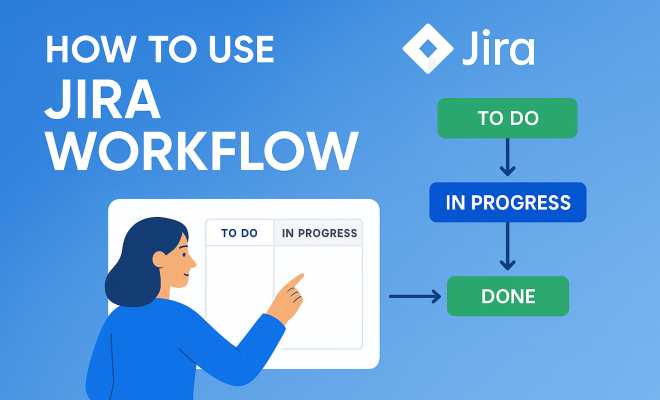
Workflows typically consist of different statuses (like ‘To Do’, ‘In Progress’, and ‘Done’) and transitions that allow issues to move from one status to another. Understanding how to customize these elements to fit your team’s unique processes is crucial. This means not just knowing what each status represents, but also knowing how transitions can affect team dynamics and project timelines.
2. Creating and Customizing Your Workflow
Starting with a blank slate can be daunting, but Jira provides intuitive tools to help you create a workflow that’s right for your team. To create a workflow, navigate to the Jira Administration section and select Workflows. Here, you can create a new workflow or modify an existing one. Remember to think about your team’s specific needs and processes.
Customization is where the magic happens. You can add additional statuses, define transitions, and establish conditions and validators for each transition. For instance, you might want to ensure that a task cannot be marked as ‘Done’ unless code review is completed. This level of customization helps enforce your team’s processes and maintain consistency.
3. Utilizing Workflow Schemes
In Jira, a workflow scheme links your workflows to specific project types or issue types, allowing for varied processes across different areas of your organization. Implementing workflow schemes can streamline your project management by ensuring that the right workflows are applied in the right contexts.
To set up a workflow scheme, navigate back to the Jira Administration section and select Workflow Schemes. Here, you can map your workflows to specific projects or issue types. This allows for a high degree of flexibility and ensures that each team or project can operate under a workflow that suits them best.
4. Best Practices for Workflow Management
Like any tool, Jira workflows are most effective when used with best practices in mind. Start by keeping your workflows simple; overly complex workflows can lead to confusion and hinder productivity. Aim for clarity in statuses and transitions, ensuring that every team member understands the process.
Regularly reviewing and updating your workflows is also essential. As project requirements change, your workflows should evolve too. Encourage feedback from your team to identify any bottlenecks or inefficiencies in the current workflow. This collaborative approach not only improves the process but also enhances team morale by making everyone feel involved.
5. Integrating Automation in Jira Workflows
One of the powerful features of Jira is its ability to automate repetitive tasks within workflows. Automation can save time and reduce the chance for human error. For instance, you can set up automation rules that automatically transition issues based on certain triggers, such as moving a task to the ‘In Progress’ status when a developer starts working on it.
To set up automation, navigate to the Project Settings and select Automation. Here, you can create rules that fit your specific needs. This might include notifications for team members when a task moves to a certain status or automatically assigning tasks based on workload. Utilizing automation can elevate your workflow efficiency dramatically. (better project management tips)
6. Tracking and Reporting on Workflows
Effective project management involves not just executing tasks but also tracking progress and reporting on outcomes. Jira provides robust reporting tools that allow you to analyze how workflows are performing. You can generate reports on issue statuses, time tracking, and team performance which can be invaluable for understanding your project’s health. (See: Jira overview on Wikipedia.)
Utilizing dashboards can also enhance visibility across your project. Customize your dashboard to include widgets that track workflow statistics, such as the average time an issue spends in a particular status or the number of tasks completed in a sprint. This information can guide future workflow adjustments and help in strategic planning.
7. Common Challenges and Solutions
No tool is without its challenges, and Jira workflows are no exception. One common issue teams face is resistance to change; team members may be accustomed to certain processes and reluctant to adopt new workflows. To overcome this, provide training sessions and create documentation that explains the benefits of the new workflow clearly.
Another challenge is maintaining workflow integrity as teams scale. As your organization grows, workflows may need to be more complex. Continuously review and refine your workflows to ensure they remain relevant and effective. Don’t hesitate to involve a wider range of team members in this process to gather diverse feedback.
8. Staying Updated with Jira
Jira is constantly evolving, with regular updates that add new features and improve existing ones. Staying informed about these changes can help you make the most of your workflows. Subscribe to Atlassian’s blog or join community forums where professionals share tips and experiences related to Jira.
Participating in webinars or training offered by Atlassian or third-party vendors can also keep your skills sharp. The more you engage with the Jira community, the better equipped you’ll be to leverage its features for your project management needs.
9. Advanced Workflow Customization Techniques
Once you’re familiar with the basics, you can explore advanced techniques to customize your workflows even further. For example, you can use post functions to automate actions that happen after a transition occurs. This could include updating fields, sending notifications, or even creating sub-tasks. This not only saves time but also ensures important steps aren’t overlooked.
You might also consider implementing custom field configurations that align with your workflow’s needs. Adding fields for priority, due date, or specific team member assignments can aid in tracking progress and accountability. The ability to tailor fields to your operations boosts the usability and relevance of your workflow.
10. Integrating Jira with Other Tools
Jira’s power can be expanded by integrating it with other tools your team is already using. Whether it’s Confluence for documentation, Bitbucket for code repositories, or Slack for communications, integrations can help unify your workflow. By connecting these tools, you create a seamless flow of information that keeps everyone on the same page.
For instance, you can link Jira issues to corresponding Confluence pages where detailed documentation resides. This means that when a task is created in Jira, it’s easy to reference the related documentation without switching between platforms. Explore the Atlassian Marketplace for add-ons that enhance your Jira experience and streamline your workflow.
11. Real-World Success Stories
Many organizations have seen marked improvements in their project management efficiency after implementing tailored Jira workflows. For example, a software development company managed to cut down their project delivery time by 30% after customizing their Jira workflows to align more closely with their agile practices. By integrating feedback loops and automating status updates, they increased transparency and accountability within their teams.
Similarly, a marketing team used Jira to coordinate their campaigns. By establishing a workflow that included content creation, review, and publication phases, they were able to enhance collaboration, reduce bottlenecks, and ensure that deadlines were consistently met.
These success stories highlight not only the flexibility of Jira but also the importance of tailoring workflows to meet specific team needs effectively.
12. Analyzing Workflow Performance
To get the most out of your workflows, you need to analyze their performance regularly. Jira provides several built-in reports, such as the Control Chart and Cumulative Flow Diagram, which give insights into how long issues stay in different statuses and highlight potential bottlenecks. (See: CDC on ergonomics in project management.)
Consider setting up regular review meetings to discuss workflow performance with your team. During these meetings, you can analyze metrics like cycle time and lead time to see where improvements can be made. This data-driven approach ensures that your workflows evolve based on actual performance rather than assumptions.
13. Jira Workflow FAQs
What is a Jira workflow?
A Jira workflow is a set of statuses and transitions that an issue goes through from start to finish. It defines the process every task or bug will follow within a project.
How can I create a new workflow in Jira?
To create a new workflow, navigate to the Jira Administration section, select Workflows, and use the provided tools to add statuses and transitions based on your team’s needs.
Can I customize Jira workflows for different teams?
Absolutely! You can customize workflows for various teams or projects by creating different workflow schemes, ensuring that each team follows a process that best fits their specific requirements.
Is it possible to automate transitions in Jira?
Yes, Jira allows you to set up automation rules that can automatically transition issues based on specific triggers, helping to streamline your workflow and reduce manual effort. There’s a fuller look at top project management apps.
How do I track my workflow efficiency in Jira?
Utilize the reporting tools available in Jira to generate insights on issue statuses, time tracking, and team performance. You can also customize dashboards to visualize workflow statistics tailored to your needs.
What are the key differences between different Jira workflow types?
Jira offers a variety of workflow types, including simple workflows, which have a straightforward linear sequence, and complex workflows that involve multiple branches and conditions. Understanding these differences can help you select the right one for your project needs.
Can workflows be exported and imported in Jira?
Yes, Jira allows you to export workflows in XML format, which can then be imported into another Jira instance. This feature is useful for organizations that implement similar workflows across multiple projects or teams.
How can I handle workflow changes without impacting ongoing projects?
To manage workflow changes effectively, consider implementing a versioning system. You can create new versions of workflows while keeping existing ones operational. This way, ongoing projects can continue without interruptions while you test and implement new processes on other workflows. We covered enhancing IT project management in more detail.
Are there any training resources available for Jira users?
Definitely! Atlassian provides a wealth of resources including online documentation, training courses, webinars, and community forums where users can share tips and ask questions. Utilizing these resources can help your team become more proficient in using Jira workflows.
Incorporating Jira workflows into your project management strategy can lead to significant improvements in team efficiency and project visibility. Whether you’re a novice or an experienced user, understanding the ins and outs of Jira workflows is essential for maximizing your productivity. Start exploring the power of Jira today and see how it can transform the way your team collaborates and delivers results.
14. Jira Workflow Customization Case Studies
Examining case studies can provide valuable insights into how different organizations apply Jira workflows to solve specific challenges. For instance, a healthcare organization utilized Jira to manage patient care projects. By implementing a customized workflow that integrated with their electronic health records system, they were able to streamline communication between care teams and enhance patient outcomes. (See: Research on project management tools.)
Another case involves a large e-commerce company facing challenges with order processing. They created a Jira workflow that included stages for order receipt, fulfillment, and shipping. This visualization provided real-time tracking for team members and minimized delays in order delivery.
15. Future Trends in Jira Workflows
As technology continues to evolve, so too does the landscape of project management tools like Jira. One emerging trend is the integration of artificial intelligence (AI) and machine learning to enhance workflows. These technologies can analyze historical project data to suggest optimizations and predict potential bottlenecks before they occur.
Another trend is the increased focus on remote collaboration. As teams become more distributed, workflow tools are being enhanced to facilitate communication and coordination across various locations. Features such as real-time updates, mobile accessibility, and virtual team boards are becoming more commonplace, allowing teams to stay aligned regardless of where they are working.
16. Integrating User Feedback into Workflow Development
Developing workflows is not just about creating processes; it’s also about understanding the needs of the people using them. Regularly gathering user feedback can provide insights into what’s working and what’s not. Consider conducting surveys or interviews with your team to gather input on their experiences and suggestions for improvement.
Implementing a feedback loop ensures that workflows remain relevant and user-friendly. You could also establish a dedicated channel for ongoing discussions about workflow improvements, making it easier for team members to share their thoughts and contribute to the evolution of processes.
17. Jira Workflow Best Practices for Agile Teams
Agile teams can benefit from specific workflow practices designed to enhance flexibility and responsiveness. One best practice is to implement shorter sprints with defined goals and review cycles. This allows for frequent adjustments based on team feedback and changing project requirements.
Another practice is to incorporate retrospective meetings at the end of each sprint to analyze the workflow’s effectiveness. Discuss what went well and what could be improved, and use that information to adapt the workflows for future sprints. This commitment to continuous improvement is at the heart of Agile methodology and can lead to enhanced team performance over time.
Incorporating Jira workflows into your project management strategy can lead to significant improvements in team efficiency and project visibility. Whether you’re a novice or an experienced user, understanding the ins and outs of Jira workflows is essential for maximizing your productivity. Start exploring the power of Jira today and see how it can transform the way your team collaborates and delivers results.
“`
Trending Now
Frequently Asked Questions
What is a Jira workflow?
A Jira workflow is a defined series of steps that an issue, such as a task or bug, goes through from inception to completion. It includes various statuses (like 'To Do', 'In Progress', and 'Done') and transitions that allow issues to move between these statuses, enabling teams to tailor their project management processes.
How do I create a workflow in Jira?
To create a workflow in Jira, navigate to the Jira Administration section and select 'Workflows'. From there, you can create a new workflow or modify an existing one. It's important to consider your team's specific needs and processes while designing the workflow.
Can I customize my Jira workflow?
Yes, Jira allows extensive customization of workflows. You can add additional statuses, define transitions, and set conditions and validators for each transition. This enables you to create a workflow that aligns perfectly with your team's unique processes and requirements.
What are the key components of a Jira workflow?
The key components of a Jira workflow include statuses, which represent different stages of an issue (like 'To Do', 'In Progress', 'Done'), and transitions, which define how issues move from one status to another. Understanding these components is essential for effective project management.
Why is understanding Jira workflows important?
Understanding Jira workflows is crucial as it significantly enhances team efficiency and project output. By customizing workflows to fit specific needs, teams can improve their processes, streamline work, and ensure that projects are managed effectively from start to finish.
Have you experienced this yourself? We'd love to hear your story in the comments.