The Tech Edvocate

Top Menu

  • Advertisement
  • Apps
  • Home Page
  • Home Page Five (No Sidebar)
  • Home Page Four
  • Home Page Three
  • Home Page Two
  • Home Tech2
  • Icons [No Sidebar]
  • Left Sidbear Page
  • Lynch Educational Consulting
  • My Account
  • My Speaking Page
  • Newsletter Sign Up Confirmation
  • Newsletter Unsubscription
  • Our Brands
  • Page Example
  • Privacy Policy
  • Protected Content
  • Register
  • Request a Product Review
  • Shop
  • Shortcodes Examples
  • Signup
  • Start Here
    • Governance
    • Careers
    • Contact Us
  • Terms and Conditions
  • The Edvocate
  • The Tech Edvocate Product Guide
  • Topics
  • Write For Us
  • Advertise

Main Menu

  • Start Here
    • Our Brands
    • Governance
      • Lynch Educational Consulting, LLC.
      • Dr. Lynch’s Personal Website
      • Careers
    • Write For Us
    • The Tech Edvocate Product Guide
    • Contact Us
    • Books
    • Edupedia
    • Post a Job
    • The Edvocate Podcast
    • Terms and Conditions
    • Privacy Policy
  • Topics
    • Assistive Technology
    • Child Development Tech
    • Early Childhood & K-12 EdTech
    • EdTech Futures
    • EdTech News
    • EdTech Policy & Reform
    • EdTech Startups & Businesses
    • Higher Education EdTech
    • Online Learning & eLearning
    • Parent & Family Tech
    • Personalized Learning
    • Product Reviews
  • Advertise
  • Tech Edvocate Awards
  • The Edvocate
  • Pedagogue
  • School Ratings

logo

The Tech Edvocate

  • Start Here
    • Our Brands
    • Governance
      • Lynch Educational Consulting, LLC.
      • Dr. Lynch’s Personal Website
        • My Speaking Page
      • Careers
    • Write For Us
    • The Tech Edvocate Product Guide
    • Contact Us
    • Books
    • Edupedia
    • Post a Job
    • The Edvocate Podcast
    • Terms and Conditions
    • Privacy Policy
  • Topics
    • Assistive Technology
    • Child Development Tech
    • Early Childhood & K-12 EdTech
    • EdTech Futures
    • EdTech News
    • EdTech Policy & Reform
    • EdTech Startups & Businesses
    • Higher Education EdTech
    • Online Learning & eLearning
    • Parent & Family Tech
    • Personalized Learning
    • Product Reviews
  • Advertise
  • Tech Edvocate Awards
  • The Edvocate
  • Pedagogue
  • School Ratings
  • The Reckless Ben Controversy: An Outrageous Fight for Justice

  • Outrageous: The Sydney Sweeney Ad Controversy You Didn’t See Coming — And Why It’s Working

  • The AI CRM War: Why Salesforce Just Made a $2 Billion Bid for a Startup

  • OpenAI’s Navier-Stokes ‘Solution’ Ignites Firestorm: Did They Steal It?

  • Blizzard’s Boldest Bet: Why a StarCraft Shooter in 2030 Could Redefine Gaming

  • Volatile: Why Top AI Bosses Just Triggered a Massive AI Stocks Decline

  • ‘Godfather of AI’ backs Anthropic chief’s call to slow down development

  • Why Millions Are Flocking to Trade Schools as AI Reshapes the Job Market

  • Unmasking the Bizarre ‘Cat in the Hat’ Trend: Why Schools Are Sounding the Alarm

  • Florida DMV Hacked: 200,000 Driver Records Exposed in Stunning Breach

Digital & Mobile Technology
Home›Digital & Mobile Technology›How to Use Enchanted Books in Minecraft

How to Use Enchanted Books in Minecraft
By Matthew Lynch
May 30, 2023
0
Spread the love

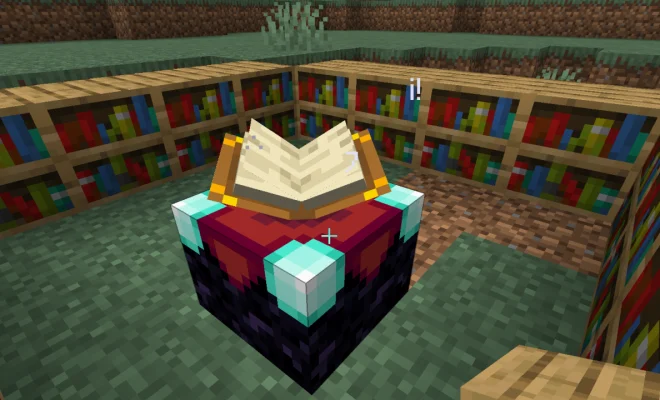
Enchanted books are a valuable asset in Minecraft. They are rare and valuable items that can make a significant impact on your gameplay experience. These books can be used to enhance your weapons, tools, and armor, making them more powerful and efficient. In this article, we will explore how to use enchanted books in Minecraft.

First, let’s look at how to obtain enchanted books. You can find enchanted books in chests, fishing, trading with librarians, or by enchanting books at an enchanting table. Once you have an enchanted book, you need to apply it to an item to give it the enchanted effect.

To apply an enchanted book to an item, you need an anvil. An anvil can be made with three iron blocks and four iron ingots. Once you have an anvil, place your item in the left slot and the enchanted book in the right slot. The cost of applying the enchantment will be displayed in experience points. If you have enough experience points, click the “repair and name” button to apply the enchantment.

There are several types of enchantments that can be applied to items. Here are some of the most common enchantments and how to use them:

1. Unbreaking – This enchantment reduces the item’s durability loss. Apply it to your tools and weapons to make them last longer.

2. Sharpness – This enchantment increases the damage dealt by your weapons. Apply it to swords, axes, and other weapons to make them more powerful.

3. Efficiency – This enchantment increases the speed of mining and reduces the time it takes to break blocks. Apply it to pickaxes and shovels to make them more efficient.

4. Protection – This enchantment reduces the damage taken from most sources. Apply it to armor to make it more protective.

5. Fire Protection – This enchantment reduces the damage taken from fire and lava. Apply it to armor to make it more fire-resistant.

6. Depth Strider – This enchantment allows the player to move faster underwater. Apply it to boots to make swimming and exploring underwater easier.

Enchanted books are a valuable tool in Minecraft. They can enhance your gameplay experience by making your tools, weapons, and armor more powerful and efficient. Remember to use an anvil to apply the enchantment to your item and consider the type of enchantment that will benefit you the most. With these tips, you can get the most out of your enchanted books and create a more enjoyable Minecraft experience.

Previous Article

What Does ‘Slide Into Your DMs Like…’ ...

Next Article

How to Pair a Roku Remote

Matthew Lynch

Related articles More from author

  • Digital & Mobile Technology

    How to Check if Your Nintendo Switch Is Moddable

    June 26, 2023
    By Matthew Lynch
  • Digital & Mobile Technology

    Ways to Get a Live Wallpaper for Your Mac: It’s Easier Than You Think

    August 5, 2023
    By Matthew Lynch
  • Digital & Mobile Technology

    Free Online DAWs for Music Production and Podcasting

    June 22, 2023
    By Matthew Lynch
  • Digital & Mobile Technology

    How to Open JAR Files in Windows 10

    August 5, 2023
    By Matthew Lynch
  • Digital & Mobile Technology

    Ways to Fix the “Compressed (Zipped) Folder Is Invalid” Error on Windows

    September 8, 2023
    By Matthew Lynch
  • Digital & Mobile Technology

    What Is Google Images and How Does It Work?

    June 4, 2023
    By Matthew Lynch

Search

Login & Registration

  • Log in
  • Entries feed
  • Comments feed
  • WordPress.org

Newsletter

Signup for The Tech Edvocate Newsletter and have the latest in EdTech news and opinion delivered to your email address!

About Us

Since technology is not going anywhere and does more good than harm, adapting is the best course of action. That is where The Tech Edvocate comes in. We plan to cover the PreK-12 and Higher Education EdTech sectors and provide our readers with the latest news and opinion on the subject. From time to time, I will invite other voices to weigh in on important issues in EdTech. We hope to provide a well-rounded, multi-faceted look at the past, present, the future of EdTech in the US and internationally.

We started this journey back in June 2016, and we plan to continue it for many more years to come. I hope that you will join us in this discussion of the past, present and future of EdTech and lend your own insight to the issues that are discussed.

Newsletter

Signup for The Tech Edvocate Newsletter and have the latest in EdTech news and opinion delivered to your email address!

Contact Us

The Tech Edvocate
910 Goddin Street
Richmond, VA 23231
(601) 630-5238
[email protected]

Copyright © 2026 Matthew Lynch. All rights reserved.