How to use DAW
“`html
The world of music production has transformed dramatically with the advent of Digital Audio Workstations (DAWs). These powerful software tools allow musicians, producers, and audio engineers to create, edit, and mix music in a way that was once only possible in high-end studios. If you’re eager to dive into the realm of music production, understanding how to use a DAW is your first crucial step. In this guide, we’ll explore seven essential tips that will help you navigate your DAW, maximize its potential, and unleash your creativity.
1. Choose the Right DAW for Your Needs
Before diving into the specifics of how to use a DAW, you need to select the one that best suits your needs. There are numerous options available, each with unique features and workflows. Popular DAWs include Ableton Live, Logic Pro X, FL Studio, and Pro Tools, among others. Each has strengths and weaknesses, so consider what you plan to do with the software.
For instance, if you’re interested in electronic music production, Ableton Live’s session view might be ideal for you. On the other hand, if you’re focused on mixing live recordings, Pro Tools is a professional standard in many studios. Research tutorials, read reviews, or even try free trials to see which DAW feels right for your workflow.
It’s also worth considering your budget. While some DAWs are free, like GarageBand for Mac users, others come at a higher price point. Think about whether you want a one-time purchase or a subscription model. Understanding the costs associated with each DAW will help you make an informed decision and ensure you’re investing wisely in your music production journey.
2. Understand the Interface
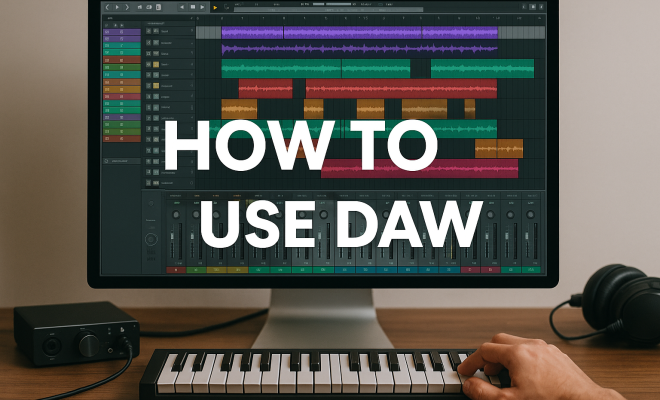
Once you’ve selected your DAW, familiarize yourself with its interface. Each DAW has a different layout, but they generally share common elements. Spend time exploring the main components: the mixer, track list, transport controls, and the arrangement view.
Take note of how to create and delete tracks, how to adjust volume levels, and where to find built-in instruments and effects. Many DAWs offer customizable layouts, so you can tailor your workspace to suit your preferences. Learning the shortcuts for various functions can also drastically improve your efficiency in using a DAW, allowing you to focus more on creativity rather than navigation.
In addition, consider configuring your layout to maximize your workflow. For instance, if you often work with MIDI tracks, you might want to keep your MIDI editor open at all times. Creating a workspace that reflects your needs can eliminate wasted time searching for tools and help you stay organized.
3. Learn Basic Recording Techniques
Understanding how to record audio and MIDI tracks is fundamental for any DAW user. Start by connecting your audio interface or MIDI controller to your computer and setting it up within your DAW. Make sure to configure your audio preferences correctly to avoid latency issues.
When recording, pay attention to your levels. Aim for a healthy signal that doesn’t clip, which is crucial for maintaining audio quality. Additionally, experiment with different microphone placements if you’re recording vocals or instruments. This fundamental knowledge will serve as the backbone of your music production skills.
Don’t overlook the importance of practice when it comes to recording. Try recording a variety of instruments and vocals to hone your skills and discover your unique style. Record multiple takes and don’t be afraid to experiment with different settings on your audio interface or DAW to find the best sound. Each session is a learning opportunity.
4. Master the Art of Editing
Editing is a significant part of music production, and knowing how to use a DAW effectively means being skilled in this area. This includes arranging, cutting, copying, and pasting audio and MIDI clips. Learn about the various editing tools available in your DAW, such as automation lanes, quantization, and fading effects.
Take the time to experiment with arranging your tracks and layering different sounds. A well-edited track can make the difference between a good song and a great one. As you hone your editing skills, you’ll find that you can shape your music with precision, allowing your artistic vision to shine through.
Additionally, consider the use of advanced editing techniques such as time-stretching and pitch correction. These tools can help you salvage imperfect takes or create unique soundscapes that were not possible with traditional recording methods. The more you explore editing capabilities, the better your final product will be.
5. Utilize Plugins and Effects
One of the most exciting aspects of using a DAW is the ability to enhance your sound through plugins and effects. These can range from virtual instruments to audio processors that manipulate your sound in creative ways. Understanding how to use a DAW to its full extent involves mastering these tools. (See: Digital Audio Workstation overview.)
Experiment with reverb, delay, compression, and equalization to see how they affect your mix. Many DAWs come with a variety of built-in effects, but you can also explore third-party options. Don’t hesitate to dive into sound design; you’ll be amazed at the sounds you can create. Remember, the goal is to find a sound that resonates with your artistic vision, and plugins are your best friends in achieving that goal.
It’s also worth noting that some DAWs support VST (Virtual Studio Technology) plugins, which can greatly expand your sonic palette. Whether you’re looking for vintage synth sounds or cutting-edge effects, VSTs can provide a depth of textures that complement your creative workflow.
6. Mixing and Mastering Basics
After your tracks are recorded and edited, the next step is mixing and mastering. Mixing is the process of balancing levels, panning instruments, and adding effects to create a cohesive sound. Learning how to use a DAW for mixing requires practice, but there are fundamental principles you can follow, such as the use of EQ to carve out space for each instrument and utilizing compression to control dynamics.
Mastering is the final step in the production process, ensuring your track sounds polished and ready for distribution. It’s important to understand the difference between mixing and mastering; they serve distinct purposes. Many DAWs now include mastering suites that can help you finalize your tracks with professional quality.
Don’t forget about the crucial aspect of reference tracks. Listening to professionally mixed songs in your genre can provide a benchmark and help you identify areas to improve in your own mixes. Comparing your work to industry standards can be a great learning opportunity.
7. Join the Community and Keep Learning
Finally, one of the best ways to excel in how to use a DAW is to engage with the community. Online forums, social media groups, and YouTube channels dedicated to music production can provide invaluable tips, tricks, and inspiration. You’ll find countless tutorials that can help you troubleshoot specific problems or learn new techniques.
Additionally, consider collaborating with other musicians or producers to gain new perspectives. The music-making process is filled with learning opportunities, and sharing your work can open doors to feedback and growth. As technology continues to evolve, so should your skills—stay curious and keep experimenting.
Networking can also lead to new opportunities, whether that’s finding collaborators for projects or getting your music heard by a wider audience. Attend local music events, workshops, or online webinars to meet others who share your passion.
8. Exploring Advanced Features
Once you’re comfortable with the basics, it’s time to explore the more advanced features of your DAW. Many DAWs come equipped with tools that significantly enhance your production capabilities. For example, you can delve into MIDI editing, which allows you to manipulate note velocities, timing, and other parameters to create intricate performances.
Consider using automation to control volume, panning, and effects over time. This adds dynamic interest to your tracks and can help create emotional highs and lows. For instance, automating a filter effect can turn a straightforward sound into something more engaging and lively as the song progresses.
Another advanced technique is utilizing side-chaining, particularly in electronic music. By routing a kick drum to compress other elements like bass or pads, you can create a “pumping” effect that adds excitement to your tracks. Understanding these advanced functionalities can truly elevate your productions.
9. Integrating Hardware with Your DAW
Many producers find that integrating hardware gear with their DAW can enhance their workflow and creativity. Whether you’re using synthesizers, drum machines, or outboard effects, knowing how to connect and use them with your DAW is invaluable.
When working with hardware, ensure that your DAW is configured to recognize it properly. MIDI setups are particularly important—ensure your MIDI inputs and outputs are set correctly. This enables you to record and manipulate sounds from your hardware directly within your DAW.
Additionally, using audio interfaces can improve sound quality and reduce latency. Investing in a high-quality interface can make a significant difference in the clarity and detail of your recordings. Explore how these tools can complement your DAW workflow.
10. Understanding Music Theory Basics
While not strictly a function of how to use a DAW, understanding music theory can greatly enhance your production skills. Knowing the basics of chords, scales, and rhythm can help you create more harmonically interesting tracks. For example, learning about chord progressions can assist you in writing more compelling melodies and harmonies.
Additionally, understanding the structure of songs—such as verses, choruses, and bridges—can help you effectively arrange your tracks. Most popular songs follow a structure that leads to a satisfying listener experience, and you can use this knowledge to craft your own music more effectively. (See: New York Times article on music production.)
11. FAQ on How to Use a DAW
What is a DAW and why do I need one?
A DAW, or Digital Audio Workstation, is software that allows you to record, edit, mix, and produce audio files. It’s essential for anyone looking to produce music or audio content, as it provides all the tools needed to create professional-quality tracks from the comfort of your home.
Can I use a DAW without any musical training?
Absolutely! While some musical training can be beneficial, many beginners start using a DAW with no prior experience. There are countless resources available online, including tutorials and courses, that can help you get started and learn how to produce music effectively.
How important are plugins in music production?
Plugins are incredibly important in music production. They expand the sonic possibilities of your DAW, allowing you to access a wide range of sounds and effects. Whether you’re utilizing virtual instruments or audio effects, plugins can greatly enhance your music-making experience.
Is it possible to collaborate with others using a DAW?
Yes! Many DAWs offer collaboration features, allowing you to share projects or work in real time with other musicians. You can also share audio files and project stems to collaborate with those using different DAWs.
What’s the difference between mixing and mastering?
Mixing is the process of balancing individual tracks within a song, adjusting levels, effects, and panning to create a cohesive sound. Mastering, on the other hand, is the final step in production, where the mixed track is polished and prepared for distribution. Both processes require different techniques and skills.
12. Final Thoughts
Mastering how to use a DAW may seem daunting at first, but with patience and practice, you can harness its full potential. Follow these tips to build a solid foundation in music production, and you’ll be well on your way to creating tracks that reflect your unique artistic voice. Remember, the journey in music production is as important as the destination. Enjoy the process, learn from your mistakes, and celebrate your successes along the way.
13. Common Mistakes to Avoid When Using a DAW
Getting started with a DAW can be overwhelming, and it’s easy to make mistakes that could hinder your workflow or creativity. Being aware of common pitfalls can help you navigate challenges more effectively.
- Neglecting Backups: One of the most frustrating things that can happen is losing your project due to a computer crash or software issue. Always save your work regularly and consider using cloud storage for automatic backups.
- Ignoring the Gain Staging: Proper gain staging ensures that your audio levels are optimal throughout the production process. Avoid recording too hot, as it can lead to distortion, and ensure that your mix does not clip when exporting.
- Overusing Effects: While effects can enhance your sound, overusing them can muddy your mix. Use effects selectively and always consider how they contribute to the overall sound of your track.
- Not Taking Breaks: Listening fatigue can set in quickly during long sessions. Give yourself regular breaks to maintain perspective on your mix and to keep your ears fresh.
- Skipping the Mix Bus: Utilizing a master bus for your tracks can help you maintain control over overall levels and apply compression or EQ collectively to achieve a cohesive sound.
14. Incorporating Music Genres in Your Production
Understanding different music genres can greatly enhance your music production skills. Each genre has its unique characteristics, and being familiar with them helps you capture the essence of the style you want to create.
For example, electronic music often relies heavily on synthesized sounds and beats, whereas rock music may emphasize live instruments and vocals. Knowing the typical tempo, structure, and instrumentation of various genres can provide guidance in your production choices.
Additionally, you might find that blending genres can result in innovative sounds. For instance, incorporating hip-hop rhythms into a pop structure or using orchestral elements in electronic music can lead to exciting new ideas. Experimenting with genre fusion can help you carve out your own musical niche.
15. Advanced Sound Design Techniques
Sound design is a crucial aspect of music production that can set your tracks apart. Exploring advanced sound design techniques can significantly enhance your DAW skills and the quality of your music.
One technique is layering sounds. By combining different sounds, you can create a more complex and rich texture. For instance, layering a synth pad with a string sample can add warmth and depth to your track.
Another method is to use granular synthesis, which allows you to manipulate audio at a microscopic level. This technique can create unique and evolving soundscapes that can be particularly useful in electronic music.
Don’t forget about sampling either. Whether it’s from vinyl records, field recordings, or other sources, sampling can introduce a whole new dimension to your productions. Learning how to chop, pitch shift, and manipulate samples can lead to unique sonic results. (See: Research on music production technology.)
Lastly, experimenting with unconventional sound sources can inspire creativity. Don’t hesitate to record sounds from your environment or use everyday objects as instruments. This approach can lead to refreshing and innovative ideas.
16. Getting Feedback on Your Tracks
Receiving feedback on your music can be invaluable for growth as a producer. Sharing your work with trusted peers or mentors can provide new insights and help you identify areas for improvement.
When seeking feedback, consider being specific about what you want others to focus on—whether it’s the overall mix, specific instruments, or the arrangement. Constructive criticism can highlight aspects you may have overlooked and make your final product stronger.
Joining online communities or local music groups can also lead to opportunities for collaboration and feedback. Be open to suggestions, and don’t take criticism personally; it’s all part of the learning process.
Additionally, consider participating in music production challenges or competitions. These events often provide a platform for you to showcase your work and receive feedback from a broader audience.
17. Building a Home Studio Setup
If you’re serious about music production, investing in a home studio setup can elevate your projects. A few essential items can drastically improve your workflow and sound quality.
Your first consideration should be a good audio interface. This device converts analog signals to digital and vice versa, ensuring high-quality sound. Look for interfaces that offer low latency and multiple inputs for recording various instruments.
Next, consider investing in studio monitors. Unlike regular speakers, studio monitors are designed for accurate sound reproduction, allowing you to hear your mix true to form. This accuracy is vital for making informed mixing decisions.
Acoustic treatment is also important for a home studio. Treating your room with bass traps, diffusers, and acoustic panels can minimize unwanted echoes and reflections, leading to a clearer sound.
Lastly, consider your MIDI controller and other instruments. A versatile MIDI controller can enhance your workflow and provide a more hands-on approach to music production. Think about what fits your style best and complement your DAW setup.
“`
Trending Now
Frequently Asked Questions
What is a DAW and how does it work?
A Digital Audio Workstation (DAW) is software used for recording, editing, and mixing audio. It allows musicians and producers to create music digitally, utilizing various tools and features like virtual instruments, effects, and audio tracks to produce professional-quality sound.
How do I choose the right DAW for music production?
To choose the right DAW, consider your specific needs and the type of music you want to produce. Research different options, read reviews, and take advantage of free trials to find a DAW that suits your workflow, budget, and production goals.
What are the essential features to look for in a DAW?
Essential features to consider in a DAW include an intuitive interface, support for virtual instruments, audio editing capabilities, a robust mixer, and compatibility with plugins. Additionally, look for features that align with your music production style, such as MIDI support or live performance tools.
Can I use a DAW for live performances?
Yes, many DAWs are designed with live performance capabilities. For instance, Ableton Live offers a session view that is ideal for triggering loops and samples on the fly. Ensure the DAW you choose has features that facilitate live setups if performance is a priority for you.
Is there a free DAW for beginners?
Yes, there are several free DAWs available for beginners, such as GarageBand for Mac users and Cakewalk by BandLab for Windows users. These options provide a great starting point for music production without financial investment, allowing users to learn and create music effectively.
Have you experienced this yourself? We’d love to hear your story in the comments.