How to track sleep on Apple Watch
“`html
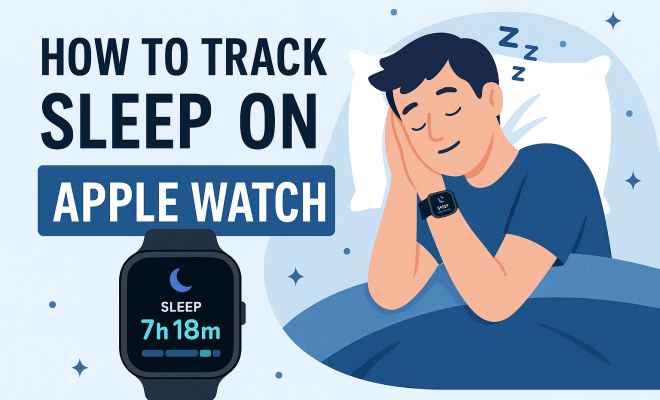
The Apple Watch has become an indispensable tool for many, not just for fitness tracking but also for monitoring sleep patterns. By using its built-in features, you can track sleep on your Apple Watch effectively. This guide will walk you through everything you need to know about sleep tracking on this popular device, from setup to interpreting your data.
1. The Sleep Tracking Feature: An Overview
Apple introduced sleep tracking as part of its watchOS 7 update, integrating it seamlessly into the Apple ecosystem. This feature enables users to gain insights into their sleep patterns, helping them make informed decisions about their health. Sleep tracking on the Apple Watch does not merely monitor how long you sleep; it evaluates sleep quality and duration, providing a holistic view of your rest.
By employing advanced sensors, including accelerometers, the Apple Watch detects your movements during sleep, allowing it to determine when you are awake or in different sleep stages. This data is then compiled into a comprehensive summary, which you can review in the Sleep app on your watch or the Health app on your iPhone.
2. Setting Up Sleep Tracking on Your Apple Watch
Getting started with sleep tracking requires a few simple steps. First, ensure that your Apple Watch is updated to the latest watchOS version. Once updated, open the Sleep app on your Apple Watch. You’ll be prompted to set your sleep goals, including your preferred bedtime and wake-up time. Setting a consistent schedule is crucial for effective sleep tracking.
In the Sleep app, you can customize your preferences, including Wind Down and Sleep Mode. Wind Down helps prepare your body for sleep by limiting distractions, while Sleep Mode silences notifications during your scheduled sleep hours. Don’t forget to wear your watch to bed; without it on your wrist, sleep tracking won’t occur.
3. Understanding Sleep Analysis
Once you track sleep on your Apple Watch, the data collected is analyzed and presented in an easy-to-read format. The Sleep app provides metrics such as total sleep time, time spent in bed, and sleep quality. You can see how closely you adhere to your sleep goals and identify trends over time.
Moreover, the Apple Watch categorizes your sleep into different stages: REM, Core, and Deep sleep. Understanding these stages is crucial, as each plays a role in your overall health. For instance, REM sleep is vital for cognitive functions, while deep sleep helps with physical recovery. The more you understand your sleep patterns, the better you can adjust your habits for improved rest.
4. Utilizing the Health App for Deeper Insights
The Health app on your iPhone complements the Apple Watch’s sleep tracking capabilities by providing a more detailed analysis of your sleep data. Here, you can view trends over days, weeks, and months. This broader perspective can help identify sleep disturbances or patterns that may not be evident from the watch alone.
You can also integrate additional health data, such as heart rate and activity levels, to see how they correlate with your sleep quality. For example, you might discover that higher activity levels during the day lead to improved sleep quality at night. This holistic view empowers you to make lifestyle changes that positively impact your sleep.
5. Sleep Tracking: The Impact on Daily Life
Tracking sleep with your Apple Watch can significantly improve your daily life. Understanding your sleep patterns enables you to adjust your habits, such as bedtime routines, screen time before bed, and even dietary choices. Many users report feeling more energetic and focused after analyzing their sleep data and making necessary adjustments.
Additionally, consistent sleep tracking can aid in recognizing sleep disorders. If you notice persistent issues with sleep quality or significant variations in your sleep data, it may be time to consult a healthcare professional. The Apple Watch can be a great first step in identifying potential health concerns related to sleep.
6. Tips for Effective Sleep Tracking
To maximize the effectiveness of your sleep tracking on the Apple Watch, consider these practical tips. First, establish a consistent sleep schedule, as regularity helps your body regulate its internal clock. Second, ensure that your watch is charged each evening; low battery levels can hinder accurate tracking. (See: CDC Sleep Health Information.)
Next, customize your Wind Down routine by incorporating relaxing activities, such as reading or meditation, to signal your body that it’s time to prepare for sleep. Lastly, be mindful of your sleep environment; a dark, cool room is conducive to better sleep quality. By implementing these strategies, you can enhance your sleep experience and obtain more reliable data.
7. Common Issues and Troubleshooting
While tracking sleep on your Apple Watch is relatively straightforward, some users may encounter issues. One common problem is inaccurate data, which can occur if the watch is not worn correctly or if it’s loose while sleeping. Ensure that your watch fits snugly on your wrist for optimal sensor performance.
If you find that your sleep data is not syncing with the Health app, try restarting both your Apple Watch and iPhone. Additionally, check that both devices are up-to-date with the latest software updates. If issues persist, consulting Apple Support or visiting an Apple Store can provide further assistance.
8. The Future of Sleep Tracking with Apple Devices
As technology evolves, so does the potential for sleep tracking on devices like the Apple Watch. Future updates may introduce more advanced sleep metrics, potentially integrating tools that monitor sleep apnea or offer personalized sleep coaching. Apple’s commitment to health and wellness suggests that sleep tracking will continue to be a priority in software updates and new feature releases.
Moreover, as Apple collaborates with health organizations and researchers, users can expect increasingly sophisticated insights into their sleep patterns. This can transform how individuals approach sleep hygiene and overall wellness, making sleep tracking on the Apple Watch an integral part of many users’ health journeys.
9. Comparing Sleep Tracking Features Across Devices
While the Apple Watch is a leader in sleep monitoring, there are several competitors in the market that offer similar functionalities. Devices like Fitbit, Garmin, and Samsung smartwatches may have distinct features that cater to various user preferences. For instance, Fitbit is renowned for its detailed sleep stage breakdowns, which include light, deep, and REM sleep analytics. Some models even provide personalized insights based on your sleep data over time.
Garmin’s sleep tracking focuses on performance, linking your sleep quality with training metrics, which is beneficial for athletes who need to monitor recovery. Samsung’s Galaxy Watch offers sleep coaching features, suggesting tips based on your sleep patterns to enhance your overall sleep quality.
When comparing these devices, consider what’s most important to you. If you’re heavily invested in the Apple ecosystem, the Apple Watch provides seamless integration with your iPhone and other Apple products, making it a practical choice. However, if you prioritize detailed analytics or specific features, exploring alternatives may offer additional benefits.
10. Expert Perspectives on Sleep Tracking
Health experts emphasize the importance of sleep tracking as a tool for improving sleep hygiene. According to Dr. Matthew Walker, a renowned sleep scientist and author of “Why We Sleep,” understanding your sleep patterns is pivotal for optimizing health. He notes that modern technology allows individuals to become more attuned to their sleep needs, enabling proactive adjustments.
Additionally, sleep psychologist Dr. Shelby Harris believes that devices like the Apple Watch can be beneficial for those struggling with sleep issues, as they provide tangible data that can lead to actionable insights. However, she cautions against becoming overly fixated on the numbers, as this may lead to sleep anxiety. Balance and moderation are essential in leveraging technology for better sleep.
11. Statistics on Sleep and Health
Understanding the connection between sleep and health is supported by various studies. According to the Centers for Disease Control and Prevention (CDC), about 35% of adults report getting less than the recommended seven hours of sleep per night. Insufficient sleep can lead to a plethora of health issues, including obesity, heart disease, and depression.
A study published in the journal “Sleep” found that individuals who use sleep tracking devices are more likely to make sleep-improving lifestyle changes. This highlights how awareness can lead to better habits. In fact, a survey by the National Sleep Foundation found that people who monitored their sleep reported feeling more rested and productive during the day.
12. Frequently Asked Questions (FAQ)
What types of sleep data does the Apple Watch track?
The Apple Watch tracks total sleep time, time spent in bed, sleep stages (REM, Core, and Deep sleep), and overall sleep quality.
Can I track sleep without my Apple Watch on my wrist?
No, the Apple Watch needs to be worn on your wrist to accurately track sleep. It relies on its sensors to gather data about your movements and heart rate. (See: NIH on Sleep Deprivation.)
How does the Apple Watch determine different sleep stages?
Using its accelerometer and heart rate monitor, the Apple Watch analyzes your movements and physiological signals to classify your sleep into various stages, helping you understand your sleep architecture.
Will tracking sleep on my Apple Watch drain the battery quickly?
While sleep tracking does use battery power, Apple Watch’s efficient design allows it to maintain a reasonable battery life. Make sure your watch is sufficiently charged before bedtime to avoid interruptions.
Can the Apple Watch help with sleep disorders?
While it can highlight potential issues by providing insights into your sleep patterns, it is not a diagnostic tool. If you suspect you have a sleep disorder, consult a healthcare professional for an evaluation.
Is there a way to improve sleep tracking accuracy on the Apple Watch?
Yes! Ensure your watch fits snugly on your wrist, keep it updated with the latest software, and maintain a consistent sleep schedule for the most accurate data.
13. Understanding Sleep Architecture
Sleep architecture refers to the structure and pattern of sleep cycles throughout the night. Sleep is not a uniform state; rather, it consists of various stages that you cycle through multiple times during a typical night’s rest. Each cycle lasts about 90 minutes and includes periods of light sleep, deep sleep, and REM sleep.
During the first part of the night, deep sleep is more prominent, which is essential for physical recovery. As the night progresses, REM sleep stages increase, playing a crucial role in memory consolidation and emotional processing. By tracking sleep on your Apple Watch, you can gain insights into your sleep architecture, helping you understand how well your body is recovering and functioning.
Studies have shown that individuals who maintain balanced sleep architecture, with appropriate amounts of each sleep stage, tend to report higher energy levels and improved cognitive performance during the day. The Apple Watch provides valuable data to help you monitor and adjust your habits accordingly.
14. Sleep Environment: A Key Influencer
Your sleep environment significantly impacts the quality of your rest. Factors such as light exposure, noise levels, and temperature can either promote or hinder good sleep. The Apple Watch can help you monitor sleep patterns, but optimizing your sleep environment is equally important.
Consider using blackout curtains to eliminate excess light, setting your thermostat to a cooler temperature (between 60-67°F is optimal for sleep), and utilizing white noise machines or earplugs to drown out disruptive sounds. The Sleep app on your Apple Watch can help you identify any correlations between changes in your environment and improvements or declines in your sleep quality.
Additionally, investing in a quality mattress and pillows that support your preferred sleep position can make a significant difference. Remember, a well-rounded approach that combines sleep tracking with an optimized environment can lead to the best results in your overall sleep health.
15. Social and Psychological Factors Affecting Sleep
Sleep is not just a biological process; it’s also influenced by social and psychological factors. Stress, anxiety, and social obligations can significantly impact your ability to achieve restful sleep. Many people overlook these aspects when focusing solely on physical health metrics. (See: WHO Sleep Fact Sheet.)
Incorporating stress management techniques such as mindfulness, meditation, and regular physical activity can help mitigate sleep disturbances. Research shows that individuals who engage in mindfulness practices report better sleep quality and fewer instances of insomnia. You can use your Apple Watch to set reminders for mindfulness breaks throughout the day, enhancing your ability to unwind before bed.
Moreover, maintaining a supportive social network can have positive effects on your mental health, which in turn influences sleep. Engaging with friends and family, even virtually, can alleviate feelings of loneliness and anxiety, contributing to a more peaceful night’s sleep.
16. Real-Life User Experiences
User experiences with sleep tracking on the Apple Watch vary widely. Some users report transformative changes in their sleep quality after consistently monitoring their patterns. For instance, one user noted that simply being aware of their sleep habits led them to reduce caffeine intake in the afternoon, resulting in more restful nights and increased alertness during the day.
Another user shared how the Wind Down feature encourages them to take a break from screens, replacing late-night scrolling with relaxing activities like journaling or reading. This simple shift has not only improved their sleep quality but has also fostered a more mindful evening routine.
However, not all feedback is positive. Some users express frustration over occasional inaccuracies in sleep stage detection, citing nights where they felt they had a good sleep but woke up to low scores. This underscores the importance of viewing sleep metrics as guidance rather than definitive measures. The Apple Watch aims to help you create better habits, but it’s essential to listen to your body and understand its unique needs.
17. Future Developments and Innovations in Sleep Tech
The field of sleep technology is rapidly evolving, and companies like Apple are at the forefront of these developments. Future Apple Watch models may introduce features such as advanced biometric sensors that provide deeper insights into sleep quality, like detecting sleep apnea or measuring blood oxygen levels during sleep.
Innovations like machine learning algorithms could potentially analyze your sleep data over time, offering personalized recommendations tailored to your unique sleep patterns and lifestyle. Imagine a scenario where your Apple Watch not only tracks your sleep but also provides suggestions for optimizing your daily habits based on your sleep data, such as when to adjust your activity levels or dietary choices for better rest.
As advancements in wearable technology continue, the integration of artificial intelligence could lead to the development of smart sleep environments that adjust lighting, temperature, and noise based on your sleep stages as detected by your Apple Watch. These innovations could revolutionize the way we approach sleep, making it easier than ever to get the restorative rest we need.
18. Conclusion: The Value of Tracking Sleep
Tracking sleep on your Apple Watch is not just about knowing how long you sleep; it’s about understanding your overall health. By utilizing its features effectively, you can gain valuable insights that empower you to make meaningful changes in your daily life. Whether you’re looking to improve your sleep quality or simply curious about your sleep habits, the Apple Watch provides a user-friendly and insightful way to monitor this critical aspect of health.
“`
Trending Now
Frequently Asked Questions
How does sleep tracking work on Apple Watch?
Sleep tracking on the Apple Watch utilizes advanced sensors, including accelerometers, to monitor your movements during sleep. It detects when you are awake or in different sleep stages, compiling this data into a comprehensive summary available in the Sleep app.
What do I need to set up sleep tracking on my Apple Watch?
To set up sleep tracking, ensure your Apple Watch is updated to the latest watchOS version. Open the Sleep app to establish your sleep goals, customize preferences like Wind Down and Sleep Mode, and remember to wear your watch to bed for accurate tracking.
Can I see my sleep data on my iPhone?
Yes, the sleep data tracked by your Apple Watch can be reviewed in the Health app on your iPhone. This allows you to gain insights into your sleep patterns and make informed decisions about your health.
What is Wind Down on Apple Watch?
Wind Down is a feature in the Sleep app that helps prepare your body for sleep by limiting distractions before bedtime. It allows you to customize your pre-sleep routine to enhance your overall sleep quality.
Does Apple Watch track sleep quality?
Yes, the Apple Watch not only tracks the duration of your sleep but also evaluates sleep quality. It provides a holistic view of your rest by analyzing different sleep stages and overall sleep patterns.
Agree or disagree? Drop a comment and tell us what you think.