The Tech Edvocate

Top Menu

  • Advertisement
  • Apps
  • Home Page
  • Home Page Five (No Sidebar)
  • Home Page Four
  • Home Page Three
  • Home Page Two
  • Home Tech2
  • Icons [No Sidebar]
  • Left Sidbear Page
  • Lynch Educational Consulting
  • My Account
  • My Speaking Page
  • Newsletter Sign Up Confirmation
  • Newsletter Unsubscription
  • Our Brands
  • Page Example
  • Privacy Policy
  • Protected Content
  • Register
  • Request a Product Review
  • Shop
  • Shortcodes Examples
  • Signup
  • Start Here
    • Governance
    • Careers
    • Contact Us
  • Terms and Conditions
  • The Edvocate
  • The Tech Edvocate Product Guide
  • Topics
  • Write For Us
  • Advertise

Main Menu

  • Start Here
    • Our Brands
    • Governance
      • Lynch Educational Consulting, LLC.
      • Dr. Lynch’s Personal Website
      • Careers
    • Write For Us
    • The Tech Edvocate Product Guide
    • Contact Us
    • Books
    • Edupedia
    • Post a Job
    • The Edvocate Podcast
    • Terms and Conditions
    • Privacy Policy
  • Topics
    • Assistive Technology
    • Child Development Tech
    • Early Childhood & K-12 EdTech
    • EdTech Futures
    • EdTech News
    • EdTech Policy & Reform
    • EdTech Startups & Businesses
    • Higher Education EdTech
    • Online Learning & eLearning
    • Parent & Family Tech
    • Personalized Learning
    • Product Reviews
  • Advertise
  • Tech Edvocate Awards
  • The Edvocate
  • Pedagogue
  • School Ratings

logo

The Tech Edvocate

  • Start Here
    • Our Brands
    • Governance
      • Lynch Educational Consulting, LLC.
      • Dr. Lynch’s Personal Website
        • My Speaking Page
      • Careers
    • Write For Us
    • The Tech Edvocate Product Guide
    • Contact Us
    • Books
    • Edupedia
    • Post a Job
    • The Edvocate Podcast
    • Terms and Conditions
    • Privacy Policy
  • Topics
    • Assistive Technology
    • Child Development Tech
    • Early Childhood & K-12 EdTech
    • EdTech Futures
    • EdTech News
    • EdTech Policy & Reform
    • EdTech Startups & Businesses
    • Higher Education EdTech
    • Online Learning & eLearning
    • Parent & Family Tech
    • Personalized Learning
    • Product Reviews
  • Advertise
  • Tech Edvocate Awards
  • The Edvocate
  • Pedagogue
  • School Ratings
  • Ramp’s Staggering $60 Billion Valuation: 8 Reasons Why Investors Are Piling In

  • Uncovering the Cost: Why This AI Startup’s Collapse Is a Troubling Sign for Tech

  • The Silent Crisis: Why Your Next Console Will Cost a Fortune

  • Advisers urged to steer clear of ‘hyperscale’ AI models

  • The Quiet Crisis: Is AI in Education Creating an ‘Illusion of Learning’?

  • 84% of Ransomware Attacks Use AI: This Is How Your Own Systems Are Turning Against You

  • The Staggering Truth About Healthcare Cyberattacks: 76.6 Million Records Exposed in 2026

  • This Crucial Deadline For Rogue AI Is Much Closer Than You Think

  • This RNA Breakthrough Could Rewrite Alzheimer’s Treatment

  • This One Thing Is Silently Crushing US Consumer Inflation — And Your Wallet

Tech Advice
Home›Tech Advice›How to Skip YouTube Ads

How to Skip YouTube Ads
By Matthew Lynch
July 22, 2023
0
Spread the love

YouTube is the ultimate platform for streaming videos online. With its enormous collection of user-generated content, this platform offers videos across several genres, such as music, DIY tutorials, news updates, and much more. However, while diving into the world of YouTube videos, we often encounter the infamous YouTube ads. These ads can sometimes be annoying and disruptive to the viewing experience. This article provides you with a comprehensive guide on how to skip YouTube Ads on various devices.

Automatic Skipping of YouTube Ads

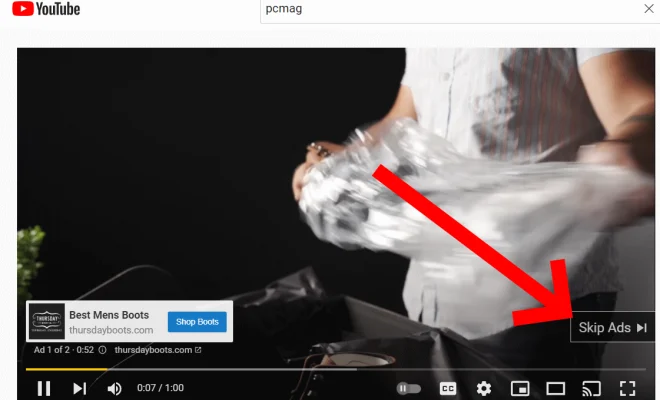
YouTube implements both skippable and non-skippable ads in their video streaming service. Most of the time, viewers will see a skippable ad with a “Skip Ad” button that appears after five seconds. Clicking on this button allows users to bypass the ad and proceed with watching their desired video.

Non-skippable ads are trickier to bypass as they appear for a mandatory duration usually lasting 15-20 seconds. In general, viewers must watch these ads in their entirety before continuing with their selected video.
Ways to Skip or Minimize YouTube Ads

1. Use an ad-blocking browser extension: Ad-blockers are browser extensions designed specifically for removing unwanted advertisements from websites. The application of an ad-blocker can effectively minimize or eliminate ads on YouTube. Examples of popular ad-blockers include AdBlock Plus, uBlock Origin, and Brave Browser’s built-in ad blocker.

2. Opt for YouTube’s Premium Subscription: As a subscription-based option, YouTube Premium allows users to enjoy an ad-free viewing experience across all devices supporting it. The monthly cost is generally justified for regular users who seek uninterrupted entertainment.

3. Choose alternative video platforms: Many other platforms provide similar content without interrupting your viewing experiences with frequent advertisements. Consider exploring alternative sites like Vimeo or Dailymotion if you’re continually frustrated by non-skippable ads.

4. Refresh the video page: If you encounter a non-skippable ad lasting longer than you’d like, refreshing the page might force YouTube’s algorithm to display a skippable ad instead. Note that this method doesn’t guarantee successful results consistently.

5. Utilize browser extensions, scripts, or plugins: In addition to ad-blockers, several browser extensions or scripts have been developed specifically for bypassing or disabling YouTube ads. Do thorough research and find an extension compatible with your browser to employ this approach efficiently.

Conclusion

While advertisements are essential for funding the platform and supporting content creators, YouTube ads can often be disruptive to your viewing experience. Implementing the methods mentioned above will enable users to skip or minimize ads on the platform. It is essential to remember that some of these methods potentially deprive content creators of revenue. Be mindful of using these techniques and maintain a balance that supports both the content creators and your preference for an uninterrupted viewing experience.


Previous Article

How to Use Apple Music Sing

Next Article

How to Stop Your Smart TV From ...

Matthew Lynch

Related articles More from author

  • Tech Advice

    2025 Mini Cooper EV First Look: More Range to Play

    September 12, 2023
    By Matthew Lynch
  • Tech Advice

    Defined Contribution Plan: What It Is & How It Works

    September 7, 2023
    By Matthew Lynch
  • Tech Advice

    Best Record Player for 2023

    July 16, 2023
    By Matthew Lynch
  • Tech Advice

    Mighty Vibe Spotify Music Player review: A tiny Spotify player that frees you from your phone

    July 12, 2023
    By Matthew Lynch
  • Tech Advice

    Best Video Chat Apps: FaceTime, Zoom, Google Meet and More

    July 16, 2023
    By Matthew Lynch
  • Tech Advice

    2023 Porsche Cayenne Review: The V8 Lives to Fight Another Day

    August 11, 2023
    By Matthew Lynch

Search

Login & Registration

  • Log in
  • Entries feed
  • Comments feed
  • WordPress.org

Newsletter

Signup for The Tech Edvocate Newsletter and have the latest in EdTech news and opinion delivered to your email address!

About Us

Since technology is not going anywhere and does more good than harm, adapting is the best course of action. That is where The Tech Edvocate comes in. We plan to cover the PreK-12 and Higher Education EdTech sectors and provide our readers with the latest news and opinion on the subject. From time to time, I will invite other voices to weigh in on important issues in EdTech. We hope to provide a well-rounded, multi-faceted look at the past, present, the future of EdTech in the US and internationally.

We started this journey back in June 2016, and we plan to continue it for many more years to come. I hope that you will join us in this discussion of the past, present and future of EdTech and lend your own insight to the issues that are discussed.

Newsletter

Signup for The Tech Edvocate Newsletter and have the latest in EdTech news and opinion delivered to your email address!

Contact Us

The Tech Edvocate
910 Goddin Street
Richmond, VA 23231
(601) 630-5238
[email protected]

Copyright © 2026 Matthew Lynch. All rights reserved.