The Tech Edvocate

Top Menu

  • Advertisement
  • Apps
  • Home Page
  • Home Page Five (No Sidebar)
  • Home Page Four
  • Home Page Three
  • Home Page Two
  • Home Tech2
  • Icons [No Sidebar]
  • Left Sidbear Page
  • Lynch Educational Consulting
  • My Account
  • My Speaking Page
  • Newsletter Sign Up Confirmation
  • Newsletter Unsubscription
  • Our Brands
  • Page Example
  • Privacy Policy
  • Protected Content
  • Register
  • Request a Product Review
  • Shop
  • Shortcodes Examples
  • Signup
  • Start Here
    • Governance
    • Careers
    • Contact Us
  • Terms and Conditions
  • The Edvocate
  • The Tech Edvocate Product Guide
  • Topics
  • Write For Us
  • Advertise

Main Menu

  • Start Here
    • Our Brands
    • Governance
      • Lynch Educational Consulting, LLC.
      • Dr. Lynch’s Personal Website
      • Careers
    • Write For Us
    • The Tech Edvocate Product Guide
    • Contact Us
    • Books
    • Edupedia
    • Post a Job
    • The Edvocate Podcast
    • Terms and Conditions
    • Privacy Policy
  • Topics
    • Assistive Technology
    • Child Development Tech
    • Early Childhood & K-12 EdTech
    • EdTech Futures
    • EdTech News
    • EdTech Policy & Reform
    • EdTech Startups & Businesses
    • Higher Education EdTech
    • Online Learning & eLearning
    • Parent & Family Tech
    • Personalized Learning
    • Product Reviews
  • Advertise
  • Tech Edvocate Awards
  • The Edvocate
  • Pedagogue
  • School Ratings

logo

The Tech Edvocate

  • Start Here
    • Our Brands
    • Governance
      • Lynch Educational Consulting, LLC.
      • Dr. Lynch’s Personal Website
        • My Speaking Page
      • Careers
    • Write For Us
    • The Tech Edvocate Product Guide
    • Contact Us
    • Books
    • Edupedia
    • Post a Job
    • The Edvocate Podcast
    • Terms and Conditions
    • Privacy Policy
  • Topics
    • Assistive Technology
    • Child Development Tech
    • Early Childhood & K-12 EdTech
    • EdTech Futures
    • EdTech News
    • EdTech Policy & Reform
    • EdTech Startups & Businesses
    • Higher Education EdTech
    • Online Learning & eLearning
    • Parent & Family Tech
    • Personalized Learning
    • Product Reviews
  • Advertise
  • Tech Edvocate Awards
  • The Edvocate
  • Pedagogue
  • School Ratings
  • Philippines Sees 1% Drop in External Debt Amid Rising Fuel Prices and Global Economic Tensions

  • Stability in Fuel Prices Amid Global Turmoil: What You Need to Know

  • Nifty 50 Plummets Amid Escalating Middle East Tensions and Oil Price Volatility

  • Crude Oil Prices Surge as Tensions Rise Over Iran Threats

  • China’s Economic Resilience in Early 2026 Amid Global Turbulence

  • Revolutionizing Entrepreneurship: The Rise of One-Person Startups in China Using AI

  • Bold Secures $40 Million to Revolutionize AI-Driven Cybersecurity Solutions

  • Breaking Through the Noise: Google and Accel India Select Promising Startups Beyond AI ‘Wrappers’

  • Accel and Google’s AI Futures Fund Highlights Innovation with 2026 Atoms AI Cohort

  • Capital Shifts: The New Wave of Startup Investments in AI and Robotics

Tech Advice
Home›Tech Advice›How to Use Apple Music Sing

How to Use Apple Music Sing
By Matthew Lynch
July 22, 2023
0
Spread the love

Apple Music is a popular music streaming service that boasts an extensive library of songs and albums from various genres. One exciting feature that enhances the music listening experience is Apple Music Sing – a built-in, user-friendly option that offers lyrics to most of the tracks. With this guide, you’ll learn how to use Apple Music Sing for an enjoyable karaoke experience.

Step 1: Update Your Device and Apple Music App

Before you can access the Apple Music Sing, ensure your device (iPhone, iPad, or Mac) is updated to the latest software version, and you have the newest version of the Apple Music app installed.

Step 2: Open Apple Music

To start using Apple Music Sing, simply launch the Apple Music app on your device.

Step 3: Choose Your Song

Search for your desired song by typing its title or the name of the artist in the search bar. When you find the track you want to sing along to, tap on it to begin playing.

Step 4: Enable Lyrics Display

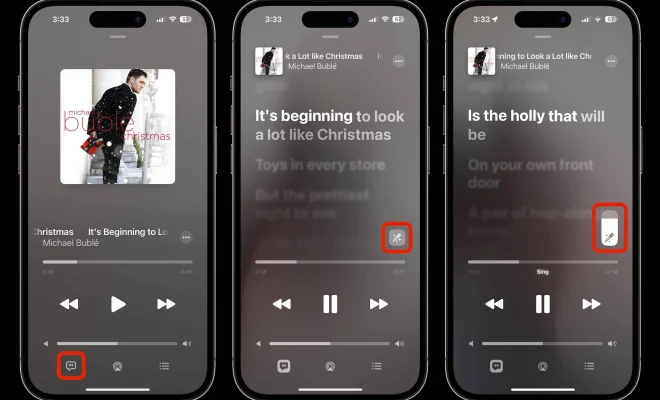
With your chosen song now playing, tap on the lyrics icon located at the bottom of the screen. It appears as a speech bubble or “quote” symbol. Enabling this feature will display synced lyrics in a real-time karaoke format.
For Mac users, click on “Window” at the top of your desktop screen in Finder and then select “Lyrics” from the dropdown menu. The synchronized lyrics will appear alongside the album art.

Step 5: Enjoy Singing Along

Now that you have enabled lyrics display in Apple Music Sing, start singing along! As each lyric line scrolls from the bottom up in-sync with the music, use this real-time guide to enhance your singing experience with friends or solo.

Step 6: Customize Your Experience

Apple Music Sing allows you to further customize your experience with features like changing font size, screen brightness, or connecting to external speakers. On your Apple TV device, you can even enjoy a full-screen karaoke experience with Apple Music Sing!

Conclusion

Apple Music Sing is a fun and intuitive way to enjoy your favorite tracks while enhancing your music experience. By following these simple steps, you can transform your living room into your stage and become the star of your personal karaoke show. With Apple Music Sing, the possibilities are endless – just pick a song, belt out the lyrics and have a blast!


Previous Article

How to Use Apple Music on an ...

Next Article

How to Skip YouTube Ads

Matthew Lynch

Related articles More from author

  • Tech Advice

    Discovering the Best Direct-to-Consumer Cookware Brands

    July 8, 2023
    By Matthew Lynch
  • Tech Advice

    2024 RAM 2500 Truck: Latest Prices, Reviews, Specs, and Incentives

    August 19, 2023
    By Matthew Lynch
  • Tech Advice

    Best DSL Internet Providers of 2023

    July 8, 2023
    By Matthew Lynch
  • Tech Advice

    2024 Porsche 911 S/T is the Build-A-Bear of hardcore sports cars

    August 20, 2023
    By Matthew Lynch
  • Tech Advice

    The Best Computer Speakers for 2023

    July 19, 2023
    By Matthew Lynch
  • Tech Advice

    Tesla Powerwall Review: A Well-Rounded Solar Battery

    July 8, 2023
    By Matthew Lynch

Search

Login & Registration

  • Register
  • Log in
  • Entries feed
  • Comments feed
  • WordPress.org

Newsletter

Signup for The Tech Edvocate Newsletter and have the latest in EdTech news and opinion delivered to your email address!

About Us

Since technology is not going anywhere and does more good than harm, adapting is the best course of action. That is where The Tech Edvocate comes in. We plan to cover the PreK-12 and Higher Education EdTech sectors and provide our readers with the latest news and opinion on the subject. From time to time, I will invite other voices to weigh in on important issues in EdTech. We hope to provide a well-rounded, multi-faceted look at the past, present, the future of EdTech in the US and internationally.

We started this journey back in June 2016, and we plan to continue it for many more years to come. I hope that you will join us in this discussion of the past, present and future of EdTech and lend your own insight to the issues that are discussed.

Newsletter

Signup for The Tech Edvocate Newsletter and have the latest in EdTech news and opinion delivered to your email address!

Contact Us

The Tech Edvocate
910 Goddin Street
Richmond, VA 23231
(601) 630-5238
[email protected]

Copyright © 2025 Matthew Lynch. All rights reserved.