The Tech Edvocate

Top Menu

  • Advertisement
  • Apps
  • Home Page
  • Home Page Five (No Sidebar)
  • Home Page Four
  • Home Page Three
  • Home Page Two
  • Home Tech2
  • Icons [No Sidebar]
  • Left Sidbear Page
  • Lynch Educational Consulting
  • My Account
  • My Speaking Page
  • Newsletter Sign Up Confirmation
  • Newsletter Unsubscription
  • Our Brands
  • Page Example
  • Privacy Policy
  • Protected Content
  • Register
  • Request a Product Review
  • Shop
  • Shortcodes Examples
  • Signup
  • Start Here
    • Governance
    • Careers
    • Contact Us
  • Terms and Conditions
  • The Edvocate
  • The Tech Edvocate Product Guide
  • Topics
  • Write For Us
  • Advertise

Main Menu

  • Start Here
    • Our Brands
    • Governance
      • Lynch Educational Consulting, LLC.
      • Dr. Lynch’s Personal Website
      • Careers
    • Write For Us
    • The Tech Edvocate Product Guide
    • Contact Us
    • Books
    • Edupedia
    • Post a Job
    • The Edvocate Podcast
    • Terms and Conditions
    • Privacy Policy
  • Topics
    • Assistive Technology
    • Child Development Tech
    • Early Childhood & K-12 EdTech
    • EdTech Futures
    • EdTech News
    • EdTech Policy & Reform
    • EdTech Startups & Businesses
    • Higher Education EdTech
    • Online Learning & eLearning
    • Parent & Family Tech
    • Personalized Learning
    • Product Reviews
  • Advertise
  • Tech Edvocate Awards
  • The Edvocate
  • Pedagogue
  • School Ratings

logo

The Tech Edvocate

  • Start Here
    • Our Brands
    • Governance
      • Lynch Educational Consulting, LLC.
      • Dr. Lynch’s Personal Website
        • My Speaking Page
      • Careers
    • Write For Us
    • The Tech Edvocate Product Guide
    • Contact Us
    • Books
    • Edupedia
    • Post a Job
    • The Edvocate Podcast
    • Terms and Conditions
    • Privacy Policy
  • Topics
    • Assistive Technology
    • Child Development Tech
    • Early Childhood & K-12 EdTech
    • EdTech Futures
    • EdTech News
    • EdTech Policy & Reform
    • EdTech Startups & Businesses
    • Higher Education EdTech
    • Online Learning & eLearning
    • Parent & Family Tech
    • Personalized Learning
    • Product Reviews
  • Advertise
  • Tech Edvocate Awards
  • The Edvocate
  • Pedagogue
  • School Ratings
  • Seniors Lose More Money to Investment Scams Than Any Other Fraud

  • Gemini Can Now Connect to Google Wallet to Offer Spending Insights, Budgeting Tips

  • Dramatic: Financial Giants Are Quietly Preparing for Mass AI Job Replacement

  • Malicious Cyberattack on Curaçao Gaming Regulator: Your Data Exposed?

  • Staggering: Lawyers Are Being Struck Off For This AI Blunder – What You Must Know Now

  • Dramatic Cuts: How The GOP Tuition Deflation Act Is Reshaping College Costs

  • This Professor’s Alarming AI Cheating Warning Reveals a Deeper Crisis in Education

  • This One Reckless Mistake Caused Zeabur’s Devastating Collapse

  • Terrifying: AI Cybercrime Just Got a Whole Lot Worse, Here’s How

  • The cost of your new car loan has hit a record high – Newswav

Digital & Mobile Technology
Home›Digital & Mobile Technology›How to Reset Your Roku Remote

How to Reset Your Roku Remote
By Matthew Lynch
June 1, 2023
0
Spread the love

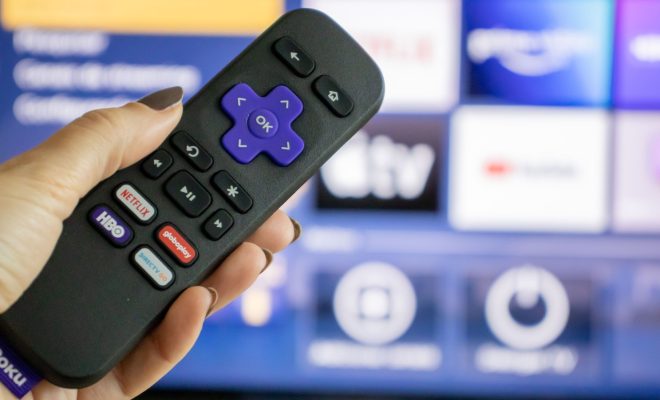
If you own a Roku device, you know how important the remote is. The remote allows you to navigate through your Roku channels, control the volume, and even turn your TV on and off. However, like any other device, your Roku remote may encounter issues. One common solution to fix the issues is by resetting the remote.

Here are some steps on how to reset your Roku remote:

Step 1: Remove the batteries

Locate the battery compartment on the backside of your Roku remote. Slide open the compartment and remove the batteries. Wait for a few seconds before reinserting the batteries back into the compartment. Doing so can help reset your remote’s connection with your Roku device.

Step 2: Power cycle your Roku

If the first step did not work, try power cycling your Roku device. Unplug your Roku device and wait for at least 10-15 seconds before plugging it back in. Wait for your Roku device to reboot before trying to pair your remote again.

Step 3: Pair your remote with your Roku

If you still encounter issues with your Roku remote, you may need to re-pair your remote with your Roku device. Here are the steps to follow:

– Press and hold the ‘pairing’ button located at the back of your remote. Hold the button for at least 3 seconds.

– Release the button once the pairing light starts to blink on the remote.

– Wait for the light to stop blinking and stay solidly lit. This means that the remote has successfully paired with your Roku device.

If none of these solutions work, it may be time to purchase a new remote. However, before doing so, check with Roku support to see if they can assist you further. They may be able to provide additional tips or offer a replacement remote if your current one is still under warranty.

In conclusion, resetting your Roku remote is simple and easy. By following the steps above, you can quickly fix any issues you may encounter with your remote and continue enjoying your Roku experience.


Previous Article

Best USB Headsets of 2023

Next Article

How to Mirror or Flip an Image ...

Matthew Lynch

Related articles More from author

  • Digital & Mobile Technology

    Why I’m Torn Between an iPad Air and a Surface Pro

    July 31, 2023
    By Matthew Lynch
  • Digital & Mobile Technology

    How to Fix Outlook When It’s Not Receiving Emails

    June 1, 2023
    By Matthew Lynch
  • Digital & Mobile Technology

    How to Safely Uninstall Google Drive From a Mac

    September 8, 2023
    By Matthew Lynch
  • Digital & Mobile Technology

    How to Send Emails From an Excel Spreadsheet Using VBA Scripts

    August 5, 2023
    By Matthew Lynch
  • Digital & Mobile Technology

    How to Change the Trusted Phone Number for Your Apple ID

    June 15, 2023
    By Matthew Lynch
  • Digital & Mobile Technology

    Best Meeting Minutes Templates for Professionals

    June 6, 2023
    By Matthew Lynch

Search

Login & Registration

  • Log in
  • Entries feed
  • Comments feed
  • WordPress.org

Newsletter

Signup for The Tech Edvocate Newsletter and have the latest in EdTech news and opinion delivered to your email address!

About Us

Since technology is not going anywhere and does more good than harm, adapting is the best course of action. That is where The Tech Edvocate comes in. We plan to cover the PreK-12 and Higher Education EdTech sectors and provide our readers with the latest news and opinion on the subject. From time to time, I will invite other voices to weigh in on important issues in EdTech. We hope to provide a well-rounded, multi-faceted look at the past, present, the future of EdTech in the US and internationally.

We started this journey back in June 2016, and we plan to continue it for many more years to come. I hope that you will join us in this discussion of the past, present and future of EdTech and lend your own insight to the issues that are discussed.

Newsletter

Signup for The Tech Edvocate Newsletter and have the latest in EdTech news and opinion delivered to your email address!

Contact Us

The Tech Edvocate
910 Goddin Street
Richmond, VA 23231
(601) 630-5238
[email protected]

Copyright © 2026 Matthew Lynch. All rights reserved.