The Tech Edvocate

Top Menu

  • Advertisement
  • Apps
  • Home Page
  • Home Page Five (No Sidebar)
  • Home Page Four
  • Home Page Three
  • Home Page Two
  • Home Tech2
  • Icons [No Sidebar]
  • Left Sidbear Page
  • Lynch Educational Consulting
  • My Account
  • My Speaking Page
  • Newsletter Sign Up Confirmation
  • Newsletter Unsubscription
  • Our Brands
  • Page Example
  • Privacy Policy
  • Protected Content
  • Register
  • Request a Product Review
  • Shop
  • Shortcodes Examples
  • Signup
  • Start Here
    • Governance
    • Careers
    • Contact Us
  • Terms and Conditions
  • The Edvocate
  • The Tech Edvocate Product Guide
  • Topics
  • Write For Us
  • Advertise

Main Menu

  • Start Here
    • Our Brands
    • Governance
      • Lynch Educational Consulting, LLC.
      • Dr. Lynch’s Personal Website
      • Careers
    • Write For Us
    • The Tech Edvocate Product Guide
    • Contact Us
    • Books
    • Edupedia
    • Post a Job
    • The Edvocate Podcast
    • Terms and Conditions
    • Privacy Policy
  • Topics
    • Assistive Technology
    • Child Development Tech
    • Early Childhood & K-12 EdTech
    • EdTech Futures
    • EdTech News
    • EdTech Policy & Reform
    • EdTech Startups & Businesses
    • Higher Education EdTech
    • Online Learning & eLearning
    • Parent & Family Tech
    • Personalized Learning
    • Product Reviews
  • Advertise
  • Tech Edvocate Awards
  • The Edvocate
  • Pedagogue
  • School Ratings

logo

The Tech Edvocate

  • Start Here
    • Our Brands
    • Governance
      • Lynch Educational Consulting, LLC.
      • Dr. Lynch’s Personal Website
        • My Speaking Page
      • Careers
    • Write For Us
    • The Tech Edvocate Product Guide
    • Contact Us
    • Books
    • Edupedia
    • Post a Job
    • The Edvocate Podcast
    • Terms and Conditions
    • Privacy Policy
  • Topics
    • Assistive Technology
    • Child Development Tech
    • Early Childhood & K-12 EdTech
    • EdTech Futures
    • EdTech News
    • EdTech Policy & Reform
    • EdTech Startups & Businesses
    • Higher Education EdTech
    • Online Learning & eLearning
    • Parent & Family Tech
    • Personalized Learning
    • Product Reviews
  • Advertise
  • Tech Edvocate Awards
  • The Edvocate
  • Pedagogue
  • School Ratings
  • 100 Best Revenue Recognition Apps

  • Dramatic: AI Surveillance Giant Cuts Hundreds of Jobs Amid Privacy Backlash

  • Dramatic: Anthropic Claude AI Just Banned ‘Cruel’ Behavior — Here’s Why It Matters

  • This One Shift in Gaming VC Could Reshape the Entire Industry

  • The AI Doctor Is Coming: Is It a Miracle or a Menace?

  • Unmasking the AI Deepfake Threat: Why Corporate America’s Billions Are at Risk

  • Shocking: China’s AI Programmers Collapse — A Disturbing Glimpse Into Our Future?

  • Dramatic Spike: College Costs Projected to Soar 7.5% — Are You Ready?

  • 20 Million Records Exposed: The Reckless Truth Behind the Oracle Health Data Breach

  • The AI Cybersecurity Threat: A Dangerous New Frontier

Digital & Mobile Technology
Home›Digital & Mobile Technology›How to Make Google Your Default Search Engine

How to Make Google Your Default Search Engine
By Matthew Lynch
June 12, 2023
0
Spread the love

Google is one of the most popular search engines in the world. It is easy to use and provides accurate results. If you would like to make Google your default search engine, here are some quick and easy steps to follow.

For Google Chrome:

1. Open Google Chrome on your computer.

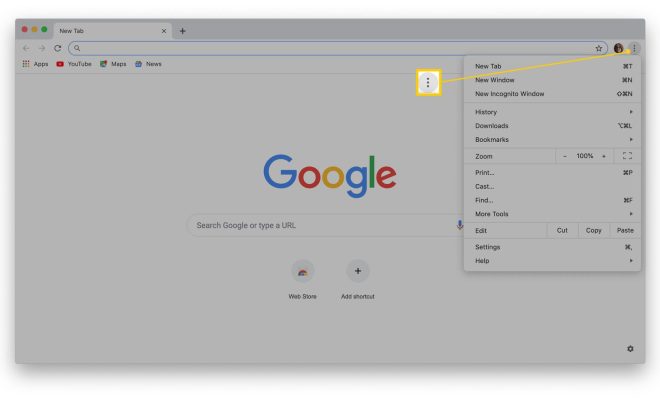
2. Click on the three dots in the top right corner to open the menu.

3. Click on “Settings.”

4. In the “Settings” menu, scroll down and find the “Search engine” section.

5. Click on “Search engine used in the address bar.”

6. Select “Google.”

7. Close the “Settings” menu.

8. Whenever you search using the address bar, your searches will now be directed to Google.

For Mozilla Firefox:

1. Open Mozilla Firefox on your computer.

2. Click on the three horizontal lines in the top right corner to open the menu.

3. Click on “Options.”

4. In the “Options” menu, click on “Search” on the left-hand side.

5. In the “Default Search Engine” section, select “Google.”

6. Close the “Options” menu.

7. Whenever you search using the address bar, your searches will now be directed to Google.

For Microsoft Edge:

1. Open Microsoft Edge on your computer.

2. Click on the three horizontal dots in the top right corner to open the menu.

3. Click on “Settings.”

4. In the “Settings” menu, click on “Privacy, search, and services” on the left-hand side.

5. Scroll down to the “Address bar and search” section.

6. Click on “Address bar and search.”

7. Under “Search engine used in the address bar,” click on the drop-down menu and select “Google.”

8. Close the “Settings” menu.

9. Whenever you search using the address bar, your searches will now be directed to Google.

In conclusion, making Google your default search engine is an easy process that can be completed in a few simple steps. Once you have set Google as your default search engine, all your searches will be directed to Google, making your search experience even more convenient and reliable.


Previous Article

How to Set the Home Page to ...

Next Article

How to Clean a Mac Keyboard

Matthew Lynch

Related articles More from author

  • Digital & Mobile Technology

    What Is Satellite Radio?

    June 9, 2023
    By Matthew Lynch
  • Digital & Mobile Technology

    What Is the Wish App?

    June 10, 2023
    By Matthew Lynch
  • Digital & Mobile Technology

    How to Use the JavaScript if-else Statement

    June 5, 2023
    By Matthew Lynch
  • Digital & Mobile Technology

    What Is POST?

    June 8, 2023
    By Matthew Lynch
  • Digital & Mobile Technology

    SOHO Routers and Networks Explained

    June 8, 2023
    By Matthew Lynch
  • Digital & Mobile Technology

    Free Pedometer Apps That Are Better Than Fitbit

    June 14, 2023
    By Matthew Lynch

Search

Login & Registration

  • Log in
  • Entries feed
  • Comments feed
  • WordPress.org

Newsletter

Signup for The Tech Edvocate Newsletter and have the latest in EdTech news and opinion delivered to your email address!

About Us

Since technology is not going anywhere and does more good than harm, adapting is the best course of action. That is where The Tech Edvocate comes in. We plan to cover the PreK-12 and Higher Education EdTech sectors and provide our readers with the latest news and opinion on the subject. From time to time, I will invite other voices to weigh in on important issues in EdTech. We hope to provide a well-rounded, multi-faceted look at the past, present, the future of EdTech in the US and internationally.

We started this journey back in June 2016, and we plan to continue it for many more years to come. I hope that you will join us in this discussion of the past, present and future of EdTech and lend your own insight to the issues that are discussed.

Newsletter

Signup for The Tech Edvocate Newsletter and have the latest in EdTech news and opinion delivered to your email address!

Contact Us

The Tech Edvocate
910 Goddin Street
Richmond, VA 23231
(601) 630-5238
[email protected]

Copyright © 2026 Matthew Lynch. All rights reserved.