The Tech Edvocate

Top Menu

  • Advertisement
  • Apps
  • Home Page
  • Home Page Five (No Sidebar)
  • Home Page Four
  • Home Page Three
  • Home Page Two
  • Home Tech2
  • Icons [No Sidebar]
  • Left Sidbear Page
  • Lynch Educational Consulting
  • My Account
  • My Speaking Page
  • Newsletter Sign Up Confirmation
  • Newsletter Unsubscription
  • Our Brands
  • Page Example
  • Privacy Policy
  • Protected Content
  • Register
  • Request a Product Review
  • Shop
  • Shortcodes Examples
  • Signup
  • Start Here
    • Governance
    • Careers
    • Contact Us
  • Terms and Conditions
  • The Edvocate
  • The Tech Edvocate Product Guide
  • Topics
  • Write For Us
  • Advertise

Main Menu

  • Start Here
    • Our Brands
    • Governance
      • Lynch Educational Consulting, LLC.
      • Dr. Lynch’s Personal Website
      • Careers
    • Write For Us
    • The Tech Edvocate Product Guide
    • Contact Us
    • Books
    • Edupedia
    • Post a Job
    • The Edvocate Podcast
    • Terms and Conditions
    • Privacy Policy
  • Topics
    • Assistive Technology
    • Child Development Tech
    • Early Childhood & K-12 EdTech
    • EdTech Futures
    • EdTech News
    • EdTech Policy & Reform
    • EdTech Startups & Businesses
    • Higher Education EdTech
    • Online Learning & eLearning
    • Parent & Family Tech
    • Personalized Learning
    • Product Reviews
  • Advertise
  • Tech Edvocate Awards
  • The Edvocate
  • Pedagogue
  • School Ratings

logo

The Tech Edvocate

  • Start Here
    • Our Brands
    • Governance
      • Lynch Educational Consulting, LLC.
      • Dr. Lynch’s Personal Website
        • My Speaking Page
      • Careers
    • Write For Us
    • The Tech Edvocate Product Guide
    • Contact Us
    • Books
    • Edupedia
    • Post a Job
    • The Edvocate Podcast
    • Terms and Conditions
    • Privacy Policy
  • Topics
    • Assistive Technology
    • Child Development Tech
    • Early Childhood & K-12 EdTech
    • EdTech Futures
    • EdTech News
    • EdTech Policy & Reform
    • EdTech Startups & Businesses
    • Higher Education EdTech
    • Online Learning & eLearning
    • Parent & Family Tech
    • Personalized Learning
    • Product Reviews
  • Advertise
  • Tech Edvocate Awards
  • The Edvocate
  • Pedagogue
  • School Ratings
  • The Brutal Truth: 8 Lies Scammers Tell About Your Student Loans

  • New Student Loan Rules: The Shocking Truth About 2026 Relief Programs

  • New Repayment Plan Changes Trigger Student Loan Scam Epidemic

  • Why Millions Are Ditching Degrees for This One Skill-Boosting Secret

  • The Quiet Revolution: How Micro-Credentials Are Reshaping Tech Careers

  • Why 96% of Employers Are Now Demanding Micro-Credentials

  • This One Incident Exposed How Vulnerable Your Student Data Really Is

  • The Brutal Truth About EdTech Security: 10 Solutions to Prevent Another Canvas LMS Disaster

  • The Billion-User Data Heist: Why Your Child’s School Data Is Under Attack

  • This Crucial Mistake Is Killing Your Tech Career (It’s Not What You Think)

Digital & Mobile Technology
Home›Digital & Mobile Technology›How to Filter Content on Your Tumblr Dashboard

How to Filter Content on Your Tumblr Dashboard
By Matthew Lynch
July 31, 2023
0
Spread the love

Tumblr is one of the most popular microblogging platforms out there. Boasting of millions of users worldwide, the site offers a wide range of content with something for every person. However, at times, the content on your Tumblr dashboard can be overwhelming, making it challenging to keep up. Thankfully, there are tools to filter content on your Tumblr dashboard and make it more manageable. In this article, we will highlight how to filter content on your Tumblr dashboard.

1. Use Safe Search

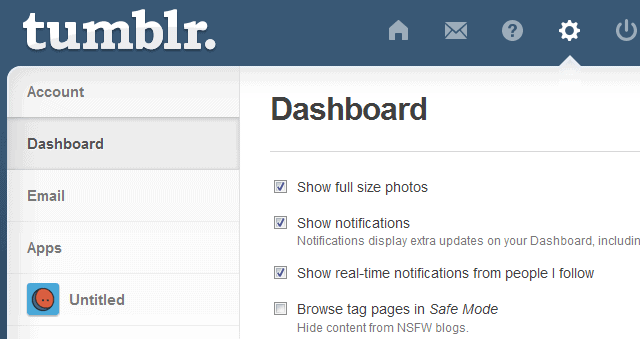
The Safe Search feature on Tumblr filters content, ensuring that it contains no explicit language or images. To activate the feature, click on the gear icon on the top right corner of the screen and select “Safe Mode.” You will be required to log in to your account to change this setting, ensuring that no other user can view your content without your permission. Turning on Safe Search is a great way to filter out NSFW content and make your dashboard safe for work.

2. Block Users

If you have specific users whose content you don’t want to see, you can block them. To do this, hover over their profile icon and select the three dots that appear. Then, click on “Block.” Blocked users won’t be able to interact with you or see your content, and their posts won’t appear on your dashboard. This is a useful tool if you are trying to keep your feed clean.

3. Mute Tags

Another way to filter content on your Tumblr dashboard is by muting specific tags. If there are specific topics or subjects that you are not interested in, you can mute them to avoid seeing their posts. To do this, click on the “Search” icon on your dashboard and type in the tag you want to mute. Once the results load, click on the tag and select “Mute” from the options provided. Muting tags will ensure that posts containing that particular tag do not appear on your dashboard.

4. Customize Your Dashboard

Tumblr also lets you customize your dashboard to view specific content. You can do this by creating a custom filter. To create a custom filter, click on the gear icon on the top right corner of the screen and select “Filters.” Then, click on “Create Filter” and input the tags or blogs you want to see. You can also add conditions like the type of post or the time frame for the filter. Once you save the filter, it will appear on the left-hand side of your dashboard, allowing you to toggle it on and off whenever you want.

In conclusion, Tumblr offers a wide range of content, and it can be challenging to keep up with everything. The above steps on how to filter content on your Tumblr dashboard will go a long way in making it more manageable. Whether you want to avoid NSFW content or filter out specific tags, Tumblr provides several tools to help you customize your dashboard. Try out each of the methods above and see which one works best for you.


Previous Article

How to Create a Google Meet

Next Article

How to Change an Account PIN in ...

Matthew Lynch

Related articles More from author

  • Digital & Mobile Technology

    The Best Windows 11 Themes You May Have Overlooked

    June 23, 2023
    By Matthew Lynch
  • Digital & Mobile Technology

    Help Command

    June 4, 2023
    By Matthew Lynch
  • Digital & Mobile Technology

    What Is Mail Privacy Protection in macOS and iOS?

    August 5, 2023
    By Matthew Lynch
  • Digital & Mobile Technology

    How to Fix It When Your PS4 Won’t Turn On

    May 30, 2023
    By Matthew Lynch
  • Digital & Mobile Technology

    Pure Sine Wave Inverters: Necessary or Overkill?

    July 31, 2023
    By Matthew Lynch
  • Digital & Mobile Technology

    What to Do When Your Car’s USB Port Won’t Charge Your Phone

    July 5, 2023
    By Matthew Lynch

Search

Login & Registration

  • Log in
  • Entries feed
  • Comments feed
  • WordPress.org

Newsletter

Signup for The Tech Edvocate Newsletter and have the latest in EdTech news and opinion delivered to your email address!

About Us

Since technology is not going anywhere and does more good than harm, adapting is the best course of action. That is where The Tech Edvocate comes in. We plan to cover the PreK-12 and Higher Education EdTech sectors and provide our readers with the latest news and opinion on the subject. From time to time, I will invite other voices to weigh in on important issues in EdTech. We hope to provide a well-rounded, multi-faceted look at the past, present, the future of EdTech in the US and internationally.

We started this journey back in June 2016, and we plan to continue it for many more years to come. I hope that you will join us in this discussion of the past, present and future of EdTech and lend your own insight to the issues that are discussed.

Newsletter

Signup for The Tech Edvocate Newsletter and have the latest in EdTech news and opinion delivered to your email address!

Contact Us

The Tech Edvocate
910 Goddin Street
Richmond, VA 23231
(601) 630-5238
[email protected]

Copyright © 2026 Matthew Lynch. All rights reserved.