The Tech Edvocate

Top Menu

  • Advertisement
  • Apps
  • Home Page
  • Home Page Five (No Sidebar)
  • Home Page Four
  • Home Page Three
  • Home Page Two
  • Home Tech2
  • Icons [No Sidebar]
  • Left Sidbear Page
  • Lynch Educational Consulting
  • My Account
  • My Speaking Page
  • Newsletter Sign Up Confirmation
  • Newsletter Unsubscription
  • Our Brands
  • Page Example
  • Privacy Policy
  • Protected Content
  • Register
  • Request a Product Review
  • Shop
  • Shortcodes Examples
  • Signup
  • Start Here
    • Governance
    • Careers
    • Contact Us
  • Terms and Conditions
  • The Edvocate
  • The Tech Edvocate Product Guide
  • Topics
  • Write For Us
  • Advertise

Main Menu

  • Start Here
    • Our Brands
    • Governance
      • Lynch Educational Consulting, LLC.
      • Dr. Lynch’s Personal Website
      • Careers
    • Write For Us
    • The Tech Edvocate Product Guide
    • Contact Us
    • Books
    • Edupedia
    • Post a Job
    • The Edvocate Podcast
    • Terms and Conditions
    • Privacy Policy
  • Topics
    • Assistive Technology
    • Child Development Tech
    • Early Childhood & K-12 EdTech
    • EdTech Futures
    • EdTech News
    • EdTech Policy & Reform
    • EdTech Startups & Businesses
    • Higher Education EdTech
    • Online Learning & eLearning
    • Parent & Family Tech
    • Personalized Learning
    • Product Reviews
  • Advertise
  • Tech Edvocate Awards
  • The Edvocate
  • Pedagogue
  • School Ratings

logo

The Tech Edvocate

  • Start Here
    • Our Brands
    • Governance
      • Lynch Educational Consulting, LLC.
      • Dr. Lynch’s Personal Website
        • My Speaking Page
      • Careers
    • Write For Us
    • The Tech Edvocate Product Guide
    • Contact Us
    • Books
    • Edupedia
    • Post a Job
    • The Edvocate Podcast
    • Terms and Conditions
    • Privacy Policy
  • Topics
    • Assistive Technology
    • Child Development Tech
    • Early Childhood & K-12 EdTech
    • EdTech Futures
    • EdTech News
    • EdTech Policy & Reform
    • EdTech Startups & Businesses
    • Higher Education EdTech
    • Online Learning & eLearning
    • Parent & Family Tech
    • Personalized Learning
    • Product Reviews
  • Advertise
  • Tech Edvocate Awards
  • The Edvocate
  • Pedagogue
  • School Ratings
  • Miro vs Conceptboard for project management

  • How to use Teamwork for resource management

  • How much does Procore cost per month

  • How to organize Microsoft Planner buckets

  • Is Teamwork good for billable hours

  • Procore vs Buildertrend which is better

  • Airtable project management templates

  • Can Miro track project progress

  • How to use Basecamp for client work

  • Can Lucidchart create swimlane diagrams

Assistive Technology
Home›Assistive Technology›How to Force Restart a Frozen iPod

How to Force Restart a Frozen iPod
By Matthew Lynch
June 8, 2023
0
Spread the love

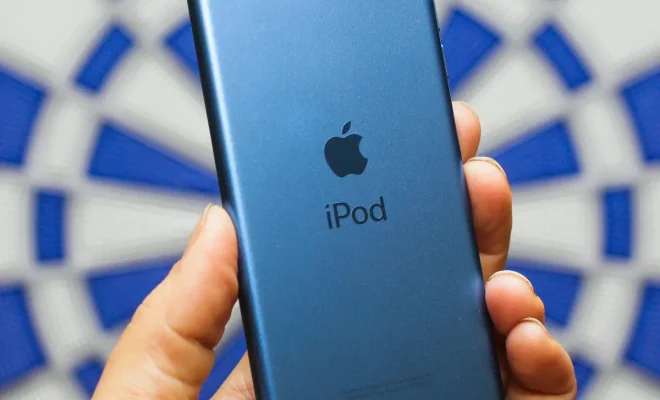
iPods, like most electronic devices, can become frozen and unresponsive at times. This can be frustrating, especially if you’re in the middle of listening to your favorite tunes or watching a movie. However, fear not – there is a way to force restart your iPod and get it working again.

Step 1: Check if your iPod is really frozen

Before taking any measures to force restart your iPod, ensure that it is actually frozen. Sometimes, your iPod may be slow or unresponsive due to factors like low battery or a faulty cable. Thus, before anything else, try connecting your iPod to a power source and see if it responds. If it doesn’t, move on to the next step.

Step 2: Press and Hold the Home and Power Buttons

The next step is to force restart your iPod. Depending on the model of your iPod, the instructions may vary. For example, if you own an iPod classic, you should first set the “hold” switch to the “off” position, then press and hold the “menu” and “center” buttons together until you see the Apple logo. However, for most iPod models, the process is relatively similar. Press and hold both the home button (located at the bottom of the device) and the power button (usually on the top right-hand side of the device) simultaneously for a few seconds.

Step 3: Wait and Resume

After pressing and holding both the home and power buttons, your iPod should restart automatically. During this time, please wait patiently and avoid interrupting the process, even if it seems like nothing is happening. If everything went well, you should see the Apple logo signifying that the iPod is restarting. Finally, once the iPod has restarted, you can resume using it as usual.

In conclusion, a frozen iPod can be a frustrating experience for anyone. However, knowing how to force restart your device can save a lot of headache and allow you to continue enjoying your favorite music and videos. Always remember to check your iPod’s battery and cables before attempting to force restart it, as these simple solutions may resolve the issue.


Previous Article

Is Your iPhone Home Button Not Working? ...

Next Article

Best Offline iPhone/iOS Games of 2023

Matthew Lynch

Related articles More from author

  • Assistive Technology

    How to Hyperlink in Word Documents

    June 8, 2023
    By Matthew Lynch
  • Assistive Technology

    How to Delete Stations on Pandora

    June 10, 2023
    By Matthew Lynch
  • Assistive Technology

    How to Move Apps to an SD Card for Your Android Devices

    June 23, 2023
    By Matthew Lynch
  • Assistive Technology

    How to Find and Change the Subnet Mask in Windows 11

    June 10, 2023
    By Matthew Lynch
  • Assistive Technology

    How to Do a Hanging Indent on Google Docs

    September 7, 2023
    By Matthew Lynch
  • Assistive Technology

    Practical Ways to Use Your Mac’s Image Capture App

    June 6, 2023
    By Matthew Lynch

Search

Login & Registration

  • Log in
  • Entries feed
  • Comments feed
  • WordPress.org

Newsletter

Signup for The Tech Edvocate Newsletter and have the latest in EdTech news and opinion delivered to your email address!

About Us

Since technology is not going anywhere and does more good than harm, adapting is the best course of action. That is where The Tech Edvocate comes in. We plan to cover the PreK-12 and Higher Education EdTech sectors and provide our readers with the latest news and opinion on the subject. From time to time, I will invite other voices to weigh in on important issues in EdTech. We hope to provide a well-rounded, multi-faceted look at the past, present, the future of EdTech in the US and internationally.

We started this journey back in June 2016, and we plan to continue it for many more years to come. I hope that you will join us in this discussion of the past, present and future of EdTech and lend your own insight to the issues that are discussed.

Newsletter

Signup for The Tech Edvocate Newsletter and have the latest in EdTech news and opinion delivered to your email address!

Contact Us

The Tech Edvocate
910 Goddin Street
Richmond, VA 23231
(601) 630-5238
[email protected]

Copyright © 2026 Matthew Lynch. All rights reserved.