The Tech Edvocate

Top Menu

  • Advertisement
  • Apps
  • Home Page
  • Home Page Five (No Sidebar)
  • Home Page Four
  • Home Page Three
  • Home Page Two
  • Home Tech2
  • Icons [No Sidebar]
  • Left Sidbear Page
  • Lynch Educational Consulting
  • My Account
  • My Speaking Page
  • Newsletter Sign Up Confirmation
  • Newsletter Unsubscription
  • Our Brands
  • Page Example
  • Privacy Policy
  • Protected Content
  • Register
  • Request a Product Review
  • Shop
  • Shortcodes Examples
  • Signup
  • Start Here
    • Governance
    • Careers
    • Contact Us
  • Terms and Conditions
  • The Edvocate
  • The Tech Edvocate Product Guide
  • Topics
  • Write For Us
  • Advertise

Main Menu

  • Start Here
    • Our Brands
    • Governance
      • Lynch Educational Consulting, LLC.
      • Dr. Lynch’s Personal Website
      • Careers
    • Write For Us
    • The Tech Edvocate Product Guide
    • Contact Us
    • Books
    • Edupedia
    • Post a Job
    • The Edvocate Podcast
    • Terms and Conditions
    • Privacy Policy
  • Topics
    • Assistive Technology
    • Child Development Tech
    • Early Childhood & K-12 EdTech
    • EdTech Futures
    • EdTech News
    • EdTech Policy & Reform
    • EdTech Startups & Businesses
    • Higher Education EdTech
    • Online Learning & eLearning
    • Parent & Family Tech
    • Personalized Learning
    • Product Reviews
  • Advertise
  • Tech Edvocate Awards
  • The Edvocate
  • Pedagogue
  • School Ratings

logo

The Tech Edvocate

  • Start Here
    • Our Brands
    • Governance
      • Lynch Educational Consulting, LLC.
      • Dr. Lynch’s Personal Website
        • My Speaking Page
      • Careers
    • Write For Us
    • The Tech Edvocate Product Guide
    • Contact Us
    • Books
    • Edupedia
    • Post a Job
    • The Edvocate Podcast
    • Terms and Conditions
    • Privacy Policy
  • Topics
    • Assistive Technology
    • Child Development Tech
    • Early Childhood & K-12 EdTech
    • EdTech Futures
    • EdTech News
    • EdTech Policy & Reform
    • EdTech Startups & Businesses
    • Higher Education EdTech
    • Online Learning & eLearning
    • Parent & Family Tech
    • Personalized Learning
    • Product Reviews
  • Advertise
  • Tech Edvocate Awards
  • The Edvocate
  • Pedagogue
  • School Ratings
  • A Visitors Guide to Long Beach (CA), United States

  • A Visitor’s Guide to Fresno (CA), United States

  • A Visitors Guide to New Orleans (LA), United States

  • A Visitors Guide to Sacramento (CA), United States

  • A Visitors Guide to Lyon, France

  • JisuLife Ultra2 Portable Fan: A Powerful Multi-Function Cooling Solution

  • A Visitors Guide to Viña del Mar, Chile

  • A Visitors Guide to Århus, Denmark

  • A Visitors Guide to Bakersfield (CA), United States

  • A Visitors Guide to Aurora (CO), United States

Assistive Technology
Home›Assistive Technology›How to Fix Wlanapi.dll Not Found or Missing Errors

How to Fix Wlanapi.dll Not Found or Missing Errors
By Matthew Lynch
June 10, 2023
0
Spread the love

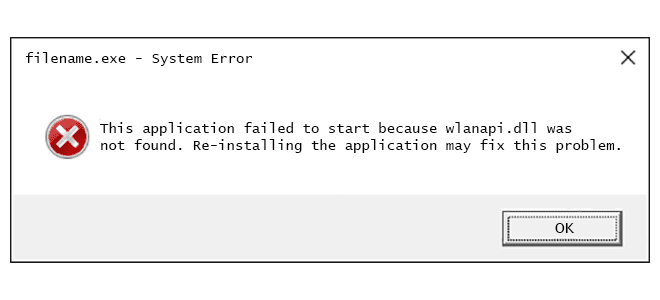
Wlanapi.dll is an important Windows system file that is responsible for running the Wireless LAN API (Application Programming Interface). This file enables wireless networking functionality on your device. However, many users have reported issues when encountering the “Wlanapi.dll not found or missing error” when using their computers. In this article, we will discuss the causes and solutions to fix the Wlanapi.dll not found or missing error.

Possible Causes of Wlanapi.dll Not Found Errors

1. Virus or Malware Infection

A virus or malware attack on your device can damage, corrupt, or delete system files, including Wlanapi.dll, and cause the “Wlanapi.dll not found or missing error.”

2. Outdated or Corrupted Drivers

The outdated, corrupted, or incorrect drivers for your wireless adapter can also result in the Wlanapi.dll not found error.

3. System File Corruption

If any system file, including Wlanapi.dll, gets corrupted, it can lead to an error in the system, causing the Wlanapi.dll not found or missing error.

4. Windows Corruption

If Windows is faulty, it can cause the Wlanapi.dll not found or missing error.

Solutions to Fix Wlanapi.dll Not Found or Missing Errors


Solution 1: Run a Virus Scan

The first solution to fix the Wlanapi.dll not found or missing error is to run a virus scan on your device using trusted antivirus software. This will help in identifying and getting rid of any potential viruses or malware that might be causing the error.

Solution 2: Update the Wireless Driver

An outdated, corrupted, or incorrect driver for your wireless adapter can cause the Wlanapi.dll not found error. To solve this error, you need to update the wireless adapter driver to the latest version or reinstall the driver. You can do this by following these steps:

Step 1:

Press the Windows key + X, and then select Device Manager.

Step 2:

 In Device Manager, expand the Network Adapters option.

Step 3:

Right-click on the wireless network adapter and select Update Driver Software.

Step 4:

Follow the instructions to complete the driver update.

Solution 3: Use System File Checker (SFC)

The System File Checker (SFC) is a built-in tool in Windows that helps to scan, and fix any broken or corrupted system files, including Wlanapi.dll. Here are the steps to use SFC:

Step 1:

Press the Windows key + X, and then select Command Prompt (Admin).

Step 2:

 In the Command Prompt window, type the following command and press Enter:

sfc /scannow

Step 3:

Wait for the scanning and repairing process to complete.

Solution 4: Reinstall Windows

If none of the above solutions worked, the last resort is to reinstall Windows, assuming the Wlanapi.dll file is corrupted or damaged beyond repair.

Conclusion

The Wlanapi.dll not found or missing error can be frustrating and can cause disruption to your wireless network functions. The error could arise due to various reasons such as virus or malware infection, outdated or corrupted drivers, system file corruption or Windows corruption. You can use solutions such as updating the driver, scanning for a virus, using the System File Checker tool, or reinstalling Windows. Hopefully, this article has given you an idea of how to resolve the Wlanapi.dll not found or missing error so that you can use your device without any issues.


Previous Article

What Is a DMZ and How Do ...

Next Article

What Is QMK in Keyboards? Can You ...

Matthew Lynch

Related articles More from author

  • Assistive Technology

    How to Use ROUND Functions in Excel

    June 23, 2023
    By Matthew Lynch
  • Assistive Technology

    How to Use Python to Reverse a String

    June 23, 2023
    By Matthew Lynch
  • Assistive Technology

    How to Turn Off Autocorrect on Your iPhone

    June 14, 2023
    By Matthew Lynch
  • Assistive Technology

    How to List All Users in Linux

    June 6, 2023
    By Matthew Lynch
  • Assistive Technology

    How to Fix the “Software Exception 0xc0000409” Error in Windows 11/10

    June 23, 2023
    By Matthew Lynch
  • Assistive Technology

    How to Get a Spotify Student Discount

    June 8, 2023
    By Matthew Lynch

Search

Login & Registration

  • Register
  • Log in
  • Entries feed
  • Comments feed
  • WordPress.org

Newsletter

Signup for The Tech Edvocate Newsletter and have the latest in EdTech news and opinion delivered to your email address!

About Us

Since technology is not going anywhere and does more good than harm, adapting is the best course of action. That is where The Tech Edvocate comes in. We plan to cover the PreK-12 and Higher Education EdTech sectors and provide our readers with the latest news and opinion on the subject. From time to time, I will invite other voices to weigh in on important issues in EdTech. We hope to provide a well-rounded, multi-faceted look at the past, present, the future of EdTech in the US and internationally.

We started this journey back in June 2016, and we plan to continue it for many more years to come. I hope that you will join us in this discussion of the past, present and future of EdTech and lend your own insight to the issues that are discussed.

Newsletter

Signup for The Tech Edvocate Newsletter and have the latest in EdTech news and opinion delivered to your email address!

Contact Us

The Tech Edvocate
910 Goddin Street
Richmond, VA 23231
(601) 630-5238
[email protected]

Copyright © 2025 Matthew Lynch. All rights reserved.