The Tech Edvocate

Top Menu

  • Advertisement
  • Apps
  • Home Page
  • Home Page Five (No Sidebar)
  • Home Page Four
  • Home Page Three
  • Home Page Two
  • Home Tech2
  • Icons [No Sidebar]
  • Left Sidbear Page
  • Lynch Educational Consulting
  • My Account
  • My Speaking Page
  • Newsletter Sign Up Confirmation
  • Newsletter Unsubscription
  • Our Brands
  • Page Example
  • Privacy Policy
  • Protected Content
  • Register
  • Request a Product Review
  • Shop
  • Shortcodes Examples
  • Signup
  • Start Here
    • Governance
    • Careers
    • Contact Us
  • Terms and Conditions
  • The Edvocate
  • The Tech Edvocate Product Guide
  • Topics
  • Write For Us
  • Advertise

Main Menu

  • Start Here
    • Our Brands
    • Governance
      • Lynch Educational Consulting, LLC.
      • Dr. Lynch’s Personal Website
      • Careers
    • Write For Us
    • The Tech Edvocate Product Guide
    • Contact Us
    • Books
    • Edupedia
    • Post a Job
    • The Edvocate Podcast
    • Terms and Conditions
    • Privacy Policy
  • Topics
    • Assistive Technology
    • Child Development Tech
    • Early Childhood & K-12 EdTech
    • EdTech Futures
    • EdTech News
    • EdTech Policy & Reform
    • EdTech Startups & Businesses
    • Higher Education EdTech
    • Online Learning & eLearning
    • Parent & Family Tech
    • Personalized Learning
    • Product Reviews
  • Advertise
  • Tech Edvocate Awards
  • The Edvocate
  • Pedagogue
  • School Ratings

logo

The Tech Edvocate

  • Start Here
    • Our Brands
    • Governance
      • Lynch Educational Consulting, LLC.
      • Dr. Lynch’s Personal Website
        • My Speaking Page
      • Careers
    • Write For Us
    • The Tech Edvocate Product Guide
    • Contact Us
    • Books
    • Edupedia
    • Post a Job
    • The Edvocate Podcast
    • Terms and Conditions
    • Privacy Policy
  • Topics
    • Assistive Technology
    • Child Development Tech
    • Early Childhood & K-12 EdTech
    • EdTech Futures
    • EdTech News
    • EdTech Policy & Reform
    • EdTech Startups & Businesses
    • Higher Education EdTech
    • Online Learning & eLearning
    • Parent & Family Tech
    • Personalized Learning
    • Product Reviews
  • Advertise
  • Tech Edvocate Awards
  • The Edvocate
  • Pedagogue
  • School Ratings
  • Viaim Opennote Review: The AI Note-Taker That Disappears Into Your Daily Routine

  • A Visitors Guide to Long Beach (CA), United States

  • A Visitor’s Guide to Fresno (CA), United States

  • A Visitors Guide to New Orleans (LA), United States

  • A Visitors Guide to Sacramento (CA), United States

  • A Visitors Guide to Lyon, France

  • JisuLife Ultra2 Portable Fan: A Powerful Multi-Function Cooling Solution

  • A Visitors Guide to Viña del Mar, Chile

  • A Visitors Guide to Århus, Denmark

  • A Visitors Guide to Bakersfield (CA), United States

Digital & Mobile Technology
Home›Digital & Mobile Technology›How to Find and Customize Your LinkedIn URL

How to Find and Customize Your LinkedIn URL
By Matthew Lynch
June 12, 2023
0
Spread the love

In today’s digital age, where everything is online, a LinkedIn profile has become an essential tool for professionals to showcase their skills and experience. A well-crafted LinkedIn profile can make a lasting impression on potential employers, peers, and clients, helping individuals to build their professional brand and network. One crucial aspect of LinkedIn profile building is customizing the LinkedIn URL. A custom LinkedIn URL can help make a LinkedIn profile appear more professional and easier to share. Here’s a step-by-step guide on how to find and customize your LinkedIn URL.

Step 1: Log in to your LinkedIn account

The first step to finding and customizing a LinkedIn URL is to log in to your LinkedIn account. If you do not have an account, create one, and fill out all necessary information to create a strong foundation for your professional brand.

Step 2: Access your public profile settings

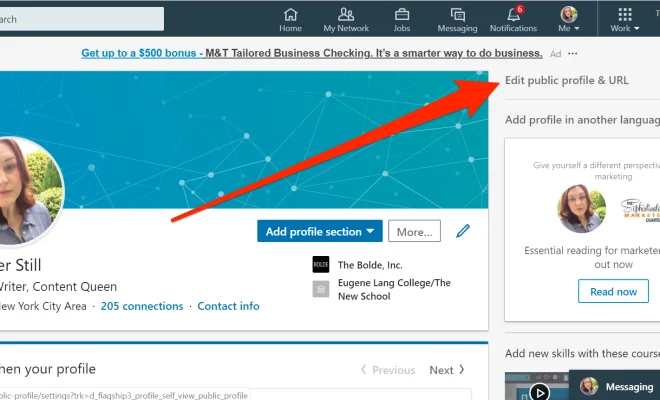
Once you are logged in, click on the “Me” icon on the top of your LinkedIn account page. Then select “View profile” from the dropdown menu that appears. This will take you to your LinkedIn profile page. On the right-hand side of the page, click on the “Edit public profile & URL” button, which will take you to the public profile settings page.

Step 3: Customize your LinkedIn URL

On the public profile settings page, you will see an option that says “Edit your custom URL.” Click on the pencil icon next to your LinkedIn URL, which will allow you to customize your LinkedIn URL. Type in your desired URL and click “Save.”

Step 4: Share your customized LinkedIn URL

Once you have customized your LinkedIn URL, share it with your network on your business cards, email signature, and other online platforms.

Tips for customizing your LinkedIn URL

– Keep it brief and memorable
– Use your name or professional brand in the URL
– Avoid using excessive symbols or numbers
– Ensure that the URL is a clear representation of your professional identity
– Double-check your URL for any spelling or grammatical errors.

In conclusion, while customizing a LinkedIn URL may seem like a small detail, it’s a vital element in building a strong professional brand online. A well-crafted LinkedIn URL not only looks professional, but it’s also easier to share and can help individuals stand out in a crowded job market. By following these simple steps, anyone can customize their LinkedIn URL and take the first step towards building a strong professional brand online.

Previous Article

Cat Games for Your iPad or Android ...

Next Article

Easy Info Hash to Torrent Magnet Converters

Matthew Lynch

Related articles More from author

  • Digital & Mobile Technology

    What Are White Box Laptop Chassis?

    June 14, 2023
    By Matthew Lynch
  • Digital & Mobile Technology

    How to Calculate a Z-Score in Excel

    August 5, 2023
    By Matthew Lynch
  • Digital & Mobile Technology

    How to Separate First and Last Names in Microsoft Excel

    May 8, 2023
    By Matthew Lynch
  • Digital & Mobile Technology

    The Best Websites to Bookmark for Learning Math Step by Step

    June 13, 2023
    By Matthew Lynch
  • Digital & Mobile Technology

    The 5 Best Free Auto Subtitle Generators Online

    August 3, 2023
    By Matthew Lynch
  • Digital & Mobile Technology

    Is It Bad to Charge Your Kindle Overnight?

    June 21, 2023
    By Matthew Lynch

Search

Login & Registration

  • Register
  • Log in
  • Entries feed
  • Comments feed
  • WordPress.org

Newsletter

Signup for The Tech Edvocate Newsletter and have the latest in EdTech news and opinion delivered to your email address!

About Us

Since technology is not going anywhere and does more good than harm, adapting is the best course of action. That is where The Tech Edvocate comes in. We plan to cover the PreK-12 and Higher Education EdTech sectors and provide our readers with the latest news and opinion on the subject. From time to time, I will invite other voices to weigh in on important issues in EdTech. We hope to provide a well-rounded, multi-faceted look at the past, present, the future of EdTech in the US and internationally.

We started this journey back in June 2016, and we plan to continue it for many more years to come. I hope that you will join us in this discussion of the past, present and future of EdTech and lend your own insight to the issues that are discussed.

Newsletter

Signup for The Tech Edvocate Newsletter and have the latest in EdTech news and opinion delivered to your email address!

Contact Us

The Tech Edvocate
910 Goddin Street
Richmond, VA 23231
(601) 630-5238
[email protected]

Copyright © 2025 Matthew Lynch. All rights reserved.