The Tech Edvocate

Top Menu

  • Advertisement
  • Apps
  • Home Page
  • Home Page Five (No Sidebar)
  • Home Page Four
  • Home Page Three
  • Home Page Two
  • Home Tech2
  • Icons [No Sidebar]
  • Left Sidbear Page
  • Lynch Educational Consulting
  • My Account
  • My Speaking Page
  • Newsletter Sign Up Confirmation
  • Newsletter Unsubscription
  • Our Brands
  • Page Example
  • Privacy Policy
  • Protected Content
  • Register
  • Request a Product Review
  • Shop
  • Shortcodes Examples
  • Signup
  • Start Here
    • Governance
    • Careers
    • Contact Us
  • Terms and Conditions
  • The Edvocate
  • The Tech Edvocate Product Guide
  • Topics
  • Write For Us
  • Advertise

Main Menu

  • Start Here
    • Our Brands
    • Governance
      • Lynch Educational Consulting, LLC.
      • Dr. Lynch’s Personal Website
      • Careers
    • Write For Us
    • The Tech Edvocate Product Guide
    • Contact Us
    • Books
    • Edupedia
    • Post a Job
    • The Edvocate Podcast
    • Terms and Conditions
    • Privacy Policy
  • Topics
    • Assistive Technology
    • Child Development Tech
    • Early Childhood & K-12 EdTech
    • EdTech Futures
    • EdTech News
    • EdTech Policy & Reform
    • EdTech Startups & Businesses
    • Higher Education EdTech
    • Online Learning & eLearning
    • Parent & Family Tech
    • Personalized Learning
    • Product Reviews
  • Advertise
  • Tech Edvocate Awards
  • The Edvocate
  • Pedagogue
  • School Ratings

logo

The Tech Edvocate

  • Start Here
    • Our Brands
    • Governance
      • Lynch Educational Consulting, LLC.
      • Dr. Lynch’s Personal Website
        • My Speaking Page
      • Careers
    • Write For Us
    • The Tech Edvocate Product Guide
    • Contact Us
    • Books
    • Edupedia
    • Post a Job
    • The Edvocate Podcast
    • Terms and Conditions
    • Privacy Policy
  • Topics
    • Assistive Technology
    • Child Development Tech
    • Early Childhood & K-12 EdTech
    • EdTech Futures
    • EdTech News
    • EdTech Policy & Reform
    • EdTech Startups & Businesses
    • Higher Education EdTech
    • Online Learning & eLearning
    • Parent & Family Tech
    • Personalized Learning
    • Product Reviews
  • Advertise
  • Tech Edvocate Awards
  • The Edvocate
  • Pedagogue
  • School Ratings
  • A Visitor’s Guide to Fresno (CA), United States

  • A Visitors Guide to New Orleans (LA), United States

  • A Visitors Guide to Sacramento (CA), United States

  • A Visitors Guide to Lyon, France

  • JisuLife Ultra2 Portable Fan: A Powerful Multi-Function Cooling Solution

  • A Visitors Guide to Viña del Mar, Chile

  • A Visitors Guide to Århus, Denmark

  • A Visitors Guide to Bakersfield (CA), United States

  • A Visitors Guide to Aurora (CO), United States

  • A Visitor’s Guide to Toledo (OH), United States

Digital & Mobile Technology
Home›Digital & Mobile Technology›Wi-Fi Wireless Bridging Explained

Wi-Fi Wireless Bridging Explained
By Matthew Lynch
June 4, 2023
0
Spread the love

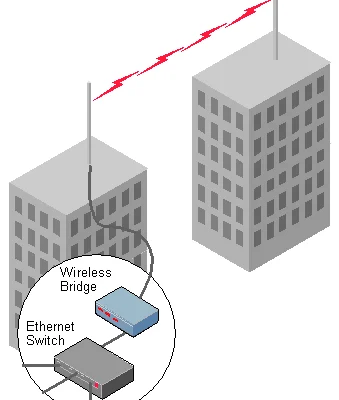
Wi-Fi wireless bridging has become a popular solution for extending Wi-Fi connectivity to areas where a wired network is impractical or impossible to install. A wireless bridge connects two or more networks wirelessly, allowing them to communicate with each other and share resources. In this article, we’ll explore the basics of Wi-Fi wireless bridging and how it works.

What is Wi-Fi Wireless Bridging?

Wi-Fi wireless bridging is the process of connecting two or more wireless networks together to form one larger network. It involves using wireless routers or access points to create a bridge between two different Wi-Fi networks, allowing devices to move seamlessly between them without interruption.

How does Wi-Fi Wireless Bridging work?

Wi-Fi wireless bridging works by using a bridge device, which is usually a wireless router or access point, to wirelessly connect two separate networks. The bridge device receives incoming wireless signals from one network and passes them on to the other network, effectively creating a bridge between the two.

A wireless bridge operates in the same frequency band and using the same wireless standard (such as 802.11ac or 802.11n) as the networks it is bridging. This ensures that devices connected to the bridged networks can communicate with each other seamlessly.

Why use Wi-Fi Wireless Bridging?

There are several reasons why you might want to use Wi-Fi wireless bridging:

1. Extending Wi-Fi coverage: Wi-Fi wireless bridging can be used to extend Wi-Fi coverage to areas where installing a wired network is impractical, such as in large buildings, across large outdoor spaces, or between separate buildings.

2. Improving network performance: Wi-Fi wireless bridging can improve network performance by allowing devices to connect to the closest access point or router. This can reduce network congestion and improve overall network speeds.

3. Creating a mesh network: Wi-Fi wireless bridging can be used to create a mesh network, where each access point or router acts as a node in the network. This can provide seamless Wi-Fi coverage across large areas, with no dead spots or interruptions.

Conclusion

Wi-Fi wireless bridging is a powerful networking solution that can be used to create seamless Wi-Fi coverage across large areas, improve network performance, and create mesh networks. By understanding how Wi-Fi wireless bridging works, you can choose the right equipment and configuration to create a reliable and efficient network that meets your needs.

Previous Article

How to Use the Windows Keyboard Shortcut ...

Next Article

How to Encrypt Your iPhone

Matthew Lynch

Related articles More from author

  • Digital & Mobile Technology

    How to Install Minecraft on Ubuntu or Any Other Linux Distribution

    April 27, 2023
    By Matthew Lynch
  • Digital & Mobile Technology

    Best Free Audio Converter Software Programs

    May 31, 2023
    By Matthew Lynch
  • Digital & Mobile Technology

    What Is the Difference Between Bronze and Gold-Rated PSUs?

    September 8, 2023
    By Matthew Lynch
  • Digital & Mobile Technology

    Is BoohooMAN Legit? A Guide to Shopping Safely

    June 7, 2023
    By Matthew Lynch
  • Digital & Mobile Technology

    How to Shuffle or Repeat Songs on iPhone or iPad

    May 9, 2023
    By Matthew Lynch
  • Digital & Mobile Technology

    How to Transfer Photos from an iPhone to a PC

    May 29, 2023
    By Matthew Lynch

Search

Login & Registration

  • Register
  • Log in
  • Entries feed
  • Comments feed
  • WordPress.org

Newsletter

Signup for The Tech Edvocate Newsletter and have the latest in EdTech news and opinion delivered to your email address!

About Us

Since technology is not going anywhere and does more good than harm, adapting is the best course of action. That is where The Tech Edvocate comes in. We plan to cover the PreK-12 and Higher Education EdTech sectors and provide our readers with the latest news and opinion on the subject. From time to time, I will invite other voices to weigh in on important issues in EdTech. We hope to provide a well-rounded, multi-faceted look at the past, present, the future of EdTech in the US and internationally.

We started this journey back in June 2016, and we plan to continue it for many more years to come. I hope that you will join us in this discussion of the past, present and future of EdTech and lend your own insight to the issues that are discussed.

Newsletter

Signup for The Tech Edvocate Newsletter and have the latest in EdTech news and opinion delivered to your email address!

Contact Us

The Tech Edvocate
910 Goddin Street
Richmond, VA 23231
(601) 630-5238
[email protected]

Copyright © 2025 Matthew Lynch. All rights reserved.