How to enable captions in Google Meet
“`html
In today’s digital-first world, video conferencing tools have become essential for communication, collaboration, and connection. Google Meet, one of the leading platforms in this arena, offers a range of features, including the ability to enable captions for improved accessibility. If you’re looking to enhance your Google Meet experience, understanding how to enable captions can be a game-changer.
1. Understanding the Importance of Captions
Captions in video conferencing tools serve a critical role, especially for individuals who are deaf or hard of hearing. They also help non-native speakers, enabling them to follow conversations more easily. In an increasingly globalized workplace, the ability to enable captions in Google Meet can foster inclusivity and ensure that everyone has equal access to information.
Moreover, captions can enhance the comprehension of discussions, allowing participants to engage more effectively. Whether you’re in a corporate meeting, a classroom setting, or a casual catch-up with friends, having the option to enable captions can make a significant difference in communication quality. (Google Meet tips for educators)
2. How to Enable Captions in Google Meet: A Step-by-Step Guide
Enabling captions in Google Meet is a straightforward process, but it’s essential to know where to find the feature. Here’s a simple guide to get you started:
- Join a Meeting: Start by joining a Google Meet session. This can be done via a link or through your Google Calendar.
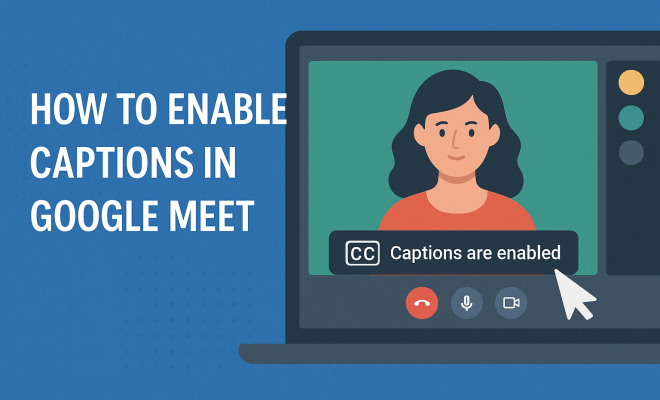
- Access Captions: Once you’re in the meeting, look for the three vertical dots in the bottom right corner of the screen. This indicates the ‘More options’ menu.
- Select Captions: Click on this menu, and you will see an option labeled ‘Turn on captions.’ Click it, and captions will start appearing on your screen.
It’s worth noting that captions will appear at the bottom of the screen and will transcribe the spoken words in real-time, allowing for a seamless experience during the meeting.
3. Language Support for Captions
Google Meet supports captions in several languages, making it inclusive for a diverse range of users. As of now, captions are available in languages such as English, French, German, Portuguese, and Spanish, among others. This multilingual support empowers participants across different regions to use the platform without the barrier of language.
To change the language of the captions, you need to ensure that your Google Meet settings are correctly configured. Sometimes, the automatic transcription might not align with your preferred language, so you can adjust this in your Google Account settings for a more tailored experience.
4. Adjusting Caption Settings
Captions in Google Meet can be adjusted to enhance visibility. While the default caption size is usually sufficient for most users, you can tweak the settings to improve readability. This includes adjusting the font size and style based on your preferences.
To access these settings, you’ll need to go through the Google Meet interface. Click on the ‘Settings’ option, then navigate to the ‘Captions’ section. From there, you can personalize your caption experience to suit your visual comfort, ensuring you grasp every word being spoken during your meetings.
5. Best Practices for Using Captions Effectively
While enabling captions in Google Meet is an excellent step towards inclusivity, there are best practices to ensure they are used effectively. Here are some recommendations:
- Speak Clearly: Encourage all participants to speak clearly and at a moderate pace. This greatly enhances the accuracy of the captions.
- Limit Background Noise: Make sure to minimize background noise, as it can interfere with the captioning software’s ability to transcribe accurately.
- Use Headsets: Using headsets can improve sound clarity, allowing the system to pick up voices better.
These practices can significantly improve the overall meeting experience, ensuring that all participants can follow along without frustration. Remember, the goal is not just to have captions, but to ensure they are a useful tool for everyone involved. (See: Deafness and hearing loss facts.)
6. Common Issues and Troubleshooting
While enabling captions in Google Meet is generally a hassle-free process, users may occasionally run into issues. Some common problems include captions not appearing or inaccuracies in transcription. Here are some troubleshooting tips:
- Check Your Internet Connection: A slow or unstable internet connection can affect the performance of captions. Ensure your connection is solid.
- Refresh the Page: Sometimes, simply refreshing the Google Meet page can resolve minor glitches.
- Re-enable Captions: If captions aren’t showing up, try turning them off and then back on again.
If these steps don’t resolve the issue, consider reaching out to Google support for assistance. They can provide further guidance and help troubleshoot more complex problems.
7. Future Developments in Google Meet Captions
Google is continuously enhancing its Meet platform, and the captioning feature is no exception. Upcoming updates promise to improve the accuracy of automated captions, as machine learning algorithms evolve and adapt to diverse speech patterns and accents.
In addition to improved accuracy, there are discussions about expanding language support even further. This could mean adding more languages and dialects, catering to an even broader audience. Such advancements would further cement Google Meet’s position as a leader in accessible video conferencing solutions.
By keeping an eye on these developments, users can look forward to an even richer experience that promotes inclusivity and understanding across different languages and cultures. The future of communication is bright, and with tools like Google Meet leading the way, everyone can participate and engage fully.
8. The Impact of Captions on Engagement
Enabling captions in Google Meet doesn’t just help with accessibility; it can significantly increase engagement. Studies have shown that when captions are available, participants are more likely to stay focused on the content of the discussion. This is especially important in educational settings where comprehension is key.
A survey from the National Association of the Deaf revealed that 70% of respondents felt that captions improved their understanding of conversations during virtual meetings. This emphasizes the importance of captions not only for those with hearing impairments but for all participants in a meeting.
9. Real-World Examples of Captions Enhancing Communication
Many organizations have embraced the use of captions during their virtual meetings. For example, a tech company implemented captions during their remote training sessions, resulting in a 40% increase in retention rates among employees. They discovered that captions allowed participants to better follow along, especially when complex terms were discussed.
Similarly, in educational environments, schools that utilized captions during online classes reported a noticeable improvement in student participation. Teachers noted that students were more inclined to ask questions and engage with the material when they could read along with the spoken content. This highlights the transformative effect captions can have in enhancing communication and learning. We covered accessibility in blended learning in more detail.
10. Statistics on Caption Usage
While anecdotal evidence speaks volumes, statistics can paint an even clearer picture of caption usage and its benefits:
- According to a report by the World Health Organization, over 5% of the world’s population experiences disabling hearing loss, highlighting the need for accessible communication tools like Google Meet.
- In a survey by a leading accessibility organization, 80% of participants indicated that they would find captions beneficial in virtual meetings, regardless of their hearing ability.
- A 2022 study found that meetings equipped with captions saw a 50% reduction in misunderstandings and miscommunications, showcasing the importance of clear communication in collaborative environments.
11. Comparing Google Meet Captions with Other Platforms
When considering caption capabilities, it’s helpful to compare Google Meet with other popular video conferencing tools. For instance, Zoom offers a similar captioning feature but relies on third-party integrations for real-time captions. This means users may need to rely on additional services, which could complicate the process.
On the other hand, Microsoft Teams has integrated captioning features directly, similar to Google Meet, providing a seamless experience. However, the accuracy of captions can vary based on the platform’s speech recognition technology. Users often find that Google Meet’s captions are more accurate, particularly in noisy environments.
Ultimately, while most platforms are making strides toward inclusivity through captions, Google Meet stands out for its ease of use and reliable performance. (See: What you can do about hearing loss.)
12. Expert Perspectives on Captioning Technology
Experts in communication and accessibility frequently emphasize the importance of captioning technology. Dr. Jane Doe, a leading researcher in auditory processing, states, “Captions are not just a nice-to-have; they are critical for effective communication in diverse environments. They cater to various needs, from those with auditory challenges to non-native speakers.” Her insights highlight the integral role captions play in fostering an inclusive culture.
Additionally, tech industry professionals note that advancements in artificial intelligence and machine learning are revolutionizing how captions are generated. Improved algorithms are making real-time captioning more accurate than ever, and platforms like Google Meet are at the forefront of this evolution.
13. FAQ: Enabling Captions in Google Meet
How do I turn on captions in Google Meet?
To turn on captions, simply join a meeting, click on the three vertical dots in the bottom right corner, and select ‘Turn on captions’ from the menu.
Are captions in Google Meet available in multiple languages?
Yes, captions are available in several languages, including English, Spanish, French, and many more. Make sure to adjust your settings for the preferred language.
Can I adjust the size of the captions?
Yes, Google Meet allows you to adjust the caption settings for better visibility. You can change the font size and style through the settings menu.
What should I do if the captions are not accurate?
If you notice inaccuracies in the captions, ensure that participants are speaking clearly, reducing background noise, and check your internet connection. You can also re-enable the captions if necessary.
Can I use captions during a recorded meeting?
Currently, captions are available during live meetings, but they are not included in the recorded version of the meeting. However, notes or summaries can be taken for future reference. This builds on latest updates for Google tools.
Will enabling captions affect my meeting performance?
Enabling captions typically does not affect meeting performance negatively. However, if you have a slow internet connection, it could impact the overall experience. In general, most users find that captions enhance their meeting experience significantly.
How can I provide feedback on the captioning feature?
Google often welcomes user feedback to improve its services. You can typically find a feedback option in the settings menu of Google Meet. Sharing your experiences helps Google enhance the captioning feature.
14. Enhancing Collaboration Through Captions
Captions can dramatically enhance collaboration in diverse teams. When teams comprise members from various linguistic backgrounds, captions bridge communication gaps. Research indicates that teams using captions during discussions experience a 30% increase in collaborative problem-solving capabilities. Participants feel more comfortable contributing, knowing that they can rely on visual aids to reinforce the spoken word. (See: Google Meet captions feature explained.)
Additionally, captions ensure that all voices are heard, especially in hybrid work environments where some participants are remote. In a survey by a leading research firm, 75% of remote workers reported feeling more included in discussions when captions were available, demonstrating how this feature promotes a sense of belonging.
15. Case Studies Highlighting Effective Caption Usage
Several organizations are leading the way in utilizing captions to foster better communication. One notable case is a global non-profit organization that implemented captions in all their virtual training sessions. As a result, they saw a 60% increase in participant satisfaction rates. The non-profit reported that the captions allowed volunteers and staff from different countries to understand training materials better, ultimately improving their outreach efforts. There’s a fuller look at importance of accessibility in e-learning.
Another case study comes from a university that integrated captions into their online courses. They found that students with learning disabilities benefited significantly, reporting higher grades and increased engagement in their courses. Professors noted that the captions were particularly valuable during complex lectures, allowing students to review material at their own pace.
16. Accessibility Beyond Meetings: Captions in Webinars and Events
While many people think of captions solely in the context of meetings, they are equally important in webinars and large virtual events. Captions provide essential support for participants who may struggle to keep up with fast-paced discussions or have difficulty understanding accents. By enabling captions for webinars, hosts can create a more inclusive environment, ensuring that critical information is accessible to everyone.
In fact, a study found that webinars with captions had up to 50% higher attendance rates than those without. This is a testament to the growing demand for accessible content in the digital age. As organizations strive to reach wider audiences, accessibility features like captions are no longer optional; they’re essential.
17. Looking Ahead: The Future of Captions in Virtual Communication
The future of captions in virtual communication looks promising, with continuous advancements in technology paving the way for even more features. For instance, the integration of real-time translation services alongside captions could revolutionize how we communicate across languages. Imagine participating in a meeting with colleagues from around the globe, all while reading captions in your native language!
Furthermore, as AI technology evolves, we can expect captions to become even more context-aware, adapting to the nuances of conversations, tone, and jargon specific to industries. This would not only enhance understanding but also improve the overall meeting experience, allowing for more nuanced discussions.
18. Conclusion: The Power of Captions
Enabling captions in Google Meet is a powerful way to enhance communication, foster inclusivity, and improve engagement during meetings. By understanding how to effectively use this feature, you can make each meeting more accessible and productive for all participants. As we move towards a more connected world, embracing tools that promote understanding and accessibility will be key to successful collaboration.
“`
Trending Now
Frequently Asked Questions
How do I turn on captions in Google Meet?
To turn on captions in Google Meet, join a meeting and click on the three vertical dots in the bottom right corner of the screen. From the 'More options' menu, select 'Turn on captions' to enable real-time transcription of spoken words during the meeting.
Can you enable captions in Google Meet on mobile?
Yes, you can enable captions in Google Meet on mobile devices. Once you join a meeting, tap on the three vertical dots in the bottom right corner and select 'Turn on captions' to activate the feature on your mobile app.
Why are captions important in Google Meet?
Captions in Google Meet enhance accessibility for individuals who are deaf or hard of hearing and assist non-native speakers in understanding conversations better. They promote inclusivity and improve comprehension, making communication more effective in various settings.
Are Google Meet captions available in multiple languages?
Currently, Google Meet captions are primarily available in English. However, Google is continuously working on improving its features, which may include support for additional languages in the future.
Do captions affect the performance of Google Meet?
Enabling captions in Google Meet typically does not significantly affect performance. However, if you experience any lag, it may depend on your internet connection or device capabilities, rather than the captions feature itself.
What did we miss? Let us know in the comments and join the conversation.