The Tech Edvocate

Top Menu

  • Advertisement
  • Apps
  • Home Page
  • Home Page Five (No Sidebar)
  • Home Page Four
  • Home Page Three
  • Home Page Two
  • Home Tech2
  • Icons [No Sidebar]
  • Left Sidbear Page
  • Lynch Educational Consulting
  • My Account
  • My Speaking Page
  • Newsletter Sign Up Confirmation
  • Newsletter Unsubscription
  • Our Brands
  • Page Example
  • Privacy Policy
  • Protected Content
  • Register
  • Request a Product Review
  • Shop
  • Shortcodes Examples
  • Signup
  • Start Here
    • Governance
    • Careers
    • Contact Us
  • Terms and Conditions
  • The Edvocate
  • The Tech Edvocate Product Guide
  • Topics
  • Write For Us
  • Advertise

Main Menu

  • Start Here
    • Our Brands
    • Governance
      • Lynch Educational Consulting, LLC.
      • Dr. Lynch’s Personal Website
      • Careers
    • Write For Us
    • The Tech Edvocate Product Guide
    • Contact Us
    • Books
    • Edupedia
    • Post a Job
    • The Edvocate Podcast
    • Terms and Conditions
    • Privacy Policy
  • Topics
    • Assistive Technology
    • Child Development Tech
    • Early Childhood & K-12 EdTech
    • EdTech Futures
    • EdTech News
    • EdTech Policy & Reform
    • EdTech Startups & Businesses
    • Higher Education EdTech
    • Online Learning & eLearning
    • Parent & Family Tech
    • Personalized Learning
    • Product Reviews
  • Advertise
  • Tech Edvocate Awards
  • The Edvocate
  • Pedagogue
  • School Ratings

logo

The Tech Edvocate

  • Start Here
    • Our Brands
    • Governance
      • Lynch Educational Consulting, LLC.
      • Dr. Lynch’s Personal Website
        • My Speaking Page
      • Careers
    • Write For Us
    • The Tech Edvocate Product Guide
    • Contact Us
    • Books
    • Edupedia
    • Post a Job
    • The Edvocate Podcast
    • Terms and Conditions
    • Privacy Policy
  • Topics
    • Assistive Technology
    • Child Development Tech
    • Early Childhood & K-12 EdTech
    • EdTech Futures
    • EdTech News
    • EdTech Policy & Reform
    • EdTech Startups & Businesses
    • Higher Education EdTech
    • Online Learning & eLearning
    • Parent & Family Tech
    • Personalized Learning
    • Product Reviews
  • Advertise
  • Tech Edvocate Awards
  • The Edvocate
  • Pedagogue
  • School Ratings
  • Celebrating Open Education Week 2026: A Transformative Movement in Canadian Postsecondary Education

  • Madhya Pradesh Police Embrace Tradition: Trainee Officers Start Day with Dakshinamurthy Shloka

  • Tragedy Strikes Karnataka School Hostel: Class 9 Student’s Attack Claims Life

  • Bitcoin’s Resilience Amid Ethereum’s Challenges: A Deep Dive into March 2026 Crypto Markets

  • Bitcoin’s Price Forecast for March 2026: Analyzing Current Trends and Bearish Sentiments

  • Montreal Weather Update: Drizzle and Winds Give Way to Warmer Days Ahead

  • Navigating the Cybersecurity Market: Top Stock Picks for March 2026

  • Revolutionizing Cybersecurity: The Trump Administration’s 2026 Strategy for Digital Assets

  • Navigating the Cybersecurity Landscape: The Top Stocks to Watch in 2026

  • Addressing America’s Housing Crisis: A Shortage Exceeds 4 Million Homes

Digital & Mobile Technology
Home›Digital & Mobile Technology›How to Change Your Name On Zoom

How to Change Your Name On Zoom
By Matthew Lynch
June 10, 2023
0
Spread the love

In the modern era of virtual communication, video conferencing has become one of the most effective ways to communicate with colleagues and peers worldwide. The widespread use of Zoom, particularly in the time of COVID-19, has led to many people using it for personal and professional use.

If you find that your name is incorrect or want to change it for privacy or personal reasons, don’t worry. Changing your name on Zoom is easy and straightforward. Here is a step-by-step guide on how to change your name on Zoom successfully.

Step 1: Launch Your Zoom App

The first step is to launch the Zoom app on your device. Ensure that you have adequate internet connections before proceeding to step two.

Step 2: Log In

Log in to the Zoom application using your email address and password. You will then access your Zoom account dashboard.

Step 3: Click Your Profile Picture

Once on your Zoom account dashboard, click on your profile picture. It will take you to your profile settings.

Step 4: Edit Your Profile Settings

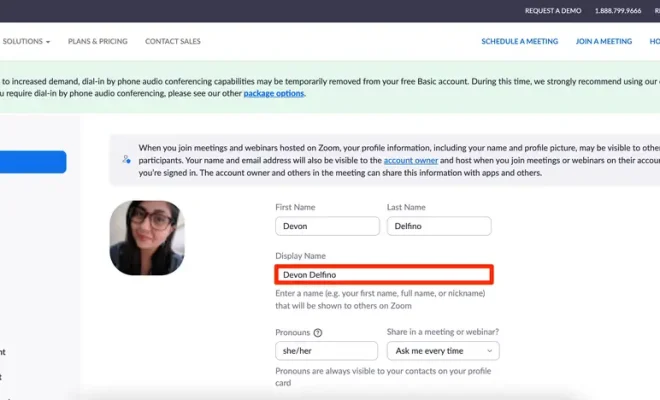
Click on the Edit button next to your name. This will prompt a dialog box to appear, where you can amend your name.

Step 5: Change Your Name

In the given field, enter your new name. It can be your full name or whatever name you want to appear on Zoom. You should ensure that the name is legible and professionally acceptable as it will appear during business meetings and video calls.

Step 6: Save Changes

Once you have entered your new name, click save changes. The new name will immediately update and reflect on your Zoom account.

Additional Tips

Suppose you have more than one name that you wish to use alternatively, for instance, your nickname or your maiden name. In that case, you can follow the same steps repeatedly and change your name before every meeting or call.

Conclusion

In summary, changing your name on Zoom is an easy and simple process that anyone can manage. Whether you want to use a professional name or a nickname, it is easy to update and reflect on your account. Therefore, if you desire to amend your name, go ahead and follow these outlined steps to change your name on Zoom.


Previous Article

How to Take a Kindle Fire Screenshot

Next Article

Amazon Echo Connect: How It Works With ...

Matthew Lynch

Related articles More from author

  • Digital & Mobile Technology

    Best Apps to Use to Fax From a Phone

    June 2, 2023
    By Matthew Lynch
  • Digital & Mobile Technology

    Best Free Text Editors

    June 1, 2023
    By Matthew Lynch
  • Digital & Mobile Technology

    How to Access Yahoo Mail With Outlook

    June 6, 2023
    By Matthew Lynch
  • Digital & Mobile Technology

    How blizzb3ar Became Twitch’s Latest Comfort Streamer

    July 31, 2023
    By Matthew Lynch
  • Digital & Mobile Technology

    The Best White PC Cases

    September 8, 2023
    By Matthew Lynch
  • Digital & Mobile Technology

    How to Access Facebook From School

    May 16, 2023
    By Matthew Lynch

Search

Login & Registration

  • Register
  • Log in
  • Entries feed
  • Comments feed
  • WordPress.org

Newsletter

Signup for The Tech Edvocate Newsletter and have the latest in EdTech news and opinion delivered to your email address!

About Us

Since technology is not going anywhere and does more good than harm, adapting is the best course of action. That is where The Tech Edvocate comes in. We plan to cover the PreK-12 and Higher Education EdTech sectors and provide our readers with the latest news and opinion on the subject. From time to time, I will invite other voices to weigh in on important issues in EdTech. We hope to provide a well-rounded, multi-faceted look at the past, present, the future of EdTech in the US and internationally.

We started this journey back in June 2016, and we plan to continue it for many more years to come. I hope that you will join us in this discussion of the past, present and future of EdTech and lend your own insight to the issues that are discussed.

Newsletter

Signup for The Tech Edvocate Newsletter and have the latest in EdTech news and opinion delivered to your email address!

Contact Us

The Tech Edvocate
910 Goddin Street
Richmond, VA 23231
(601) 630-5238
[email protected]

Copyright © 2025 Matthew Lynch. All rights reserved.