The Tech Edvocate

Top Menu

  • Advertisement
  • Apps
  • Home Page
  • Home Page Five (No Sidebar)
  • Home Page Four
  • Home Page Three
  • Home Page Two
  • Home Tech2
  • Icons [No Sidebar]
  • Left Sidbear Page
  • Lynch Educational Consulting
  • My Account
  • My Speaking Page
  • Newsletter Sign Up Confirmation
  • Newsletter Unsubscription
  • Our Brands
  • Page Example
  • Privacy Policy
  • Protected Content
  • Register
  • Request a Product Review
  • Shop
  • Shortcodes Examples
  • Signup
  • Start Here
    • Governance
    • Careers
    • Contact Us
  • Terms and Conditions
  • The Edvocate
  • The Tech Edvocate Product Guide
  • Topics
  • Write For Us
  • Advertise

Main Menu

  • Start Here
    • Our Brands
    • Governance
      • Lynch Educational Consulting, LLC.
      • Dr. Lynch’s Personal Website
      • Careers
    • Write For Us
    • The Tech Edvocate Product Guide
    • Contact Us
    • Books
    • Edupedia
    • Post a Job
    • The Edvocate Podcast
    • Terms and Conditions
    • Privacy Policy
  • Topics
    • Assistive Technology
    • Child Development Tech
    • Early Childhood & K-12 EdTech
    • EdTech Futures
    • EdTech News
    • EdTech Policy & Reform
    • EdTech Startups & Businesses
    • Higher Education EdTech
    • Online Learning & eLearning
    • Parent & Family Tech
    • Personalized Learning
    • Product Reviews
  • Advertise
  • Tech Edvocate Awards
  • The Edvocate
  • Pedagogue
  • School Ratings

logo

The Tech Edvocate

  • Start Here
    • Our Brands
    • Governance
      • Lynch Educational Consulting, LLC.
      • Dr. Lynch’s Personal Website
        • My Speaking Page
      • Careers
    • Write For Us
    • The Tech Edvocate Product Guide
    • Contact Us
    • Books
    • Edupedia
    • Post a Job
    • The Edvocate Podcast
    • Terms and Conditions
    • Privacy Policy
  • Topics
    • Assistive Technology
    • Child Development Tech
    • Early Childhood & K-12 EdTech
    • EdTech Futures
    • EdTech News
    • EdTech Policy & Reform
    • EdTech Startups & Businesses
    • Higher Education EdTech
    • Online Learning & eLearning
    • Parent & Family Tech
    • Personalized Learning
    • Product Reviews
  • Advertise
  • Tech Edvocate Awards
  • The Edvocate
  • Pedagogue
  • School Ratings
  • 100 Best Apps for Data Backup

  • 100 Best Apps for Data Migration

  • 100 Best Apps for Data Transformation

  • 100 Best Apps for Data Cleaning

  • 100 Best Apps for Data Entry

  • 100 Best Apps for Business Process Automation

  • 100 Best Apps for Operational Efficiency

  • 100 Best Apps for Improving Processes

  • 100 Best Apps for Scaling Operations

  • 100 Best Apps for Community-Led Growth

Digital & Mobile Technology
Home›Digital & Mobile Technology›How to Add Bluetooth Functionality to Non-Bluetooth Devices

How to Add Bluetooth Functionality to Non-Bluetooth Devices
By Matthew Lynch
May 17, 2023
0
Spread the love

In today’s day and age, it’s no secret that Bluetooth has become an essential feature in most electronic devices. You can connect your smartphone to your wireless headphones, your fitness tracker to your smartwatch, or stream music from your computer to your wireless speaker – all via Bluetooth. However, what if you have non-Bluetooth devices and wish to use them wirelessly with your smart devices? Here’s how to add Bluetooth functionality to non-Bluetooth devices.

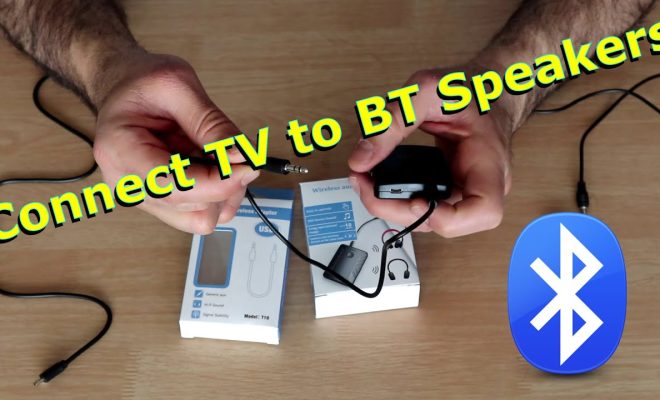
1. Bluetooth Transmitter: The easiest way to add Bluetooth functionality to non-Bluetooth devices is by using a Bluetooth transmitter. A Bluetooth transmitter is a small device that plugs into a non-Bluetooth device’s audio output port (such as a 3.5mm headphone jack or RCA ports). It then streams the audio wirelessly to a Bluetooth-enabled device such as a smartphone or a Bluetooth speaker.

2. Bluetooth Adapter: Another way to add Bluetooth to a non-Bluetooth device is by using a Bluetooth adapter. A Bluetooth adapter is a small device that plugs into a USB port on a non-Bluetooth device such as a laptop, desktop, or even a TV. Once plugged in, it allows the device to connect to Bluetooth-enabled devices such as headphones, speakers, or smartphones.

3. Bluetooth (Wireless) Headphones: If you have a device that only has a wired headphone jack, such as an older iPod or MP3 player, you can still use Bluetooth headphones for wireless listening. There are many Bluetooth headphones available in a variety of sizes and styles. You can simply pair these headphones with your non-Bluetooth device, and you’ll have wireless listening capabilities.

4. Bluetooth Speakers: Similarly, if you have a non-Bluetooth stereo system or speaker, you can add Bluetooth functionality by purchasing a Bluetooth receiver kit. These kits come with a Bluetooth receiver that plugs into the stereo system’s audio input and allows you to stream music wirelessly from your smartphone or other Bluetooth-enabled devices.

In conclusion, adding Bluetooth functionality to non-Bluetooth devices is easy and affordable. You can use Bluetooth transmitters, adapters, headphones, speakers, or receiver kits, depending on your device’s requirements. By following these methods, you can enjoy wireless streaming and listening without having to replace your old devices.

Previous Article

How to Add Bookmark Folder in Safari ...

Next Article

How to Add Channels on Dish Network

Matthew Lynch

Related articles More from author

  • Digital & Mobile Technology

    Can Alexa Play iTunes or Apple Music?

    June 14, 2023
    By Matthew Lynch
  • Digital & Mobile Technology

    Mouse Not Working on Your Mac? Tips to Fix It

    August 5, 2023
    By Matthew Lynch
  • Digital & Mobile Technology

    Best 4K Webcams You Can Buy Right Now

    April 10, 2023
    By Matthew Lynch
  • Digital & Mobile Technology

    How to Email to Cricket Phones

    May 28, 2023
    By Matthew Lynch
  • Digital & Mobile Technology

    How to Read a Floppy Disk on a Modern PC or Mac

    May 2, 2023
    By Matthew Lynch
  • Digital & Mobile Technology

    What Is an XVO File?

    June 1, 2023
    By Matthew Lynch

Search

Login & Registration

  • Log in
  • Entries feed
  • Comments feed
  • WordPress.org

Newsletter

Signup for The Tech Edvocate Newsletter and have the latest in EdTech news and opinion delivered to your email address!

About Us

Since technology is not going anywhere and does more good than harm, adapting is the best course of action. That is where The Tech Edvocate comes in. We plan to cover the PreK-12 and Higher Education EdTech sectors and provide our readers with the latest news and opinion on the subject. From time to time, I will invite other voices to weigh in on important issues in EdTech. We hope to provide a well-rounded, multi-faceted look at the past, present, the future of EdTech in the US and internationally.

We started this journey back in June 2016, and we plan to continue it for many more years to come. I hope that you will join us in this discussion of the past, present and future of EdTech and lend your own insight to the issues that are discussed.

Newsletter

Signup for The Tech Edvocate Newsletter and have the latest in EdTech news and opinion delivered to your email address!

Contact Us

The Tech Edvocate
910 Goddin Street
Richmond, VA 23231
(601) 630-5238
[email protected]

Copyright © 2026 Matthew Lynch. All rights reserved.