The Tech Edvocate

Top Menu

  • Advertisement
  • Apps
  • Home Page
  • Home Page Five (No Sidebar)
  • Home Page Four
  • Home Page Three
  • Home Page Two
  • Home Tech2
  • Icons [No Sidebar]
  • Left Sidbear Page
  • Lynch Educational Consulting
  • My Account
  • My Speaking Page
  • Newsletter Sign Up Confirmation
  • Newsletter Unsubscription
  • Our Brands
  • Page Example
  • Privacy Policy
  • Protected Content
  • Register
  • Request a Product Review
  • Shop
  • Shortcodes Examples
  • Signup
  • Start Here
    • Governance
    • Careers
    • Contact Us
  • Terms and Conditions
  • The Edvocate
  • The Tech Edvocate Product Guide
  • Topics
  • Write For Us
  • Advertise

Main Menu

  • Start Here
    • Our Brands
    • Governance
      • Lynch Educational Consulting, LLC.
      • Dr. Lynch’s Personal Website
      • Careers
    • Write For Us
    • The Tech Edvocate Product Guide
    • Contact Us
    • Books
    • Edupedia
    • Post a Job
    • The Edvocate Podcast
    • Terms and Conditions
    • Privacy Policy
  • Topics
    • Assistive Technology
    • Child Development Tech
    • Early Childhood & K-12 EdTech
    • EdTech Futures
    • EdTech News
    • EdTech Policy & Reform
    • EdTech Startups & Businesses
    • Higher Education EdTech
    • Online Learning & eLearning
    • Parent & Family Tech
    • Personalized Learning
    • Product Reviews
  • Advertise
  • Tech Edvocate Awards
  • The Edvocate
  • Pedagogue
  • School Ratings

logo

The Tech Edvocate

  • Start Here
    • Our Brands
    • Governance
      • Lynch Educational Consulting, LLC.
      • Dr. Lynch’s Personal Website
        • My Speaking Page
      • Careers
    • Write For Us
    • The Tech Edvocate Product Guide
    • Contact Us
    • Books
    • Edupedia
    • Post a Job
    • The Edvocate Podcast
    • Terms and Conditions
    • Privacy Policy
  • Topics
    • Assistive Technology
    • Child Development Tech
    • Early Childhood & K-12 EdTech
    • EdTech Futures
    • EdTech News
    • EdTech Policy & Reform
    • EdTech Startups & Businesses
    • Higher Education EdTech
    • Online Learning & eLearning
    • Parent & Family Tech
    • Personalized Learning
    • Product Reviews
  • Advertise
  • Tech Edvocate Awards
  • The Edvocate
  • Pedagogue
  • School Ratings
  • 100 Best SaaS Tools

  • 100 Best Cross-Platform Apps

  • 100 Best Mobile-First Apps

  • 100 Best Desktop Apps

  • 100 Best Browser Extensions

  • 100 Best Password Managers

  • Shocking: Unapproved Weight Loss Drug Fuels Dangerous Black Market — Here’s Why

  • This New AI Mortgage Startup Just Raised Millions to Revolutionize Home Loans

  • Billionaire VC’s Stunning Public Slam: Is This The End For Factory.ai?

  • Shocking: EU Regulators Just Targeted These Gaming Giants Over ‘Addictive’ Practices

Google ClassroomGoogle Classroom Tips
Home›Google Classroom›How Do I Open Google Calendar in Google Classroom?

How Do I Open Google Calendar in Google Classroom?

By Matthew Lynch
September 8, 2020
0
Spread the love

Choose a Classroom > Click on the ‘About’ tab > Click on ‘Google Calendar’

You can share this Calendar with the parents and guardians of your learners. This allows them to make appointments and see what is going on in Class. 

Here is how you do it:

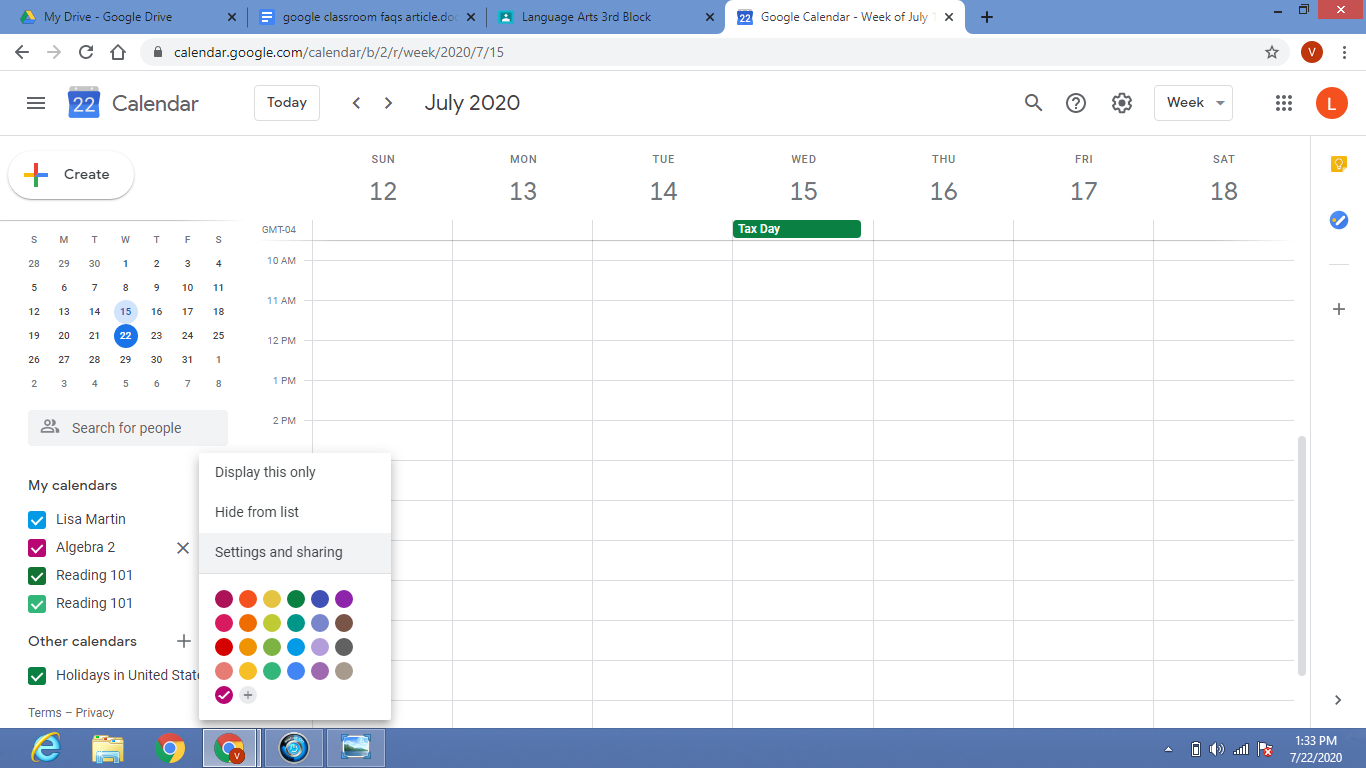
  1. Open your Google Calendar and place or hover your cursor over the Calendar you want to share from under ‘My Calendars’ and click on the ellipsis (three-dots) button next to the calendar name.

2. Click ‘Settings and sharing’
3. Scroll down to the “Access Permissions” section, and check the box ‘Make available to the public’

4. Click on ‘Get Shareable link’
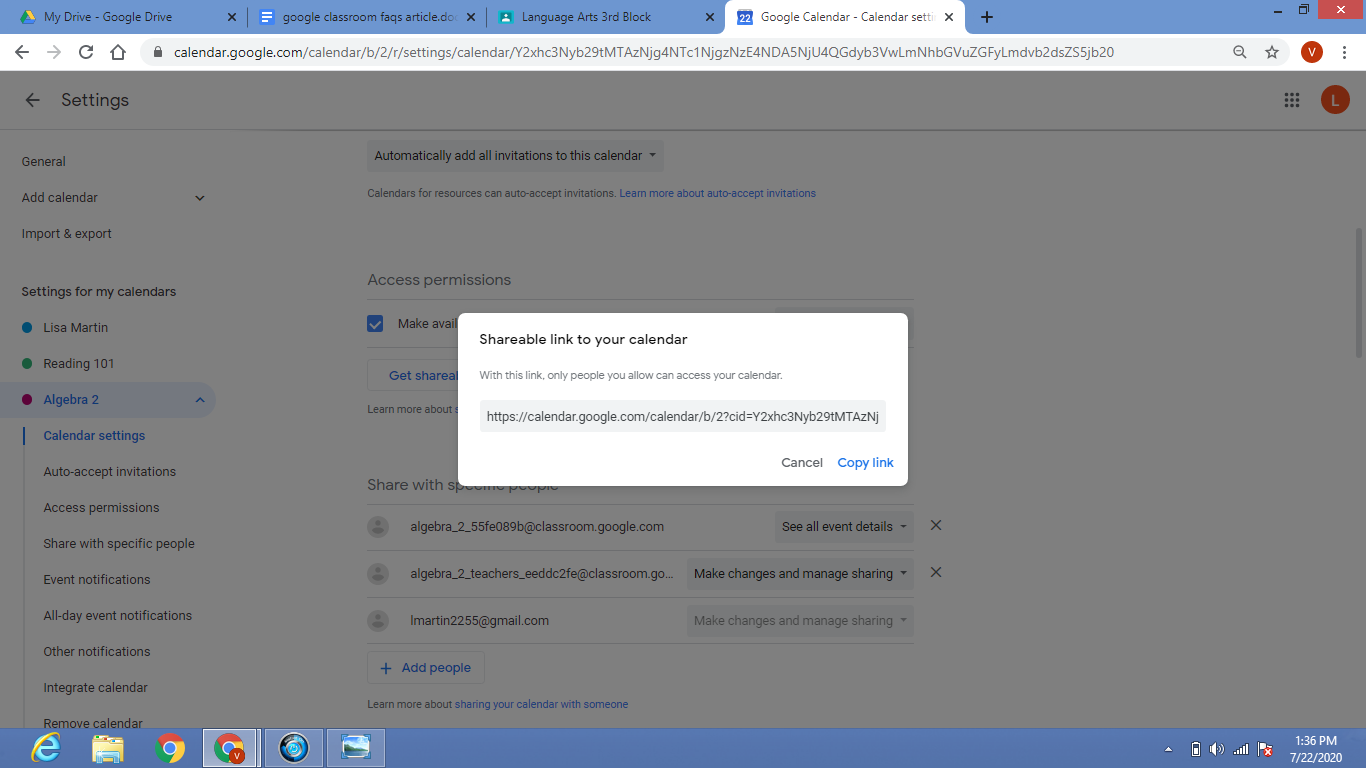
5. Copy the link and share it with the parents and guardians over email or through a social network site.

Previous Article

Why Students Love A Game-based Learning Experience

Next Article

How Can Teachers Use VR In The ...

Matthew Lynch

Related articles More from author

  • Google ClassroomGoogle Classroom Tips

    How Does Google Classroom Improve Teaching and Learning?

    August 31, 2020
    By Matthew Lynch
  • Google Classroom

    How to Add Dates Automatically in Google Sheets

    February 19, 2024
    By Matthew Lynch
  • Google Classroom Tips

    Google Classroom Tip #28: Create an Interactive Digital Classroom

    November 29, 2018
    By Matthew Lynch
  • Google ClassroomGoogle Classroom Tips

    How Do I Create a Spreadsheet of the Assignments and Grades From My Google Classroom?

    October 8, 2020
    By Matthew Lynch
  • Google ClassroomGoogle Classroom Tips

    Can I Save an Assignment as a Draft in Google Classroom and Finish It Later?

    October 9, 2020
    By Matthew Lynch
  • Early Childhood & K-12 EdTechGoogle ClassroomGoogle Classroom Tips

    6 Apps and Tools That Integrate With Google Classroom

    August 31, 2020
    By Matthew Lynch

Search

Login & Registration

  • Log in
  • Entries feed
  • Comments feed
  • WordPress.org

Newsletter

Signup for The Tech Edvocate Newsletter and have the latest in EdTech news and opinion delivered to your email address!

About Us

Since technology is not going anywhere and does more good than harm, adapting is the best course of action. That is where The Tech Edvocate comes in. We plan to cover the PreK-12 and Higher Education EdTech sectors and provide our readers with the latest news and opinion on the subject. From time to time, I will invite other voices to weigh in on important issues in EdTech. We hope to provide a well-rounded, multi-faceted look at the past, present, the future of EdTech in the US and internationally.

We started this journey back in June 2016, and we plan to continue it for many more years to come. I hope that you will join us in this discussion of the past, present and future of EdTech and lend your own insight to the issues that are discussed.

Newsletter

Signup for The Tech Edvocate Newsletter and have the latest in EdTech news and opinion delivered to your email address!

Contact Us

The Tech Edvocate
910 Goddin Street
Richmond, VA 23231
(601) 630-5238
[email protected]

Copyright © 2026 Matthew Lynch. All rights reserved.