The Tech Edvocate

Top Menu

  • Advertisement
  • Apps
  • Home Page
  • Home Page Five (No Sidebar)
  • Home Page Four
  • Home Page Three
  • Home Page Two
  • Home Tech2
  • Icons [No Sidebar]
  • Left Sidbear Page
  • Lynch Educational Consulting
  • My Account
  • My Speaking Page
  • Newsletter Sign Up Confirmation
  • Newsletter Unsubscription
  • Our Brands
  • Page Example
  • Privacy Policy
  • Protected Content
  • Register
  • Request a Product Review
  • Shop
  • Shortcodes Examples
  • Signup
  • Start Here
    • Governance
    • Careers
    • Contact Us
  • Terms and Conditions
  • The Edvocate
  • The Tech Edvocate Product Guide
  • Topics
  • Write For Us
  • Advertise

Main Menu

  • Start Here
    • Our Brands
    • Governance
      • Lynch Educational Consulting, LLC.
      • Dr. Lynch’s Personal Website
      • Careers
    • Write For Us
    • The Tech Edvocate Product Guide
    • Contact Us
    • Books
    • Edupedia
    • Post a Job
    • The Edvocate Podcast
    • Terms and Conditions
    • Privacy Policy
  • Topics
    • Assistive Technology
    • Child Development Tech
    • Early Childhood & K-12 EdTech
    • EdTech Futures
    • EdTech News
    • EdTech Policy & Reform
    • EdTech Startups & Businesses
    • Higher Education EdTech
    • Online Learning & eLearning
    • Parent & Family Tech
    • Personalized Learning
    • Product Reviews
  • Advertise
  • Tech Edvocate Awards
  • The Edvocate
  • Pedagogue
  • School Ratings

logo

The Tech Edvocate

  • Start Here
    • Our Brands
    • Governance
      • Lynch Educational Consulting, LLC.
      • Dr. Lynch’s Personal Website
        • My Speaking Page
      • Careers
    • Write For Us
    • The Tech Edvocate Product Guide
    • Contact Us
    • Books
    • Edupedia
    • Post a Job
    • The Edvocate Podcast
    • Terms and Conditions
    • Privacy Policy
  • Topics
    • Assistive Technology
    • Child Development Tech
    • Early Childhood & K-12 EdTech
    • EdTech Futures
    • EdTech News
    • EdTech Policy & Reform
    • EdTech Startups & Businesses
    • Higher Education EdTech
    • Online Learning & eLearning
    • Parent & Family Tech
    • Personalized Learning
    • Product Reviews
  • Advertise
  • Tech Edvocate Awards
  • The Edvocate
  • Pedagogue
  • School Ratings
  • Viaim Opennote Review: The AI Note-Taker That Disappears Into Your Daily Routine

  • A Visitors Guide to Long Beach (CA), United States

  • A Visitor’s Guide to Fresno (CA), United States

  • A Visitors Guide to New Orleans (LA), United States

  • A Visitors Guide to Sacramento (CA), United States

  • A Visitors Guide to Lyon, France

  • JisuLife Ultra2 Portable Fan: A Powerful Multi-Function Cooling Solution

  • A Visitors Guide to Viña del Mar, Chile

  • A Visitors Guide to Århus, Denmark

  • A Visitors Guide to Bakersfield (CA), United States

Digital & Mobile Technology
Home›Digital & Mobile Technology›Getting Started With Your Smartwatch

Getting Started With Your Smartwatch
By Matthew Lynch
June 9, 2023
0
Spread the love

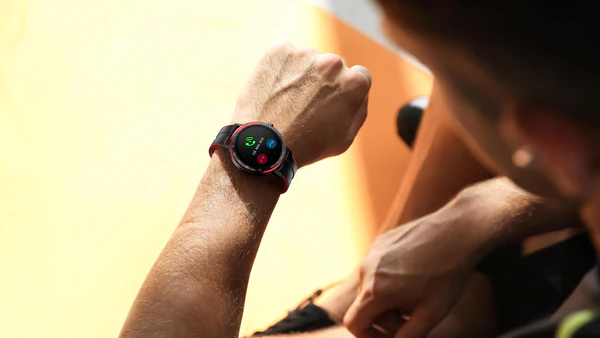
Smartwatches are becoming increasingly popular these days, and it’s not surprising why. They offer many useful features that make life easier and more efficient. If you’re new to the world of smartwatches, getting started can feel a little overwhelming. Here are some tips to help you make the most of your new device.

1. Choose the Right Smartwatch

With so many smartwatches on the market, it can be hard to know which one to choose. Do your research and read reviews to find a watch that meets your needs and budget. Consider factors like design, battery life, and compatibility with your smartphone.

2. Set Up Your Smartwatch

Once you’ve chosen your smartwatch, the next step is to set it up. Follow the instructions in the user manual to connect your watch to your smartphone. This will typically involve downloading an app and syncing your devices via Bluetooth. Make sure to complete all the necessary updates and configurations before using your watch.

3. Customize Your Watch Face

One of the best things about smartwatches is the ability to customize the watch face. Choose a style that suits your personality and preferences, and select the information you want to display, such as the time, date, weather, or fitness data.

4. Explore the Features

Smartwatches have a variety of features that can make your life easier, such as fitness tracking, messaging, and notifications. Take some time to explore these features and get comfortable using them. For example, you can track your steps, monitor your heart rate, and set fitness goals with most smartwatches. You can also receive notifications and alerts from your smartphone without having to take it out of your pocket.

5. Download Apps

Smartwatches have a range of apps that can enhance their functionality. Whether you’re looking for a music player, a GPS tracker, or a productivity app, there’s an app for that. Check out the app store on your watch and download any apps that interest you.

6. Adjust Settings

Smartwatches have a range of settings that allow you to customize your experience. For example, you can adjust the brightness of your screen, change the volume, and set up Do Not Disturb mode. Make sure to explore the settings and adjust them to your liking.

In conclusion, getting started with your smartwatch can feel overwhelming at first, but with a little patience and exploration, you can make the most of this useful device. Follow these tips to get started and enjoy the convenience and functionality that your smartwatch has to offer. Happy smartwatching!


Previous Article

What Is a Web Series? Are They ...

Next Article

How to Make a Bluetooth Speaker Louder

Matthew Lynch

Related articles More from author

  • Digital & Mobile Technology

    Best Fast Chargers of 2023

    July 5, 2023
    By Matthew Lynch
  • Digital & Mobile Technology

    How to Deactivate Your Facebook Account

    June 12, 2023
    By Matthew Lynch
  • Digital & Mobile Technology

    Reasons the Rivian R1T Is Better Than the Tesla Cybertruck

    September 7, 2023
    By Matthew Lynch
  • Digital & Mobile Technology

    Can Your Printer Be Hacked?

    July 31, 2023
    By Matthew Lynch
  • Digital & Mobile Technology

    How to Add Google Analytics to a Next.js Website

    August 3, 2023
    By Matthew Lynch
  • Digital & Mobile Technology

    Yes, You Can Get Microsoft Word for Free: Here’s How

    June 6, 2023
    By Matthew Lynch

Search

Login & Registration

  • Register
  • Log in
  • Entries feed
  • Comments feed
  • WordPress.org

Newsletter

Signup for The Tech Edvocate Newsletter and have the latest in EdTech news and opinion delivered to your email address!

About Us

Since technology is not going anywhere and does more good than harm, adapting is the best course of action. That is where The Tech Edvocate comes in. We plan to cover the PreK-12 and Higher Education EdTech sectors and provide our readers with the latest news and opinion on the subject. From time to time, I will invite other voices to weigh in on important issues in EdTech. We hope to provide a well-rounded, multi-faceted look at the past, present, the future of EdTech in the US and internationally.

We started this journey back in June 2016, and we plan to continue it for many more years to come. I hope that you will join us in this discussion of the past, present and future of EdTech and lend your own insight to the issues that are discussed.

Newsletter

Signup for The Tech Edvocate Newsletter and have the latest in EdTech news and opinion delivered to your email address!

Contact Us

The Tech Edvocate
910 Goddin Street
Richmond, VA 23231
(601) 630-5238
[email protected]

Copyright © 2025 Matthew Lynch. All rights reserved.